

Introduction
In this article we are going to learn how to do data binding in template-driven forms. We will also see what are the requirements when we want to work with template driven forms. We already know that template driven forms is the approach in Angular to create forms where most of the code is written in html. Also we know how to enable the template driven forms by adding formsModule in our application.
We are going to start with our previously created sample form using template driven approach.
When we work with data binding in template driven forms Angular provides three directives:
- ngForm
- ngModel
- ngModelGroup
open app.modules.ts and import forms module,
- import { BrowserModule } from '@angular/platform-browser';
- import { NgModule } from '@angular/core';
- import {FormsModule} from '@angular/forms'
- import { AppRoutingModule } from './app-routing.module';
- import { AppComponent } from './app.component';
- @NgModule({
- declarations: [
- AppComponent
- ],
- imports: [
- BrowserModule,
- AppRoutingModule,
- FormsModule
- ],
- providers: [],
- bootstrap: [AppComponent]
- })
- export class AppModule { }
Now open app.component.html, you can see we have created the basic html form with no Angular directives.
Let us add a bootstrap link in index.html to make use of bootstrap classes in our application.
Just add this link in index.html
- <link rel="stylesheet" href="https://stackpath.bootstrapcdn.com/bootstrap/4.1.3/css/bootstrap.min.css" integrity="sha384-MCw98/SFnGE8fJT3GXwEOngsV7Zt27NXFoaoApmYm81iuXoPkFOJwJ8ERdknLPMO" crossorigin="anonymous">
- import { Component, OnInit } from '@angular/core';
- @Component({
- selector: 'app-root',
- templateUrl: './app.component.html',
- styleUrls: ['./app.component.css']
- })
- export class AppComponent implements OnInit{
- groups=['A+', 'A-', 'B+', 'B-', 'O+', 'O-'];
- SubmitDetails(studentData){
- console.log(studentData);
- }
- constructor() { }
- ngOnInit() {
- }
- }
Now add the below contents in app.component.html
- <div class="container-fluid">
- <h3>
- Student Registration!
- </h3>
- <p>Enter the below fields for student details.</p>
- <form #studentForm="ngForm">
- <div class="row">
- <div class="col-sm-4">
- <div class="form-group">
- <label for="name">Name:</label>
- <input type="text" class="form-control" ngModel name="name">
- </div>
- </div>
- <div class="col-sm-4">
- <div class="form-group">
- <label for="email">Email address:</label>
- <input type="text" class="form-control" ngModel name="email">
- </div>
- </div>
- <div class="col-sm-4">
- <div class="form-group">
- <label for="phone">Phone:</label>
- <input type="text" class="form-control" ngModel name="phone">
- </div>
- </div>
- </div>
- <div class="row">
- <div class="col-sm-4">
- <div class="form-group">
- <label for="gender">gender:</label>
- <input type="text" class="form-control" ngModel name="gender">
- </div>
- </div>
- <div class="col-sm-4">
- <div class="form-group">
- <label for="bloodGroup">Blood Group:</label>
- <select class="form-control" ngModel name="bloodGroup">
- <option selected>A+</option>
- <option *ngFor="let group of groups">{{group}}</option>
- </select>
- </div>
- </div>
- <div class="col-sm-4">
- <div class="form-group">
- <label>Course </label><br>
- <input type="radio" ngModel name="course" value="BCA">BCA
- <input type="radio" ngModel name="course" value="B.Tech">B.Tech
- <input type="radio" ngModel name="course" value="BE">BE
- <input type="radio" ngModel name="course" value="B.Sc">B.Sc
- </div>
- </div>
- </div>
- <div class="row" ngModelGroup="address">
- <div class="col-sm-4">
- <div class="form-group">
- <label>Street</label>
- <input type="text" class="form-control" name="street" ngModel>
- </div>
- </div>
- <div class="col-sm-4">
- <div class="form-group">
- <label>City</label>
- <input type="text" class="form-control" name="city" ngModel>
- </div>
- </div>
- <div class="col-sm-4">
- <div class="form-group">
- <label>State</label>
- <input type="text" class="form-control" name="state" ngModel>
- </div>
- </div>
- </div>
- <div class="checkbox">
- <label><input type="checkbox" ngModel name="sendUpdates"> send me updates</label>
- </div>
- <button type="submit" class="btn btn-primary">Submit</button>
- </form>
- </div>
Just copy and paste the contents:
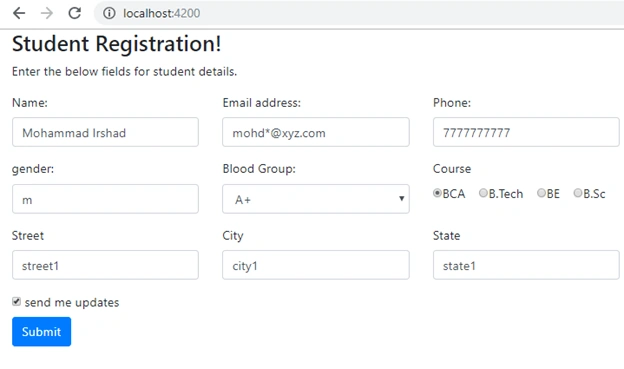
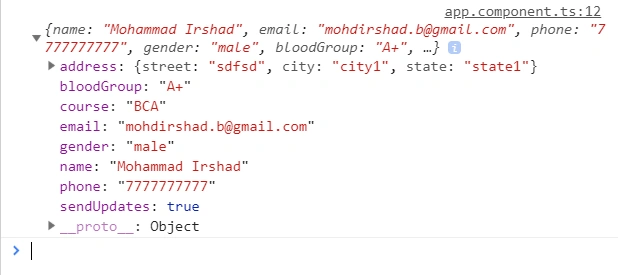
- {{studentForm.value | json}}
Add this statement anywhere in your html and you can see the bound value will be displayed.
Sani YadavPosted Apr 17, 2020, 12:41 PM
Nicely explained.. Great job
Mohammad IrshadPosted Jun 21, 2019, 1:18 PM
<form #studentForm="ngForm" (ngSubmit)="SubmitDetails(studentForm.value)">
Amit MakhijaPosted Dec 10, 2018, 3:17 AM
How to bind a selected value of one dropdownlist in another dropdownlist in angularJS?
Rupesh NPosted Dec 6, 2018, 8:27 PM
Thanks Bro. i can easily understanding. keep it bro. bro, one request , actually i am asp.net developer in webforms and website . so, i am using angularjs in my coding dynamically. so, please , tell me how ? or any links or suggestion website to combine asp.net webform and website to add angularjs. please...