
Introduction
Data binding serves as the communication bridge between the template (representing the view) and the component (housing the application's logic and data).
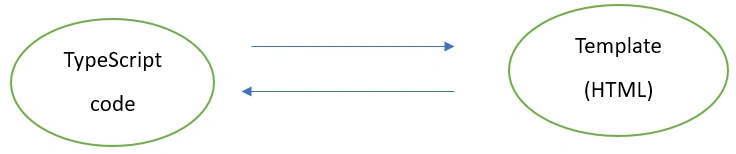
In Angular data binding, various types are used to define the direction of data flow between the component and the template (view).
Type of Data Binding
- One-way Data Binding
- Two-way Data Binding
One-way Data Binding
- Interpolation

Interpolation is a simple and concise way to embed dynamic values within the HTML template. It allows you to display component properties in the view.
Example
//app.component.ts

import { Component } from '@angular/core';
import { CommonModule } from '@angular/common';

@Component({
  selector: 'app-root',
  standalone: true,
  imports: [CommonModule],
  templateUrl: './app.component.html',
  styleUrl: './app.component.css'
})
export class AppComponent {
  title = 'TodoList';
}
<!-- app.component.html -->
<h1>{{title}}</h1>
- Property Binding

Property binding allows you to bind a property of a DOM element to a component property. This way, changes in the component automatically reflect in the view.
Example
//app.component.ts

import { Component } from '@angular/core';
import { CommonModule } from '@angular/common';

@Component({
  selector: 'app-root',
  standalone: true,
  imports: [CommonModule],
  templateUrl: './app.component.html',
  styleUrl: './app.component.css'
})
export class AppComponent {
isDisabled= true;
}
<!-- app.component.html -->
<button [disabled]="isDisabled">Click me</button>
- Event Binding
Event binding that allows you to respond to user interactions or other events by associating a method in the component with a specific event in the HTML template. This two-way connection enables dynamic and interactive user experiences by triggering component methods in response to user actions such as clicks, hover, touch or other events.

Example
//app.component.ts

import { Component } from '@angular/core';
import { CommonModule } from '@angular/common';
import { RouterOutlet } from '@angular/router';

@Component({
selector: 'app-root',
standalone: true,
imports: [CommonModule, RouterOutlet],
templateUrl: './app.component.html',
styleUrl: './app.component.css'
})
export class AppComponent {
onClick() {
console.log(Hi Welcome!');
}
}
<!-- app.component.html -->
<button (click)="onClick()"> Click me 😊</button>
Two-way Data Binding

Two-way binding that combines property binding and event binding to establish a bidirectional connection between a property in the component and an input element in the template. This synchronization enables automatic updates in both directions, ensuring that changes to the property in the component are reflected in the template, and vice versa, without the need for explicit event handling or manual updates.
Note: To use [(ngModel)], you need to import the FormsModule in your module since it provides the necessary directives for two-way binding.
Example
//app.component.ts

import { Component } from '@angular/core';
import { CommonModule } from '@angular/common';
import { FormsModule } from '@angular/forms';

@Component({
  selector: 'app-root',
  standalone: true,
  imports: [CommonModule,FormsModule],
  templateUrl: './app.component.html',
  styleUrl: './app.component.css'
})
export class AppComponent {
  text: string = '';
}
<1 -- app.component.html -->

<input [(ngModel)]="text" placeholder="Please enter text here">
<p>the text which you have type: {{ text }}</p>
Conclusion
Data binding is essential for connecting the application's logic with the user interface, offering one-way bindings for efficient data transfer and two-way bindings, exemplified by [(ngModel)], for seamless bidirectional synchronization, streamlining the development of dynamic and interactive web applications.
Join the conversation! Your thoughts help the community grow.