

Do you know you can customize the code generation for EF 6.x code first? If you are surprised then you can read a beginning guide here about the EF power tool to get more insights into the code generation process.
What can I customize using EF power tools?
You can customize the class names, attributes, methods and anything related to code that lies in your database context, entity or mapping classes.
Why would I need such customization?
Sometimes you may want to prefix/suffix the names of entities according to your requirement or may be putting in some custom attributes etc.
What this blog is about?
This blog will not cover how to use the EF power tools. I already mentioned it in the start of the post about the tutorial where you can learn about it.
In this blog we’ll talk about some enhancements which will make the tool a bit more flexible for generating classes with directory hierarchy based on namespace. Well this sentence went bit too long. So I’ll start step by step understanding the issue and what could be the proposed fix:
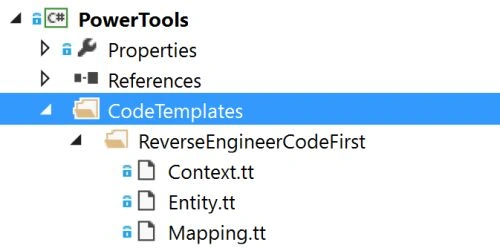
I have encountered a couple of questions in forums that the EF code templates are only generating code in a particular designated directory. Below are the files which you would get after installing the EFPowerTool.
Now, if you have already existing Code first in the project and you want to use the EF code template to customize them, y end up having the below directory hierarchy after code generation. Well you have to change the namespaces and directory hierarchy according to your existing structure of code first classes.
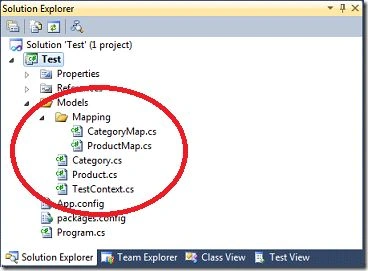
After doing a bit of research in the EF6.x source code, I found that the Model and Mapping directories including the namespaces are hardcoded in the code. To fix this problem I had to understand the whole process of code generation. So aftera few hours of research I figured out that the Custom code template files have access the EfTextTemplateHostobject via Host property.
Also I found the below properties in the EfTextTemplateHost object which can be used to change the namespace for code generation.
- publicstring Namespace { get; set; }
- publicstringModelsNamespace { get; set; }
- publicstringMappingNamespace { get; set; }
src/PowerTools/CodeTemplates/ReverseEngineerCodeFirst/Context.tt
src/PowerTools/CodeTemplates/ReverseEngineerCodeFirst/Entity.tt
src/PowerTools/CodeTemplates/ReverseEngineerCodeFirst/Mapping.tt
src/PowerTools/Handlers/ReverseEngineerCodeFirstHandler.cs
src/PowerTools/Utilities/ProjectFilesPathGenUtility.cs
The all .tt code template files have sample added in the comments how you can define the namespace to get the structure generated in desired hierarchy.
- /*
- Customize the file generations according to namespace hierarchy
- efHost.Namespace = "DataAccess";
- efHost.ModelsNamespace = "DataAccess.Models";
- efHost.MappingNamespace = "DataAccess.Mappings";
- */
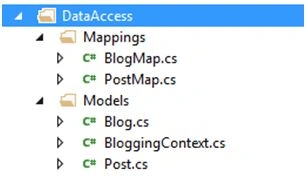
Well this would solve problem of a few people like here and here. I have submitted a PR to EF team for EF6.x repository. While waiting for feedback I have created an experimental branch of EFPowerTool on github. You can download and install the extension installation file from here (Right click and choose save as.). Those who are interested in making more enhancements or want to review these changes feel free to review/test. Raise any issues on github I’ll try to work on it with you.
Bhuvanesh MohankumarPosted May 3, 2016, 12:56 PM
Good one..
Ankur MistryPosted Mar 8, 2016, 12:44 AM
Nice share
Debasis SahaPosted Mar 7, 2016, 11:53 PM
Nice..
Mahesh ChandPosted Mar 7, 2016, 11:20 PM
Nice. Is this still Beta 2 or final version updated in Visual Studio 2015 Update 2?
Humayun Kabir MamunPosted Mar 7, 2016, 11:03 PM
Nice...
Mohammed IbrahimPosted Mar 7, 2016, 10:39 PM
nice
Sridhar SharmaPosted Mar 7, 2016, 7:30 PM
Nice Share.. :)