

The need for a formated UILabel can be done by creating the category of UILabel. Category means we must increase the functionality of the UILabel provided by the iOS SDK.
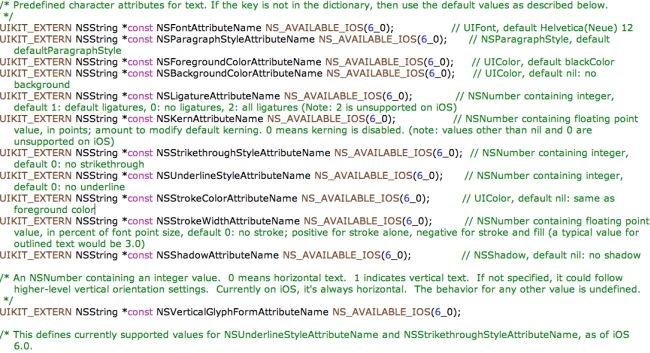
Step 2: Create a category having the name FormattedText.


#import <UIKit/UIKit.h>
@interface UILabel (FormattedText)
- (void)setTextColor:(UIColor *)textColor range:(NSRange)range;
- (void)setFont:(UIFont *)font range:(NSRange)range;
@end
Step 5: Open the "UILabel+FormattedText.m" file.
#import "UILabel+FormattedText.h"
@implementation UILabel (FormattedText)
- (void)setTextColor:(UIColor *)textColor range:(NSRange)range
{
NSMutableAttributedString *text = [[NSMutableAttributedString alloc] initWithAttributedString: self.attributedText];
[text addAttribute:NSForegroundColorAttributeName value: textColor range: range];
[selfsetAttributedText: text];
}
- (void)setFont:(UIFont *)font range:(NSRange)range
{
NSMutableAttributedString *text = [[NSMutableAttributedString alloc] initWithAttributedString: self.attributedText];
[text addAttribute:NSFontAttributeName value: font range: range];
[selfsetAttributedText: text];
}
@end
#import "UILabel+FormattedText.h"
- (void)viewDidLoad
{
[superviewDidLoad];
// Do any additional setup after loading the view, typically from a nib
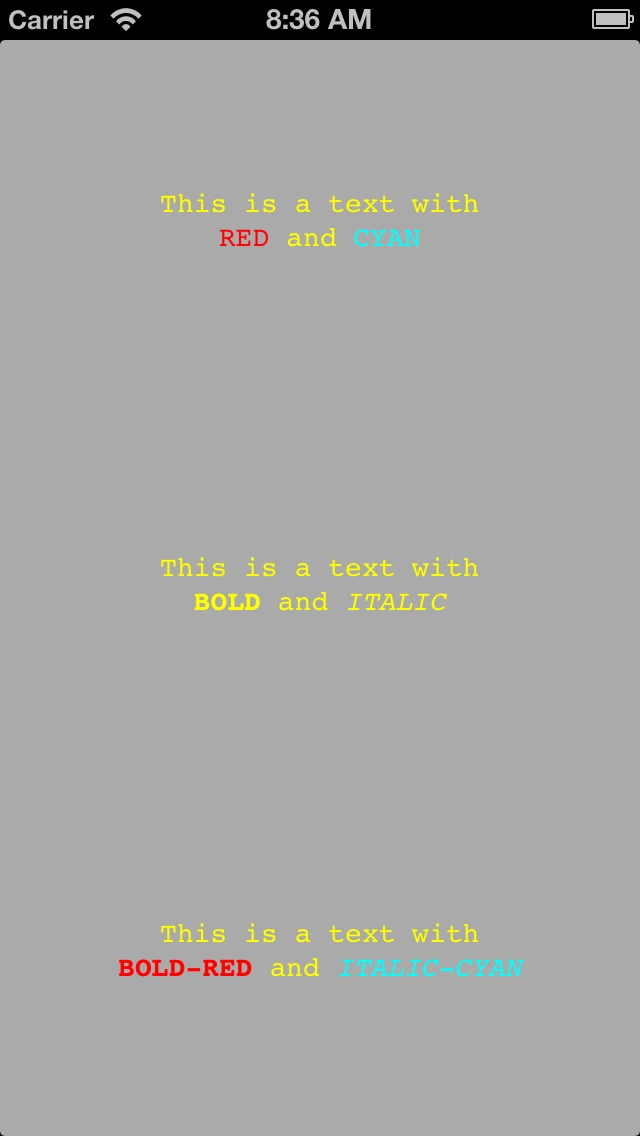
// Colors
UILabel *labelC = [[UILabelalloc] init];
[labelC setFrame:CGRectMake(0,0, self.view.frame.size.width,floorf(self.view.frame.size.height / 3))];
[labelC setBackgroundColor:[UIColorclearColor]];
[labelC setTextAlignment:NSTextAlignmentCenter];
[labelC setText:@"This is a text with\nRED and CYAN"];
[labelC setNumberOfLines:2];
[labelC setTextColor:[UIColoryellowColor]];
[labelC setFont:[UIFontfontWithName:@"Courier"size:14]];
[labelC setTextColor:[UIColorredColor] range:NSMakeRange(20,3)];
[labelC setTextColor:[UIColorcyanColor] range:NSMakeRange(28,4)];
[self.viewaddSubview:labelC];
// Fonts
UILabel *labelF = [[UILabelalloc] init];
[labelF setFrame:CGRectMake(0,floorf(self.view.frame.size.height / 3), self.view.frame.size.width,floorf(self.view.frame.size.height / 3))];
[labelF setBackgroundColor:[UIColorclearColor]];
[labelF setTextAlignment:NSTextAlignmentCenter];
[labelF setText:@"This is a text with\nBOLD and ITALIC"];
[labelF setNumberOfLines:2];
[labelF setTextColor:[UIColoryellowColor]];
[labelF setFont:[UIFontfontWithName:@"Courier"size:14]];
[labelF setFont:[UIFontfontWithName:@"Courier-Bold"size:14] range:NSMakeRange(20,4)];
[labelF setFont:[UIFontfontWithName:@"Courier-Oblique"size:14] range:NSMakeRange(29,6)];
[self.viewaddSubview:labelF];
// Colors AND Fonts
UILabel *labelCF = [[UILabelalloc] init];
[labelCF setFrame:CGRectMake(0,floorf(self.view.frame.size.height * 2 / 3), self.view.frame.size.width,floorf(self.view.frame.size.height / 3))];
[labelCF setBackgroundColor:[UIColorclearColor]];
[labelCF setTextAlignment:NSTextAlignmentCenter];
[labelCF setText:@"This is a text with\nBOLD-RED and ITALIC-CYAN"];
[labelCF setNumberOfLines:2];
[labelCF setTextColor:[UIColoryellowColor]];
[labelCF setFont:[UIFontfontWithName:@"Courier"size:14]];
[labelCF setTextColor:[UIColorredColor] range:NSMakeRange(20,8)];
[labelCF setFont:[UIFontfontWithName:@"Courier-Bold"size:14] range:NSMakeRange(20,8)];
[labelCF setTextColor:[UIColorcyanColor] range:NSMakeRange(33,11)];
[labelCF setFont:[UIFontfontWithName:@"Courier-Oblique"size:14] range:NSMakeRange(33,11)];
[self.viewsetBackgroundColor:[UIColorlightGrayColor]];
[self.viewaddSubview:labelCF];
}
Join the conversation! Your thoughts help the community grow.