

This tutorial is about creating Custom Directives in AngularJS. I feel it would be a good brain teaser if I come with some real time examples. Generally, we use directives in AngularJS and this is how Directives make AngularJS so powerful. Directives are the key part of AngularJS and I believe every person working on angular should know its benefits.
AngularJS is bundled with powerful directives out of the box. In this post, we’ll focus on how to create your own custom directives which may be one of your project needs. Though example is simple, but idea is to understand the depth.
An excerpt from docs.angularjs.org is given below about directives is :
"At a high level, directives are markers on a DOM element (such as an attribute, element name, comment or CSS class) that tell AngularJS's HTML compiler ($compile) to attach a specified behavior to that DOM element (e.g. via event listeners), or even to transform the DOM element and its children."
Angular comes with a set of these directives built-in, like ngBind, ngModel, and ngClass. Much like you create controllers and services, you can create your own directives for Angular to use.
If you have used Angular, certainly you have confronted with keyword ng-. This is what we will discuss and create.
This is one of the already built in directive as in the following short code snippet, starting with ng-model:
- <input type="text" ng-model="firstName"><br/>
All of the Angular-provided directives match attribute name, tag name, comments, or class name. The following demonstrates the various ways a directive (myDir in this case) can be referenced from within a template:
As an element:
- As an element:
- <custom-Dir></custom-Dir>
- As an attribute:
- <span custom-Dir ></span>
- As an attribute:
- <span class=" custom-Dir: exp;"></span>
- As a comment:
- <!-- directive: custom-Dir exp -->
- Custom Directive Syntax:
- app.directive("customDir", function () {
- return {
- restrict: "E", // directive is an Element (not Attribute)
- scope: { // set up directive's isolated scope
- name: "@", // name var passed by value (string, one-way)
- amount: "=", // amount var passed by reference (two-way)
- save: "&" // save action
- },
- template: // replacement HTML (can use our scope vars here)
- "<div></div>",
- replace: true, // replace original markup with template
- transclude: false, // do not copy original HTML content
- controller: [ "$scope", function ($scope) { }],
- link: function (scope, element, attrs, controller) { //define function, used for DOM manipulation }
- }
- });
- app.directive("customDir", function () {
- return {
- restrict: "EA",
- scope: false,
- template: "<div>Your name is : {{firstName}} + {{lastName}}</div>" +
- "Change your name : <input type='text' ng-model='firstName' />",
- replace: false
- };
- });
- app.directive("customDir", function () {
- return {
- restrict: "EA",
- scope: false,
- template: "<div>Your name is : {{firstName}} + {{lastName}}</div>" +
- "<b>Change your first name : </b> <input type='text' ng-model='firstName' />",
- replace: false,
- link: function ($scope, element, attrs) {
- element.on('click', function () {
- $scope.firstName = "Clicked on Custom Directive !!!";
- });
- }
- };
- });
If I run an application it shows the following screen:
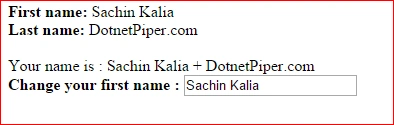
If I inspect an element than I can easily see that it has added into DOM as in the following screenshot:

Now if I change in the text box value it works perfectly and update the value of first name whereever it is bind on html page.
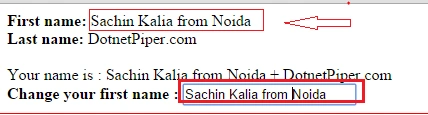
Hope it will help you somewhere and thanks for reading this.
Muhammad Aqib ShehzadPosted Jan 27, 2016, 6:35 AM
nice elaboration
Anil SinghPosted Sep 29, 2015, 4:08 AM
Nice one, It might help you http://www.code-sample.com/2014/09/angularjs-documentation.html
Saineshwar BageriPosted Sep 25, 2015, 8:34 AM
Nice one
Pankaj Kumar ChoudharyPosted Sep 25, 2015, 3:44 AM
Nice Explain Sir.......
Sibeesh VenuPosted Sep 25, 2015, 3:41 AM
Nice Share :)
Sujeet SumanPosted Sep 25, 2015, 2:51 AM
Nice Article................
Santhakumar MunuswamyPosted Sep 25, 2015, 2:40 AM
Good one
Ankit BansalPosted Sep 25, 2015, 1:07 AM
nice...thanks for sharing
Shridhar SharmaPosted Sep 24, 2015, 1:20 PM
Found Worthful. Thank for sharing Bro :)
Nilesh JadavPosted Sep 24, 2015, 11:52 AM
Nice article sir !!!
RakeshPosted Sep 24, 2015, 10:19 AM
Nice one sir
Harshad PansuriyaPosted Sep 24, 2015, 8:43 AM
nice one
Atul RawatPosted Sep 24, 2015, 6:49 AM
nice article sir..