

In web application development, when we want to create a customized application or web site using ASP.Net, then we use user control very often in our projects. But when we want to create or develop a SPA (Single Page Application) based application using normal HTML and Javascript or Angular JS, then we don't have the facility to use the user control option in such a way. But there is a alternate way of user control in Angular JS, and that is Directives.
So the first question arises: What are Directives?
As per the Angular JS documentation:
At a high level, directives are markers on a DOM element (such as an attribute, element name, comment or CSS class) that tell AngularJS's HTML compiler ($compile) to attach a specified behavior to that DOM element (e.g. via event listeners), or even to transform the DOM element and its children.
In Angular JS, Directives are the below types :-
A (Attribute)
In this directive type, the directive name is used inside standard HTML elements as an attribute.
C(Class)
In this directive type, the directive name can be used inside HTML elements class attribute.
E(Element)
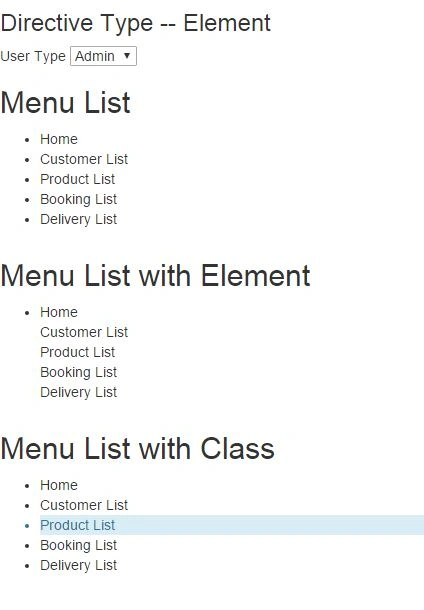
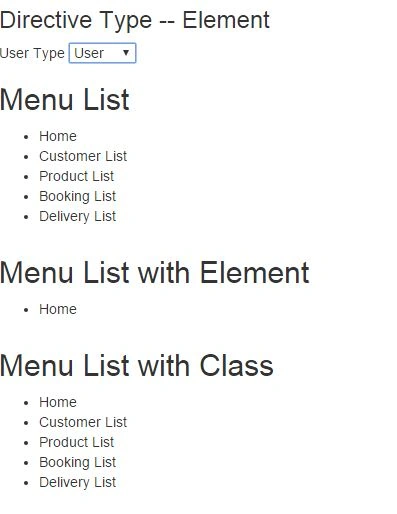
In this way, we did not need to use directive elements inside the HTML tags. We can define our own dom structure as directive and use in the html page directive just like other html tags.
For related information about this type of directive please refer to my earlier article:
- var testApp = angular.module('TestApp', []);
- testApp.directive('menuVisible', ['$http', function () {
- return {
- restrict: 'A',
- link: function (scope, element, attr) {
- var menuVisible = function () {
- if (scope.model.element == 'Admin') {
- element.css("display", "block");
- }
- else {
- element.css("display", "none");
- }
- }
- scope.$watch('model.element', function (value) {
- menuVisible();
- });
- menuVisible();
- }
- }
- }]);
- testApp.directive('menuClass', ['$http', function () {
- return {
- restrict: 'C',
- link: function (scope, element, attr) {
- var menuVisible = function () {
- if (scope.model.element == 'Admin') {
- element.addClass('alert-info');
- }
- else {
- element.removeClass('alert-info');
- }
- }
- scope.$watch('model.element', function (value) {
- menuVisible();
- });
- menuVisible();
- }
- }
- }]);
- <!DOCTYPE html>
- <html xmlns="http://www.w3.org/1999/xhtml">
- <head>
- <title>Directive Types</title>
- <link href="../../RefStyle/bootstrap.min.css" rel="stylesheet" />
- <script src="../../Scripts/angular.min.js"></script>
- <script src="SampleDirective.js"></script>
- <script src="IndexController.js"></script>
- </head>
- <body data-ng-app="TestApp" data-ng-controller="IndexController as model">
- <div class="row animated fadeInRight">
- <div class="col-lg-12">
- <div class="rowDiv">
- <h3>{{model.message}}</h3>
- </div>
- </div>
- <div class="col-lg-12">
- <div class="rowDiv">
- <span> User Type</span>
- <select data-ng-model="model.element">
- <option>Admin</option>
- <option>User</option>
- </select>
- </div>
- </div>
- <div class="col-lg-12">
- <h2>Menu List</h2>
- <div class="rowDiv">
- <ul>
- <li>Home</li>
- <li>Customer List</li>
- <li>Product List</li>
- <li>Booking List</li>
- <li>Delivery List</li>
- </ul>
- </div>
- </div>
- <div class="col-lg-12">
- <h2>Menu List with Element</h2>
- <div class="rowDiv">
- <ul>
- <li>Home</li>
- <li menu-visible>Customer List</li>
- <li menu-visible>Product List</li>
- <li menu-visible>Booking List</li>
- <li menu-visible>Delivery List</li>
- </ul>
- </div>
- </div>
- <div class="col-lg-12">
- <h2>Menu List with Class</h2>
- <div class="rowDiv">
- <ul>
- <li class="active">Home</li>
- <li class="active">Customer List</li>
- <li class="active menu-class">Product List</li>
- <li class="active">Booking List</li>
- <li class="active">Delivery List</li>
- </ul>
- </div>
- </div>
- </div>
- </body>
- </html>
- var userType = 'user';
- testApp.controller('IndexController', ['$http', function ($http, urlService) {
- var self = this;
- self.message = 'Directive Type -- Element';
- self.element = 'Admin';
- self.setUser = function () {
- getUserType = self.element;
- }
- }]);
Sr KarthigaPosted Apr 19, 2016, 10:56 PM
Nice explanation
Gowtham RajamanickamPosted Apr 2, 2016, 12:39 PM
Good one..
Prashant VermaPosted Mar 9, 2016, 2:03 AM
very helpful
Pradeep SahooPosted Mar 4, 2016, 10:59 AM
Nice thoughts .Thanks for sharing
Gowtham RajamanickamPosted Mar 4, 2016, 1:39 AM
Good one..
Shubham KumarPosted Mar 3, 2016, 12:16 AM
nice
Anil Kumar MurmuPosted Mar 2, 2016, 8:58 PM
Good.one thank you for sharing your thoughts
Asfend YarPosted Mar 2, 2016, 11:07 AM
nice
Vignesh ManiPosted Mar 2, 2016, 11:04 AM
Good one