

Before reading this article visit,Cursor in SQL Server.
Introduction
In this article, I describe Static Cursor, Keyset-Driven Cursor, and Dynamic Cursor.
First, we are creating a table.
Creation of table
- create table emp(empId int, empName varchar(10))
- insert into emp
- select 1,'d'union all
- select 2,'e'union all
- select 3,'e'union all
- select 4,'p'union all
- select 5,'a'union all
- select 6,'k'
- select * from emp
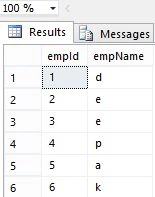
Static Cursor
A Static Cursor shows the result set as it was when the cursor was opened. If we make change to the table after the opening of Static Cursor then these changes are not reflected in the cursor. For example, if after opening the cursor we delete a row, and fetch that record by the cursor, then the cursor shows that record.
Syntax
Declare cursorName cursor
static for
statement
Here cursorName is the name of your cursor, static is a keyword, and statement is the SQL statement that you are used in the cursor. An example is given below.
Creation of Static Cursor
- declare static_cursor cursor
- static for
- select * from emp
Opening of Static Cursor
- open static_cursor
Fetching data from Static Cursor
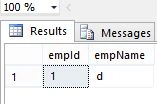
Fetching first data from Static Cursor
- fetch first from static_cursor
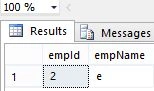
Fetching next data from Static Cursor
- fetch next from static_cursor
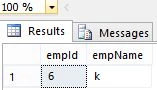
Fetching last data from Static Cursor
- fetch last from static_cursor
Fetching second data from Static Cursor
- fetch absolute 2 from static_cursor
Fetching next 2nd data from Static Cursor
- fetch relative 2 from static_cursor
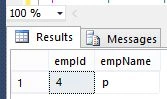
Closing of Static Cursor
- close static_cursor
Deallocating Static Cursor
- deallocate static_cursor
Dynamic Cursor
Dynamic Cursor is the opposite of the Static Cursor. When we make changes in the table after opening the Dynamic Cursor and scroll through a Dynamic Cursor all changes made to the table reflects the Dynamic Cursor. For example, If we delete the record from the table after the opening of the Dynamic Cursor, we can't access that record.
Syntax
Declare cursorName cursor
Dynamic for
statement
Here cursorName is the name of your cursor, Dynamic is a keyword, and statement is the SQL statement that you are used in cursor. An example is given below.
Creation of Dynamic Cursor
- declare dynamic_cursor cursor
- dynamic for
- select * from emp
Opening of Dynamic Cursor
- open dynamic_cursor
- fetch First from dynamic_cursor
Fetching next data from Dynamic Cursor
- fetch next from dynamic_cursor
We can fetch last, relative and absolute data same as Static Cursor.
Closing of Dynamic Cursor
- close dynamic_cursor
Deallocating Dynamic Cursor
- deallocate dynamic_cursor
Keyset-Driven Cursor
When we open keyset-driven cursor then it creates a list of unique values in the tempdb database. These values are called keyset. Every keyset uniquely identifies a single row in the result set.
A Keyset is created after the opening of the cursor so the number of rows is fixed until we close the cursor.
Creation of Keyset-driven cursor
- declare key_cursor cursor
- keyset for
- select * from emp
Opening of Keyset-driven cursor
- open key_cursor
Fetching data from Keyset-Driven cursor
Fetching first data from Keyset-driven cursor
- fetch First from key_cursor
Fetching next data from Keyset-driven cursor
- fetch next from key_cursor
Closing of Keyset Drivin cursor
- close key_cursor
Deallocation of memory
- deallocate key_cursor
Summary
In this article, I described Static Cursor, Dynamic Cursor, and Keyset-Driven Cursor. I hope this article has helped you in understanding this topic. Please share it. If you know more about this, your feedback and constructive contributions are welcome.
Babul ReddyPosted Mar 24, 2013, 8:22 AM
tHANKS :)
Deepak MiddhaPosted Jan 3, 2013, 12:30 AM
Thanx Prabhakar
Prabhakar MauryaPosted Jan 3, 2013, 12:24 AM
Nice explanation Deepak..
Deepak MiddhaPosted Jan 2, 2013, 10:12 PM
Thanx Prachi
Prachi ChandrakarPosted Jan 2, 2013, 8:06 AM
Very well explained.Easy to understand.Thank you.