

Introduction
You probably have dealt with a lot of CSS selectors already, such as class, ids and etc. However, we can’t ignore attribute selectors. Honestly, attribute selectors are my favorite because they are much easier to work with.
In this post, we are going to tackle the different types of CSS attribute selectors. Will explore from the simple attribute selectors up to the sophisticated ones. OK, then let’s get started.
What is an Attribute Selector?
Attribute selectors were introduced in CSS2, and, from the name itself, you’ll be able to specify rules that match elements based on their attributes – such as href or title – and of course the values of those attributes.
Attribute selectors defined in CSS2
- Simple Attribute Selector
- Exact Attribute Value Selector
- Partial Attribute Value Selector
- Language Attribute Selector
Attribute Selectors in CSS3
- Beginning Sub-string Attribute Value Selector
- Ending Sub-string Attribute Value Selector
- Arbitrary Sub-string Attribute Value Selector
Before starting with the examples, will be using this HTML below as the main source that will be used with entire CSS examples.
- <!DOCTYPE html>
- <html lang="en">
- <head>
- <meta charset="UTF-8">
- <meta name="viewport" content="width=device-width, initial-scale=1.0">
- <title>CSS Attribute Selectors</title>
- <body>
- <div>
- <p title="List of famous programming books in my opinion">List of famous programming books in my opinion</p>
- <ul>
- <li>
- <a href="https://www.amazon.com/Clean-Code-Handbook-Software-Craftsmanship/dp/0132350882"
- title="Clean Code: A Handbook of Agile Software Craftsmanship" target="__blank">Clean Code</a>
- </li>
- <li>
- <a href="https://www.amazon.com/Pragmatic-Programmer-Journeyman-Master/dp/020161622X"
- title="The Pragmatic Programmer: From Journeyman to Master" target="__blank">The Pragmatic
- Programmer</a>
- </li>
- <li>
- <a href="https://www.amazon.com/Refactoring-Improving-Existing-Addison-Wesley-Signature-ebook/dp/B07LCM8RG2/"
- title="Refactoring: Improving the Design of Existing Code (2nd Edition) (Addison-Wesley Signature Series (Fowler))"
- target="__blank">Refactoring</a>
- </li>
- <li>
- <a href="https://www.amazon.com/Self-Taught-Programmer-Definitive-Programming-Professionally-ebook/dp/B01M01YDQA/"
- title="The Self-Taught Programmer: The Definitive Guide to Programming Professionally"
- target="__blank" lang="en-US">The Self-Taught Programmer</a></li>
- </ul>
- </div>
- </body>
- </html>
HTML Output
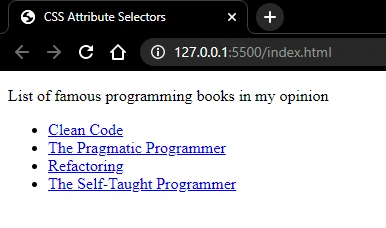
Simple Attribute Selector
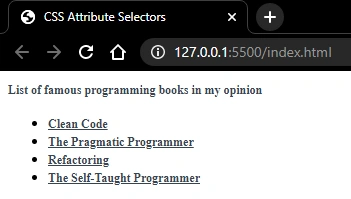
From the word itself, simple attribute selectors apply rules to elements that have the specified attribute, regardless of that attribute's value. Let's see an example.
- [title]{
- color:#36454f;
- font-size:12px;
- font-weight: bold;
- }
Output
Exact Attribute Value Selector
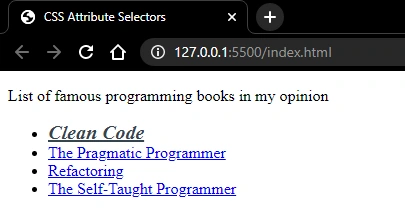
If you want to be more specific, we can use this exact attribute value selector. You just need to know what value you need to apply with the styles. Let's see an example.
- /*
- * Exact attribute value selector
- */
- a[title='Clean Code: A Handbook of Agile Software Craftsmanship']{
- color:#36454f;
- font-size:20px; /*Let's make the font-size a bit larger so it will stand-out*/
- font-weight: bold;
- font-style:italic;
- }
Output
Partial Attribute Value Selector
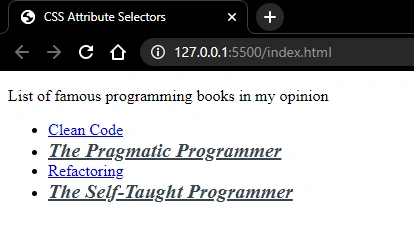
If you want to select elements that contain a specific word we can use this partial attribute value selector. Let's see an example below.
- /*
- * Partial attribute value selector
- */
- a[title~='Programmer:']{
- color:#36454f;
- font-size:20px; /*Let's make the font-size a bit larger so it will stand-out*/
- font-weight: bold;
- font-style:italic;
- }
Output
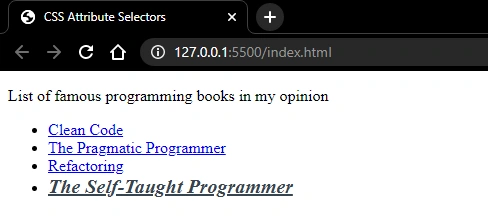
Language Attribute Selector
This selector applies rules to elements that have an attribute matching the first argument in the selector. Let's see an example below.
- /*
- * Language attribute value selector
- */
- a[lang|='en']{
- color:#36454f;
- font-size:20px; /*Let's make the font-size a bit larger so it will stand-out*/
- font-weight: bold;
- font-style:italic;
- }
Beginning Sub-string Attribute Value Selector
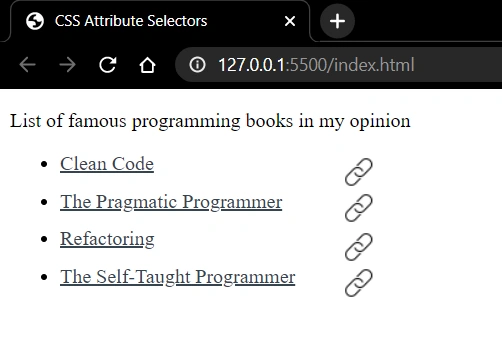
This selector finds the elements whose chosen attribute begins/starts with the string passed to it as an argument. Let's see an example below.
- /*
- * Begin substring attribute value selector
- */
- a[href^='http']{
- color:#36454f;
- background-image: url("../images/link-24.png");
- background-repeat: no-repeat;
- background-position: right;
- display: block;
- width:250px;
- height: 30px;
- }
In the example shown, we have a 24px image in height so, in order to fit in the list, we have changed the display value to block and set the height to 30px so the image will fit in the ordered-list.
Output
Ending Sub-string Attribute Value Selector
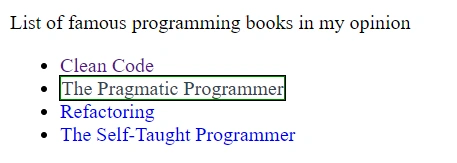
This selector is exactly the opposite of the beginning substring attribute value selector. This means that you can use it to select attributes that end with a supplied value. Let's see an example below:
- a[href^='http']{
- text-decoration: none;
- }
- /*
- * Ending Substring Attribute Value Selector
- */
- a[title$='Master']{
- color:#36454f;
- border: 1px solid green;
- outline: 1px solid black;
- }
Arbitrary Sub-string Attribute Value Selector
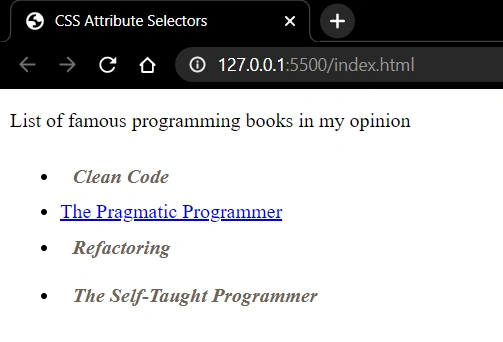
This attribute selector works in the same way as the beginning and ending substring attribute selector. However, it searches the value anywhere in the provided attribute string. Let's see an example below:
- /* Arbitrary Substring Attribute value selector
- as long as the string contains a certain value the
- styles will be applied.
- */
- a[href*='book']{
- color : #6e6456;
- font-weight: bold;
- text-decoration: none;
- font-style: italic;
- display: block;
- padding:10px;
- }
Summary
In this article, we have discussed the following:
- Attribute selectors defined in CSS2:
- Simple Attribute Selector
- Exact Attribute Value Selector
- Partial Attribute Value Selector
- Language Attribute Selector
- Attribute Selectors in CSS3
- Beginning Sub-string Attribute Value Selector
- Ending Sub-string Attribute Value Selector
- Arbitrary Sub-string Attribute Value Selector
I hope you have enjoyed this article, as I have enjoyed writing it. Until next time, happy programming!
References
Roshan RathodPosted Jul 23, 2020, 12:50 AM
Nice ..keep it up sir