

There are two pages - one for adding or updating category and subcategory or deleting the subcategory. Other for updating and deleting category.Here is how the pages will look like,
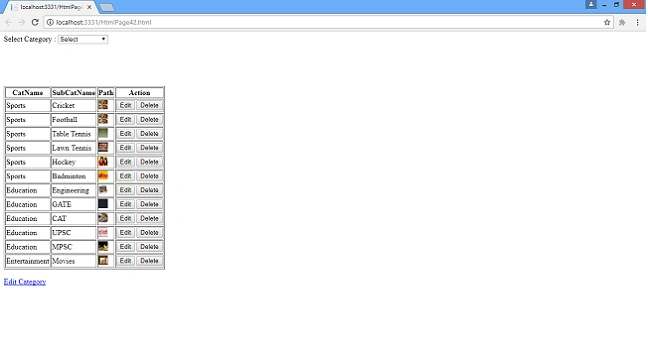
This is the page for adding category and subcategory,in this page there is a dropdownlist to which all categories are binded,the user will have option to select category and add a subcategory for the category.If he wants to add new category he will select add new option from the dropdownlist.Here is how the page will look like when he selects add new option.
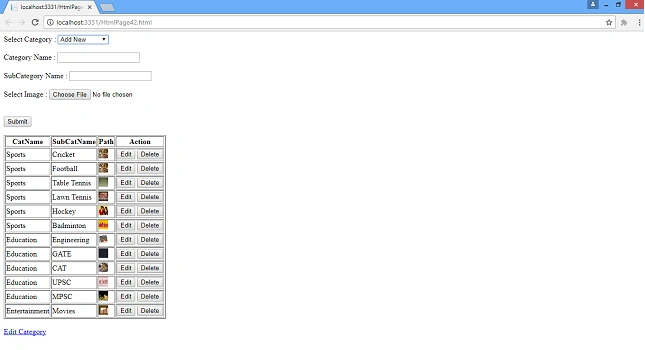
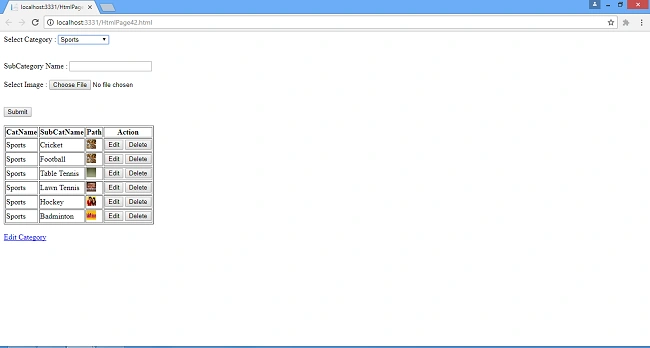
When user selects add new option from drop down the category textbox,subcategory name textbox and file upload control along with submit button will be visible.When category is selected only subcategory name textbox and file upload control and submit button will be visible.Here is how the page will look when user selects category instead of add new option from dropdown
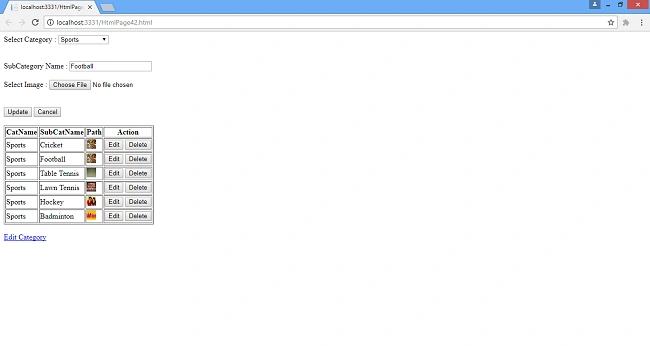
When edit button is clicked,subcategory name and category will be shown in textbox and dropdown respectively and update and cancel button will be visible and submit button will be hidden.Cancel button is if the user wants to cancel the updation.Here is how the page looks when user clicks on edit button
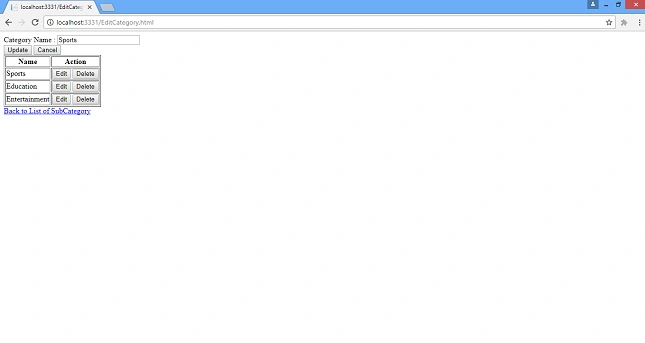
Below is the page from which user can update or delete a category.This page will open when user clicks on edit category link
This is the page for adding category and subcategory,in this page there is a dropdownlist to which all categories are binded,the user will have option to select category and add a subcategory for the category.If he wants to add new category he will select add new option from the dropdownlist.Here is how the page will look like when he selects add new option.
When user selects add new option from drop down the category textbox,subcategory name textbox and file upload control along with submit button will be visible.When category is selected only subcategory name textbox and file upload control and submit button will be visible.Here is how the page will look when user selects category instead of add new option from dropdown
When edit button is clicked,subcategory name and category will be shown in textbox and dropdown respectively and update and cancel button will be visible and submit button will be hidden.Cancel button is if the user wants to cancel the updation.Here is how the page looks when user clicks on edit button
Below is the page from which user can update or delete a category.This page will open when user clicks on edit category link
Now open sql server and create two tables name it as tblCat and tblSubCat,here is the script to create tables
- Create table tblCat
- (
- CatId int identity(1,1) Not Null,
- CatName varchar(50),
- IsActive bit Null
- )
- Create table tblSubCat
- (
- SubCatId int identity(1,1) Not Null,
- CatId int,
- SubCatName varchar(50),
- imgPath varchar(50),
- IsActive bit
- )
Now create two store procedures to add update category and subcategory respectively here are the two store procedures
- CREATE PROCEDURE Insert_update_delete_category (@Para VARCHAR(50) = '',
- @CatId INT = 0,
- @CatName VARCHAR(50) = '',
- @IsActive BIT = 0)
- AS
- BEGIN
- IF @Para = 'Add'
- BEGIN
- IF EXISTS(SELECT 1
- FROM tblcat
- WHERE catname = @CatName)
- BEGIN
- SELECT 'Exists'
- END
- ELSE
- BEGIN
- INSERT INTO tblcat
- (catname,
- isactive)
- VALUES (@CatName,
- 1)
- END
- END
- ELSE IF @Para = 'SelectForGrid'
- BEGIN
- SELECT catid,
- catname
- FROM tblcat
- WHERE isactive = 1
- END
- ELSE IF @Para = 'SelectById'
- BEGIN
- SELECT catid,
- catname
- FROM tblcat
- WHERE isactive = 1
- AND catid = @CatId
- END
- ELSE IF @Para = 'Update'
- BEGIN
- UPDATE tblcat
- SET catname = @CatName,
- isactive = 1
- WHERE catid = @CatId
- END
- ELSE IF @Para = 'Delete'
- BEGIN
- UPDATE tblcat
- SET isactive = 0
- WHERE catid = @CatId
- END
- END
- CREATE PROCEDURE Insert_delete_update_subcat (@Para VARCHAR(50)='',
- @SubCatId INT = 0,
- @CatId INT = 0,
- @CatName VARCHAR(50) = '',
- @SubCatName VARCHAR(50) = '',
- @imgPath VARCHAR(50) = '',
- @IsActive BIT = 0)
- AS
- BEGIN
- IF @Para = 'Add'
- BEGIN
- IF Len(@CatName) > 0
- BEGIN
- EXEC Insert_update_delete_category
- 'Add',
- 0,
- @CatName,
- 1
- SELECT @CatId = Max(catid)
- FROM tblcat
- INSERT INTO tblsubcat
- (catid,
- subcatname,
- imgpath,
- isactive)
- VALUES (@CatId,
- @SubCatName,
- @imgPath,
- 1)
- END
- ELSE
- BEGIN
- INSERT INTO tblsubcat
- (catid,
- subcatname,
- imgpath,
- isactive)
- VALUES (@CatId,
- @SubCatName,
- @imgPath,
- 1)
- END
- END
- ELSE IF @Para = 'GetCat'
- BEGIN
- SELECT catid,
- catname
- FROM tblcat
- WHERE isactive = 1
- END
- ELSE IF @Para = 'GetForGrid'
- BEGIN
- SELECT S.subcatid,
- C.catname,
- S.subcatname,
- S.imgpath
- FROM tblcat C
- JOIN tblsubcat S
- ON C.catid = S.catid
- WHERE S.isactive = 1
- AND C.isactive = 1
- END
- ELSE IF @Para = 'GetById'
- BEGIN
- SELECT C.catid,
- C.catname,
- S.subcatid,
- imgpath,
- S.subcatname
- FROM tblsubcat S
- JOIN tblcat C
- ON C.catid = S.catid
- WHERE subcatid = @SubCatId
- AND S.isactive = 1
- END
- ELSE IF @Para = 'Update'
- BEGIN
- UPDATE tblsubcat
- SET subcatname = @SubCatName,
- imgpath = @imgPath,
- isactive = 1
- WHERE catid = @CatId
- AND subcatid = @SubCatId
- END
- ELSE IF @Para = 'GetByCatId'
- BEGIN
- SELECT S.subcatid,
- C.catname,
- S.subcatname,
- S.imgpath
- FROM tblcat C
- JOIN tblsubcat S
- ON C.catid = S.catid
- WHERE S.isactive = 1
- AND C.isactive = 1
- AND S.catid = @CatId
- END
- ELSE IF @Para = 'Delete'
- BEGIN
- UPDATE tblsubcat
- SET isactive = 0
- WHERE subcatid = @SubCatId
- END
- END
Now right click on project in solutions explorer,select add new item and from template select code and select class.Name the class as Category and add a Category class to application and write the following code in class
- public class Category {
- public int Id {
- get;
- set;
- }
- public int SubCatId {
- get;
- set;
- }
- public string CatName {
- get;
- set;
- }
- public string SubCatName {
- get;
- set;
- }
- public string ImgPath {
- get;
- set;
- }
- }
Category class will contain five properties Id,SubCatId,CatName,SubCatName,ImgPath
Right click on project in solutions explorer and select add-new folder and name it as Images,in this folder uploaded images will be saved.
In the web.config add a connection string inside connectionStrings tag
Right click on project in solutions explorer and select add-new folder and name it as Images,in this folder uploaded images will be saved.
In the web.config add a connection string inside connectionStrings tag
- <connectionStrings>
- <add name="dbConnect" providerName="System.Data.SqlClient" connectionString="Data Source = LIVINGROOM\SQLEXPRESS;Initial Catalog=codefirstDB;Integrated Security=true;" />
- </connectionStrings>
here dbConnect is name given to connectionstring,DataSource is server name which is LIVINGROOM\SQLEXPRESS in my case,Initial Catalog is database name which is codefirstDB and Integrated Security is true and also write following code inside system.web tag
- <webServices>
- <protocols>
- <add name="HttpGet" />
- <add name="HttpPost" /> </protocols>
- </webServices>
Now write the following code in web services and uncomment the following line System.Web.Services.ScriptService
- SqlConnection con = new SqlConnection(ConfigurationManager.ConnectionStrings["dbConnect"].ToString());
- SqlCommand cmd = null;
- DataTable dt;
- SqlDataAdapter da = null;
- [WebMethod]
- public int InsertCat(string Category, string CatName, string SubCatName, string File) {
- string message = string.Empty;
- using(cmd = new SqlCommand("Insert_Delete_Update_SubCat", con)) {
- cmd.CommandType = CommandType.StoredProcedure;
- cmd.Parameters.AddWithValue("@Para", "Add");
- if (Category == "Add New") {
- cmd.Parameters.AddWithValue("@CatName", CatName);
- } else {
- cmd.Parameters.AddWithValue("@CatId", Convert.ToInt32(Category));
- }
- cmd.Parameters.AddWithValue("@SubCatName", SubCatName);
- cmd.Parameters.AddWithValue("@imgPath", File);
- if (con.State.Equals(ConnectionState.Closed)) con.Open();
- int result = cmd.ExecuteNonQuery();
- con.Close();
- return result;
- }
- }
- [WebMethod]
- public void GetAllDetails() {
- List < Category > catList = new List < Category > ();
- using(cmd = new SqlCommand("Insert_Delete_Update_SubCat", con)) {
- cmd.CommandType = CommandType.StoredProcedure;
- cmd.Parameters.AddWithValue("@Para", "GetForGrid");
- if (con.State.Equals(ConnectionState.Closed)) con.Open();
- SqlDataReader dr = cmd.ExecuteReader();
- while (dr.Read()) {
- Category cat = new Category();
- cat.SubCatId = Convert.ToInt32(dr["SubCatId"]);
- cat.CatName = dr["CatName"].ToString();
- cat.SubCatName = dr["SubCatName"].ToString();
- cat.ImgPath = dr["imgPath"].ToString();
- catList.Add(cat);
- }
- con.Close();
- JavaScriptSerializer js = new JavaScriptSerializer();
- Context.Response.Write(js.Serialize(catList));
- }
- }
- [WebMethod]
- public void GetCatList() {
- List < Category > catlist = new List < Category > ();
- using(cmd = new SqlCommand("Insert_Delete_Update_SubCat", con)) {
- cmd.CommandType = CommandType.StoredProcedure;
- cmd.Parameters.AddWithValue("@Para", "GetCat");
- if (con.State.Equals(ConnectionState.Closed)) con.Open();
- SqlDataReader dr = cmd.ExecuteReader();
- while (dr.Read()) {
- Category cat = new Category();
- cat.Id = Convert.ToInt32(dr["CatId"]);
- cat.CatName = dr["CatName"].ToString();
- catlist.Add(cat);
- }
- }
- JavaScriptSerializer js = new JavaScriptSerializer();
- Context.Response.Write(js.Serialize(catlist));
- }
- [WebMethod]
- public string GetById(string Id) {
- string Result = string.Empty;
- using(cmd = new SqlCommand("Insert_Delete_Update_SubCat", con)) {
- cmd.CommandType = CommandType.StoredProcedure;
- cmd.Parameters.AddWithValue("@Para", "GetById");
- cmd.Parameters.AddWithValue("@SubCatId", Convert.ToInt32(Id));
- if (con.State.Equals(ConnectionState.Closed)) con.Open();
- dt = new DataTable();
- da = new SqlDataAdapter(cmd);
- da.Fill(dt);
- if (dt.Rows.Count > 0) {
- Result = "{\"CatId\":";
- Result += "\"" + dt.Rows[0][0].ToString() + "\",";
- Result += "\"CatName\":\"" + dt.Rows[0][1].ToString() + "\",";
- Result += "\"SubCatId\":\"" + dt.Rows[0][2].ToString() + "\",";
- Result += "\"Path\":\"" + dt.Rows[0][3].ToString() + "\",";
- Result += "\"SubCatName\":\"" + dt.Rows[0][4].ToString() + "\"";
- Result += "}";
- }
- con.Close();
- return Result;
- }
- }
- [WebMethod]
- public int UpdateSubCat(string Category, string SubCatName, string subCatId, string File) {
- string message = string.Empty;
- using(cmd = new SqlCommand("Insert_Delete_Update_SubCat", con)) {
- cmd.CommandType = CommandType.StoredProcedure;
- cmd.Parameters.AddWithValue("@Para", "Update");
- cmd.Parameters.AddWithValue("@CatId", Convert.ToInt32(Category));
- cmd.Parameters.AddWithValue("@subCatId", Convert.ToInt32(subCatId));
- cmd.Parameters.AddWithValue("@SubCatName", SubCatName);
- cmd.Parameters.AddWithValue("@imgPath", File);
- if (con.State.Equals(ConnectionState.Closed)) con.Open();
- int result = cmd.ExecuteNonQuery();
- con.Close();
- return result;
- }
- }
- [WebMethod]
- public void GetByCategory(string Id) {
- List < Category > catList = new List < Category > ();
- using(cmd = new SqlCommand("Insert_Delete_Update_SubCat", con)) {
- cmd.CommandType = CommandType.StoredProcedure;
- cmd.Parameters.AddWithValue("@Para", "GetByCatId");
- cmd.Parameters.AddWithValue("@CatId", Convert.ToInt32(Id));
- if (con.State.Equals(ConnectionState.Closed)) con.Open();
- SqlDataReader dr = cmd.ExecuteReader();
- while (dr.Read()) {
- Category cat = new Category();
- cat.SubCatId = Convert.ToInt32(dr["SubCatId"]);
- cat.CatName = dr["CatName"].ToString();
- cat.SubCatName = dr["SubCatName"].ToString();
- cat.ImgPath = dr["imgPath"].ToString();
- catList.Add(cat);
- }
- con.Close();
- JavaScriptSerializer js = new JavaScriptSerializer();
- Context.Response.Write(js.Serialize(catList));
- }
- }
- [WebMethod]
- public int DeleteSubCat(string Id) {
- string message = string.Empty;
- using(cmd = new SqlCommand("Insert_Delete_Update_SubCat", con)) {
- cmd.CommandType = CommandType.StoredProcedure;
- cmd.Parameters.AddWithValue("@Para", "Delete");
- cmd.Parameters.AddWithValue("@SubCatId", Convert.ToInt32(Id));
- if (con.State.Equals(ConnectionState.Closed)) con.Open();
- int result = cmd.ExecuteNonQuery();
- con.Close();
- return result;
- }
- }
- [WebMethod]
- public void GetCategory() {
- List < Category > catlist = new List < Category > ();
- using(cmd = new SqlCommand("Insert_Update_Delete_Category", con)) {
- cmd.CommandType = CommandType.StoredProcedure;
- cmd.Parameters.AddWithValue("@Para", "SelectForGrid");
- if (con.State.Equals(ConnectionState.Closed)) con.Open();
- SqlDataReader dr = cmd.ExecuteReader();
- while (dr.Read()) {
- Category cat = new Category();
- cat.Id = Convert.ToInt32(dr["CatId"]);
- cat.CatName = dr["CatName"].ToString();
- catlist.Add(cat);
- }
- }
- JavaScriptSerializer js = new JavaScriptSerializer();
- Context.Response.Write(js.Serialize(catlist));
- }
- [WebMethod]
- public string GetCatById(string Id) {
- string Result = string.Empty;
- using(cmd = new SqlCommand("Insert_Update_Delete_Category", con)) {
- cmd.CommandType = CommandType.StoredProcedure;
- cmd.Parameters.AddWithValue("@Para", "SelectById");
- cmd.Parameters.AddWithValue("@CatId", Convert.ToInt32(Id));
- if (con.State.Equals(ConnectionState.Closed)) con.Open();
- dt = new DataTable();
- da = new SqlDataAdapter(cmd);
- da.Fill(dt);
- if (dt.Rows.Count > 0) {
- Result = "{\"Id\":";
- Result += "\"" + dt.Rows[0][0].ToString() + "\",";
- Result += "\"CatName\":\"" + dt.Rows[0][1].ToString() + "\"";
- Result += "}";
- }
- con.Close();
- return Result;
- }
- }
- [WebMethod]
- public int UpdateCat(string Id, string CatName) {
- string message = string.Empty;
- using(cmd = new SqlCommand("Insert_Update_Delete_Category", con)) {
- cmd.CommandType = CommandType.StoredProcedure;
- cmd.Parameters.AddWithValue("@Para", "Update");
- cmd.Parameters.AddWithValue("@CatId", Convert.ToInt32(Id));
- cmd.Parameters.AddWithValue("@CatName", CatName);
- if (con.State.Equals(ConnectionState.Closed)) con.Open();
- int result = cmd.ExecuteNonQuery();
- con.Close();
- return result;
- }
- }
- [WebMethod]
- public int DeleteCat(string Id) {
- string message = string.Empty;
- using(cmd = new SqlCommand("Insert_Update_Delete_Category", con)) {
- cmd.CommandType = CommandType.StoredProcedure;
- cmd.Parameters.AddWithValue("@Para", "Delete");
- cmd.Parameters.AddWithValue("@CatId", Convert.ToInt32(Id));
- if (con.State.Equals(ConnectionState.Closed)) con.Open();
- int result = cmd.ExecuteNonQuery();
- con.Close();
- return result;
- }
- }
As we can see the webservice contains 11 methods,first method is InsertCat which is used to insert category and subcategory.In this method if user has selected add new option then category name will be inserted and Id will be generated automatically for that category in database.But if category which is already present is selected then its Id will be inserted.File is the image name that is stored in databse for subcategory.
- Second method is GetAllDetails which returns the list of Categories and SubCategories which will be shown to the user on page load.
- Third method is GetCatList which is used to select Cateogory Name and Id which will be binded with dropdownlist
- Fourth method is GetById which fetches the subcategory details on the basis of its Id for editing.From that I have return a string result which syntax is similar to javascript object which I have created using escape sequences in C#
- Fifth method is UpdateSubCat which is used to update subcategory details
- Sixth method is GetByCategory which is used to get SubCategory based on category selected by user in dropdown.
- Seventh method is DeleteSubCat which is used to delete subcategory
- Eigth method is GetCategory which will provide list of Cateogory for updating and deleting when user clicks edit category link
- Ninth method is GetCatById which is use to select catName by Id for updation
- Tenth method is UpdateCat which is use to update catName on basis of CatId
- Last method is DeleteCat which is use to delete category
Now right click on application select Add-New-Item and from template select web and then select Generic Handler and add an ashx handler which will be used to store images inside Image folder when user uploads it.Give a name to handler I have given name as Handler1 and write the following code in it inside process request.
- public void ProcessRequest(HttpContext context) {
- context.Response.ContentType = "text/plain";
- if (context.Request.Files.Count > 0) {
- HttpFileCollection files = context.Request.Files;
- for (int i = 0; i < files.Count; i++) {
- HttpPostedFile file = files[i];
- string fileType = file.ContentType;
- if (fileType == "image/jpeg" || fileType == "image/png") {
- string fname = file.FileName;
- bool folderExists = Directory.Exists(context.Server.MapPath("~/Images/"));
- if (!folderExists) Directory.CreateDirectory(context.Server.MapPath("~/Images/"));
- fname = Path.Combine(context.Server.MapPath("~/Images/"), fname);
- file.SaveAs(fname);
- context.Response.ContentType = "text/plain";
- context.Response.Write("File Uploaded Successfully!");
- } else {
- context.Response.ContentType = "text/plain";
- context.Response.Write("File Not Uploaded Successfully,Extension should be jpeg or png");
- }
- }
- }
- }
This request will be called when user uploads image and clicks submit button or update button.In this method I have checked content type if it is image/jpeg or image/png file will be stored inside Images folder otherwise it will not be stored and base upon that message will be return to the user.
Now right click on application and add a new javascript file with .js extension.And Give a name to it,I have given it name as Javascript19.And Write the following code on it.This is used for inserting category,subcategory and updating subcategory
Now right click on application and add a new javascript file with .js extension.And Give a name to it,I have given it name as Javascript19.And Write the following code on it.This is used for inserting category,subcategory and updating subcategory
- /// <reference path="angular.min.js" />
- /// <reference path="jquery-1.8.2.min.js" />
- var myApp = angular.module("myModule", []).directive("filesInput", function() {
- return {
- require: "ngModel",
- link: function postLink(scope, elem, attrs, ngModel) {
- elem.on("change", function(e) {
- var files = elem[0].files;
- ngModel.$setViewValue(files);
- })
- }
- }
- }).controller("myController", function($scope, $http) {
- $scope.category = "0";
- $scope.cat = false;
- $scope.subcat = false;
- $scope.sumbmitbutton = false;
- $scope.showEditUpdate = false;
- $scope.showGrid = false;
- GetAllRecords();
- $scope.ShowHideDiv = function(category) {
- if (category == "Add New") {
- $scope.cat = true;
- $scope.subcat = true;
- $scope.sumbmitbutton = true;
- $scope.showEditUpdate = false;
- $scope.subCatName = '';
- $scope.catName = '';
- GetAllRecords();
- } else if (category == "0") {
- $scope.cat = false;
- $scope.subcat = false;
- $scope.sumbmitbutton = false;
- $scope.showEditUpdate = false;
- $scope.catName = '';
- $scope.subCatName = '';
- $scope.file = '';
- $("#filebutton").val('');
- GetAllRecords();
- } else {
- $scope.cat = false;
- $scope.subcat = true;
- $scope.sumbmitbutton = true;
- $scope.showEditUpdate = false;
- $scope.subCatName = '';
- $scope.catName = '';
- $scope.file = '';
- $("#filebutton").val('');
- var config = {
- params: {
- Id: category
- }
- }
- $http.get('WebService3.asmx/GetByCategory', config).then(function(response) {
- if (response.data.length > 0) {
- $scope.categoryDetails = response.data;
- $scope.showGrid = true;
- }
- })
- }
- }
- $scope.InsertData = function(category, catName, subCatName, file) {
- var FileName = "";
- var msg = "";
- if (category == "0" || category == undefined) {
- msg += "Please Select Category, ";
- }
- if (category == "Add New") {
- if (catName == '' || catName == undefined) {
- msg += "Please Enter Category Name, ";
- }
- }
- if (subCatName == '' || subCatName == undefined) {
- msg += "Please Enter SubCategory Name, ";
- }
- if (file == '' || file == undefined) {
- msg += "Please Select Image, ";
- }
- if (msg.length > 0) {
- msg = msg.substring(0, msg.length - 2);
- alert(msg);
- } else {
- var Cat = category;
- var CatName = catName;
- var SubCatName = subCatName;
- var SubCatId = 0;
- FileName = file[0].name;
- UploadFile(Cat, CatName, SubCatName, FileName, SubCatId);
- }
- }
- $scope.catList = function() {
- $http({
- method: 'Get',
- url: 'WebService3.asmx/GetCatList',
- }).then(function(result) {
- $scope.CategoryList = result.data;
- })
- }
- $scope.catList();
- function clear() {
- $scope.catName = '';
- $('#txtCategory').val('');
- $scope.subCatName = '';
- $('#txtSubCategory').val('');
- $scope.file = '';
- $("#filebutton").val('');
- $scope.category = "0";
- $scope.cat = false;
- $scope.subcat = false;
- $scope.sumbmitbutton = false;
- $scope.showEditUpdate = false;
- }
- function GetAllRecords() {
- $http({
- method: 'Get',
- url: 'WebService3.asmx/GetAllDetails'
- }).then(function(response) {
- if (response.data.length > 0) {
- $scope.categoryDetails = response.data;
- $scope.showGrid = true;
- }
- })
- }
- $scope.EditSubCat = function(Id) {
- $http({
- method: 'Post',
- url: 'WebService3.asmx/GetById',
- data: "{'Id' : '" + Id + "'}",
- contentType: "application/json; charset=utf-8",
- dataType: "json"
- }).then(function(response) {
- if (response.data.d.length > 0) {
- var Result = jQuery.parseJSON(response.data.d);
- $scope.SubCatId = Result.SubCatId;
- $scope.subCatName = Result.SubCatName;
- $scope.category = Result.CatId;
- $scope.file = '';
- $("#filebutton").val('');
- $scope.subcat = true;
- $scope.cat = false;
- $scope.sumbmitbutton = false;
- $scope.showEditUpdate = true;
- }
- })
- }
- $scope.UpdateData = function(category, subCatName, SubCatId, file) {
- var FileName = "";
- var msg = "";
- if (category == "0" || category == undefined) {
- msg += "Please Select Category, ";
- }
- if (subCatName == '' || subCatName == undefined) {
- msg += "Please Enter SubCategory Name, ";
- }
- if (file == '' || file == undefined) {
- msg += "Please Select Image, ";
- }
- if (msg.length > 0) {
- msg = msg.substring(0, msg.length - 2);
- alert(msg);
- } else {
- var Cat = category;
- var CatName = "";
- var SubCatName = subCatName;
- var SubCatId = SubCatId;
- FileName = file[0].name;
- UploadFile(Cat, CatName, SubCatName, FileName, SubCatId);
- }
- }
- $scope.CancelUpdate = function() {
- clear();
- GetAllRecords();
- }
- $scope.DeleteData = function(SubCatId) {
- if (window.confirm("Are you sure you want to Delete this record?")) $scope.result = "Yes";
- else $scope.result = "No";
- if ($scope.result == "Yes") {
- $http({
- method: 'Post',
- url: 'WebService3.asmx/DeleteSubCat',
- data: "{'Id' : '" + SubCatId + "'}",
- contentType: "application/json; charset=utf-8",
- dataType: "json"
- }).then(function(response) {
- clear();
- if (response.data.d > 0) {
- alert("Record Deleted Successfully");
- GetAllRecords();
- } else {
- alert("Record Not Deleted");
- GetAllRecords();
- }
- })
- }
- }
- function UploadFile(Cat, CatName, SubCatName, FileName, SubCatId) {
- var fileUpload = $('#filebutton').get(0);
- $log.info(fileUpload);
- var files = fileUpload.files;
- $log.info(files);
- var test = new FormData();
- for (var i = 0; i < files.length; i++) {
- test.append(files[i].name, files[i]);
- $log.info(test);
- }
- $.ajax({
- url: "Handler1.ashx",
- type: "POST",
- contentType: false,
- processData: false,
- data: test,
- success: function(result) {
- if (result == "File Uploaded Successfully!") {
- if ($scope.sumbmitbutton == true) {
- $http({
- method: 'Post',
- url: 'WebService3.asmx/InsertCat',
- data: "{'Category' : '" + Cat + "','CatName' : '" + CatName + "','SubCatName' : '" + SubCatName + "','File' : '" + FileName + "'}",
- contentType: "application/json; charset=utf-8",
- dataType: "json"
- }).then(function(response) {
- clear();
- if (response.data.d > 0) {
- alert("Record Inserted Successfully");
- $scope.catList();
- GetAllRecords();
- } else {
- alert("Entry Already Exists");
- $scope.catList();
- GetAllRecords();
- }
- })
- }
- if ($scope.showEditUpdate == true) {
- $http({
- method: 'Post',
- url: 'WebService3.asmx/UpdateSubCat',
- data: "{'Category' : '" + Cat + "','SubCatName' : '" + SubCatName + "','subCatId' : '" + SubCatId + "','File' : '" + FileName + "'}",
- contentType: "application/json; charset=utf-8",
- dataType: "json"
- }).then(function(response) {
- clear();
- if (response.data.d > 0) {
- alert("Record Updated Successfully");
- $scope.catList();
- GetAllRecords();
- } else {
- alert("Record Not Updated Successfully");
- $scope.catList();
- GetAllRecords();
- }
- })
- }
- } else {
- alert(result);
- $scope.file = '';
- $("#filebutton").val('');
- }
- }
- });
- }
- })
Now first line is angular.min.js script file which you can download from angularjs.org And second is jquery-1.8.2.min.js which I have downloaded from net and added reference of it in project.you need to add reference of this script files and order is also important.
Now second line is to create a module angular object's module method is used to create a module and to it first parameter passed is module name which is myModule and second parameter is optional if there is any dependency on module that name will be provided here.this module will be call using ng-app directive on our html page.
Then there is a directive which name is filesInput which will store the uploaded files by user
Then there is controller to it first parameter is controller name which is myController which will be fetched using ng-controller directive on html page.To the controller I have passed $scope to which we will assign property and to that property we will assign value.And use this property name on html page.Another one is $http which is used to call webmethods in webservice.which has various properties such as method which is the type of method which will be get or post.url that is the url of webmethod,data which to be pass to webmethod. Contenttype and datatype which tells us what type of data is return by user.
Inside the controller the properties are attached to $scope object first is category which is initialized to zero so when page loads,user will see Select option in dropdown for category.Other properties are cat,subcat which are set to false because initially the user will see only category dropdown.Next properties are submitbutton and showEditUpdate set to false this will set to true accordingly when user wants to enter new subcategory and when user clicks on edit button.Next property is showgrid set to false which will be made true when we fetch subcategory details present and grid will be displayed.
Now on next line GetAllRecords method is called which is used to display subcategory details in gridview on page load, Next function is insertData to which I have passed category selected by user,catName entered by user,subcatname and file name which is image name uploaded by user.Here first check is made so that user enters all the data.And then UploadFile method is called.To uploadFile method this parameters are passed.In upload file first request is made to Handler which is used to store image in Images folder,and if image is uploaded successfully then only record is inserted into database otherwise it will not be inserted.
Then there is catList function called on page load to bind categories to category dropdown, In EditSubCat method the SubCategory details are selected base on subcatId for updating.
UpdateData method is used to update the subcategory details and in this method also first uploafile method is called,so the updated image is store inside image folder and if image is uploaded successfully then only record is updated otherwise it will not be updated.Inside uploaded file I have checked two property values submitbutton and showEditUpdate depending on which one is true submit or update method will be called,
Now second line is to create a module angular object's module method is used to create a module and to it first parameter passed is module name which is myModule and second parameter is optional if there is any dependency on module that name will be provided here.this module will be call using ng-app directive on our html page.
Then there is a directive which name is filesInput which will store the uploaded files by user
Then there is controller to it first parameter is controller name which is myController which will be fetched using ng-controller directive on html page.To the controller I have passed $scope to which we will assign property and to that property we will assign value.And use this property name on html page.Another one is $http which is used to call webmethods in webservice.which has various properties such as method which is the type of method which will be get or post.url that is the url of webmethod,data which to be pass to webmethod. Contenttype and datatype which tells us what type of data is return by user.
Inside the controller the properties are attached to $scope object first is category which is initialized to zero so when page loads,user will see Select option in dropdown for category.Other properties are cat,subcat which are set to false because initially the user will see only category dropdown.Next properties are submitbutton and showEditUpdate set to false this will set to true accordingly when user wants to enter new subcategory and when user clicks on edit button.Next property is showgrid set to false which will be made true when we fetch subcategory details present and grid will be displayed.
Now on next line GetAllRecords method is called which is used to display subcategory details in gridview on page load, Next function is insertData to which I have passed category selected by user,catName entered by user,subcatname and file name which is image name uploaded by user.Here first check is made so that user enters all the data.And then UploadFile method is called.To uploadFile method this parameters are passed.In upload file first request is made to Handler which is used to store image in Images folder,and if image is uploaded successfully then only record is inserted into database otherwise it will not be inserted.
Then there is catList function called on page load to bind categories to category dropdown, In EditSubCat method the SubCategory details are selected base on subcatId for updating.
UpdateData method is used to update the subcategory details and in this method also first uploafile method is called,so the updated image is store inside image folder and if image is uploaded successfully then only record is updated otherwise it will not be updated.Inside uploaded file I have checked two property values submitbutton and showEditUpdate depending on which one is true submit or update method will be called,
- DeleteData is use to delete subcategory record
- CancelUpdate if user wants to cancel updation
- Clear function is use to clear all values after insertion or updation
ShowHideDiv which will be called on value selected in category dropdown and set the required properties to true or false base on category value selected by user.
Now right click on application and add a htmlpage give a name to it.I have given name as HtmlPage42 and write following code on it
Now right click on application and add a htmlpage give a name to it.I have given name as HtmlPage42 and write following code on it
- <!DOCTYPE html>
- <html xmlns="http://www.w3.org/1999/xhtml" ng-app="myModule">
- <head>
- <script src="Scripts/angular.min.js" type="text/javascript" lang="ja"></script>
- <script src="Scripts/jquery-1.8.2.min.js" type="text/javascript" lang="ja"></script>
- <script src="Scripts/JavaScript19.js" type="text/javascript" lang="ja"></script>
- <script type="text/javascript" lang="ja">
- function ValidateCatName(e) {
- var keyCode = (e.which) ? e.which : e.keyCode
- if (((keyCode >= 65 && keyCode <= 90) || (keyCode >= 97 && keyCode <= 122)) || keyCode == 32) {
- return true;
- } else {
- return false;
- }
- }
- function ValidateSubCatName(e) {
- var keyCode = (e.which) ? e.which : e.keyCode
- if (((keyCode >= 65 && keyCode <= 90) || (keyCode >= 97 && keyCode <= 122)) || keyCode == 32) {
- return true;
- } else {
- return false;
- }
- }
- </script>
- <title></title>
- </head>
- <body ng-controller="myController"> Select Category : <select ng-model="category" ng-change="ShowHideDiv(category)">
- <option value="0">Select</option>
- <option value="Add New">Add New</option>
- <option ng-repeat="item in CategoryList" value="{{item.Id}}">{{item.CatName}}</option>
- </select> <br /> <br />
- <div ng-show="cat"> Category Name : <input type="text" ng-model="catName" id="txtCategory" onkeypress="return ValidateCatName(event);" /> </div> <br />
- <div ng-show="subcat"> SubCategory Name : <input type="text" ng-model="subCatName" id="txtSubCategory" onkeypress="return ValidateSubCatName(event);" /> <br /> <br /> Select Image : <input type="file" id="filebutton" files-input ng-model="file"> <br /> <br /> </div> <br /> <input type="submit" value="Submit" ng-click="InsertData(category,catName,subCatName,file)" ng-show="sumbmitbutton" /> <input type="button" value="Update" ng-click="UpdateData(category,subCatName,SubCatId,file)" ng-show="showEditUpdate" /> <input type="button" value="Cancel" ng-click="CancelUpdate()" ng-show="showEditUpdate" /> <br /> <br />
- <div ng-show="showGrid">
- <table border="1">
- <tr>
- <th ng-show="false">SubCatId</th>
- <th>CatName</th>
- <th>SubCatName</th>
- <th>Path</th>
- <th>Action</th>
- </tr>
- <tr ng-repeat="cat in categoryDetails">
- <td ng-show="false">{{cat.SubCatId}}</td>
- <td>{{cat.CatName}}</td>
- <td>{{cat.SubCatName}}</td>
- <td><img ng-src="{{'Images' + '/' + cat.ImgPath}}" style="width:20px;height:20px;" /></td>
- <td> <input type="button" value="Edit" ng-click="EditSubCat(cat.SubCatId)" /> <input type="button" value="Delete" ng-click="DeleteData(cat.SubCatId)" /> </td>
- </tr>
- </table>
- </div> <br /> <a href="EditCategory.html">Edit Category</a> </body>
- </html>
Now first I have added reference of script angular.min.js,jquery-1.8.2.min.js,And javascript file which we have created which is Javascript19.js it is stored inside scripts folder in application.The script src will be the path of scripts which you have stored in your application.
The next two function are ValidateCatName and ValidateSubCatName which not allow user to enter numeric values for category name and subcategory name.This functions will be called on keypress event of category and subcategory textbox to the ng-app and ng-controller directive I have attached controller name and module name, Then there is category dropdown on its change event I have called ShowHideDiv method using ng-change directive.I have binded category selected by user to category property using ng-model directive.Then I have binded the list of category there Id as value and name using ng-repeat directive.CategoryList is the property which has been assign value in catList function on Js file.
There are two div one which contain category textbox and second contain subcategory textbox and fileupload control respectively which are not displayed initially and displayed depending upon value of category selected by user.I have used ng-show directive to show hide div
The next two function are ValidateCatName and ValidateSubCatName which not allow user to enter numeric values for category name and subcategory name.This functions will be called on keypress event of category and subcategory textbox to the ng-app and ng-controller directive I have attached controller name and module name, Then there is category dropdown on its change event I have called ShowHideDiv method using ng-change directive.I have binded category selected by user to category property using ng-model directive.Then I have binded the list of category there Id as value and name using ng-repeat directive.CategoryList is the property which has been assign value in catList function on Js file.
There are two div one which contain category textbox and second contain subcategory textbox and fileupload control respectively which are not displayed initially and displayed depending upon value of category selected by user.I have used ng-show directive to show hide div
Then there are three buttons submit,update,cancel which will be displayed according to the value selected by user and respective functions will be called.I have used ng-click directive to call a function when user clicks on these buttons.
Then there is table inside a div.This div will be displayed if records are present otherwise it will not be displayed,so i have used ng-show directive to that showGrid property is attached initially it is set to false.The table also contains two button Edit and Delete to edit and delete data respectively.
Then there is a link provided to user to edit category on clicking this link user will be directed to EditCategory page.For this anchor tag is used.
Now right click on application and add a new js file give a name to it.I have given name as EditCat which is used to update,delete category and write following code on it.
Then there is table inside a div.This div will be displayed if records are present otherwise it will not be displayed,so i have used ng-show directive to that showGrid property is attached initially it is set to false.The table also contains two button Edit and Delete to edit and delete data respectively.
Then there is a link provided to user to edit category on clicking this link user will be directed to EditCategory page.For this anchor tag is used.
Now right click on application and add a new js file give a name to it.I have given name as EditCat which is used to update,delete category and write following code on it.
- /// <reference path="Scripts/angular.min.js" />
- /// <reference path="Scripts/jquery-1.8.2.min.js" />
- var myApp = angular.module("myModule", []).controller("myController", function($scope, $http) {
- $scope.myValue = false;
- $scope.showHide = false;
- $scope.Id = "0";
- ViewData();
- function ViewData() {
- $http({
- method: 'Get',
- url: 'WebService3.asmx/GetCategory'
- }).then(function(response) {
- if (response.data.length > 0) {
- $scope.Category = response.data;
- $scope.myValue = true;
- } else {
- $scope.myValue = false;
- }
- })
- }
- $scope.DeleteData = function(Id) {
- if (window.confirm("Are you sure you want to Delete this record?")) $scope.result = "Yes";
- else $scope.result = "No";
- if ($scope.result == "Yes") {
- $http({
- method: 'Post',
- url: 'WebService3.asmx/DeleteCat',
- data: "{'Id' : '" + Id + "'}",
- contentType: "application/json; charset=utf-8",
- dataType: "json"
- }).then(function(response) {
- if (response.data.d > 0) {
- alert("Record Deleted Successfully");
- ViewData();
- } else {
- alert("Record Not Deleted");
- ViewData();
- }
- })
- }
- }
- $scope.EditData = function(Id) {
- $http({
- method: 'Post',
- url: 'WebService3.asmx/GetCatById',
- data: "{'Id' : '" + Id + "'}",
- contentType: "application/json; charset=utf-8",
- dataType: "json"
- }).then(function(response) {
- if (response.data.d.length > 0) {
- var Result = jQuery.parseJSON(response.data.d);
- $scope.Id = Result.Id;
- $scope.CatName = Result.CatName;
- $scope.showHide = true;
- }
- })
- }
- $scope.CancelUpdate = function() {
- clear();
- }
- $scope.UpdateData = function(Id, CatName) {
- if (CatName == "" || CatName == undefined) {
- alert("Please Enter Category Name")
- } else {
- $http({
- method: 'Post',
- url: 'WebService3.asmx/UpdateCat',
- data: "{'Id' : '" + Id + "','CatName' : '" + CatName + "'}",
- contentType: "application/json; charset=utf-8",
- dataType: "json"
- }).then(function(response) {
- clear();
- if (response.data.d > 0) {
- alert("Record Updated Successfully");
- ViewData();
- } else {
- alert("Record Not Updated");
- ViewData();
- }
- })
- }
- }
- function clear() {
- $scope.CatName = "";
- $scope.Id = "0";
- $scope.showHide = false;
- }
- })
In this also first add reference of two scripts angular.min.js and jquery-1.8.2.min.js which are already downloaded and order is important.
Here there are 3 properties assign to $scope object myValue,showHide set to false this will be set to true when user clicks on edit button and showHide will be set to true when list of cateogry is displayed to user inside grid and Id set to 0 which is catId initially set to zero.
To the controller $http is passed which is used to call webservice methods.
Then first function is ViewData which is used to fetch list of categories present and displayed to user on page Load
To the controller $http is passed which is used to call webservice methods.
Then first function is ViewData which is used to fetch list of categories present and displayed to user on page Load
- DeleteData function is used to delete the category
- EditData is used to edit category base upon category Id
- CancelUpdate if user wants to cancel category updation
- UpdateData is used to update category name
- Clear is used to reset values when user updates catName
Now right click on application and add an html page name it as EditCategory.html and write following code in it
- <!DOCTYPE html>
- <html xmlns="http://www.w3.org/1999/xhtml" ng-app="myModule">
- <head>
- <script src="Scripts/angular.min.js" type="text/javascript" lang="ja"></script>
- <script src="Scripts/jquery-1.8.2.min.js" type="text/javascript" lang="ja"></script>
- <script src="EditCat.js" type="text/javascript" lang="ja"></script>
- <script type="text/javascript" lang="ja">
- function ValidateCatName(e) {
- var keyCode = (e.which) ? e.which : e.keyCode
- if (((keyCode >= 65 && keyCode <= 90) || (keyCode >= 97 && keyCode <= 122)) || keyCode == 32) {
- return true;
- } else {
- return false;
- }
- }
- </script>
- <title></title>
- </head>
- <body ng-controller="myController">
- <div ng-show="showHide"> Category Name : <input type="text" ng-model="CatName" onkeypress="return ValidateCatName(event);" /> <br /> <input type="button" value="Update" ng-click="UpdateData(Id,CatName)" /> <input type="button" value="Cancel" ng-click="CancelUpdate()" /> </div>
- <div ng-show="myValue">
- <table border="1">
- <tr>
- <th ng-show="false">Id</th>
- <th>Name</th>
- <th>Action</th>
- </tr>
- <tr ng-repeat="cat in Category">
- <td ng-show="false">{{cat.Id}}</td>
- <td>{{cat.CatName}}</td>
- <td> <input type="button" value="Edit" ng-click="EditData(cat.Id)" /> <input type="button" value="Delete" ng-click="DeleteData(cat.Id)" /> </td>
- </tr>
- </table>
- </div> <a href="HtmlPage42.html">Back to List of SubCategory</a> </body>
- </html>
First add reference of script files angular.min.js,jquery-1.8.2.min.js and EditCat.js which is been created just now.
Then there is function ValidateCatName which will not allow user to enter numeric values for category name and called on keypress event of catName textbox
Next there is a div which contains catName textbox which is initially not visible and will be visible when user clicks edit button.The div also contains Update and Cancel button to update catName or Cancel the updation respectively.
Then there is another div which is also not visible initially it will be visible if catName are present and respective category Name will be displayed in table inside the div.In the table there is edit and delete button to edit and delete category respectively.
Then a anchor tag is used on clicking this user can go back to main page from where category and subcategory can be added. Build and run the application by setting the page for Adding category and subcategory which is HtmlPage42 in my application as a startup page.
Then there is function ValidateCatName which will not allow user to enter numeric values for category name and called on keypress event of catName textbox
Next there is a div which contains catName textbox which is initially not visible and will be visible when user clicks edit button.The div also contains Update and Cancel button to update catName or Cancel the updation respectively.
Then there is another div which is also not visible initially it will be visible if catName are present and respective category Name will be displayed in table inside the div.In the table there is edit and delete button to edit and delete category respectively.
Then a anchor tag is used on clicking this user can go back to main page from where category and subcategory can be added. Build and run the application by setting the page for Adding category and subcategory which is HtmlPage42 in my application as a startup page.
Dharmendra YadavPosted May 10, 2019, 5:44 AM
Simply the code paraghrap wise. nice tutorial for begineer. please attached sample code also.
Revathi ParvathiPosted Nov 15, 2017, 2:34 AM
Very nice.It is very useful for a beginner.Can you attach sample code project for that?