

This article will explain CRUD operations using AJAX calls and returning the JSON data with the help of jQuery. By using this we don't need to reload the whole page to perform any of the CRUD operations.
First, we will understand what an AJAX call is. AJAX is not a programming language. It is used to exchange the data between the server and the browser. It uses an XMLHttpRequest object in your browser to request the data from the server. By default, AJAX is an asynchronous call which means there is no delay between the requests. It's a method of jQuery having many parameters. We will see some of the main parameters to call.
- add jquery = <script src="http://ajax.googleapis.com/ajax/libs/jquery/1.11.0/jquery.min.js"></script>
- add bootstrap = <link rel="stylesheet" href="http://netdna.bootstrapcdn.com/bootstrap/3.0.3/css/bootstrap.min.css" />
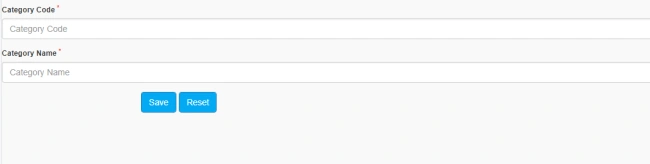
Let's start from a simple page having two fields,
- <div class="form-group">
- <label class="control-label" for="input-name"> Category Code <sup style="color: Red">*</sup>
- </label>
- <input type="text" name="filter_name" placeholder="Category Code" id="c_code" class="form-control noslash" autocomplete="off" maxlength="50" />
- </div>
- <div class="form-group">
- <label class="control-label" for="input-email"> Category Name <sup style="color: Red">*</sup>
- </label>
- <input type="text" name="filter_email" value="" placeholder="Category Name" id="c_name" class="form-control noslash" autocomplete="off" maxlength="100" />
- </div>
- <div class="col-lg-4">
- <button type="button" id="reset" class="btn btn-primary pull-right"> Reset </button>
- <button type="button" id="save" class="btn btn-primary pull-right"> Save </button>
- <button type="button" id="update" class="btn btn-primary pull-right"> Update </button>
- </div>
- <script type="text/javascript" language="javascript">
- $(document).ready(function () {
- bind();
- ----------------------------------------------------------- Insertion --------------------------------------------------------------
- $('#save').click(function () {
- var code = $('#c_code').val();
- var name = $('#c_name').val();
- if (code == "") {
- alert('Please Fill Category Code !!!');
- return false;
- }
- if (name == "") {
- alert('Please Fill Category Name !!!');
- return false;
- }
- var data = { code: code, name: name };
- var stringData = JSON.stringify(data);
- $.ajax({
- type: "POST",
- url: "category.aspx/insertion",
- data: stringData,
- contentType: "application/json; charset=utf-8",
- dataType: "json",
- success: OnSucces,
- error: OnError
- });
- function OnSucces(response) {
- if (response == 1) {
- alert('Category Added Successfully !!!');
- reset();
- }
- else {
- alert(response);
- }
- }
- function OnError(response) {
- alert(response);
- }
- });
- });
- </script>
Type - Mention the type we used. Here in this, we mention POST and we use GET also
- GET - Requests data from a specified resource
- POST - Submits data to be processed to a specified resource
Data - parameters need to send to web method. Here we send code and name parameters and while sending data, data has to be a string so we use JSON.stringify() to convert a javascript object to string.
ContentType - the type of data you send to a server.
DataType - the type of data you receive from the server.
Success - called when the request has succeeded.
Error- called when the request fails.
WEB Method For Insert
- [System.Web.Services.WebMethod(EnableSession = true), ScriptMethod(ResponseFormat = ResponseFormat.Json)]
- public static string insertion(string code, string name)
- {
- string r = string.Empty;
- SqlConnection con = (SqlConnection)HttpContext.Current.Session["conn"];
- try
- {
- using (SqlCommand cmd = new SqlCommand())
- {
- con.Open();
- cmd.CommandText = "insert into category(category_code,category_name,uid)values(@code,@name,@uid)";
- cmd.Parameters.AddWithValue("@code", code);
- cmd.Parameters.AddWithValue("@name", name);
- cmd.Parameters.AddWithValue("@uid", HttpContext.Current.Session["uid"].ToString());
- cmd.Connection = con;
- cmd.ExecuteNonQuery();
- con.Close();
- }
- return "1";
- }
- catch (SqlException exx)
- {
- string ab = string.Empty;
- if (exx.Number == 2627)
- {
- r = "Category Code or Name already exist !!!";
- }
- return r;
- }
- catch (Exception ex)
- {
- return ex.Message;
- }
- finally
- {
- if (con.State == ConnectionState.Open)
- con.Close();
- }
- }
Below is the table header structure and the bind function,
- <table class="table table-striped table-bordered" cellspacing="0" width="100%" id="bind">
- <thead>
- <tr>
- <td class="text-left" style="width:30%">Category Code</td>
- <td class="text-left" style="width:40%">Category Name</td>
- <td class="text-right" style="width:5%">Action</td>
- </tr>
- </thead>
- </table>
- --------------------------------------------------Bind-----------------------------------------------------
- function bind() {
- $.ajax({
- type: "POST",
- url: "category.aspx/binds",
- data: stringData,
- contentType: "application/json; charset=utf-8",
- dataType: "json",
- success: OnSucces,
- error: OnError
- });
- function onSuccess(response) {
- var obj = $.parseJSON(response);
- var str = '';
- var inc = 1;
- if (obj.length > 0) {
- var services = obj[0].Table1;
- inc = 2;
- $.each(services, function (index, value) {
- $('#iid').val(inc);
- str = str + "<tr>";
- str = str + "<td >";
- str = str + "<span >" + services[index].category_code + "</span>";
- str = str + "<input type='hidden' Value='" + services[index].category_id + "'>";
- str = str + "</td>";
- str = str + "<td >";
- str = str + "<span >" + services[index].category_name + "</span>";
- str = str + "</td>";
- str = str + "<td >";
- str = str + "<a href='#' data-toggle='tooltip' class='btn btn-primary' id='" + services[index].category_id + "' onclick='edit(this)' data-original-title='Edit'><i class='fa fa-pencil'></i></a>";
- str = str + "<a href='#' data-toggle='tooltip' class='btn btn-
- primary' id='" + services[index].category_id + "' onclick='delete(this)' data-original-title='Delete'><i class='fa fa-trash'></i></a>";
- str = str + "</td>";
- str = str + "</tr>";
- });
- $('#bind').append(str);
- }
- else {
- $("[id*=bind] tr").remove();
- }
- $('#load').hide();
- }
- function onError(response) {
- alert(response.d);
- }
- }
- [System.Web.Services.WebMethod(EnableSession = true), ScriptMethod(ResponseFormat = ResponseFormat.Json)]
- public static string binds()
- {
- List<Dictionary<string, Object>> tables = new List<Dictionary<string, object>>();
- //to create tables with table name and their rows.
- List<Dictionary<string, Object>> rows = null;
- //to hold single table with rows
- Dictionary<string, Object> tab = new Dictionary<string, object>();
- // to hold single row of each table.
- Dictionary<string, Object> row = null;
- System.Web.Script.Serialization.JavaScriptSerializer serializer = new System.Web.Script.Serialization.JavaScriptSerializer();
- SqlConnection con = null;
- con = (SqlConnection)HttpContext.Current.Session["conn"];
- string g3 = "select category_id,category_code,category_name from category";
- SqlCommand cmdgla = new SqlCommand(g3, con);
- cmdgla.Connection = con;
- SqlDataAdapter adpgla = new SqlDataAdapter(cmdgla);
- DataTable ndt = new DataTable();
- adpgla.Fill(ndt);
- DataTable dtadd = new DataTable();
- dtadd.Columns.Add("category_id");
- dtadd.Columns.Add("category_code");
- dtadd.Columns.Add("category_name");
- DataRow dr1;
- for (int k = 0; k < ndt.Rows.Count; k++)
- {
- dr1 = dtadd.NewRow();
- dtadd.Rows.Add(dr1);
- }
- DataSet ds = new DataSet();
- ds.Tables.Add(ndt);
- foreach (DataTable dt in ds.Tables)
- {
- rows = new List<Dictionary<string, object>>();
- foreach (DataRow dr in ndt.Rows)
- {
- row = new Dictionary<string, object>();
- foreach (DataColumn dc in ndt.Columns)
- {
- row.Add(dc.ColumnName.Trim(), dr[dc]);
- }
- rows.Add(row);
- }
- tab.Add(ndt.TableName.Trim(), rows);
- }
- tables.Add(tab);
- return serializer.Serialize(tables);
- }
Now, we will see how we can delete the row. Call a delete function on onclick event and get the ID that deletes from the database. Make an AJAX call for delete method, pass that ID through the AJAX data parameters and in the web method run a delete query. After returning to the success method again bind the table so that a deleted row also gets deleted from the HTML table.
- ------------------------------------------------------Delete------------------------------------------------------
- function delete(idd) {
- var idd = idd.id;
- $.ajax({
- type: "POST",
- contentType: "application/json; charset=utf-8",
- url: "category.aspx/delete",
- data: "{'id':'" + idd + "'}",
- dataType: "json",
- success: function (response) {
- if (response.d == "1") {
- alert("Delete succssfully !!!");
- $("[id*=bind] tr").remove();
- bind();
- clear();
- }
- }, error: function (response) {
- }
- });
- }
- [System.Web.Services.WebMethod(EnableSession = true), ScriptMethod(ResponseFormat = ResponseFormat.Json)]
- public static string Deletion(string id)
- {
- string r = string.Empty;
- SqlConnection con = (SqlConnection)HttpContext.Current.Session["conn"];
- try
- {
- using (SqlCommand cmd = new SqlCommand())
- {
- con.Open();
- cmd.CommandText = "delete from category where category_id=@id";
- cmd.Parameters.AddWithValue("@id", id);
- cmd.Connection = con;
- cmd.ExecuteNonQuery();
- con.Close();
- }
- return "1";
- }
- catch (Exception ex)
- {
- return ex.Message;
- }
- finally
- {
- if (con.State == ConnectionState.Open)
- con.Close();
- }
- }
Now, for our last operation update we show our existing record by clicking on the edit icon of the respective row and then click the update button to update the record for that row.
- function edit(idd) {
- var idd = idd.id;
- $.ajax({
- type: "POST",
- contentType: "application/json; charset=utf-8",
- url: "category.aspx/select",
- data: "{'id':'" + idd + "'}",
- dataType: "json",
- success: function (response) {
- $('#save').hide();
- var info = response.split('`');
- $('#c_code').val(info[1]);
- $('#c_name').val(info[2]);
- $('#c_id').val(idd);
- $('#update').show();
- }, error: function (response) {
- }
- });
- }
- [System.Web.Services.WebMethod(EnableSession = true), ScriptMethod(ResponseFormat = ResponseFormat.Json)]
- public static string select(string id)
- {
- string r = string.Empty;
- SqlConnection con = (SqlConnection)HttpContext.Current.Session["conn"];
- try
- {
- using (SqlCommand cmd = new SqlCommand())
- {
- cmd.CommandText = "select category_code,category_name from category where category_id=@cid";
- cmd.Parameters.AddWithValue("@cid", id);
- cmd.Connection = con;
- SqlDataAdapter adp = new SqlDataAdapter(cmd);
- DataTable dt = new DataTable();
- adp.Fill(dt);
- if (dt.Rows.Count > 0)
- {
- string ccode = dt.Rows[0]["category_code"].ToString();
- string cname = dt.Rows[0]["category_name"].ToString();
- return ccode + "`" + cname ;
- }
- }
- return "1";
- }
- catch (SqlException exx)
- {
- string ab = string.Empty;
- if (exx.Number == 2627)
- {
- r = "Category Code or Name already exist !!!";
- }
- return r;
- }
- catch (Exception ex)
- {
- return ex.Message;
- }
- finally
- {
- if (con.State == ConnectionState.Open)
- con.Close();
- }
- }
- ----------------------------------------------------- Update -------------------------------------------------------
- $('#update').click(function () {
- var code = $('#c_code').val();
- var name = $('#c_name').val();
- if (code == "") {
- alert('Please Fill Category Code !!!');
- return false;
- }
- if (name == "") {
- alert('Please Fill Category Name !!!');
- return false;
- }
- var id =$('#c_id').val();
- var data = { code: code, name: name,id:id };
- var stringData = JSON.stringify(data);
- $.ajax({
- type: "POST",
- url: "category.aspx/updation",
- data: stringData,
- contentType: "application/json; charset=utf-8",
- dataType: "json",
- success: OnSucces,
- error: OnError
- });
- function OnSucces(response) {
- if (response == 1) {
- alert('Category Updated Successfully !!!');
- reset();
- }
- else {
- alert(response);
- }
- }
- function OnError(response) {
- alert(response);
- }
- });
- [System.Web.Services.WebMethod(EnableSession = true), ScriptMethod(ResponseFormat = ResponseFormat.Json)]
- public static string updation(string id, string code, string name)
- {
- string r = string.Empty;
- SqlConnection con = (SqlConnection)HttpContext.Current.Session["conn"];
- try
- {
- using (SqlCommand cmd = new SqlCommand())
- {
- con.Open();
- cmd.CommandText = "update category set category_code=@code,category_name=@name,userid=@uid where category_id=@cid";
- cmd.Parameters.AddWithValue("@code", code);
- cmd.Parameters.AddWithValue("@name", name);
- cmd.Parameters.AddWithValue("@cid", id);
- cmd.Parameters.AddWithValue("@uid", HttpContext.Current.Session["uid"].ToString());
- cmd.Connection = con;
- cmd.ExecuteNonQuery();
- con.Close();
- }
- return "1";
- }
- catch (SqlException exx)
- {
- string ab = string.Empty;
- if (exx.Number == 2627)
- {
- r = "Category Code or Name already exist !!!";
- }
- return r;
- }
- catch (Exception ex)
- {
- return ex.Message;
- }
- finally
- {
- if (con.State == ConnectionState.Open)
- con.Close();
- }
- }
These are all the operations. By following this article, you can easily do the CRUD operations using JSON. No need to reload the whole page just for the insertion or any other operation. Please write in the comment section if you like this article so that I can try to make the next article better than this and if you face any difficulty please ask for help.
Horacio GallardoPosted Jan 27, 2021, 9:29 PM
Nice Article .. can you please upload source code ?
Amit MohantyPosted Jun 27, 2019, 2:13 AM
Nice Article !!!
Abhishek ChadhaPosted Sep 28, 2018, 6:34 AM
Gerson Machado Ramzanali Momin madhan kumar soon will upload the source code . for the time being if u find any difficulty anywhere u can ask.
Gerson MachadoPosted Sep 28, 2018, 6:26 AM
Very good, and where is the source code ?
Ramzanali MominPosted Aug 27, 2018, 2:49 AM
Nice Article .. can you please upload source code ?
madhan kumarPosted Aug 14, 2018, 11:25 PM
Nice Article .. can you please upload source code ?