

Introduction
In this article, I will create a demo project for student information.
Prerequisite
- Angular 7
- Web API
- SQL Server
- HTML/Bootstrap
In this article, we will create a simple Angular 7 application in a step-by-step manner from scratch to perform the CRUD operations using Web API, Angular 7, and SQL Server.
Steps required for CRUD Operations.
- Create Database and table in SQL Server.
- Create Web API using ASP.NET Web API.
- Create a new project in Angular 7
For this article, I have created a database and two tables. For creating the database, we follow the following steps.
Step 1
Let's open SSMS (SQL Server Management Studio).

Step 2
Connect to the SSMS.
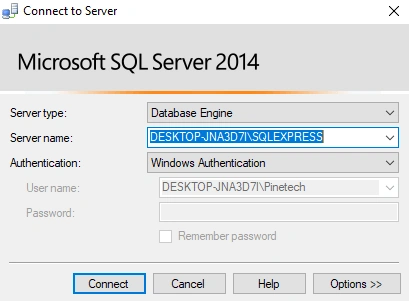
Step 3
I have created the database using the following query.
- create Database StudentCurd
Step 4
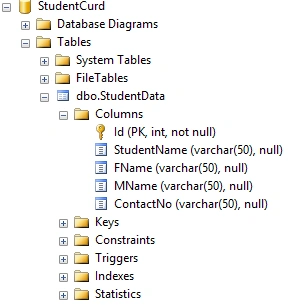
I have created a StudentData table.
- CREATE TABLE [dbo].[StudentData](
- [Id] [int] NOT NULL,
- [StudentName] [varchar](50) NULL,
- [FName] [varchar](50) NULL,
- [MName] [varchar](50) NULL,
- [ContactNo] [varchar](50) NULL,
- CONSTRAINT [PK_StudentData] PRIMARY KEY CLUSTERED
- (
- [Id] ASC
- )WITH (PAD_INDEX = OFF, STATISTICS_NORECOMPUTE = OFF, IGNORE_DUP_KEY = OFF, ALLOW_ROW_LOCKS = ON, ALLOW_PAGE_LOCKS = ON) ON [PRIMARY]
- ) ON [PRIMARY]
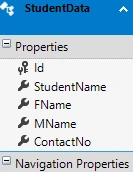
Now, the database looks like below.
I have created a Web API using ASP.Net Web API. For creating the Web API, we need to follow the following steps.
Step 1
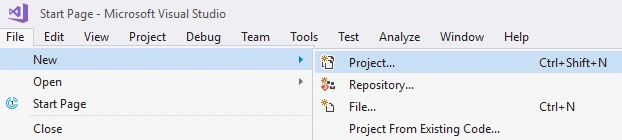
Open Visual Studio 2017 and go to File > New > Project.

Step 2
Select Web >> ASP.NET Web Application.

Step 3
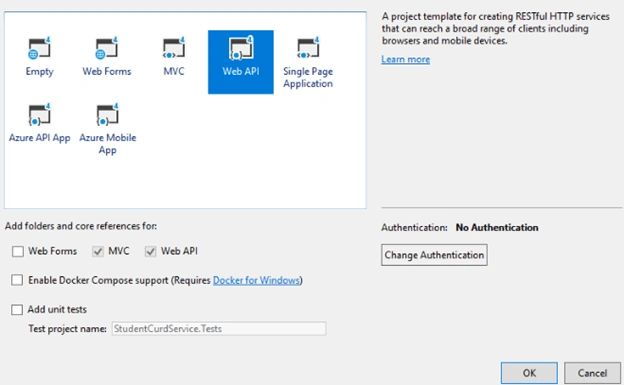
Then, select Web API and click OK.
Step 4
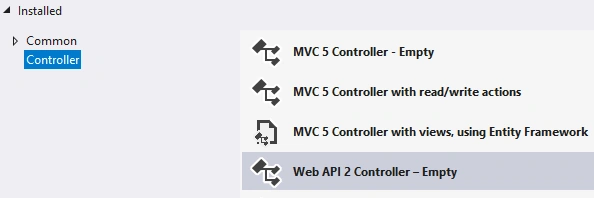
Now, create a new Controller named Student.

Step 5
Now, import the database using Entity Framework.
Step 6
Now, create a method (StudentInsert) for Insert and Update operation on student data in Student Controller.
- [Route("StudentInsert")]
- [HttpPost]
- public object StudentInsert(StudentVM objVM)
- {
- try
- {
- if (objVM.Id == 0)
- {
- var objlm = new StudentData();
- objlm.StudentName = objVM.StudentName;
- objlm.FName = objVM.FName;
- objlm.MName = objVM.MName;
- objlm.ContactNo = objVM.ContactNo;
- wmsEN.StudentDatas.Add(objlm);
- wmsEN.SaveChanges();
- return new ResultVM
- { Status = "Success", Message = "SuccessFully Saved." };
- }
- else
- {
- var objlm = wmsEN.StudentDatas.Where(s => s.Id == objVM.Id).ToList<StudentData>().FirstOrDefault();
- if (objlm.Id > 0)
- {
- objlm.StudentName = objVM.StudentName;
- objlm.FName = objVM.FName;
- objlm.MName = objVM.MName;
- objlm.ContactNo = objVM.ContactNo;
- wmsEN.SaveChanges();
- return new ResultVM
- { Status = "Success", Message = "SuccessFully Update." };
- }
- return new ResultVM
- { Status = "Error", Message = "Invalid." };
- }
- }
- catch (Exception ex)
- {
- return new ResultVM
- { Status = "Error", Message = ex.Message.ToString() };
- }
- }
Step 7
Now, create a method (GetStudentData) for fetching the student data in Student controller.
- [Route("GetStudentData")]
- [HttpGet]
- public object GetStudentData()
- {
- var obj = from u in wmsEN.StudentDatas
- select u;
- return obj;
- }
Step 8
Now, create a method (GetStudentById) for fetching the particluar student data in Student Controller.
- [Route("GetStudentById")]
- [HttpGet]
- public object GetStudentById(int Id)
- {
- return wmsEN.StudentDatas.Where(s => s.Id == Id).ToList<StudentData>().FirstOrDefault();
- }
Step 9
Now, create a method (GetStudentById) for deleting the data in Student Controller.
- [Route("DeleteStudent")]
- [HttpGet]
- public object DeleteStudent(int Id)
- {
- try
- {
- var objlm = wmsEN.StudentDatas.Where(s => s.Id == Id).ToList<StudentData>().FirstOrDefault();
- wmsEN.StudentDatas.Remove(objlm);
- wmsEN.SaveChanges();
- return new ResultVM
- { Status = "Success", Message = "SuccessFully Delete." };
- }
- catch (Exception ex)
- {
- return new ResultVM
- { Status = "Error", Message = ex.Message.ToString() };
- }
- }
Here is the complete code for StudentController.cs.
- using StudentCurdService.Models;
- using StudentCurdService.Models.VM;
- using System;
- using System.Collections.Generic;
- using System.Linq;
- using System.Net;
- using System.Net.Http;
- using System.Threading.Tasks;
- using System.Web.Http;
- namespace StudentCurdService.Controllers
- {
- [RoutePrefix("api/student")]
- public class StudentController : ApiController
- {
- StudentCurdEntities1 wmsEN = new StudentCurdEntities1();
- [Route("StudentInsert")]
- [HttpPost]
- public object StudentInsert(StudentVM objVM)
- {
- try
- {
- if (objVM.Id == 0)
- {
- var objlm = new StudentData();
- objlm.StudentName = objVM.StudentName;
- objlm.FName = objVM.FName;
- objlm.MName = objVM.MName;
- objlm.ContactNo = objVM.ContactNo;
- wmsEN.StudentDatas.Add(objlm);
- wmsEN.SaveChanges();
- return new ResultVM
- { Status = "Success", Message = "SuccessFully Saved." };
- }
- else
- {
- var objlm = wmsEN.StudentDatas.Where(s => s.Id == objVM.Id).ToList<StudentData>().FirstOrDefault();
- if (objlm.Id > 0)
- {
- objlm.StudentName = objVM.StudentName;
- objlm.FName = objVM.FName;
- objlm.MName = objVM.MName;
- objlm.ContactNo = objVM.ContactNo;
- wmsEN.SaveChanges();
- return new ResultVM
- { Status = "Success", Message = "SuccessFully Update." };
- }
- return new ResultVM
- { Status = "Error", Message = "Invalid." };
- }
- }
- catch (Exception ex)
- {
- return new ResultVM
- { Status = "Error", Message = ex.Message.ToString() };
- }
- }
- [Route("GetStudentData")]
- [HttpGet]
- public object GetStudentData()
- {
- var obj = from u in wmsEN.StudentDatas
- select u;
- return obj;
- }
- [Route("GetStudentById")]
- [HttpGet]
- public object GetStudentById(int Id)
- {
- return wmsEN.StudentDatas.Where(s => s.Id == Id).ToList<StudentData>().FirstOrDefault();
- }
- [Route("DeleteStudent")]
- [HttpGet]
- public object DeleteStudent(int Id)
- {
- try
- {
- var objlm = wmsEN.StudentDatas.Where(s => s.Id == Id).ToList<StudentData>().FirstOrDefault();
- wmsEN.StudentDatas.Remove(objlm);
- wmsEN.SaveChanges();
- return new ResultVM
- { Status = "Success", Message = "SuccessFully Delete." };
- }
- catch (Exception ex)
- {
- return new ResultVM
- { Status = "Error", Message = ex.Message.ToString() };
- }
- }
- }
- }
For this article, I have created an Angular project using Angular 7. For creating an Angular project, we need to follow the following steps.
Step 1
I have created a project using the following command in the Command Prompt.
- ng new studentcurd
Step 2
Open project in Visual Studio Code using the following commands.
- cd studentcurd
- code .
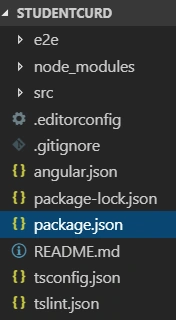
Open the project in Visual Studio Code.
Step 3
Now, we install bootstrap in our project using the following command in the terminal.
- npm install --save bootstrap
Step 4
After installing bootstrap, we should import bootstrap in style.css.
- @import '~bootstrap/dist/css/bootstrap.min.css';
Step 5
I have created a folder named Student/Class/Service in the App Folder .
Step 6
Now, open a new terminal in VS Code using Ctrl+` or View > Terminal menu.
Step 7
I have created the StudentVM Class in the Class folder using the following command.
- ng g class studentVM
Step 8
I have added the following fields in StudentVM Class.
- export class StudentVM {
- Id:string;
- StudentName:string;
- FName:string;
- MName:string;
- ContactNo:string;
- }
Step 9
Create Student Service in Service folder using the following command.
- ng g service student
Step 10
In this class, we use HttpClient to call API Services and all kinds of HTTP Methods - GET and POST. And, I have imported the following references.
- import { Injectable } from '@angular/core';
- import {HttpClient} from '@angular/common/http';
- import {HttpHeaders} from '@angular/common/http';
- import { Observable } from 'rxjs';
- import { StudentVM } from '../Class/student-vm';
Step 11
Declare the API URL in student service using the following code.
- Url = 'http://localhost:54996/Api';
Step 12
I have declared methods for Add, Update, Delete, and Fetch operations in student service using the following code.
- getStudent():Observable<StudentVM[]>
- {
- return this.http.get<StudentVM[]>(this.Url + '/student/GetStudentData');
- }
- CreateStudent(OutletVM:StudentVM):Observable<StudentVM[]>
- {
- const httpOptions = { headers: new HttpHeaders({ 'Content-Type': 'application/json' }) };
- return this.http.post<StudentVM[]>(this.Url + '/student/StudentInsert/', OutletVM, httpOptions)
- }
- DeleteStudent(StudentId:string):Observable<number>
- {
- return this.http.get<number>(this.Url + '/student/DeleteStudent?Id='+StudentId);
- }
- getStudentById(StudentId: string): Observable<StudentVM> {
- return this.http.get<StudentVM>(this.Url + '/student/GetStudentById?Id=' + StudentId);
- }
The complete code for student.service.ts is given below.
- import { Injectable } from '@angular/core';
- import {HttpClient} from '@angular/common/http';
- import {HttpHeaders} from '@angular/common/http';
- import { Observable } from 'rxjs';
- import { StudentVM } from '../Class/student-vm';
- @Injectable({
- providedIn: 'root'
- })
- export class StudentService {
- Url = 'http://localhost:54996/Api';
- constructor(private http:HttpClient) { }
- getStudent():Observable<StudentVM[]>
- {
- return this.http.get<StudentVM[]>(this.Url + '/student/GetStudentData');
- }
- CreateStudent(OutletVM:StudentVM):Observable<StudentVM[]>
- {
- const httpOptions = { headers: new HttpHeaders({ 'Content-Type': 'application/json' }) };
- return this.http.post<StudentVM[]>(this.Url + '/student/StudentInsert/', OutletVM, httpOptions)
- }
- DeleteStudent(StudentId:string):Observable<number>
- {
- return this.http.get<number>(this.Url + '/student/DeleteStudent?Id='+StudentId);
- }
- getStudentById(StudentId: string): Observable<StudentVM> {
- return this.http.get<StudentVM>(this.Url + '/student/GetStudentById?Id=' + StudentId);
- }
- }
Step 13
I have created a Student Component in the Student folder using the following command.
- ng g c student
Step 14
I have Imported StudentVM Classs and Student Service and @angular/form and rxjs in Student Component as code as below:
- import { StudentVM } from '../../Class/student-vm';
- import { StudentService } from '../../Service/student.service';
- import { NgForm, FormBuilder, FormGroup, Validators, FormControl } from '@angular/forms';
- import { Observable } from 'rxjs';
Step 15
I have declared the following field in student Component using the below code,
- dataSaved = false;
- massage:string;
- FromStudent: any;
- StudentId:string="0";
- allStudent:Observable<StudentVM[]>;
- constructor(private formbulider: FormBuilder,private StudentService:StudentService) { }
Step 16
I have created a form builder using the below code,
- ngOnInit(): void {
- this.FromStudent = this.formbulider.group({
- Id: ['', [Validators.required]],
- StudentName: ['', [Validators.required]],
- FName: ['', [Validators.required]],
- MName: ['', [Validators.required]],
- ContactNo: ['', [Validators.required]],
- });
- this.GetStudent();
- }
Step 17
I have create a method for getting student data using the below code,
- GetStudent( )
- {
- this.allStudent=this.StudentService.getStudent();
- }
Step 18
I have created a method for adding Student Data using the below code,
- AddStudent(StudentVM: StudentVM) {
- StudentVM.Id = this.StudentId;
- this.StudentService.CreateStudent(StudentVM).subscribe(
- () => {
- this.dataSaved = true;
- this.massage = 'Record saved Successfully';
- this.GetStudent();
- this.Reset();
- this.StudentId = "0";
- });
Step 19
I have created a method for editing Student Data using the below code,
- StudentEdit(StudentId: string) {
- debugger;
- this.StudentService.getStudentById(StudentId).subscribe(Response => {
- this.massage = null;
- this.dataSaved = false;
- debugger;
- this.StudentId = Response.Id;
- this.FromStudent.controls['StudentName'].setValue(Response.StudentName);
- this.FromStudent.controls['FName'].setValue(Response.FName);
- this.FromStudent.controls['MName'].setValue(Response.MName);
- this.FromStudent.controls['ContactNo'].setValue(Response.ContactNo);
- });
- }
I have created a method for deleting Student Data using the below code,
- DeleteStudent(StudentId: string) {
- if (confirm("Are You Sure To Delete this Informations")) {
- this.StudentService.DeleteStudent(StudentId).subscribe(
- () => {
- this.dataSaved = true;
- this.massage = "Deleted Successfully";
- this.GetStudent();
- });
- }
- }
Step 21
I have created a method for resetting all controls using the below code,
- Reset()
- {
- this.FromStudent.reset();
- }
Complete code for student-componant.ts,
- import {
- Component,
- OnInit
- } from '@angular/core';
- import {
- StudentVM
- } from '../../Class/student-vm';
- import {
- StudentService
- } from '../../Service/student.service';
- import {
- Observable
- } from 'rxjs';
- import {
- NgForm,
- FormBuilder,
- FormGroup,
- Validators,
- FormControl
- } from '@angular/forms';
- @Component({
- selector: 'app-student',
- templateUrl: './student.component.html',
- styleUrls: ['./student.component.css']
- })
- export class StudentComponent implements OnInit {
- dataSaved = false;
- massage: string;
- FromStudent: any;
- StudentId: string = "0";
- allStudent: Observable < StudentVM[] > ;
- constructor(private formbulider: FormBuilder, private StudentService: StudentService) {}
- GetStudent() {
- debugger;
- this.allStudent = this.StudentService.getStudent();
- }
- Reset() {
- this.FromStudent.reset();
- }
- AddStudent(StudentVM: StudentVM) {
- debugger;
- StudentVM.Id = this.StudentId;
- this.StudentService.CreateStudent(StudentVM).subscribe(
- () => {
- this.dataSaved = true;
- this.massage = 'Record saved Successfully';
- this.GetStudent();
- this.Reset();
- this.StudentId = "0";
- });
- }
- DeleteStudent(StudentId: string) {
- if (confirm("Are You Sure To Delete this Informations")) {
- this.StudentService.DeleteStudent(StudentId).subscribe(
- () => {
- this.dataSaved = true;
- this.massage = "Deleted Successfully";
- this.GetStudent();
- }
- );
- }
- }
- StudentEdit(StudentId: string) {
- debugger;
- this.StudentService.getStudentById(StudentId).subscribe(Response => {
- this.massage = null;
- this.dataSaved = false;
- debugger;
- this.StudentId = Response.Id;
- this.FromStudent.controls['StudentName'].setValue(Response.StudentName);
- this.FromStudent.controls['FName'].setValue(Response.FName);
- this.FromStudent.controls['MName'].setValue(Response.MName);
- this.FromStudent.controls['ContactNo'].setValue(Response.ContactNo);
- });
- }
- ngOnInit(): void {
- this.FromStudent = this.formbulider.group({
- Id: ['', [Validators.required]],
- StudentName: ['', [Validators.required]],
- FName: ['', [Validators.required]],
- MName: ['', [Validators.required]],
- ContactNo: ['', [Validators.required]],
- });
- this.GetStudent();
- }
- }
Step 22
I have added a table displaying student data in student.componant.html using the below code,
- <div class="card-footer">
- <div class="col-lg-12 table-responsive">
- <table class="table table-striped">
- <thead>
- <tr>
- <th>Id</th>
- <th>Student Name</th>
- <th>Father Name</th>
- <th>Mother Name</th>
- <th>ContactNo</th>
- <th></th>
- </tr>
- </thead>
- <tbody>
- <tr *ngFor="let Student of allStudent|async">
- <td>{{Student.Id}}</td>
- <td>{{Student.StudentName}}</td>
- <td>{{Student.FName}}</td>
- <td>{{Student.MName}}</td>
- <td>{{Student.ContactNo}}</td>
- <td>
- <button type="button" class="btn btn-primary mr-1" (click)="StudentEdit(Student.Id)">Edit</button>
- <button type="button" class="btn btn-danger mr-1" (click)="DeleteStudent(Student.Id)">Delete</button>
- </td>
- </tr>
- </tbody>
- </table>
- </div>
- </div>
Step 23
I have added controls for CRUD operations in student.component.html using below code,
- <div class="form-group col-sm-3">
- <label for="company">Student Name</label>
- <input type="text" class="form-control" formControlName="StudentName" id="company" placeholder="Enter Student Name" >
- </div>
- <div class="form-group col-sm-3">
- <label for="company">ContactNo</label>
- <input type="text" class="form-control" formControlName="ContactNo" id="ContactNo" placeholder="Enter ContactNo" >
- </div>
- <div class="form-group col-sm-3">
- <label for="company">Father Name</label>
- <input type="text" class="form-control" formControlName="FName" id="FatherName" placeholder="Enter Father Name" >
- </div>
- <div class="form-group col-sm-3">
- <label for="company">Mother Name</label>
- <input type="text" class="form-control" formControlName="MName" id="MotherName" placeholder="Enter Mother Name" >
- </div>
- </div>
- <div class="row">
- <div class="form-group col-sm-3">
- <button type="submit" class="btn btn-primary" >Add Student</button>
- </div>
- </div>
- </form>
- </div>
Complete code for Student.Component.html
- <div class="card">
- <div class="card-header" style="text-align:center">
- <b>WEL COME TO STUDENT CURD OPERATION</b>
- </div>
- <div class="card-body">
- <form [formGroup]="FromStudent" (ngSubmit)="AddStudent(FromStudent.value)">
- <div class="row">
- <div class="form-group col-sm-3">
- <label for="company">Student Name</label>
- <input type="text" class="form-control" formControlName="StudentName" id="company" placeholder="Enter Student Name" >
- </div>
- <div class="form-group col-sm-3">
- <label for="company">ContactNo</label>
- <input type="text" class="form-control" formControlName="ContactNo" id="ContactNo" placeholder="Enter ContactNo" >
- </div>
- <div class="form-group col-sm-3">
- <label for="company">Father Name</label>
- <input type="text" class="form-control" formControlName="FName" id="FatherName" placeholder="Enter Father Name" >
- </div>
- <div class="form-group col-sm-3">
- <label for="company">Mother Name</label>
- <input type="text" class="form-control" formControlName="MName" id="MotherName" placeholder="Enter Mother Name" >
- </div>
- </div>
- <div class="row">
- <div class="form-group col-sm-3">
- <button type="submit" class="btn btn-primary" >Add Student</button>
- </div>
- </div>
- </form>
- </div>
- <div class="card-footer">
- <div class="col-lg-12 table-responsive">
- <table class="table table-striped">
- <thead>
- <tr>
- <th>Id</th>
- <th>Student Name</th>
- <th>Father Name</th>
- <th>Mother Name</th>
- <th>ContactNo</th>
- <th></th>
- </tr>
- </thead>
- <tbody>
- <tr *ngFor="let Student of allStudent|async">
- <td>{{Student.Id}}</td>
- <td>{{Student.StudentName}}</td>
- <td>{{Student.FName}}</td>
- <td>{{Student.MName}}</td>
- <td>{{Student.ContactNo}}</td>
- <td>
- <button type="button" class="btn btn-primary mr-1" (click)="StudentEdit(Student.Id)">Edit</button>
- <button type="button" class="btn btn-danger mr-1" (click)="DeleteStudent(Student.Id)">Delete</button>
- </td>
- </tr>
- </tbody>
- </table>
- </div>
- </div>
- </div>
Step 24
Let's start the project using the following command:
- npm start
Add Student

Student List

Summary
In this article I have discussed CRUD operations using Web API and Angular 7. In my next article I am going to discuss cascading dropdowns using Angular 7.
jose loraPosted Oct 21, 2021, 5:34 PM
Excelent article
Nimesh PatelPosted Aug 2, 2021, 11:14 AM
Wow its geat article
Jeffery KelleyPosted Oct 10, 2019, 10:54 PM
Can't bind to 'formGroup' since it isn't a known property of 'form'.
Jeffery KelleyPosted Oct 10, 2019, 10:53 PM
I could never get over the following error.
Abhijit SuryagandhPosted May 31, 2019, 7:17 AM
Could you please create a code where I can get the drop down city list for the Student and once selected and submitted it will show in the database.
Former memberPosted May 27, 2019, 12:31 AM
Hi.How to update list automatically when any changes in db (insert,update)?Like trigger.Thanks in advance
AminPosted Apr 7, 2019, 9:13 AM
Very good article
Jignesh KumarPosted Apr 6, 2019, 4:16 AM
Good article