

In this article, we will be building an Angular 6 application and will perform a CRUD Operation step by step from scratch with an example. We will be generating our Angular 6 application using Angular CLI and then modify it to have an employee management project where the end-user can perform CRUD operations, i.e., Create, List, Update, and Delete with the sample REST API exposed using HttpClientModule. We will also be using RouterModule to have the routing enabled.
For this project, I have npm 5.6.0 and node v8.11.2 installed on my local system. You can download the latest version of Node from here. To update NPM, you can run the following command in the terminal.
npm install npm@latest -g
If you have the @angular/cli version older than 6, then run the following command to install the latest version.
npm uninstall -g @angular/cli
npm cache clean
npm install -g @angular/cli
To install a specific version, you can use this command.
npm install -g @angular/[email protected]
Generating Angular 6 Project
Once the npm and node are upgraded to the latest version, you can run the following command to generate an Angular 6 project in any location of your choice.
ng new crudoperation
Doing so, our Angular 6 application is generated.
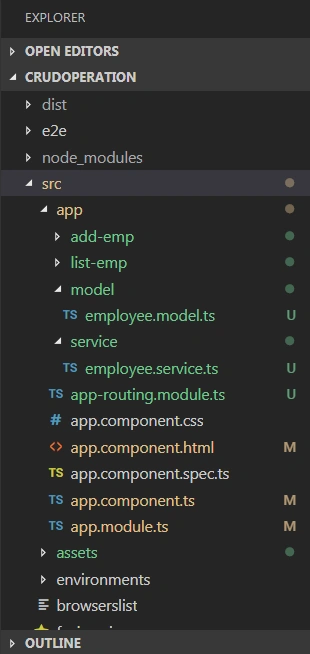
Angular 6 Project Structure
Once the project is generated, you can run the following commands to see the Angular 6 app running at localhost:4200.
cd crudoperation
ng serve
Routing
Following is our routing configuration. We have configured it to use ListEmpComponent as a default component. Also, do not forget to include it in the main module - app.module.ts.
app-routing.module.ts
import { NgModule } from '@angular/core';
import { CommonModule } from '@angular/common';
import { RouterModule, Routes } from '@angular/router';
import { ListEmpComponent } from './list-emp/list-emp.component';
import { AddEmpComponent } from './add-emp/add-emp.component';

export const routes: Routes = [
  { path: '', component: ListEmpComponent, pathMatch: 'full' },
  { path: 'list-emp', component: ListEmpComponent },
  { path: 'add-emp', component: AddEmpComponent }
];

@NgModule({
  imports: [
    CommonModule,
    RouterModule.forRoot(routes)
  ],
  exports: [RouterModule],
  declarations: []
})
export class AppRoutingModule { }
app.module.ts
import { BrowserModule } from '@angular/platform-browser';
import { NgModule } from '@angular/core';
import { HttpClientModule } from '@angular/common/http';
import { AppRoutingModule } from './app-routing.module';
import { ReactiveFormsModule } from "@angular/forms";

import { AppComponent } from './app.component';
import { ListEmpComponent } from './list-emp/list-emp.component';
import { AddEmpComponent } from './add-emp/add-emp.component';
import { EmployeeService } from './service/employee.service';

@NgModule({
  declarations: [
    AppComponent,
    ListEmpComponent,
    AddEmpComponent
  ],
  imports: [
    BrowserModule,
    HttpClientModule,
    AppRoutingModule,
    ReactiveFormsModule
  ],
  providers: [EmployeeService],
  bootstrap: [AppComponent]
})
export class AppModule { }

// Model
export class Employee {
  id?: number;
  employee_name?: string;
  employee_salary?: number;
  employee_age?: number;
}
Following is the implementation of our EmployeeService. It has all the API details that are required for the CRUD operation. Here, I have used JSON Server for making API calls. The JSON Server is for front-end developers, which simulates a back-end REST Service to deliver the data in JSON format to the front-end application and make sure everything is working as expected.
import { Injectable } from '@angular/core';
import { HttpClient } from '@angular/common/http';
import { Employee } from '../model/employee.model';

@Injectable({
  providedIn: 'root'
})
export class EmployeeService {

  constructor(private http: HttpClient) { }

  baseUrl: string = 'http://localhost:3004/posts/';

  getEmployees() {
    return this.http.get<Employee[]>(this.baseUrl);
  }

  deleteEmployees(id: number) {
    return this.http.delete<Employee[]>(this.baseUrl + id);
  }

  createUser(employee: Employee) {
    return this.http.post(this.baseUrl, employee);
  }

  getEmployeeById(id: number) {
    return this.http.get<Employee>(this.baseUrl + '/' + id);
  }

  updateEmployee(employee: Employee) {
    return this.http.put(this.baseUrl + '/' + employee.id, employee);
  }
}
Creating Components list-emp.component.html.
<div class="col-md-12">
  <h2>User Details</h2>
  <div class="table-responsive table-container">
    <table class="table">
      <thead>
        <tr>
          <th>Id</th>
          <th>Employee Name</th>
          <th>Salary</th>
          <th>Age</th>
          <th>Actions</th>
        </tr>
      </thead>
      <tbody>
        <tr *ngFor="let emp of employees">
          <td class="hidden">{{ emp.id }}</td>
          <td>{{ emp.employee_name }}</td>
          <td>{{ emp.employee_salary }}</td>
          <td>{{ emp.employee_age }}</td>
          <td>
            <button (click)="deleteEmp(emp)" class="btn btn-info"> Delete </button>
            <button (click)="editEmp(emp)" style="margin-left: 20px;" class="btn btn-info"> Edit </button>
          </td>
        </tr>
      </tbody>
    </table>
  </div>
</div>
list-emp.component.ts
import { Component, OnInit } from '@angular/core';
import { EmployeeService } from '../service/employee.service';
import { Employee } from '../model/employee.model';
import { Router } from "@angular/router";

@Component({
  selector: 'app-list-emp',
  templateUrl: './list-emp.component.html',
  styleUrls: ['./list-emp.component.css']
})
export class ListEmpComponent implements OnInit {

  employees: Employee[];

  constructor(private empService: EmployeeService, private router: Router) { }

  ngOnInit() {
    this.empService.getEmployees()
      .subscribe((data: Employee[]) => {
        this.employees = data;
      });
  }

  deleteEmp(employee: Employee): void {
    this.empService.deleteEmployees(employee.id)
      .subscribe(data => {
        this.employees = this.employees.filter(u => u !== employee);
      });
  }

  editEmp(employee: Employee): void {
    localStorage.removeItem('editEmpId');
    localStorage.setItem('editEmpId', employee.id.toString());
    this.router.navigate(['add-emp']);
  }

}
add-emp.component.html
<div class="col-md-6">
  <h2 class="text-center">{{ empformlabel }}</h2>
  <form [formGroup]="addForm" novalidate class="form">
    <div class="form-group">
      <label for="empId">Employee Id:</label>
      <input type="number" formControlName="id" placeholder="Id" name="empId" class="form-control" id="empId">
    </div>

    <div class="form-group">
      <label for="empName">Employee Name:</label>
      <input formControlName="employee_name" placeholder="Employee Name" name="empName" class="form-control" id="empName">
      <div class="alert alert-danger" *ngIf="addForm.get('employee_name').hasError('required') && addForm.get('employee_name').touched">
        Employee Name is required
      </div>
    </div>

    <div class="form-group">
      <label for="empSalary">Employee Salary:</label>
      <input formControlName="employee_salary" placeholder="Employee Salary" name="employee_salary" class="form-control" id="employee_salary">
      <div class="alert alert-danger" *ngIf="addForm.get('employee_salary').hasError('maxlength') && addForm.get('employee_salary').touched">
        Employee Salary is required and should be less than 9 characters.
      </div>
    </div>

    <div class="form-group">
      <label for="empAge">Employee Age:</label>
      <input formControlName="employee_age" placeholder="Employee Age" name="empAge" class="form-control" id="empAge">
      <div class="alert alert-danger" *ngIf="addForm.get('employee_age').hasError('maxlength') && addForm.get('employee_age').touched">
        Age is required and should be less than 3 characters.
      </div>
    </div>

    <button class="btn btn-success" [disabled]="addForm.invalid" *ngIf="btnvisibility" (click)="onSubmit()">Save</button>
    <button class="btn btn-success" [disabled]="addForm.invalid" *ngIf="!btnvisibility" (click)="onUpdate()">Update</button>

    <p>Form value: {{ addForm.value | json }}</p>
  </form>
</div>
add-emp.component.ts
import { Component, OnInit } from '@angular/core';
import { FormBuilder, FormGroup, Validators } from "@angular/forms";
import { EmployeeService } from '../service/employee.service';
import { Router } from "@angular/router";

@Component({
  selector: 'app-add-emp',
  templateUrl: './add-emp.component.html',
  styleUrls: ['./add-emp.component.css']
})
export class AddEmpComponent implements OnInit {

  empformlabel: string = 'Add Employee';
  empformbtn: string = 'Save';

  constructor(private formBuilder: FormBuilder, private router: Router, private empService: EmployeeService) { }

  addForm: FormGroup;
  btnvisibility: boolean = true;

  ngOnInit() {
    this.addForm = this.formBuilder.group({
      id: [],
      employee_name: ['', Validators.required],
      employee_salary: ['', [Validators.required, Validators.maxLength(9)]],
      employee_age: ['', [Validators.required, Validators.maxLength(3)]]
    });

    let empid = localStorage.getItem('editEmpId');
    if (+empid > 0) {
      this.empService.getEmployeeById(+empid).subscribe(data => {
        this.addForm.patchValue(data);
      });
      this.btnvisibility = false;
      this.empformlabel = 'Edit Employee';
      this.empformbtn = 'Update';
    }
  }

  onSubmit() {
    console.log('Create fire');
    this.empService.createUser(this.addForm.value)
      .subscribe(data => {
        this.router.navigate(['list-emp']);
      },
      error => {
        alert(error);
      });
  }

  onUpdate() {
    console.log('Update fire');
    this.empService.updateEmployee(this.addForm.value).subscribe(data => {
      this.router.navigate(['list-emp']);
    },
    error => {
      alert(error);
    });
  }

}
Global Style style.css
/* You can add global styles to this file, and also import other style files */

@import "~bootstrap/dist/css/bootstrap.css";
@import "~font-awesome/css/font-awesome.css";

.ng-valid[required],
.ng-valid.required {
  border-left: 5px solid #42A948; /* green */
}

.ng-invalid:not(form) {
  border-left: 5px solid #a94442; /* red */
}

.mtop10 {
  margin-top: 10px;
}
Testing Angular 6 Application
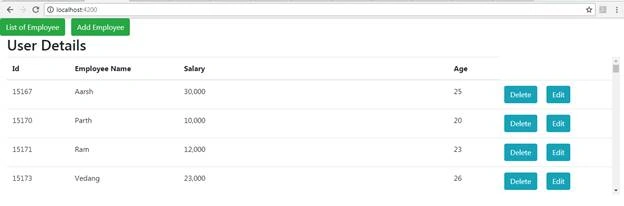
Now, run the command ng serve and hit localhost:4200.
You can see the following screen with a list of users. On this page, you can perform actions to add, edit, and delete an employee.
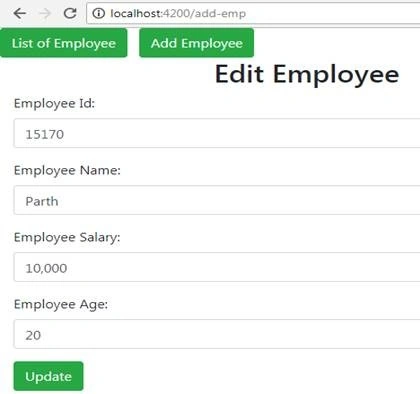
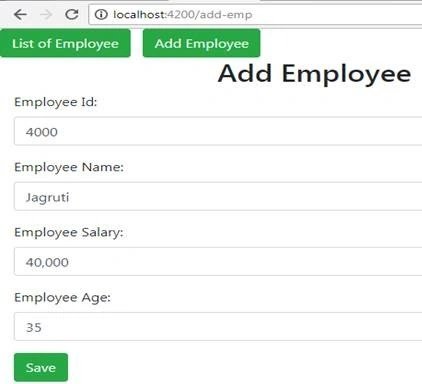
Here, we have used the same component to Add and Edit/Update the Employee.
Conclusion
In this article, we learned about Angular 6 CRUD operations and created a demo application. The source can be downloaded from GitHub here.
anushanuliPosted Jul 4, 2020, 2:41 PM
Cn u give app.component.html
JosephsPosted May 13, 2020, 3:53 AM
Your github is empty sir
Ketan ShindePosted Apr 18, 2019, 4:42 AM
Where is your model "employee.model"?
Ashutosh PandeyPosted Apr 10, 2019, 2:13 AM
Every time you create a new employee, you are subscribing. This is causing multiple subscription, will that not cause memory leaks?
ravi kumarPosted Mar 18, 2019, 2:44 AM
Hi sir i need to create a nested array objects based on type using json server in angular4 please help me
Abhijit PandiaPosted Jan 25, 2019, 5:04 AM
Please provide the full project crud operation project in github
syed tousifPosted Dec 7, 2018, 7:23 AM
Iam not able to get the Data..project is getting launced but details are not fetched..
Vipul UpadhyayPosted Nov 18, 2018, 8:46 AM
Please upload project properly ...nothing any page or file which is mentioned above pages plz check and update on GitHub project
Shivaling BelurePosted Oct 9, 2018, 7:48 AM
I was using this example but when i am adding employees its not showing in list emlopyees... help me fix this.
asad ajPosted Sep 23, 2018, 1:25 PM
Error in src/app/model/employee.model.ts: error TS1146 Declaration expected
asad ajPosted Sep 23, 2018, 12:52 PM
Any guidelines hiw we can reproduce the missing files especially employee.model
SanketPosted Sep 16, 2018, 1:04 PM
Add-emp.component.ts, list-emp.component.ts etc missing from Github source
Arto KuvajaPosted Sep 16, 2018, 3:09 AM
Github seems to have only the barebones of the code.
JosephsPosted Sep 5, 2018, 6:19 AM
Nice one, How to implemented Register and Login page ?
Muthu KumarPosted Sep 5, 2018, 4:42 AM
Nice Article. Thanks for sharing.
Hadshana KamalanathanPosted Sep 4, 2018, 7:49 PM
Thanks for sharing...