

This article shows how to do Create, Read, Update and Delete (CRUD) operations in MVC 5, WEB API 2 and AngularJS with a Stored Procedure.
The following is the table I will use to do the CRUD operations: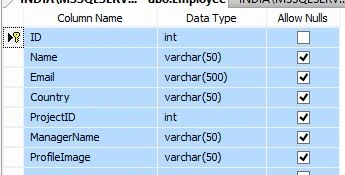
Image 1.
The following is sample data for the table: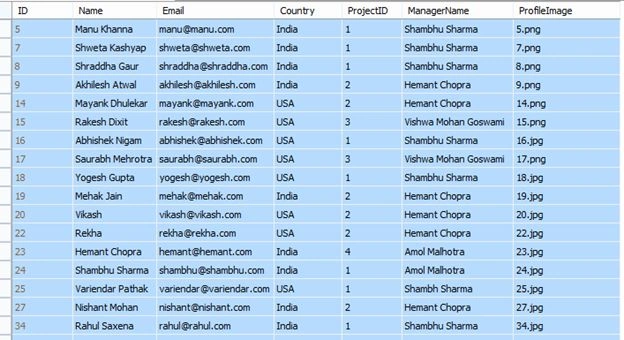
Image 2.
The following are the four Stored Procedures.
1. ADDNewEmployee
- CREATE PROCEDURE [dbo].[ADDNewEmployee]
- (
- @Emp_Name VARCHAR(100) = null,
- @Email VARCHAR(500) = null,
- @Country VARCHAR(100) = null ,
- @ProjectID INT,
- @ManagerName VARCHAR(100) = null,
- @ProfileImage VARCHAR(100) = null
- )
- AS
- BEGIN
- INSERT INTO Employee (Name, Email,Country,ProjectID,ManagerName,ProfileImage)
- VALUES (@Emp_Name, @Email, @Country,@ProjectID,@ManagerName, @ProfileImage)
- END
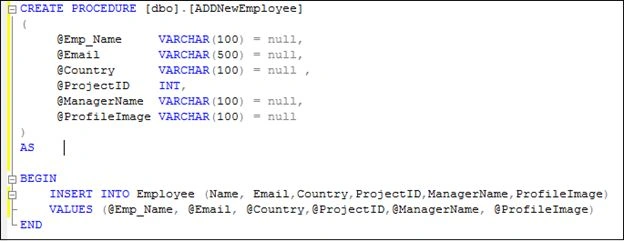
Image 3.
2. UpdateEmployee
- CREATE PROCEDURE [dbo].[UpdateEmployee]
- (
- @Emp_ID INT,
- @Emp_Name VARCHAR(100) = null,
- @Email VARCHAR(500) = null,
- @Country VARCHAR(100) = null ,
- @ManagerName VARCHAR(100) = null
- )
- AS
- BEGIN
- UPDATE Employee
- SET Name=@Emp_Name,
- Email=@Email,
- Country=@Country,
- ManagerName=@ManagerName
- WHERE ID=@Emp_ID
- END
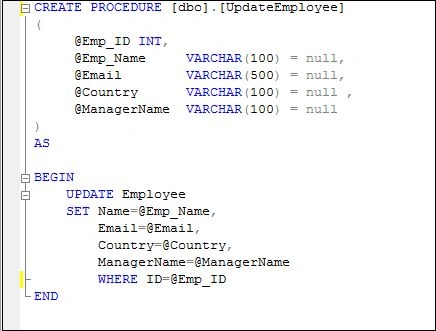
Image 4.
3. DeleteEmployee.
- ALTER PROCEDURE [dbo].[DeleteEmployee]
- (
- @Emp_ID INT
- )
- AS
- BEGIN
- DELETE FROM Employee WHERE ID=@Emp_ID
- END
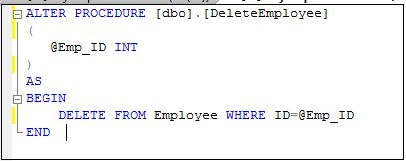
Image 5.
4. ReadAllEmployee
- -- EXEC [ReadAllEmployee] null, null, null
- ALTER PROCEDURE [dbo].[ReadAllEmployee]
- (
- @Emp_Name VARCHAR(100) = null,
- @Country VARCHAR(100) = null,
- @ManagerName VARCHAR(100) = null
- )
- AS
- BEGIN
- IF (@Emp_Name IS NULL)
- BEGIN
- SET @Emp_Name=''
- END
- IF (@Country IS NULL)
- BEGIN
- SET @Country=''
- END
- IF (@ManagerName IS NULL)
- BEGIN
- SET @ManagerName=''
- END
- SELECT ID, Name, Email, Country, ManagerName
- FROM Employee
- WHERE Name like @Emp_Name +'%'
- AND Country like @Country +'%'
- AND ManagerName like @ManagerName +'%'
- ORDER BY Name
- END
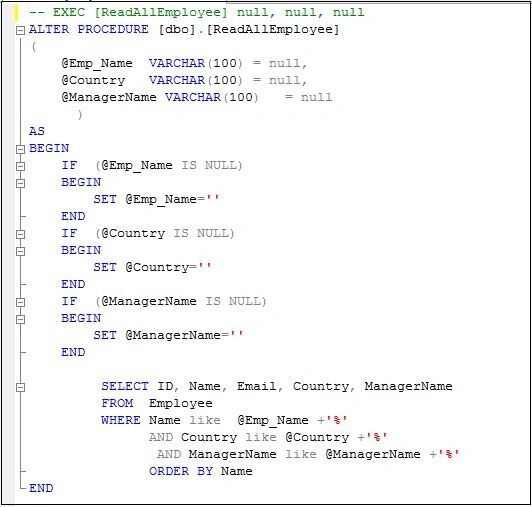
Image 6.
Now open Visual Studio 2015 and create new ASP.NET web application.
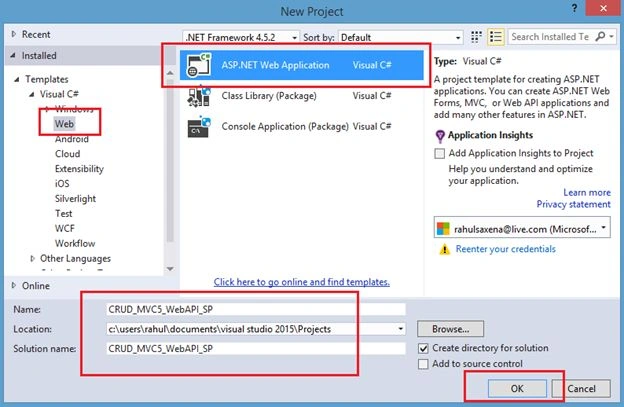
Image 7.
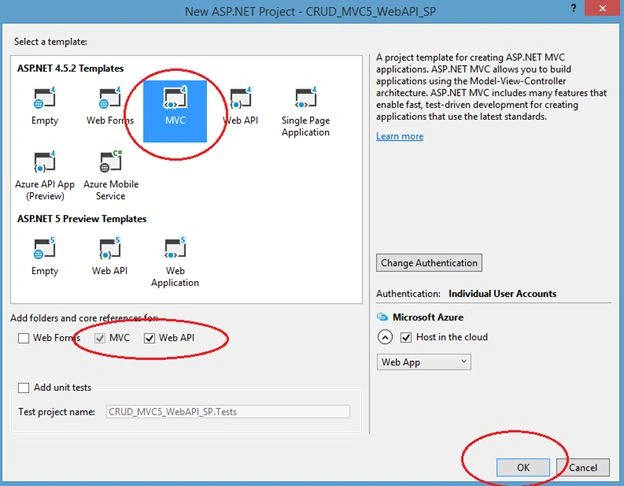
Image 8.
Now right-click on the project in the Solution Explorer as in the following:
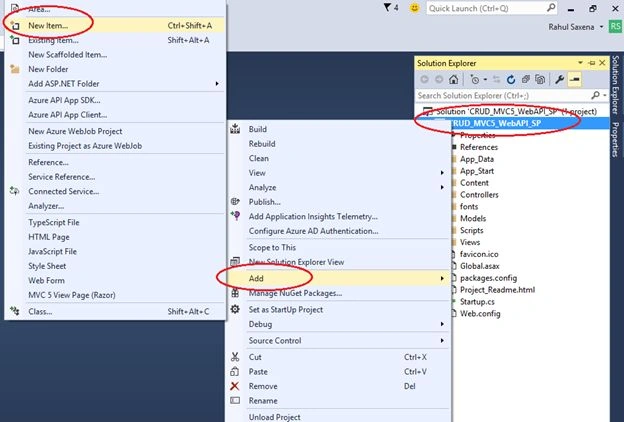
Image 9.
Select ADO.NET Entity Data Model.
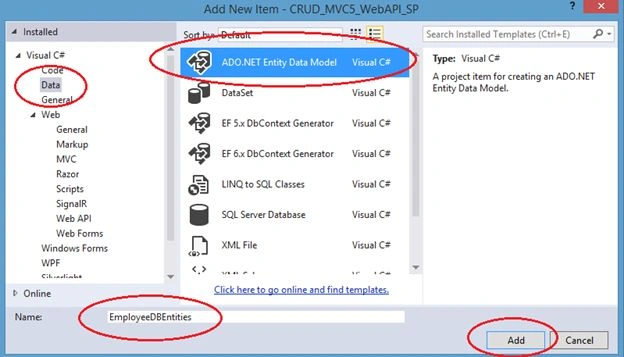
Image 10.
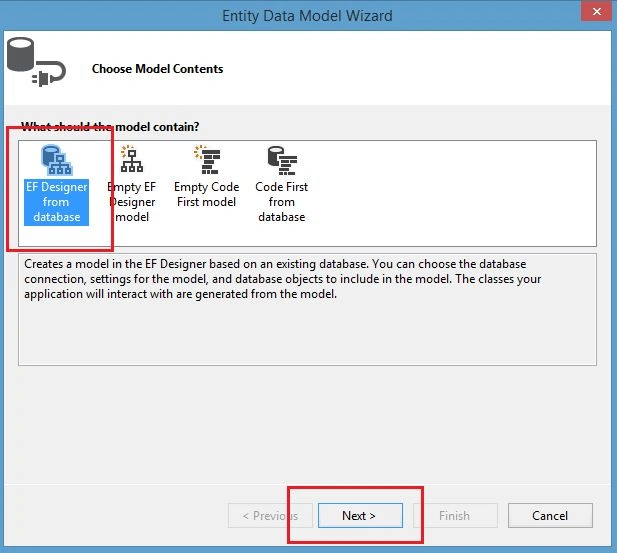
Image 11.
Select your Data Source and database.
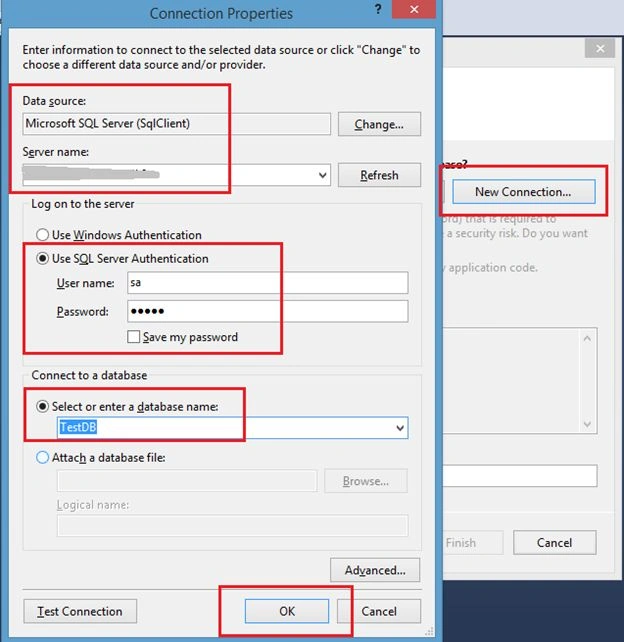
Image 12.
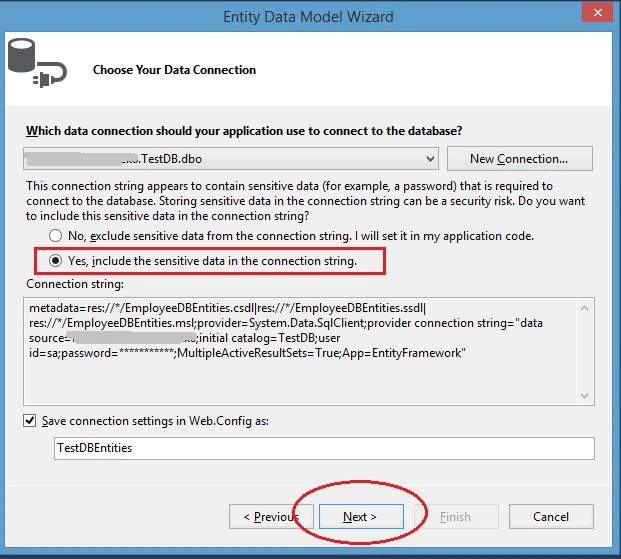
Image 13.
Select your data table and Stored Procedure.
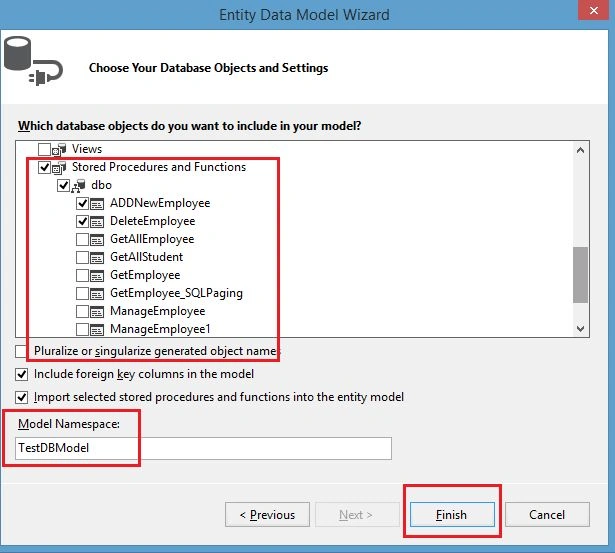
Image 14.
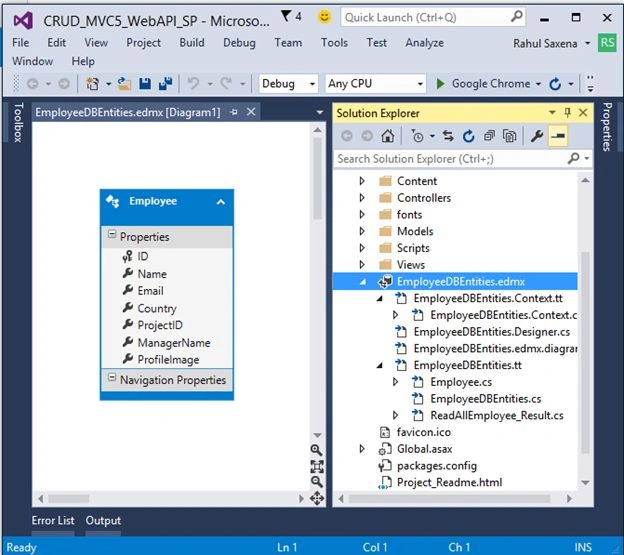
Image 15.
Now to add a Web API controller. So right-click on Controllers and Add New Controller.
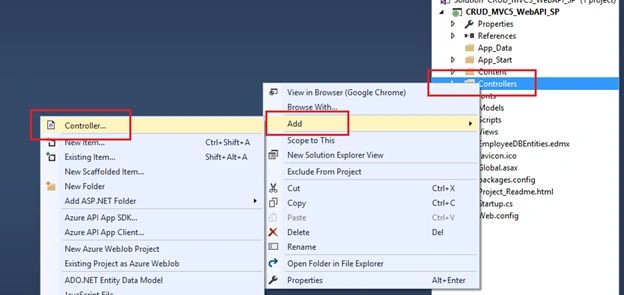
Image 16.
Select Web API 2 Controller – Empty.
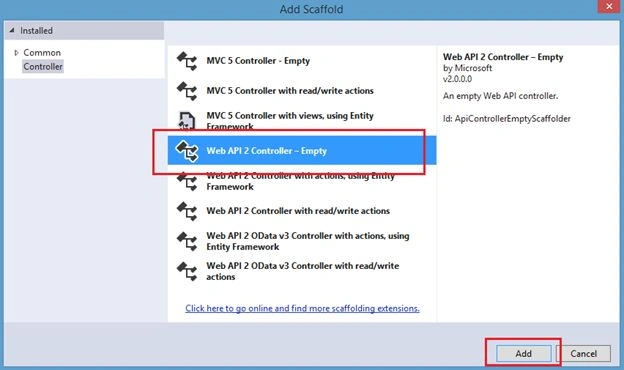
Image 17.
Provide it a name.
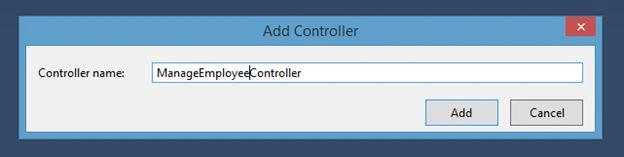
Image 18.
Here's the code:
- using System;
- using System.Collections.Generic;
- using System.Linq;
- using System.Net;
- using System.Net.Http;
- using System.Web.Http;
- using CRUD_MVC5_WebAPI_SP.Models;
- namespace CRUD_MVC5_WebAPI_SP.Controllers
- {
- public class ManageEmployeeController : ApiController
- {
- TestDBEntities obj = new TestDBEntities();
- [HttpGet]
- public IEnumerable<ReadAllEmployee_Result> ListAllEmployee(string emp_Name, string country, string managerName)
- {
- return obj.ReadAllEmployee(emp_Name, country, managerName).AsEnumerable();
- }
- [HttpGet]
- public void addNewEmployee(string emp_Name, string email, string country, string managerName)
- {
- obj.ADDNewEmployee(emp_Name, email, country, 1, managerName, "Profile.jpg");
- }
- [HttpGet]
- public void updateEmployee(int? emp_ID, string emp_Name, string email, string country, string managerName)
- {
- obj.UpdateEmployee(emp_ID, emp_Name, email, country, managerName);
- }
- [HttpGet]
- public void deleteEmployee(int emp_ID)
- {
- obj.DeleteEmployee(emp_ID);
- obj.SaveChanges();
- }
- }
- }
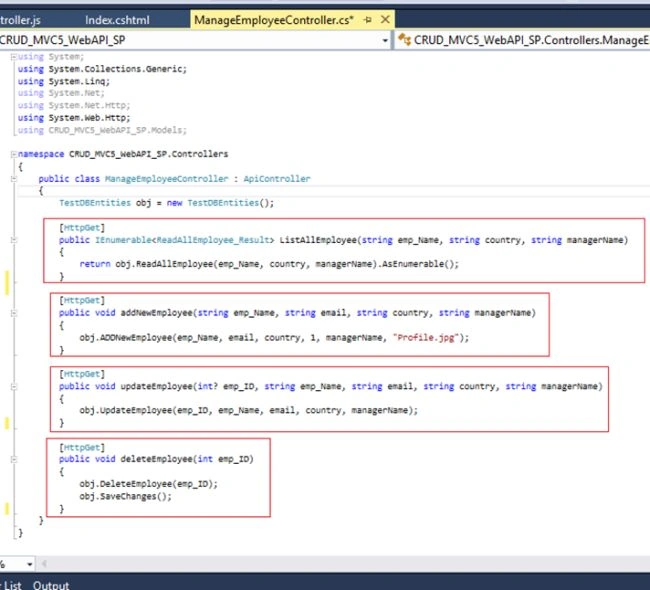
Image 19.
Now to add the AngularJs reference to your project. So right-click on your project in the Solution Explorer as in the following, then click Manage NuGet Packages...
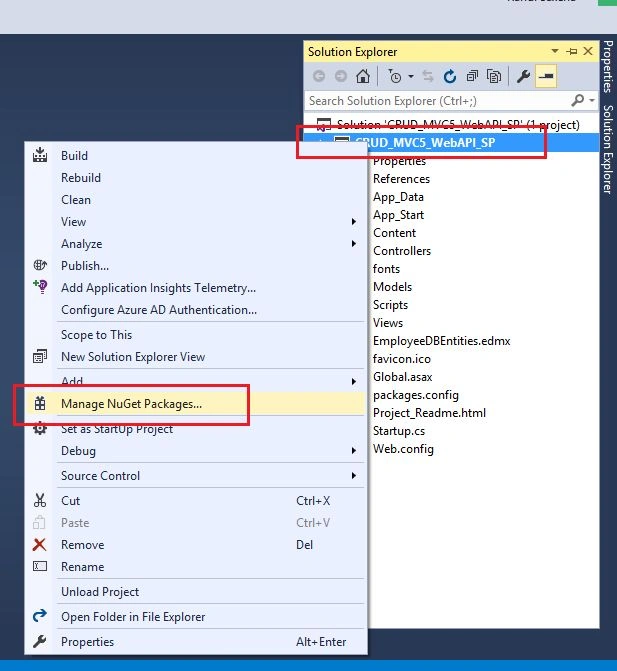
Image 20.
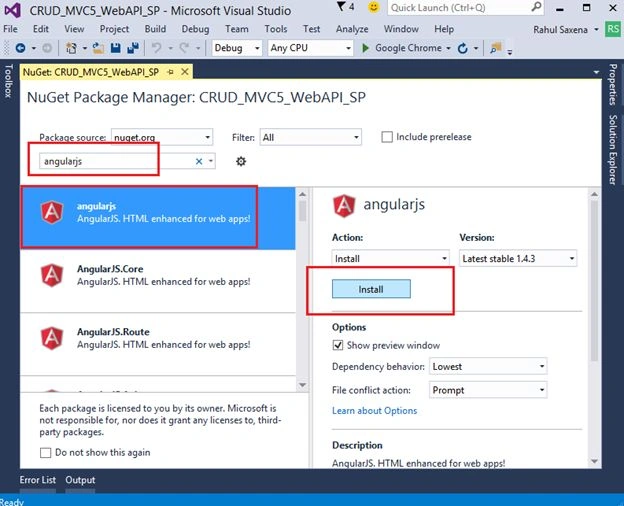
Image 21.
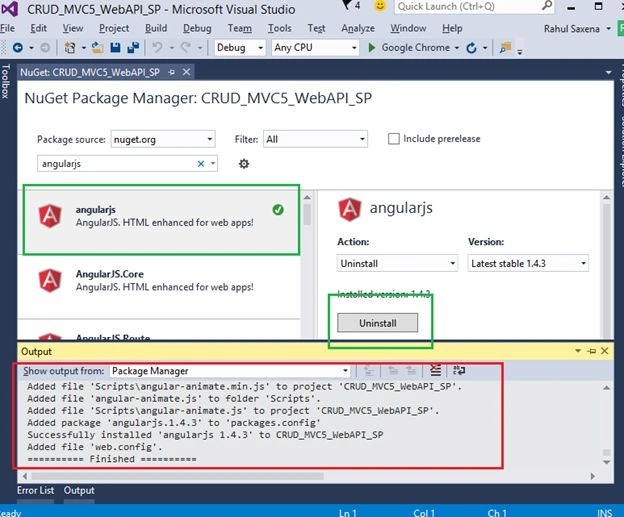
Image 22.
Now create a new folder under the Scripts Folder, then right-click MyScripts and select AngularController as in the following:
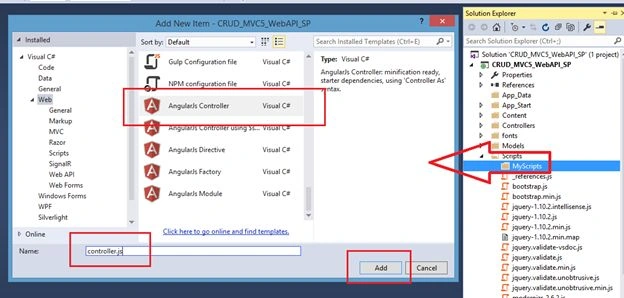
Image 23.
Here's the code:
- // <reference path="../angular.js" />
- /// <reference path="../angular.min.js" />
- /// <reference path="../angular-animate.js" />
- /// <reference path="../angular-animate.min.js" />
- var app;
- (function () {
- app = angular.module("RESTClientModule", ['ngAnimate']);
- })();
- app.controller("AngularJs_ManageEmployeeInfoController", function ($scope, $timeout, $rootScope, $window, $http) {
- $scope.date = new Date();
- $scope.empNameSearch = "";
- $scope.empCountrySearch = "";
- $scope.ManagerNameSearch = "";
- $scope.ManageEMP_Info = false;
- $scope.ListEmployee = true;
- $scope.searchEmployee = true;
- $scope.EmpIds = 0;
- $scope.empName = "";
- $scope.empEmail = "";
- $scope.empCountry = "";
- $scope.empManager = "";
- getEmployeeList($scope.empNameSearch, $scope.empCountrySearch, $scope.ManagerNameSearch);
- function getEmployeeList(EmployeeName, Country, ManagerName) {
- $http.get('/api/ManageEmployee/', { params: { emp_Name: EmployeeName, country: Country, managerName: ManagerName } }).success(function (data) {
- $scope.Employees = data;
- $scope.ManageEMP_Info = false;
- $scope.ListEmployee = true;
- $scope.searchEmployee = true;
- if ($scope.Employees.length > 0) {
- }
- })
- .error(function () {
- $scope.error = "Some Error.";
- });
- }
- //Search
- $scope.searchEmp = function () {
- getEmployeeList($scope.empNameSearch, $scope.empCountrySearch, $scope.ManagerNameSearch);
- }
- //Edit Employee Details
- $scope.editEmployeeInfo = function editEmployeeInfo(Employee_ID, Name, Email, Country, ManagerName) {
- cleardetails();
- $scope.EmpIds = Employee_ID;
- $scope.empName = Name
- $scope.empEmail = Email;
- $scope.empCountry = Country;
- $scope.empManager = ManagerName;
- $scope.ManageEMP_Info = true;
- $scope.ListEmployee = true;
- $scope.searchEmployee = true;
- }
- //Delete Dtudent Detail
- $scope.Employee_Delete = function Employee_Delete(EmpIds, Name) {
- cleardetails();
- $scope.EmpIds = EmpIds;
- var delConfirm = confirm("Are you sure you want to delete the Employee " + Name + " ?");
- if (delConfirm == true) {
- $http.get('/api/ManageEmployee/deleteEmployee/', { params: { emp_ID: $scope.EmpIds } }).success(function (data) {
- alert("Employee Deleted Successfully!!");
- cleardetails();
- $scope.empNameSearch = "";
- $scope.empCountrySearch = "";
- $scope.ManagerNameSearch = "";
- getEmployeeList($scope.empNameSearch, $scope.empCountrySearch, $scope.ManagerNameSearch);
- })
- .error(function () {
- $scope.error = "Some Error.";
- });
- }
- }
- $scope.AddEmployeeForm = function () {
- cleardetails();
- $scope.ManageEMP_Info = true;
- $scope.ListEmployee = true;
- $scope.searchEmployee = true;
- }
- function cleardetails() {
- $scope.EmpIds = 0;
- $scope.empName = "";
- $scope.empEmail = "";
- $scope.empCountry = "";
- $scope.empManager = "";
- }
- //Form Validation
- $scope.Message = "";
- $scope.IsFormSubmitted = false;
- $scope.IsFormValid = false;
- $scope.$watch("f1.$valid", function (isValid) {
- $scope.IsFormValid = isValid;
- });
- //Save-Edit Employee
- $scope.saveDetails = function () {
- $scope.IsFormSubmitted = true;
- if ($scope.IsFormValid) {
- if ($scope.EmpIds == 0) {
- $http.get('/api/ManageEmployee/addNewEmployee/', { params: { emp_Name: $scope.empName, email: $scope.empEmail, country: $scope.empCountry, managerName: $scope.empManager } }).success(function (data) {
- alert("Employee Added Successfully.");
- cleardetails();
- $scope.empNameSearch = "";
- $scope.empCountrySearch = "";
- $scope.ManagerNameSearch = "";
- getEmployeeList($scope.empNameSearch, $scope.empCountrySearch, $scope.ManagerNameSearch);
- })
- .error(function () {
- $scope.error = "Some Error.";
- });
- }
- else {
- $http.get('/api/ManageEmployee/updateEmployee/', { params: { emp_ID: $scope.EmpIds, emp_Name: $scope.empName, email: $scope.empEmail, country: $scope.empCountry, managerName: $scope.empManager } }).success(function (data) {
- alert("Employee Updated Successfully");
- cleardetails();
- $scope.empNameSearch = "";
- $scope.empCountrySearch = "";
- $scope.ManagerNameSearch = "";
- getEmployeeList($scope.empNameSearch, $scope.empCountrySearch, $scope.ManagerNameSearch);
- })
- .error(function () {
- $scope.error = "Some Error.";
- });
- }
- }
- else {
- $scope.Message = "All the fields are required.";
- }
- }
- });
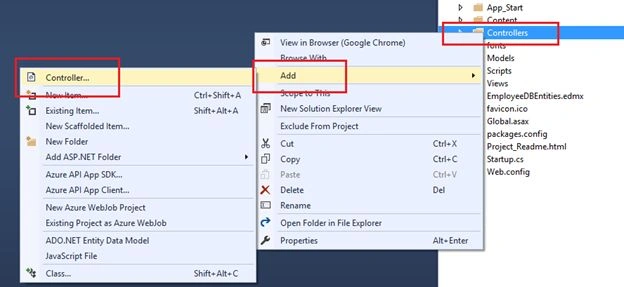
Image 24.
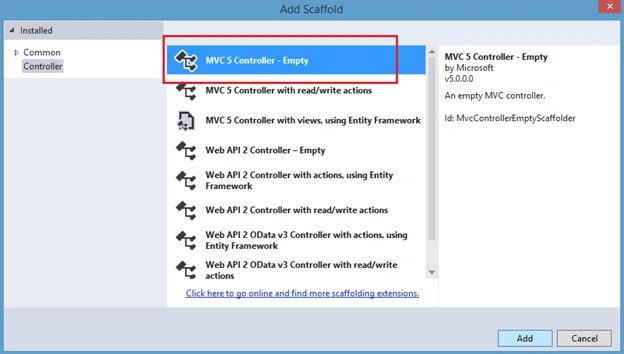
Image 25.
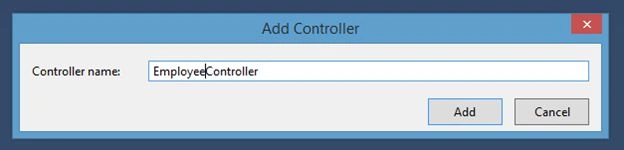
Image 26.
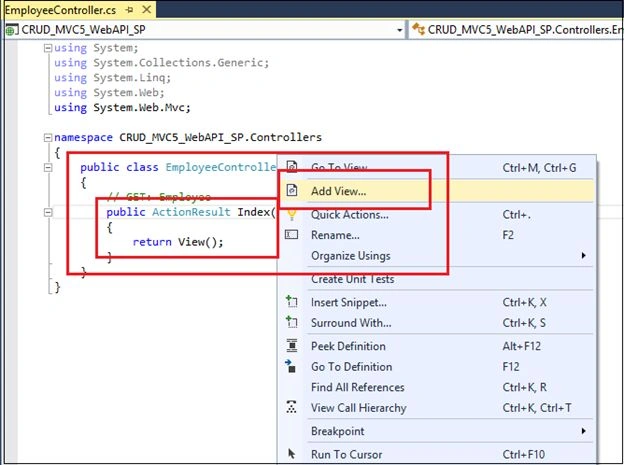
Image 27.
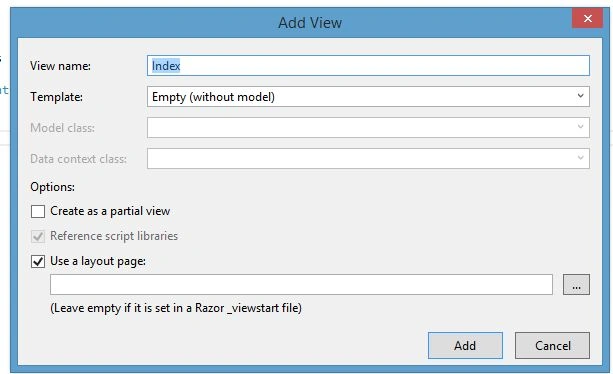
Image 28.
Here's the code in Index.cshtml:
- <html data-ng-app="RESTClientModule">
- @{
- ViewBag.Title = "Manage Employee Information Uisng MVC 5 , WebAPI2, AngularJS with Stored Procedure";
- }
- <body data-ng-controller="AngularJs_ManageEmployeeInfoController">
- <table style='width: 99%; background-color:skyblue; text-align:center;'>
- <tr ng-show="searchEmployee">
- <td>
- <table style=" background-color:crimson; border: solid 4px green; padding: 5px;width: 99%; color:white;" cellpadding="2" cellspacing="2">
- <tr>
- <td>
- <b>Name</b>
- : <input type="text" name="txtEmpName" ng-model="empNameSearch" value="" />
- </td>
- <td>
- <b> Country </b> :
- <input type="text" name="txtCountry" ng-model="empCountrySearch" />
- </td>
- <td>
- <b> Manager Name </b> :
- <input type="text" name="txtManager" ng-model="ManagerNameSearch" />
- </td>
- <td>
- <input type="submit" value="Search Employee" ng-click="searchEmp()" />
- </td>
- <td align="right">
- <input type="button" value="Add New Employee" ng-click="AddEmployeeForm()" />
- </td>
- </tr>
- </table>
- </td>
- </tr>
- <tr ng-show="ManageEMP_Info">
- <td>
- <table style="border:solid 4px blue; background-color:orange; width:100%;">
- <tr>
- <td width="20"></td>
- <td valign="top">
- <form novalidate name="f1" ng-submit="saveDetails()">
- <table style="color:#0d3d2b; font-weight:bold; font-size:12pt; text-align:right;">
- <tr>
- <td>
- Employee ID :
- </td>
- <td>
- <input type="text" name="txtEmpId" ng-model="EmpIds" value="0" style="background-color:tan" readonly />
- </td>
- <td>
- Name :
- </td>
- <td>
- <input type="text" name="txtEmpName" ng-model="empName" placeholder=" Employee Name..." required />
- <br />
- <span class="error" ng-show="(f1.file.$dirty || IsFormSubmitted) && f1.txtEmpName.$error.required">Name required!</span>
- </td>
- </tr>
- <tr>
- <td>
- Email :
- </td>
- <td>
- <input type="text" name="txtEmail" ng-model="empEmail" placeholder=" Email..." required />
- <br />
- <span class="error" ng-show="(f1.file.$dirty || IsFormSubmitted) && f1.txtEmail.$error.required">Email required!</span>
- </td>
- <td>
- Country :
- </td>
- <td>
- <input type="text" name="txtCountry" ng-model="empCountry" placeholder=" Country ..." required />
- <br />
- <span class="error" ng-show="(f1.file.$dirty || IsFormSubmitted) && f1.txtCountry.$error.required">Country required!</span>
- </td>
- </tr>
- <tr>
- <td>
- Manager Name:
- </td>
- <td>
- <input type="text" name="txtManager" ng-model="empManager" placeholder=" Manager ..." required />
- <br />
- <span class="error" ng-show="(f1.file.$dirty || IsFormSubmitted) && f1.txtManager.$error.required">Manager Name required!</span>
- </td>
- <td colspan="2">
- <input type="submit" value="Save Employee" style="background-color:#336699;color:#FFFFFF" required />
- </td>
- </tr>
- </table>
- </form>
- </td>
- </tr>
- </table>
- </td>
- </tr>
- <tr ng-show="ListEmployee">
- <td>
- <table style="width:100%;">
- <tr style="background-color:darkgreen; color:white; font-weight:bold;">
- <td width="120px" align="center">Name</td>
- <td width="120" align="center">Email</td>
- <td width="80" align="center">Country</td>
- <td width="200" align="center">Manager Name</td>
- <td width="40" align="center">Edit</td>
- <td width="40" align="center">Delete</td>
- </tr>
- <tbody data-ng-repeat="emp in Employees">
- <tr style="background-color:whitesmoke; font-family:Cambria, Cochin, Georgia, Times, Times New Roman, serif; font-size:11pt; color:midnightblue; text-align:left; padding-left:10px;">
- <td style="width:120px;">
- {{emp.Name}}
- </td>
- <td>
- {{emp.Email}}
- </td>
- <td>
- {{emp.Country}}
- </td>
- <td>
- {{emp.ManagerName}}
- </td>
- <td align="center">
- <span style="color:#9F000F;">
- <input type="submit" value="Edit" ng-click="editEmployeeInfo(emp.ID,emp.Name,emp.Email,emp.Country,emp.ManagerName)" />
- </span>
- </td>
- <td align="center">
- <span style="color:#9F000F;">
- <input type="submit" value="Delete" ng-click="Employee_Delete(emp.ID,emp.Name)" />
- </span>
- </td>
- </tr>
- </tbody>
- </table>
- </td>
- </tr>
- </table>
- </body>
- </html>
- <script src="~/Scripts/angular-animate.js"></script>
- <script src="~/Scripts/angular.js"></script>
- <script src="~/Scripts/angular.min.js"></script>
- <script src="~/Scripts/angular-animate.min.js"></script>
- <script src="~/Scripts/MyScripts/controller.js"></script>
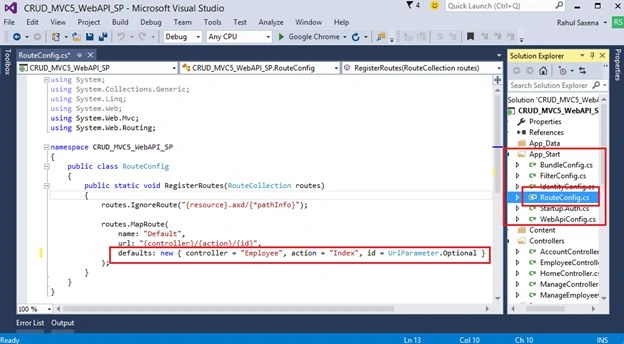
Image 29.
Now run your application:
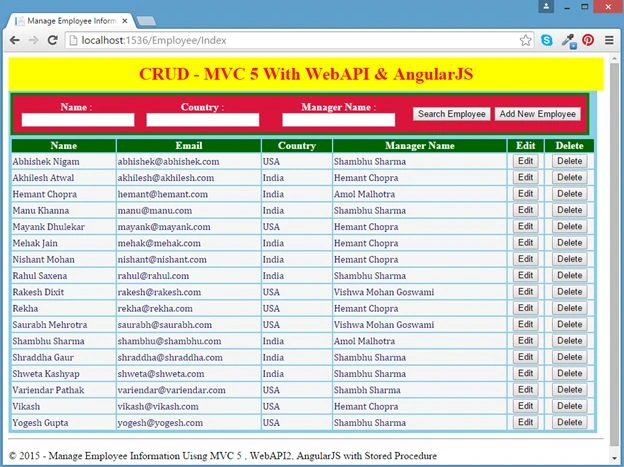
Image 30.
Now provide some search criteria as in the following:
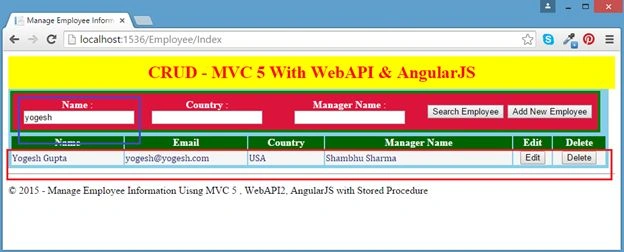
Image 31.
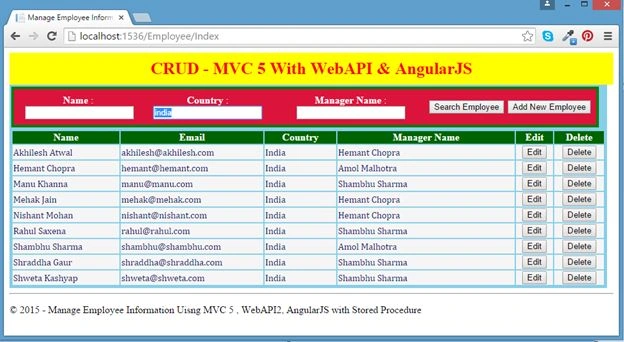
Image 32.
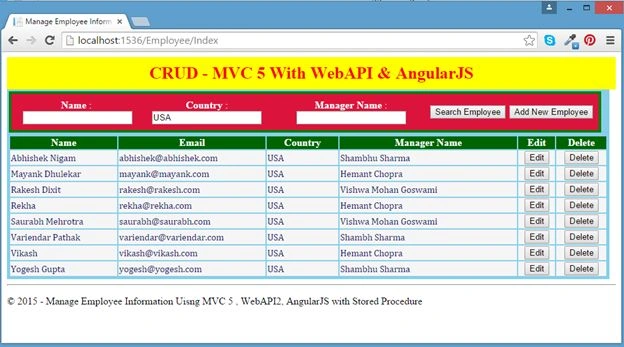
Image 33.
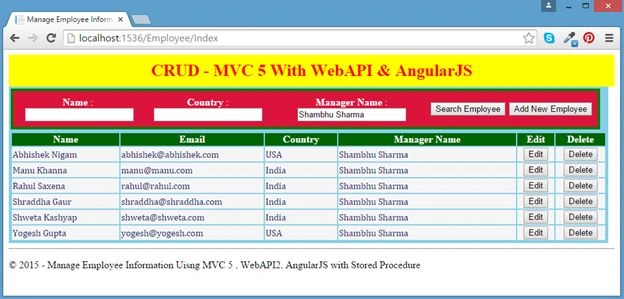
Image 34.
Now click on Add New Employee.
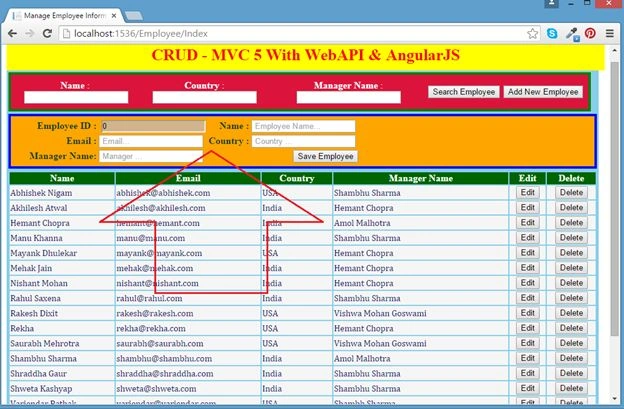
Image 35.
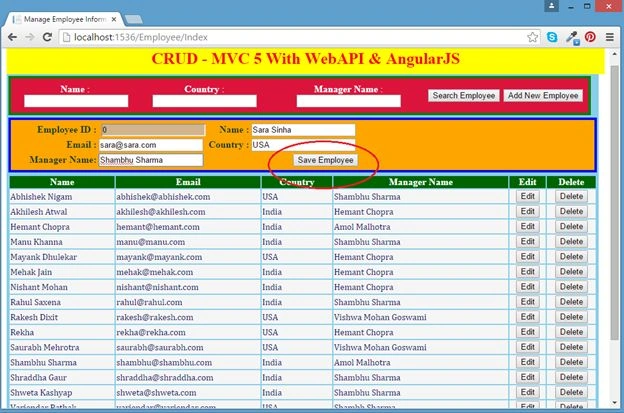
Image 36.
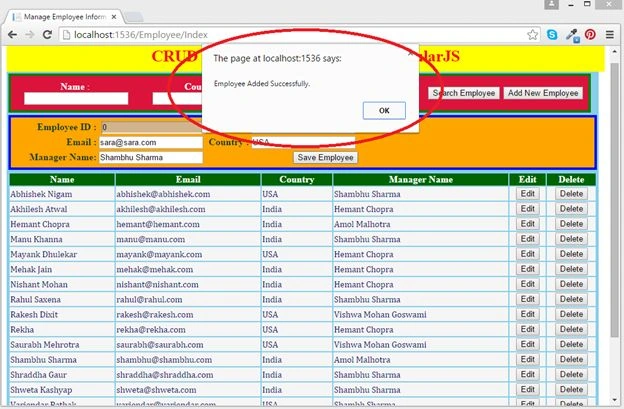
Image 37.
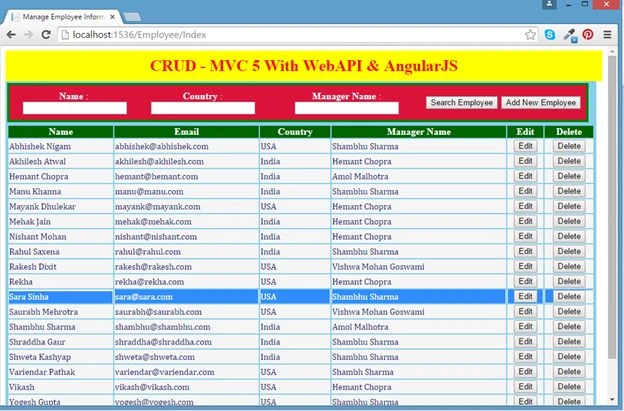
Image 38.
Now edit a record:
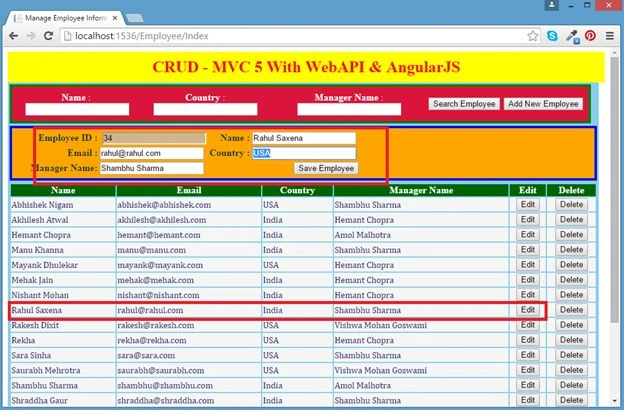
Image 39.
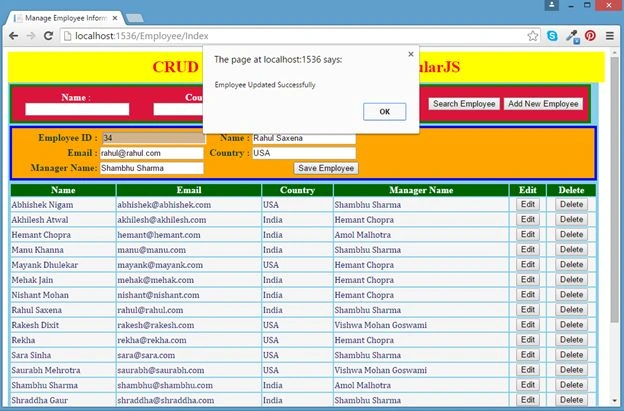
Image 40.
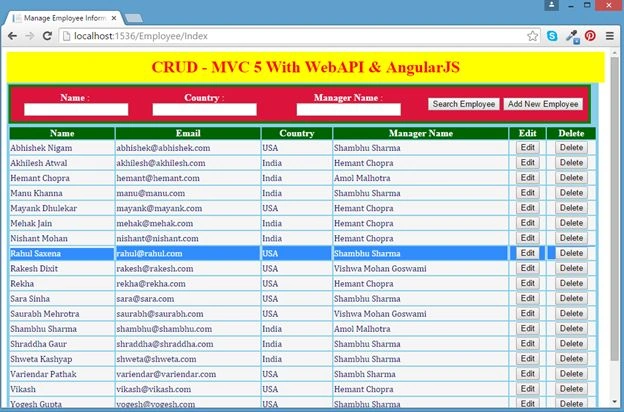
Image 41.
Now delete a record:
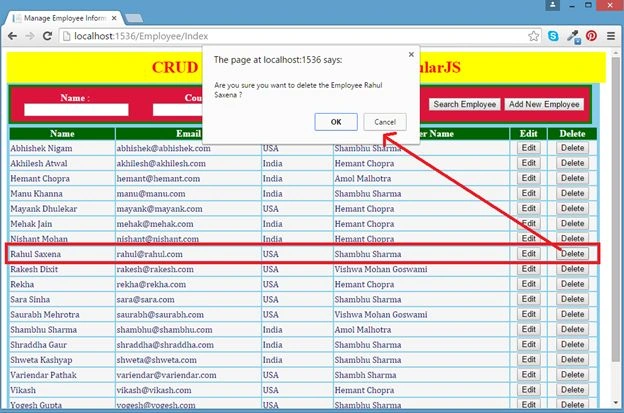
Image 42.
Monir MiaPosted Oct 30, 2017, 3:24 PM
Hi Do you have the same code with Angular 2 or Angular 4 ?
bhavinPosted Apr 21, 2017, 1:08 AM
Very Nice Article. Now I am trying with new angluar js version 1.6.4. Please let me know what changes to be done in controller.js for working with new angurlar js version.
Rahul Kumar SaxenaPosted Sep 1, 2016, 6:22 AM
Thanks Delpin Susai Raj
Delpin Susai RajPosted Aug 28, 2016, 6:51 AM
Nice
Rahul Kumar SaxenaPosted May 13, 2016, 2:54 AM
Thanks Rupali
Rupali ShindePosted Apr 18, 2016, 7:21 AM
really useful article sir :) thanks for sharing
Rahul Kumar SaxenaPosted Nov 20, 2015, 2:17 AM
Thanks Prahalad..
Rahul Kumar SaxenaPosted Nov 20, 2015, 2:17 AM
Welcome Ramesh S
PrahaladPosted Nov 19, 2015, 12:06 PM
Worth reading!!!
Ramesh SPosted Nov 12, 2015, 6:02 AM
Thank u for code
Rahul Kumar SaxenaPosted Sep 2, 2015, 1:24 AM
Thanks Amit Prabhu
Rahul Kumar SaxenaPosted Sep 2, 2015, 1:24 AM
Thanks Kiranteja Jallepalli
Rahul Kumar SaxenaPosted Sep 2, 2015, 1:24 AM
Thanks Shridhar Sharma
Rahul Kumar SaxenaPosted Sep 2, 2015, 1:24 AM
Thanks Ravi Makhija
Amit PrabhuPosted Aug 31, 2015, 11:19 PM
Nice
Kiranteja JallepalliPosted Aug 27, 2015, 9:15 AM
very nice Rahul
Shridhar SharmaPosted Aug 19, 2015, 10:47 AM
awesome !
Ravi MakhijaPosted Aug 19, 2015, 9:41 AM
Nice article thanks for sharing..Rahul. :)
Rahul Kumar SaxenaPosted Aug 4, 2015, 9:52 AM
thank u Nihal Ahmed
Nihal AhmedPosted Aug 4, 2015, 7:30 AM
Nice one sir. good explain.
Rahul Kumar SaxenaPosted Aug 4, 2015, 2:43 AM
Thanks. Debasis Saha
Rahul Kumar SaxenaPosted Aug 4, 2015, 2:43 AM
Thanks. Nilesh Jadav
Rahul Kumar SaxenaPosted Aug 4, 2015, 2:43 AM
Thanks Chervine Bhiwoo
Debasis SahaPosted Aug 4, 2015, 12:54 AM
Good One...
Nilesh JadavPosted Aug 4, 2015, 12:14 AM
Ohh that's really nice article thank you for sharing
Chervine BhiwooPosted Aug 3, 2015, 11:25 PM
Great share!
Rahul Kumar SaxenaPosted Aug 3, 2015, 11:23 PM
Thank u Narasimha Reddy Chennupalli
Narasimha Reddy ChennupalliPosted Aug 3, 2015, 11:19 PM
Nice article Sir
Rahul Kumar SaxenaPosted Aug 3, 2015, 3:12 PM
Thanks sreenivasa k
Rahul Kumar SaxenaPosted Aug 3, 2015, 3:12 PM
Thanks Santhakumar Munuswamy
sreenivasa kPosted Aug 3, 2015, 2:37 PM
really wonderful example
Santhakumar MunuswamyPosted Aug 3, 2015, 2:36 PM
Good Show. Thanks for sharing
Rahul Kumar SaxenaPosted Aug 3, 2015, 11:27 AM
Thanks Shridhar Sharma
Rahul Kumar SaxenaPosted Aug 3, 2015, 11:27 AM
Thank u Rakesh Chavda
Shridhar SharmaPosted Aug 3, 2015, 11:04 AM
very nice article sir.
RakeshPosted Aug 3, 2015, 11:04 AM
Really Well Explain Sir
Rahul Kumar SaxenaPosted Aug 3, 2015, 9:15 AM
Thanks Ankit Bansal
Rahul Kumar SaxenaPosted Aug 3, 2015, 9:15 AM
Thanks Neeraj Kumar
Ankit BansalPosted Aug 3, 2015, 8:32 AM
well explained...good...Rahul...Thanks for sharing..
Neeraj KumarPosted Aug 3, 2015, 7:18 AM
Nice Article
Rahul Kumar SaxenaPosted Aug 3, 2015, 6:33 AM
thanks Vignesh Mani
Vignesh ManiPosted Aug 3, 2015, 6:32 AM
Nice One
Rahul Kumar SaxenaPosted Aug 3, 2015, 6:32 AM
Thanks Rajeesh Menoth
Rahul Kumar SaxenaPosted Aug 3, 2015, 6:32 AM
Thanks Vu Hong Trieu
Rahul Kumar SaxenaPosted Aug 3, 2015, 6:31 AM
Thanks Gopi Chand
Rajeesh MenothPosted Aug 3, 2015, 6:27 AM
Good Explanation
Vu Hong TrieuPosted Aug 3, 2015, 6:24 AM
Nice tut.
Gopi ChandPosted Aug 3, 2015, 6:14 AM
Excellent work
Rahul Kumar SaxenaPosted Aug 3, 2015, 6:05 AM
thank u Sibeesh Venu
Rahul Kumar SaxenaPosted Aug 3, 2015, 6:05 AM
thank u Keyur Patel
Sibeesh VenuPosted Aug 3, 2015, 6:00 AM
Nice share buddy.
Keyur PatelPosted Aug 3, 2015, 5:51 AM
Very detailed explanation. Good effort.