

What is Web API?
Web API or Web Application Programming Interface is an extensible framework for building HTTP-based services that can be accessed in different applications on different platforms, such as Web, Mobile, or Windows. It works as ASP.NET MVC but instead of returning a View, it returns the data as a response. It is a Web Service and only supports HTTP protocol.
What is CRUD?
CRUD stands for Create, Read, Update and Delete. In HTTP, Create is a POST method, Read is a GET method, Update is a PUT method, and Delete is a DELETE method. An API performs these four functions. In this article, I will use the SQL Server database to implement all these methods. We will test the API using POSTMAN.
Implementation
Let us create a Web API using the following steps.
- Create a new project in Visual Studio. Go to New Project > ASP.NET Web application and name it as Web_API_CRUD (you can give a name according to your choice).
- On the next popup window, select the Web API template.
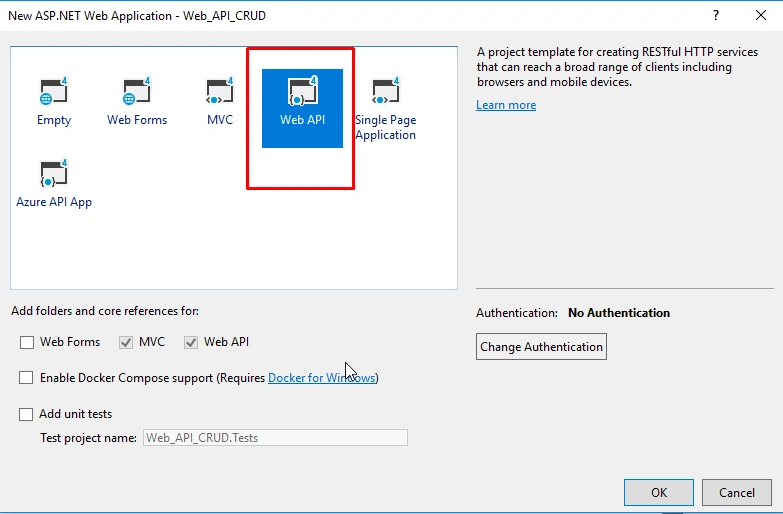
- After selecting the template, click OK.
- Now, in Solution Explorer, you can see two controllers. Add a new API Controller.
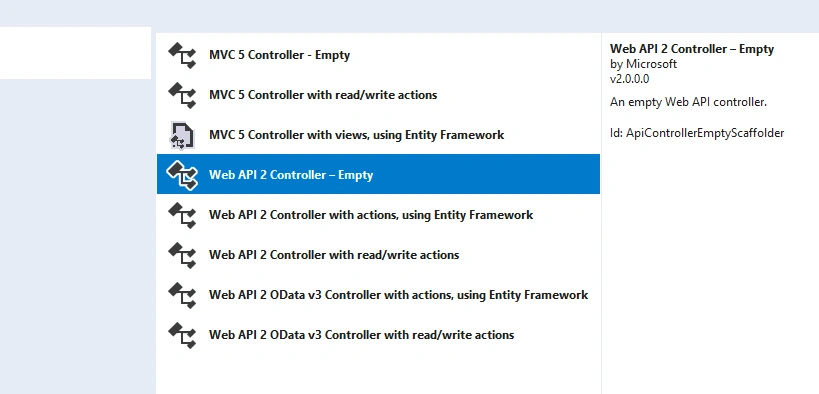
- Name it as CustomersController.
- Create a table in SQL Server and name it as Customer.
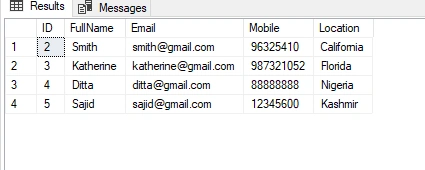
- Now, add an ADO.NET Entity Data Model for your database.
- Create an object of the "Entities" class in your Customer Controller.
CRUD Implementation
- The Read operation is referred to as the GET method in API. We will add two Get methods in our Controller. The first Get method will be without parameters and it will return a list of customers. Whereas the second Get method will accept an id and return a single record against that id. Code snippet for Get methods is given below for your reference.
- //This method will return All customers' list
- public IEnumerable<Customer> Get()
- {
- return db.Customers.ToList();
- }
- //This method will return a single Customer against id
- public Customer Get(int id)
- {
- Customer customer = db.Customers.Find(id);
- return customer;
- }
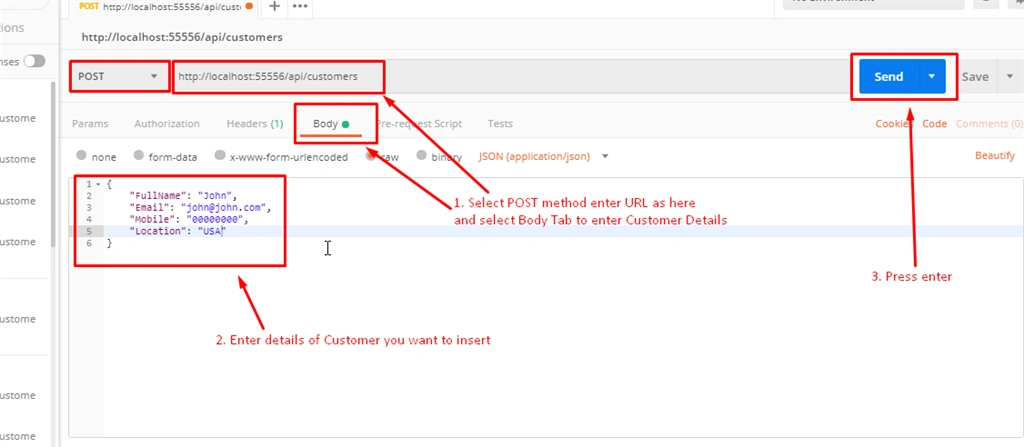
- The Create method is known as a POST method in API. I will add a POST method that will accept a "Customer" type object in parameters and add that Customer in the database.
- //This method will add a new Customer
- public void POST(Customer customer)
- {
- db.Customers.Add(customer);
- db.SaveChanges();
- }
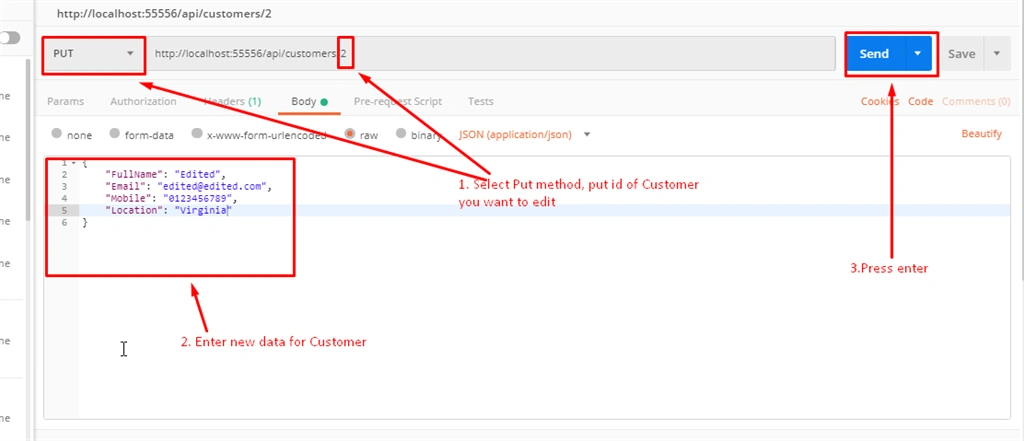
- The Put method will update a customer's record in our database.
- //This method to Update a Customer
- public void PUT(int id, Customer customer)
- {
- var customer1 = db.Customers.Find(id);
- customer1.Email = customer.Email;
- customer1.FullName = customer.FullName;
- customer1.Location = customer.Location;
- customer1.Mobile = customer.Mobile;
- db.Entry(customer1).State = System.Data.Entity.EntityState.Modified;
- db.SaveChanges();
- }
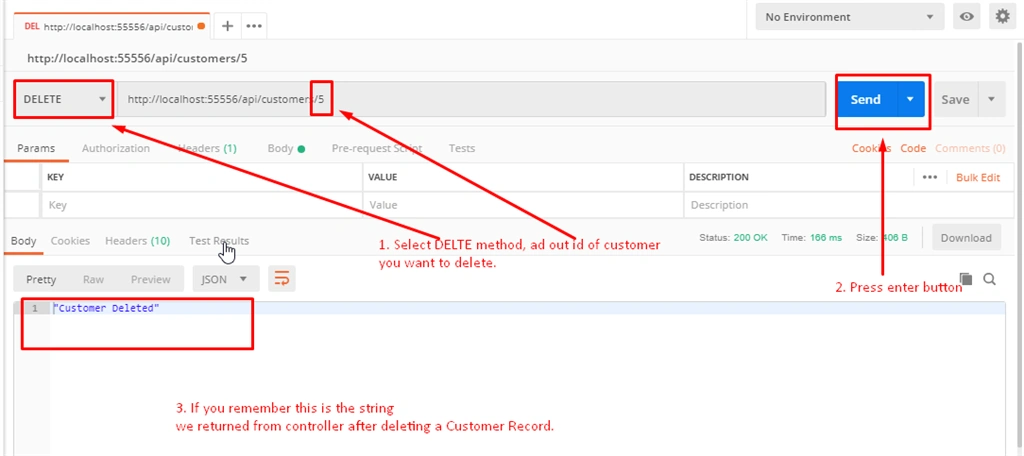
- The Delete method will delete a record from the database.
- //This method will delete a customer
- public string Delete(int id)
- {
- Customer customer = db.Customers.Find(id);
- db.Customers.Remove(customer);
- db.SaveChanges();
- return "Customer Deleted";
- }
Testing with POSTMAN
POSTMAN is a tool for testing the APIs. It is free and you can download it from their website. I will test all these operations one by one.
- Testing Get method without any parameter.
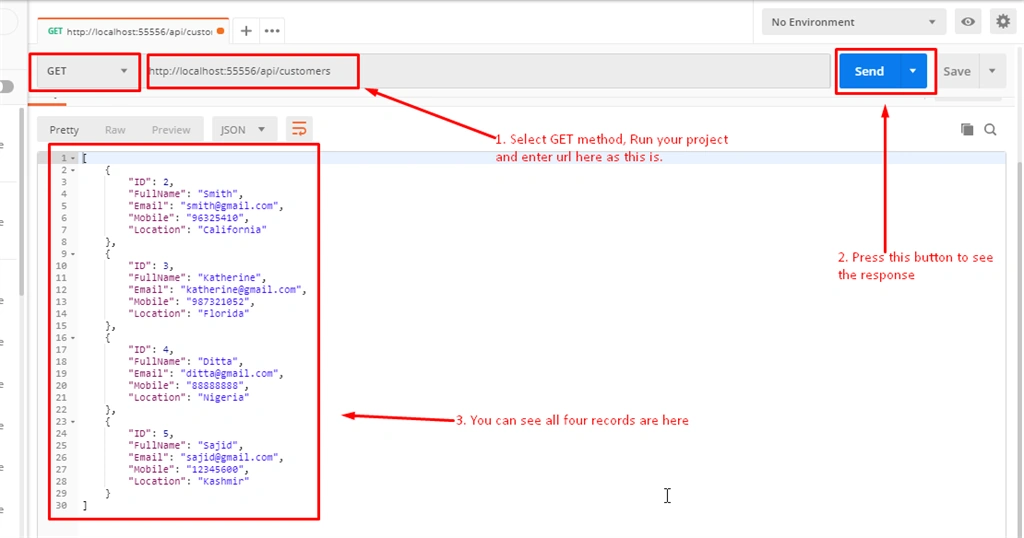
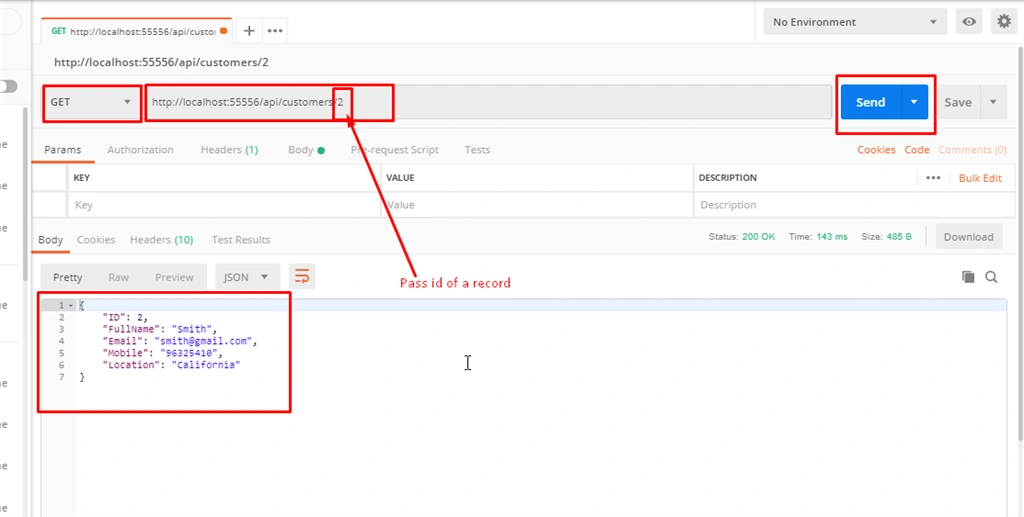
- Testing Get method with id as a parameter.
- Testing the POST method by passing an object of Customer.
- Testing the PUT method by updating a Customer record.
- Deleting a Customer record by id.
After performing all CRUD operations, this is the final result.
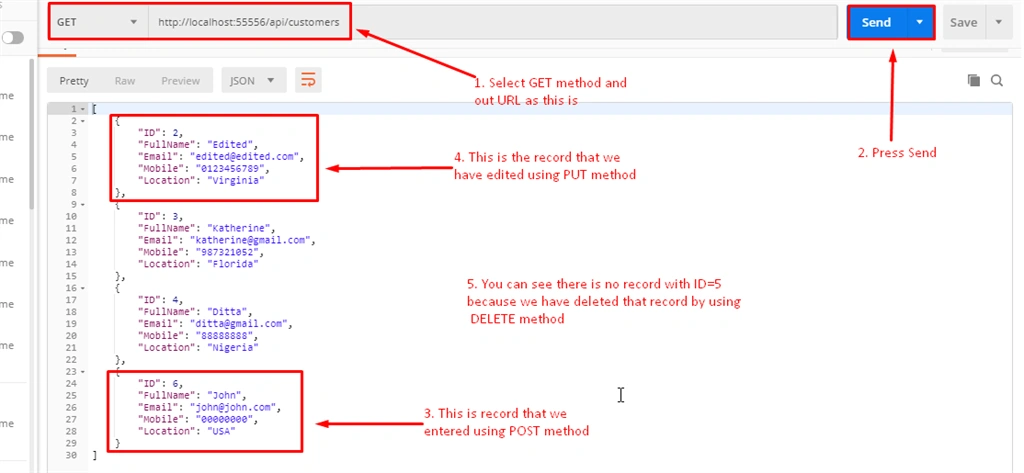
That's it. This is how we can perform the CRUD operations in a Web API and SQL Server Database.
Jacob BeynonPosted May 16, 2023, 3:33 PM
Hi Jamil Moughal, Thank you for the guide! How do you set the api to use the URL: https://localhost:44382/api/customers? I keep getting No HTTP Resource was found
Muhammad ZubairPosted Jun 15, 2022, 6:39 AM
Send me this project please at [email protected]
Priyankith SridharPosted May 1, 2021, 11:24 AM
Can you send the project to [email protected]
Ryan SPosted Jul 21, 2020, 10:14 PM
What if you want to return all records based on parameter pass in by the user
Harish MechPosted Jul 20, 2020, 1:25 AM
Can i have project please [email protected]
Chittaranjan SwainPosted Dec 23, 2019, 10:57 PM
Nice article.
Krishna JallepalliPosted Nov 27, 2019, 10:14 AM
Can I have the project, please? [email protected] i want with database script also.
MUSTAFA KANAANPosted Aug 27, 2019, 2:29 PM
Can I have the project, please?
Denmark CoPosted Aug 1, 2019, 1:13 AM
Good walk-through
Riza AfandiPosted May 5, 2019, 11:09 PM
Good Article, but I got error when try POST and PUT request. The error say that the media type 'multipart/form-data' is not supported for this resource. How to fix that ?
Omar AlFalahiPosted Apr 1, 2019, 4:06 AM
Good artical.. Can you download source code
Abdul NasirPosted Feb 9, 2019, 4:51 PM
Nice article