
In this article you will learn how to create a JSP CRUD application with Pagination, Sorting and export option using NetBeans IDE and MySQL 5. This simple application is a Create, Read, Update and Delete application operating on an ‘emp’ table in ‘test’ database in MySQL Database Server.
Software Used
- JDK 8u25
- NetBeans IDE 8.02
- MySQL 5.*(or XAMPP)
- MySQL Connector 5.*
- Hibernate 4.3.** (Bundled with NetBeans)
- Display Tag Library(For pagination ,sorting and export)
Steps:
- Install JDK8 or JDK7 if not installed.
- Install NetBeans and associated ApacheTomcat Server.
- Install MySQL Database server or XAMPP (for easy MySQL management).
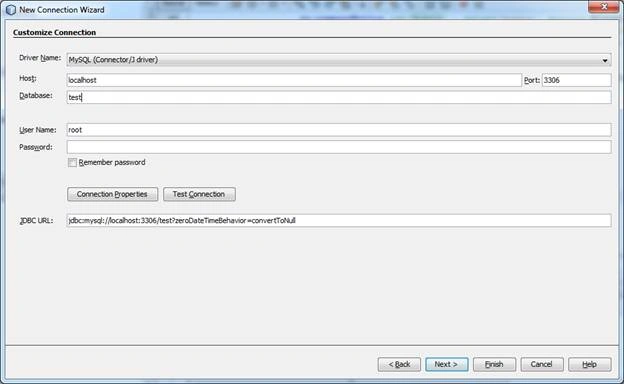
After Installing NetBeans click the services tab on the left.Expand Database node.Expand Drivers node. Right click MySQL(Connector/Jdriver) then connect.Put test as the database. As shown below. Put password if you have given password at the time of installation of MySQL database server. For XAMPP no password is required. Then test connection. If successful click finish button.
Create ‘Emp’ Table using below script in MySQL TEST Database,
- CREATE TABLE `Emp` (
- `empno` int(10) unsigned NOT NULL auto_increment,
- `ename` varchar(45) NOT NULL,
- `sal` int(15) NOT NULL,
- `dob` date NOT NULL,
- PRIMARY KEY (`empno`)
- ) ENGINE=InnoDB AUTO_INCREMENT=1 DEFAULT CHARSET=utf8;
Project Structure:
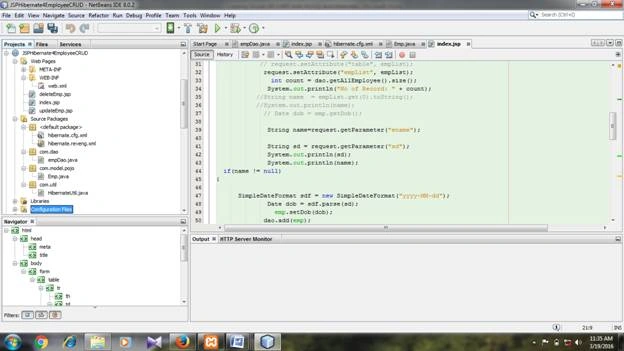
Creating Project JSPHibernate4EmployeeCRUD
File, New Project, Categories, Choose JavaWeb, then choose WebApplication, Click Next and Give Project Name JSPHibernate4EmployeeCRUD, then click Next and choose Framework Hibernate, then click Finish
Download and add the following libraries(JAR) one by one by right clicking the libraries folder in project window then-Add JAR/Folder.
- MySQL-Connector.java-5.1.35-bin.jar
- displaytag-1.2.jar
- displaytag-export-poi-1.2.jar
- displaytag-portlet-1.2.jar
- commons-beanutilis-1.8.0.jar
- commons-collections-3.1.jar
- commons-lang-2.4.jar
Creating Packages and Classes
Right click SourcePackages folder and create three packages,
- com.dao- This would contain DAO (Data Access Object) class empDao.java.
- com.model.pojo- This would contain entity class Emp.java.
- com.util- This will contain HibernateUtil.java class
Following Files would be created using Netbeans,
- hibernate.cfg.xml File-Automatically generated.
- Reverse Engineering File-hibernate.reveng.xml.
- Entity(POJO) File-Emp.java(POJO stands for Plain Old Java Objects).
- DataAccessObject(DAO) File-àempDao.java.
- HibernateUtil.java File.
- web.xml (Automatically generated)
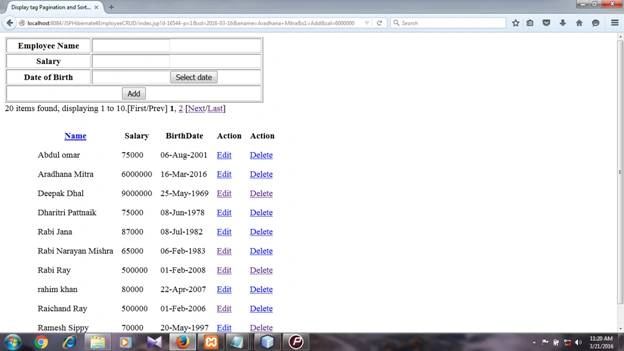
- index.jsp (Add employee record and displays all employee records)
- deleteEmp.jsp (Displays employee record before deleting)
- updateEmp.jsp (Displays employee record for updating)
1.hibernate.cfg.xml
It is generated automatically when connected to test database of MySQL.
By Netbeans Services Tab àDatabasesàGet connected to test database.
COPY AND PASTE CODE OF THE FILE GIVEN BELOW WHOSE CODE IS NOT GENERATED
2. Creating Reverse Engineering File-àhibernate.reveng.xml
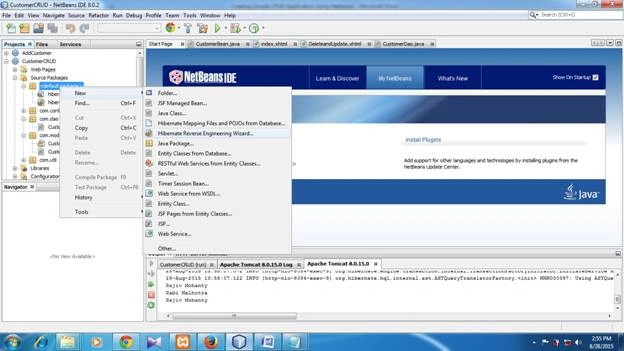
Right Click default package in the Source Package, new, choose Hibernate Reverse Engineering Wizard, click next, then choose emp table, Add, then click finish.
Code
- <?xml version="1.0" encoding="UTF-8"?>
- <!DOCTYPE hibernate-reverse-engineering PUBLIC "-//Hibernate/Hibernate Reverse Engineering DTD 3.0//EN" "http://hibernate.sourceforge.net/hibernate-reverse-engineering-3.0.dtd">
- <hibernate-reverse-engineering>
- <schema-selection match-catalog="test" />
- <table-filter match-name="emp" />
- </hibernate-reverse-engineering>
3. Creating Annotation Based Entity (pojo) Class File Emp.java
Emp.java Class File
Important:To create this file MySQL database test must be connected through NetBeans.
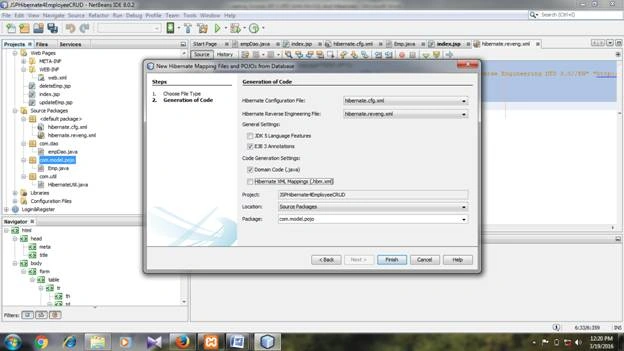
Right click com.model package--new-Hibernate Mappling Files and pojos from database, then click Finish
Connect to database, then the following window opens . Check EJB3.0 annotation box, uncheck Hibernate XML Mapping check box. Choose package com.model.pojo.
Emp.java Class File
- package com.model.pojo;
- // Generated Mar 3, 2016 3:30:15 PM by Hibernate Tools 4.3.1
- import java.util.Date;
- import javax.persistence.Column;
- import javax.persistence.Entity;
- import javax.persistence.GeneratedValue;
- import static javax.persistence.GenerationType.IDENTITY;
- import javax.persistence.Id;
- import javax.persistence.Table;
- import javax.persistence.Temporal;
- import javax.persistence.TemporalType;
- /**
- * Emp generated by hbm2java
- */
- @Entity
- @Table(name = "emp"
- , catalog = "test"
- )
- public class Emp implements java.io.Serializable {
- private Integer empno;
- private String ename;
- private Integer sal;
- private Date dob;
- public Emp() {
- }
- public Emp(String ename, Integer sal, Date dob) {
- this.ename = ename;
- this.sal = sal;
- this.dob = dob;
- }
- @Id @GeneratedValue(strategy = IDENTITY)
- @Column(name = "empno", unique = true, nullable = false)
- public Integer getEmpno() {
- return this.empno;
- }
- public void setEmpno(Integer empno) {
- this.empno = empno;
- }
- @Column(name = "ename", length = 20)
- public String getEname() {
- return this.ename;
- }
- public void setEname(String ename) {
- this.ename = ename;
- }
- @Column(name = "sal")
- public Integer getSal() {
- return this.sal;
- }
- public void setSal(Integer sal) {
- this.sal = sal;
- }
- @Temporal(TemporalType.DATE)
- @Column(name = "dob", length = 10)
- public Date getDob() {
- return this.dob;
- }
- public void setDob(Date dob) {
- this.dob = dob;
- }
- //This method writes the values of contact object with System.out.println(Emp.toString()) code
- @Override
- public String toString() {
- return "Emp"
- +"\n\t EmpNo: " + this.empno
- +
- "\n\t EmployeeName: " + this.ename
- +
- "\n\t Salary: " + this.sal
- +
- "\n\t Date of Birth: " + this.dob;
- }
- }
4. Creating DataAccessObject (DAO) File
empDao.java File
Right click com.dao package, new, JavaClass, Give class name empDao, then click Finish.
empDao.java File CODE:
- package com.dao;
- import java.util.List;
- import java.util.ArrayList;
- import org.hibernate.Query;
- import org.hibernate.Transaction;
- import org.hibernate.Session;
- import com.util.HibernateUtil;
- import com.model.pojo.Emp;
- /**
- *
- * @author Raichand
- */
- public class empDao {
- private Emp emp;
- private Emp newemp;
- private List < Emp > DaoAllEmp;
- private List < Emp > DaoSearchEmpList;
- //Session session;
- public List < Emp > getAllEmployee() {
- Session session = HibernateUtil.getSessionFactory().openSession();
- try {
- session.beginTransaction();
- DaoAllEmp = session.createCriteria(Emp.class).list();
- int count = DaoAllEmp.size();
- System.out.println("No of Record From Dao: " + count);
- session.getTransaction().commit();
- } catch (Exception e) {
- e.printStackTrace();
- // ses.getTransaction().rollback();
- }
- session.close();
- return DaoAllEmp;
- }
- public List < Emp > SearchByRecordNo(String RecordNo) {
- Session session = HibernateUtil.getSessionFactory().openSession();
- List < Emp > daoSearchList = new ArrayList < > ();
- // List<Item> daoSearchList =null;
- try {
- session.beginTransaction();
- Query qu = session.createQuery("From Emp E where E.recordno =:recordNo"); //User is the entity not the table
- daoSearchList = qu.list();
- int count = daoSearchList.size();
- session.getTransaction().commit();
- } catch (Exception e) {
- e.printStackTrace();
- session.getTransaction().rollback();
- } finally {
- session.close();
- }
- return daoSearchList;
- }
- public void add(Emp emp) {
- Transaction trans = null;
- Session session = HibernateUtil.getSessionFactory().openSession();
- try {
- String name = emp.getEname();
- System.out.println("Employee Name:" + name);
- // begin a transaction
- session.beginTransaction();
- session.persist(emp);
- session.getTransaction().commit();
- System.out.println("New Employee saved, EmpNo: " +
- emp.getEname());
- } catch (RuntimeException e) {
- if (trans != null) {
- trans.rollback();
- }
- e.printStackTrace();
- } finally {
- session.flush();
- session.close();
- }
- }
- public void delete(Emp emp) {
- Transaction trans = null;
- Session session = HibernateUtil.getSessionFactory().openSession();
- try {
- String EmpName = (emp.getEname());
- System.out.println("Emp deleted, EmpName: " + EmpName);
- // begin a transaction
- session.beginTransaction()
- session.delete(emp);
- session.getTransaction().commit();
- System.out.println("Emp Deleted, : " + emp.toString());
- } catch (RuntimeException e) {
- if (trans != null) {
- trans.rollback();
- }
- e.printStackTrace();
- } finally {
- session.flush();
- session.close();
- }
- }
- public void update(Emp emp) {
- Transaction trans = null;
- Session session = HibernateUtil.getSessionFactory().openSession();
- try {
- String EmpName = (emp.getEname());
- System.out.println("Emp updated, EmpName: " + EmpName);
- // begin a transaction
- session.beginTransaction();
- session.update(emp);
- session.getTransaction().commit()
- } catch (RuntimeException e) {
- if (trans != null) {
- trans.rollback();
- }
- e.printStackTrace();
- } finally {
- session.flush();
- session.close();
- }
- }
- public Emp getEmpbyEmpNo(int empno) {
- Session session = HibernateUtil.getSessionFactory().openSession();
- session.beginTransaction();
- emp = (Emp) session.load(Emp.class, empno);
- System.out.println(emp.toString());
- session.getTransaction().commit();
- session.close();
- return emp;
- }
- }
5.HibernateUtil.java File
Right click com.util folder, new, javaclass, Class name, then give name HibernateUtil, then click Finish.
HibernateUtil.java CODE:
- import org.hibernate.SessionFactory;
- import org.hibernate.boot.registry.StandardServiceRegistryBuilder;
- import org.hibernate.cfg.Configuration;
- import org.hibernate.service.ServiceRegistry;
- public class HibernateUtil
- {
- private static SessionFactory sessionFactory = buildSessionFactory();
- private static SessionFactory buildSessionFactory()
- {
- try
- {
- if (sessionFactory == null) {
- // loads configuration and mappings
- Configuration configuration = new Configuration().configure();
- ServiceRegistry serviceRegistry
- = new StandardServiceRegistryBuilder()
- .applySettings(configuration.getProperties()).build();
- // builds a session factory from the service registry
- sessionFactory = configuration.buildSessionFactory(serviceRegistry);
- }
- return sessionFactory;
- } catch (Throwable ex)
- {
- System.err.println("Initial SessionFactory creation failed." + ex);
- throw new ExceptionInInitializerError(ex);
- }
- }
- public static SessionFactory getSessionFactory()
- {
- return sessionFactory;
- }
- public static void closeSession()
- {
- getSessionFactory().close();
- }
- }
6. web.xml (Automatically generated)
CODE:
- <?xml version="1.0" encoding="UTF-8"?>
- <web-app version="3.1" xmlns="http://xmlns.jcp.org/xml/ns/javaee" xmlns:xsi="http://www.w3.org/2001/XMLSchema-instance" xsi:schemaLocation="http://xmlns.jcp.org/xml/ns/javaee
- http://xmlns.jcp.org/xml/ns/javaee/web-app_3_1.xsd">
- <session-config>
- <session-timeout>
- 30
- </session-timeout>
- </session-config>
- <welcome-file-list>
- <welcome-file>index.jsp</welcome-file>
- </welcome-file-list>
- </web-app>
6. Creating index.jsp File
Right click WebPages folderàNewàJspàGive name index.jsp then click Finish.
Similarly create deleteEmp.jsp and updateEmp.jsp files.
Index.jsp
7.index.jsp code:
- <%@page contentType="text/html" pageEncoding="UTF-8"%>
- <%@page import="java.util.ArrayList"%>
- <%@page import="com.model.pojo.Emp"%>
- <%@page import ="java.util.Date"%>
- <%@page import = "java.text.SimpleDateFormat"%>
- <%@page import="com.dao.empDao"%>
- <%@page import="java.util.List"%>
- <jsp:useBean id="emp" class="com.model.pojo.Emp">
- </jsp:useBean>
- <jsp:setProperty property="*" name="emp" />
- <%@ taglib prefix="display" uri="http://displaytag.sf.net"%>
- <!DOCTYPE html PUBLIC "-//W3C//DTD HTML 4.01 Transitional//EN" "http://www.w3.org/TR/html4/loose.dtd">
- <html>
- <head>
- <meta http-equiv="Content-Type" content="text/html; charset=UTF-8">
- <link rel="stylesheet" href="https://ajax.googleapis.com/ajax/libs/jqueryui/1.11.4/themes/smoothness/jquery-ui.css">
- <script src="https://ajax.googleapis.com/ajax/libs/jquery/1.11.3/jquery.min.js" type="text/javascript"></script>
- <script src="https://ajax.googleapis.com/ajax/libs/jqueryui/1.11.4/jquery-ui.min.js" type="text/javascript"></script>
- <script type="text/javascript">
- $(document).ready(function() {
- $("#datepicker").datepicker({
- showButtonPanel: true,
- showOn: "button",
- buttonText: "Select date",
- dateFormat: 'yy-mm-dd',
- changeMonth: true,
- changeYear: true,
- yearRange: "-90:"
- });
- });
- </script>
- <title>Display tag Pagination and Sorting Example in JSP</title>
- </head>
- <%
- empDao dao = new empDao();
- List empList = dao.getAllEmployee();
- request.setAttribute("empList", empList);
- int count = dao.getAllEmployee().size();
- System.out.println("No of Record: " + count);
- String name=request.getParameter("ename");
- String sd = request.getParameter("sd");
- System.out.println(sd);
- System.out.println(name);
- if(name != null)
- {
- SimpleDateFormat sdf = new SimpleDateFormat("yyyy-MM-dd");
- Date dob = sdf.parse(sd);
- emp.setDob(dob);
- dao.add(emp);
- empList = dao.getAllEmployee();
- request.setAttribute("empList", empList);
- }
- %>
- <body>
- <form name="f1" action="index.jsp" method="post">
- <table width="471" border="1">
- <tr>
- <th>Employee Name </th>
- <td><input name="ename" type="text"></td>
- </tr>
- <tr>
- <th>Salary </th>
- <td><input name="sal" type="text"></td>
- </tr>
- <tr>
- <th>Date of Birth</th>
- <td><input name="sd" type="text" id="datepicker"></td>
- </tr>
- <tr>
- <th colspan="2"><input type="submit" onclick=u pdate(EmpTable) name="s1" value="Add">
- </th>
- </tr>
- </table>
- </form>
- <display:table id="EmpTable" name="empList" class="dataTable" export="true" pagesize="10" cellpadding="5px;" uid="row" cellspacing="5px;" style="margin-left:50px;margin-top:20px;" requestURI="">
- <display:column property="ename" title="Name" sortable="true" />
- <display:column property="sal" title="Salary" />
- <display:column property="dob" format="{0,date,dd-MMM-yyyy}" title="BirthDate" />
- <display:column property="empno" format="Edit" href="updateEmp.jsp" paramId="empno" paramProperty="empno" title="Action" />
- <display:column property="empno" format="Delete" href="deleteEmp.jsp" paramId="empno" paramProperty="empno" title="Action" />
- <display:setProperty name="export.excel.filename" value="EmployeeDetails.xls" />
- <display:setProperty name="export.pdf.filename" value="EmployeeDetails.pdf" />
- <display:setProperty name="export.csv.filename" value="EmployeeDetails.csv" />
- </display:table>
- </body>
- </html>
8.DeleteEmp.jsp file code:
- <%@page contentType="text/html" pageEncoding="UTF-8"%>
- <%@page import="java.util.ArrayList"%>
- <%@page import="com.model.pojo.Emp"%>
- <%@page import ="java.util.Date"%>
- <%@page import = "java.text.SimpleDateFormat"%>
- <%@page import="com.dao.empDao"%>
- <%@page import="java.util.List"%>
- <jsp:useBean id="emp" class="com.model.pojo.Emp">
- </jsp:useBean>
- <%@ taglib prefix="display" uri="http://displaytag.sf.net"%>
- <!DOCTYPE html PUBLIC "-//W3C//DTD HTML 4.01 Transitional//EN" "http://www.w3.org/TR/html4/loose.dtd">
- <html>
- <head>
- <meta http-equiv="Content-Type" content="text/html; charset=UTF-8">
- <link rel="stylesheet" href="https://ajax.googleapis.com/ajax/libs/jqueryui/1.11.4/themes/smoothness/jquery-ui.css">
- <script src="https://ajax.googleapis.com/ajax/libs/jquery/1.11.3/jquery.min.js" type="text/javascript"></script>
- <script src="https://ajax.googleapis.com/ajax/libs/jqueryui/1.11.4/jquery-ui.min.js" type="text/javascript"></script>
- <script type="text/javascript">
- $(document).ready(function() {
- $("#datepicker").datepicker({
- showButtonPanel: true,
- showOn: "button",
- buttonText: "Select date",
- dateFormat: 'yy-mm-dd',
- changeMonth: true,
- changeYear: true,
- yearRange: "-90:"
- });
- });
- </script>
- <title>Update Employee</title>
- </head>
- <body>
- <%
- String sub=request.getParameter("s1");
- empDao dao = new empDao();
- Emp deleteemp = new Emp();
- String num=request.getParameter("empno");
- int salary=0;
- String name="";
- Date dob=null;
- if(sub == null){
- //num=request.getParameter("empno");
- int empno =Integer.parseInt(num);
- deleteemp = dao.getEmpbyEmpNo(empno);
- salary = deleteemp.getSal();
- name = deleteemp.getEname();
- //out.println(deleteemp.toString());//Debugging Purpose
- dob = deleteemp.getDob();
- }
- if(sub != null)
- {
- //deleting record
- int eno= Integer.parseInt(request.getParameter("eno"));
- deleteemp.setEmpno(eno);
- //out.println(deleteemp.toString());
- dao.delete(deleteemp);
- response.sendRedirect("index.jsp");
- }
- %>
- <form name="f1" action="deleteEmp.jsp" method="post">
- <table width="471" border="1">
- <tr>
- <th> Employee No </th>
- <td><input name="eno" type="text" value="<%= num %>" onFocus="this.blur()">
- </td>
- </tr>
- <tr>
- <th>Employee Name </th>
- <td><input name="ename" type="text" value="<%= name %>"></td>
- </tr>
- <tr>
- <th>Salary </th>
- <td><input name="esal" type="text" value="<%= salary %>"></td>
- </tr>
- <tr>
- <th>Date of Birth</th>
- <td><input name="sd" type="text" id="datepicker" value="<%= dob %>" size=30></td>
- </tr>
- <tr>
- <th colspan="2"><input type="submit" onclick="if(confirm('Delete Record?'))
- alert('Record Deleted Successfully!'); else alert('A wise decision!')" name="s1" value="Delete">
- </th>
- </tr>
- </table>
- </form>
- </body>
- </html>
9.UpdateEmp.jsp file code:
- <%@page contentType="text/html" pageEncoding="UTF-8"%>
- <%@page import="java.util.ArrayList"%>
- <%@page import="com.model.pojo.Emp"%>
- <%@page import ="java.util.Date"%>
- <%@page import = "java.text.SimpleDateFormat"%>
- <%@page import="com.dao.empDao"%>
- <%@page import="java.util.List"%>
- <jsp:useBean id="emp" class="com.model.pojo.Emp">
- </jsp:useBean>
- <%@ taglib prefix="display" uri="http://displaytag.sf.net"%>
- <!DOCTYPE html PUBLIC "-//W3C//DTD HTML 4.01 Transitional//EN" "http://www.w3.org/TR/html4/loose.dtd">
- <html>
- <head>
- <meta http-equiv="Content-Type" content="text/html; charset=UTF-8">
- <link rel="stylesheet" href="https://ajax.googleapis.com/ajax/libs/jqueryui/1.11.4/themes/smoothness/jquery-ui.css">
- <script src="https://ajax.googleapis.com/ajax/libs/jquery/1.11.3/jquery.min.js" type="text/javascript"></script>
- <script src="https://ajax.googleapis.com/ajax/libs/jqueryui/1.11.4/jquery-ui.min.js" type="text/javascript"></script>
- <script type="text/javascript">
- $(document).ready(function() {
- $("#datepicker").datepicker({
- showButtonPanel: true,
- showOn: "button",
- buttonText: "Select date",
- dateFormat: 'yy-mm-dd',
- changeMonth: true,
- changeYear: true,
- yearRange: "-90:"
- });
- });
- </script>
- <title>Update Employee</title>
- </head>
- <body>
- <%
- String sub=request.getParameter("s1");
- empDao dao = new empDao();
- String num="";
- int salary=0;
- String name="";
- Date dob=null;
- int empno = 0;
- if(sub == null){
- num=request.getParameter("empno");
- empno=Integer.parseInt(num);
- Emp editemp = dao.getEmpbyEmpNo(empno);
- //System.out.println(editemp.toString());//Debugging Purpose
- salary = editemp.getSal();
- name = editemp.getEname();
- //out.println(editemp.toString());//Debugging Purpose
- dob = editemp.getDob();
- }
- if(sub != null)
- {
- int neweno= Integer.parseInt(request.getParameter("eno"));
- String sd = request.getParameter("sd");
- String newename = request.getParameter("ename");
- int newSalary= Integer.parseInt(request.getParameter("esal"));
- //out.println(sd);
- if(sd != null)
- {
- SimpleDateFormat sdf = new SimpleDateFormat("yyyy-MM-dd");
- Date dobdate = sdf.parse(sd);
- emp.setEmpno(neweno);
- emp.setEname(newename);
- emp.setSal(newSalary);
- emp.setDob(dobdate);
- dao.update(emp);
- %>
- <script type="text/javascript" language="javascript">
- alert("Record Updated successful");
- document.location = "index.jsp";
- </script>
- <%
- // out.println(newename);//Debugging purpose
- // out.println(emp.toString());//Debugging purpose
- }
- }
- %>
- <form name="f1" action="updateEmp.jsp" method="post">
- <table width="471" border="1">
- <tr>
- <th> Employee No </th>
- <td><input name="eno" type="text" value="<%= num %>" onFocus="this.blur()">
- </td>
- </tr>
- <tr>
- <th>Employee Name </th>
- <td><input name="ename" type="text" value="<%= name %>"></td>
- </tr>
- <tr>
- <th>Salary </th>
- <td><input name="esal" type="text" value="<%= salary %>"></td>
- </tr>
- <tr>
- <th>Date of Birth</th>
- <td><input name="sd" type="text" id="datepicker" value="<%= dob %>" size=30></td>
- </tr>
- <tr>
- <th colspan="2"><input type="submit" name="s1" value="Update">
- </th>
- </tr>
- </table>
- </form>
- </body>
- </html>
index.jsp
Update.jsp
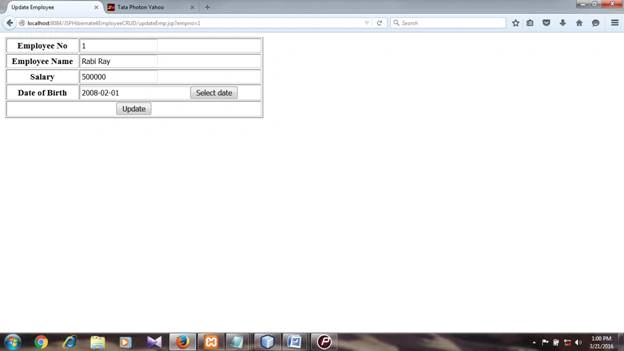
Modify the displayed record and click update.
Delete.jsp
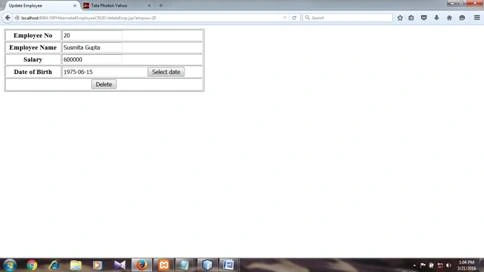
Click Delete button to delete record after viewing it.
Raichand RayPosted Jun 8, 2016, 3:02 AM
Please download provided winrar file for required libraries and code files for the project.
Debasis SahaPosted May 30, 2016, 3:02 AM
Nice share..
RajaPosted May 28, 2016, 7:00 AM
Nice Share...
Ajay MalikPosted May 28, 2016, 2:26 AM
Nice sharing..
Raichand RayPosted May 24, 2016, 6:10 AM
It uses Hibernate framework should be mentioned in article title.It is a hibernate-annotation based application.
Vignesh ManiPosted Apr 14, 2016, 8:21 AM
Nice
Debasis SahaPosted Apr 12, 2016, 1:23 PM
Good One..