

Introduction
Before creating an app in Android Studio, I will explain in brief about the SQLite database. SQLiteDatabase is the base class for working with an SQLite database in Android, which provides some methods to open, query, update and close the database.
Open Android Studio and start a new Android Studio project
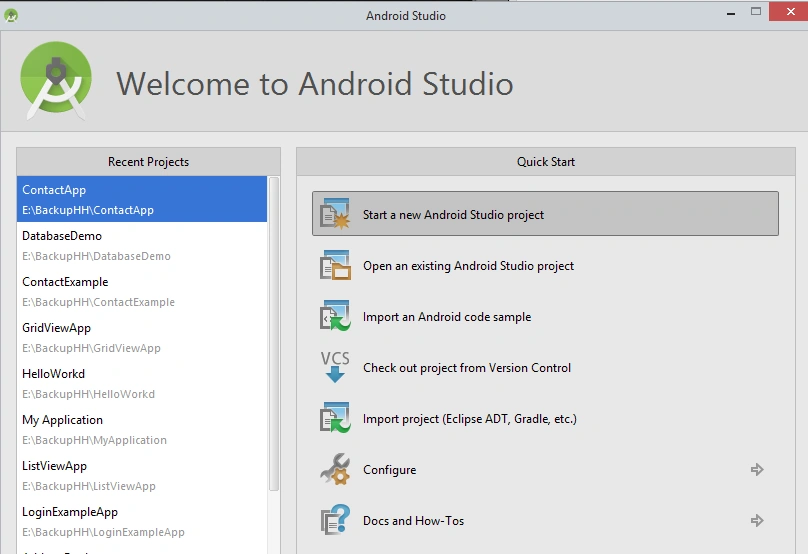
Then enter the application name and select path for it.

Select Minimum SDK for Phone and Tablet option,
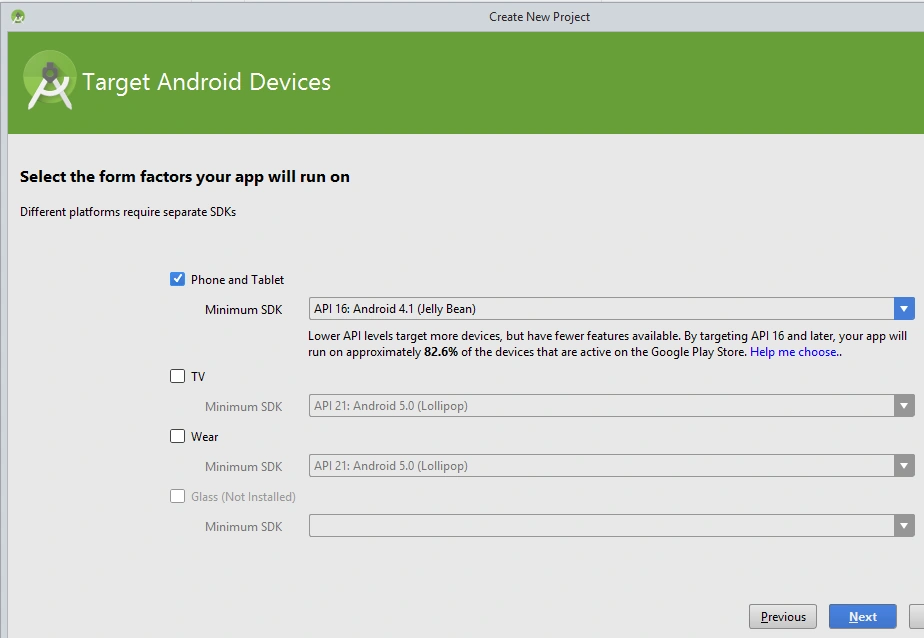
Click Next and select Blank Activity,
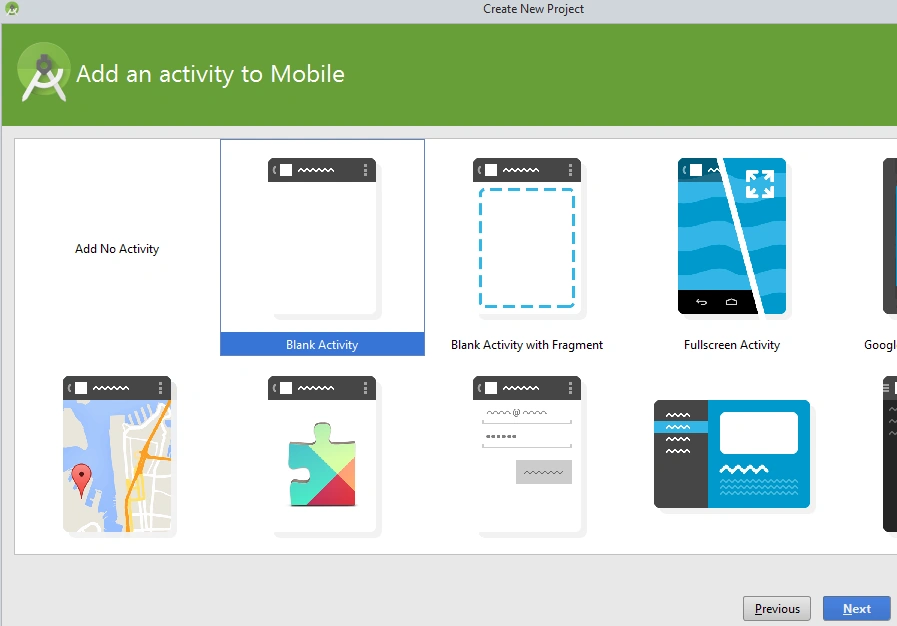
Click Next and by default, a blank activity with name MainActivity will be displayed,
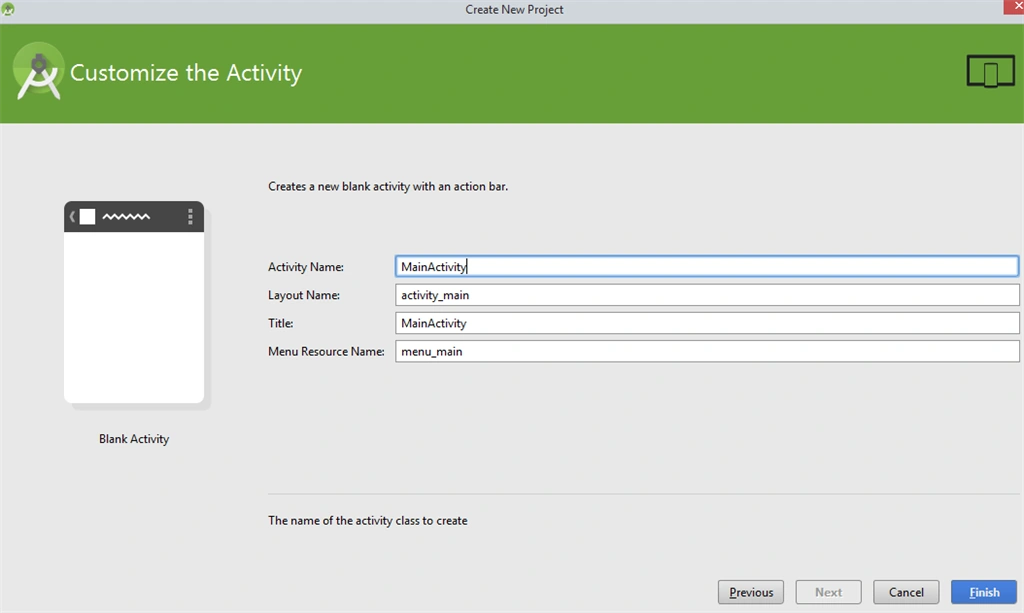

By default, Hello world will be displayed and the application will look like this with MainActivity.
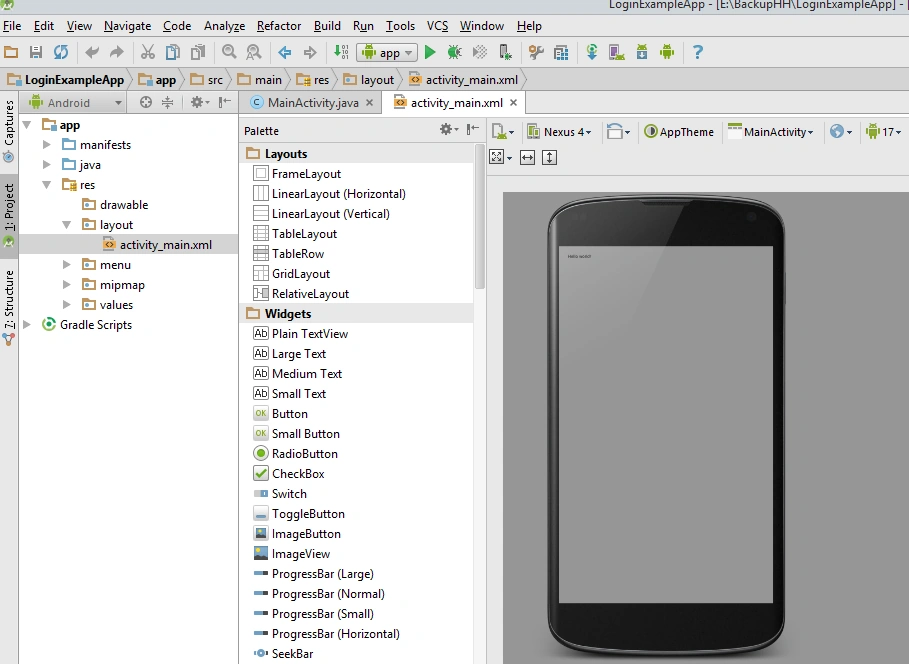
In activity_mail.xml, add TextView control.
- <TextView
- android:layout_width="wrap_content"
- android:layout_height="wrap_content"
- android:id="@+id/textView"
- android:layout_centerHorizontal="true"
- android:textSize="30dp"
- android:text="CRUD for Student using SQLLite"
- />
Add a java class called DBHelper.java to create a database.
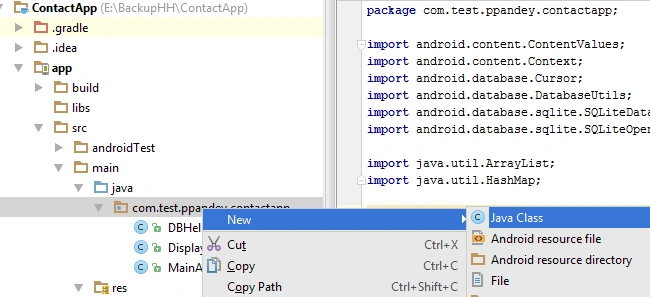
Extend this DBHelper.java class with SQLLiteOpenHelper class. Create a subclass of the SQLLiteOpenHelper class. This class provides the getReadableDatabase() and getWriteableDatabase() methods to get access to an SQLLiteDatabase object.
- package com.test.ppandey.contactapp;
- import android.content.ContentValues;
- import android.content.Context;
- import android.database.Cursor;
- import android.database.DatabaseUtils;
- import android.database.sqlite.SQLiteDatabase;
- import android.database.sqlite.SQLiteOpenHelper;
- import java.util.ArrayList;
- import java.util.HashMap;
- /**
- * Created by ppandey on 12/15/2015.
- */
- public class DBHelper extends SQLiteOpenHelper {
- public static final String DATABASE_NAME = "contactdb.sqlite";
- public static final String CONTACTS_TABLE_NAME = "mycontacts";
- public static final String CONTACTS_COLUMN_ID = "id";
- public static final String CONTACTS_COLUMN_STUNAME = "name";
- public static final String CONTACTS_COLUMN_STUPHONE = "phone";
- public static final String CONTACTS_COLUMN_STUSTREET = "street";
- public static final String CONTACTS_COLUMN_STUEMAIL = "email";
- public static final String CONTACTS_COLUMN_STUCITY = "place";
- private HashMap hp;
- public DBHelper(Context context)
- {
- super(context, DATABASE_NAME , null, 3);
- }
- @Override
- public void onCreate(SQLiteDatabase db) {
- db.execSQL(
- "create table mycontacts " +
- "(id integer primary key autoincrement, name text,phone text,email text, street text,place text)"
- );
- }
- @Override
- public void onUpgrade(SQLiteDatabase db, int oldVersion, int newVersion) {
- db.execSQL("DROP TABLE IF EXISTS mycontacts");
- onCreate(db);
- }
- public boolean addStudentContact(String contactname,String contactphone,String contactstreet,String contactemail, String contactplace){
- /*,*/
- SQLiteDatabase db=this.getWritableDatabase();
- ContentValues contantValues = new ContentValues();
- contantValues.put("name",contactname);
- contantValues.put("phone", contactphone);
- contantValues.put("street",contactstreet);
- contantValues.put("email",contactemail);
- contantValues.put("place",contactplace);
- db.insert("mycontacts", null, contantValues);
- db.close();
- return true;
- }
- public boolean updateStudentContact(Integer contactid,String contactname,String contactphone,String contactstreet,String contactemail, String contactplace)
- {
- /*,String contactname,*/
- SQLiteDatabase db=this.getWritableDatabase();
- ContentValues contantValues = new ContentValues();
- contantValues.put("name",contactname);
- contantValues.put("phone", contactphone);
- contantValues.put("street",contactstreet);
- contantValues.put("email",contactemail);
- contantValues.put("place",contactplace);
- db.update("mycontacts", contantValues, "id = ?", new String[]{Integer.toString(contactid)});
- db.close();
- return true;
- }
- public Integer deleteContact(Integer id){
- SQLiteDatabase db=this.getWritableDatabase();
- return db.delete("mycontacts","id = ?",new String[]{Integer.toString(id)});
- }
- public Cursor getData(int contactid){
- SQLiteDatabase db=this.getWritableDatabase();
- Cursor res=db.rawQuery("Select * from mycontacts where id = " + contactid + "", null);
- return res;
- }
- public int numberOfRows(){
- SQLiteDatabase db=this.getWritableDatabase();
- int numRows=(int) DatabaseUtils.queryNumEntries(db,CONTACTS_TABLE_NAME);
- return numRows;
- }
- public ArrayList<String> getAllStudentContacts(){
- ArrayList<String> arraylist= new ArrayList<String>();
- SQLiteDatabase db=this.getReadableDatabase();
- Cursor cursor=db.rawQuery("Select * from mycontacts",null);
- if (cursor.moveToFirst()) {
- do {
- arraylist.add(cursor.getString(cursor.getColumnIndex(CONTACTS_COLUMN_STUNAME)));
- } while (cursor.moveToNext());
- }
- return arraylist;
- }
- }
- <ScrollView xmlns:android="http://schemas.android.com/apk/res/android"
- xmlns:tools="http://schemas.android.com/tools"
- android:layout_width="match_parent"
- android:layout_height="wrap_content"
- android:id="@+id/scrollView1"
- >
- <RelativeLayout
- android:layout_width="match_parent"
- android:layout_height="350dp"
- android:paddingLeft="@dimen/activity_horizontal_margin"
- android:paddingRight="@dimen/activity_horizontal_margin"
- android:paddingTop="@dimen/activity_vertical_margin"
- android:paddingBottom="@dimen/activity_vertical_margin"
- tools:context="com.test.ppandey.contactapp.DisplayContact">
- <EditText
- android:id="@+id/editTextName"
- android:layout_width="wrap_content"
- android:layout_height="wrap_content"
- android:layout_alignParentLeft="true"
- android:layout_marginTop="5dp"
- android:layout_marginLeft="82dp"
- android:ems="10"
- android:inputType="text" >
- </EditText>
- <EditText
- android:id="@+id/editTextEmail"
- android:layout_width="wrap_content"
- android:layout_height="wrap_content"
- android:layout_alignLeft="@+id/editTextStreet"
- android:layout_below="@+id/editTextStreet"
- android:layout_marginTop="22dp"
- android:ems="10"
- android:inputType="textEmailAddress" />
- <TextView
- android:id="@+id/textView1"
- android:layout_width="wrap_content"
- android:layout_height="wrap_content"
- android:layout_alignBottom="@+id/editTextName"
- android:layout_alignParentLeft="true"
- android:text="@string/name"
- android:textAppearance="?android:attr/textAppearanceMedium" />
- <Button
- android:id="@+id/button1"
- android:layout_width="wrap_content"
- android:layout_height="wrap_content"
- android:layout_alignLeft="@+id/editTextCity"
- android:layout_alignParentBottom="true"
- android:layout_marginBottom="28dp"
- android:onClick="saveData"
- android:text="@string/save" />
- <TextView
- android:id="@+id/textView2"
- android:layout_width="wrap_content"
- android:layout_height="wrap_content"
- android:layout_alignBottom="@+id/editTextEmail"
- android:layout_alignLeft="@+id/textView1"
- android:text="@string/email"
- android:textAppearance="?android:attr/textAppearanceMedium" />
- <TextView
- android:id="@+id/textView5"
- android:layout_width="wrap_content"
- android:layout_height="wrap_content"
- android:layout_alignBottom="@+id/editTextPhone"
- android:layout_alignLeft="@+id/textView1"
- android:text="@string/phone"
- android:textAppearance="?android:attr/textAppearanceMedium" />
- <TextView
- android:id="@+id/textView4"
- android:layout_width="wrap_content"
- android:layout_height="wrap_content"
- android:layout_above="@+id/editTextEmail"
- android:layout_alignLeft="@+id/textView5"
- android:text="@string/street"
- android:textAppearance="?android:attr/textAppearanceMedium" />
- <EditText
- android:id="@+id/editTextCity"
- android:layout_width="wrap_content"
- android:layout_height="wrap_content"
- android:layout_alignRight="@+id/editTextName"
- android:layout_below="@+id/editTextEmail"
- android:layout_marginTop="30dp"
- android:ems="10"
- android:inputType="text" />
- <TextView
- android:id="@+id/textView3"
- android:layout_width="wrap_content"
- android:layout_height="wrap_content"
- android:layout_alignBaseline="@+id/editTextCity"
- android:layout_alignBottom="@+id/editTextCity"
- android:layout_alignParentLeft="true"
- android:layout_toLeftOf="@+id/editTextEmail"
- android:text="@string/country"
- android:textAppearance="?android:attr/textAppearanceMedium" />
- <EditText
- android:id="@+id/editTextStreet"
- android:layout_width="wrap_content"
- android:layout_height="wrap_content"
- android:layout_alignLeft="@+id/editTextName"
- android:layout_below="@+id/editTextPhone"
- android:ems="10"
- android:inputType="text" >
- <requestFocus />
- </EditText>
- <EditText
- android:id="@+id/editTextPhone"
- android:layout_width="wrap_content"
- android:layout_height="wrap_content"
- android:layout_alignLeft="@+id/editTextStreet"
- android:layout_below="@+id/editTextName"
- android:ems="10"
- android:inputType="phone|text" />
- </RelativeLayout>
- </ScrollView>
- package com.test.ppandey.contactapp;
- import android.app.AlertDialog;
- import android.content.DialogInterface;
- import android.content.Intent;
- import android.database.Cursor;
- import android.support.v7.app.ActionBarActivity;
- import android.os.Bundle;
- import android.view.Menu;
- import android.view.MenuItem;
- import android.view.View;
- import android.widget.Button;
- import android.widget.TextView;
- import android.widget.Toast;
- public class DisplayContact extends ActionBarActivity {
- int from_Where_I_Am_Coming = 0;
- private DBHelper mydb;
- TextView name;
- TextView phone;
- TextView email;
- TextView street;
- TextView place;
- int id_To_Update = 0;
- @Override
- protected void onCreate(Bundle savedInstanceState) {
- super.onCreate(savedInstanceState);
- setContentView(R.layout.activity_display_contact);
- name = (TextView) findViewById(R.id.editTextName);
- phone = (TextView) findViewById(R.id.editTextPhone);
- email = (TextView) findViewById(R.id.editTextStreet);
- street = (TextView) findViewById(R.id.editTextEmail);
- place = (TextView) findViewById(R.id.editTextCity);
- mydb = new DBHelper(this);
- Bundle extras = getIntent().getExtras();
- {
- int Value = extras.getInt("id");
- if (Value > 0) {
- //means this is the view part not the add contact part.
- Cursor rs = mydb.getData(Value);
- id_To_Update = Value;
- rs.moveToFirst();
- String stuname = rs.getString(rs.getColumnIndex(DBHelper.CONTACTS_COLUMN_STUNAME));
- String stuphone = rs.getString(rs.getColumnIndex(DBHelper.CONTACTS_COLUMN_STUPHONE));
- String stuemail = rs.getString(rs.getColumnIndex(DBHelper.CONTACTS_COLUMN_STUEMAIL));
- String stustreet = rs.getString(rs.getColumnIndex(DBHelper.CONTACTS_COLUMN_STUSTREET));
- String stuplace = rs.getString(rs.getColumnIndex(DBHelper.CONTACTS_COLUMN_STUCITY));
- if (!rs.isClosed()) {
- rs.close();
- }
- Button b = (Button) findViewById(R.id.button1);
- b.setVisibility(View.INVISIBLE);
- name.setText((CharSequence) stuname);
- name.setFocusable(false);
- name.setClickable(false);
- phone.setText((CharSequence) stuphone);
- phone.setFocusable(false);
- phone.setClickable(false);
- email.setText((CharSequence) stuemail);
- email.setFocusable(false);
- email.setClickable(false);
- street.setText((CharSequence) stustreet);
- street.setFocusable(false);
- street.setClickable(false);
- place.setText((CharSequence) stuplace);
- place.setFocusable(false);
- place.setClickable(false);
- }
- }
- }
- @Override
- public boolean onCreateOptionsMenu(Menu menu) {
- // Inflate the menu; this adds items to the action bar if it is present.
- Bundle extras = getIntent().getExtras();
- if (extras != null) {
- int Value = extras.getInt("id");
- if (Value > 0) {
- getMenuInflater().inflate(R.menu.menu_display_contact, menu);
- } else {
- getMenuInflater().inflate(R.menu.menu_main, menu);
- }
- }
- return true;
- }
- @Override
- public boolean onOptionsItemSelected(MenuItem item) {
- // Handle action bar item clicks here. The action bar will
- // automatically handle clicks on the Home/Up button, so long
- // as you specify a parent activity in AndroidManifest.xml.
- super.onOptionsItemSelected(item);
- switch (item.getItemId()) {
- case R.id.Edit_Contact:
- Button b = (Button) findViewById(R.id.button1);
- b.setVisibility(View.VISIBLE);
- name.setEnabled(true);
- name.setFocusableInTouchMode(true);
- name.setClickable(true);
- phone.setEnabled(true);
- phone.setFocusableInTouchMode(true);
- phone.setClickable(true);
- email.setEnabled(true);
- email.setFocusableInTouchMode(true);
- email.setClickable(true);
- street.setEnabled(true);
- street.setFocusableInTouchMode(true);
- street.setClickable(true);
- place.setEnabled(true);
- place.setFocusableInTouchMode(true);
- place.setClickable(true);
- return true;
- case R.id.Delete_Contact:
- AlertDialog.Builder builder = new AlertDialog.Builder(this);
- builder.setMessage(R.string.deleteContact)
- .setPositiveButton(R.string.yes, new DialogInterface.OnClickListener() {
- public void onClick(DialogInterface dialog, int id) {
- mydb.deleteContact(id_To_Update);
- Toast.makeText(getApplicationContext(), "Deleted Successfully", Toast.LENGTH_SHORT).show();
- Intent intent = new Intent(getApplicationContext(), MainActivity.class);
- startActivity(intent);
- }
- })
- .setNegativeButton(R.string.no, new DialogInterface.OnClickListener() {
- public void onClick(DialogInterface dialog, int id) {
- // User cancelled the dialog
- }
- });
- AlertDialog d = builder.create();
- d.setTitle("Are you sure ?");
- d.show();
- return true;
- default:
- return super.onOptionsItemSelected(item);
- }
- }
- public void saveData(View view) {
- /*, */
- /* mydb.addContact(name.getText().toString(),email.getText().toString(), street.getText().toString(), place.getText().toString(), phone.getText().toString());
- finish();*/
- Bundle extras = getIntent().getExtras();
- if (extras != null) {
- int Value = extras.getInt("id");
- if (Value > 0) {
- if (mydb.updateStudentContact(id_To_Update, name.getText().toString(), phone.getText().toString(), street.getText().toString(),email.getText().toString(), place.getText().toString())) {
- Toast.makeText(getApplicationContext(), "Successfully Updated", Toast.LENGTH_SHORT).show();
- Intent intent = new Intent(getApplicationContext(), MainActivity.class);
- startActivity(intent);
- } else {
- Toast.makeText(getApplicationContext(), "Record not updated", Toast.LENGTH_SHORT).show();
- }
- } else {
- if (mydb.addStudentContact(name.getText().toString(), phone.getText().toString(),street.getText().toString(), email.getText().toString(), place.getText().toString())) {
- Toast.makeText(getApplicationContext(), "Successfully Added", Toast.LENGTH_SHORT).show();
- } else {
- Toast.makeText(getApplicationContext(), "Record not added", Toast.LENGTH_SHORT).show();
- }
- Intent intent = new Intent(getApplicationContext(), MainActivity.class);
- startActivity(intent);
- }
- }
- }
- }
Added strings.xml file in values folder and add the following code.
- <?xml version="1.0" encoding="utf-8"?>
- <resources>
- <string name="app_name">ContactApp</string>
- <string name="hello_world">Hello world!</string>
- <string name="action_settings">Settings</string>
- <string name="title_activity_display_contact">DisplayContact</string>
- <string name="Add_New">Add New</string>
- <string name="edit">Edit Contact</string>
- <string name="delete">Delete Contact</string>
- <string name="name">Name</string>
- <string name="phone">Phone</string>
- <string name="email">Email</string>
- <string name="street">Street</string>
- <string name="country">City/State/Zip</string>
- <string name="save">Save Contact</string>
- <string name="deleteContact">Are you sure, you want to delete it.</string>
- <string name="yes">Yes</string>
- <string name="no">No</string>
- </resources>
In MainActivity.java class, first, create an object of DBHelper class. Using the getAllStudentContacts method, bind the listview objects with the student name.

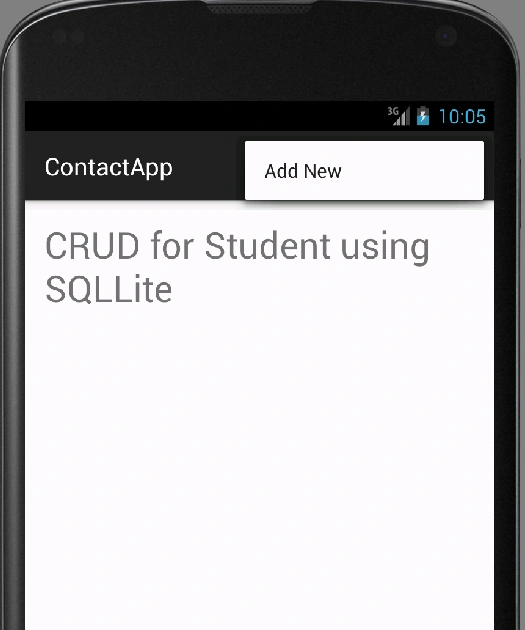
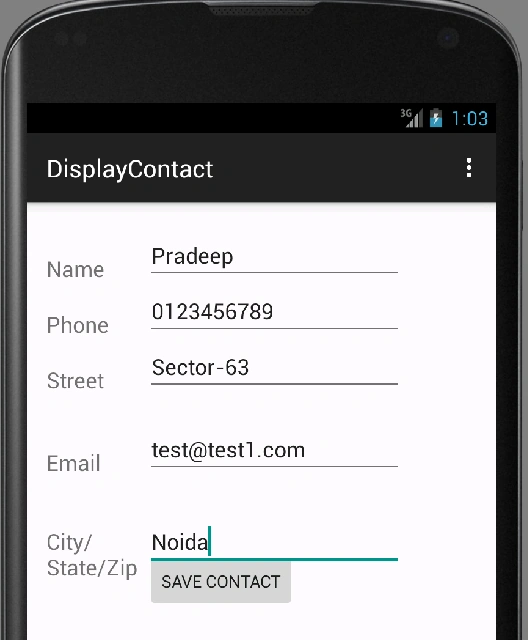
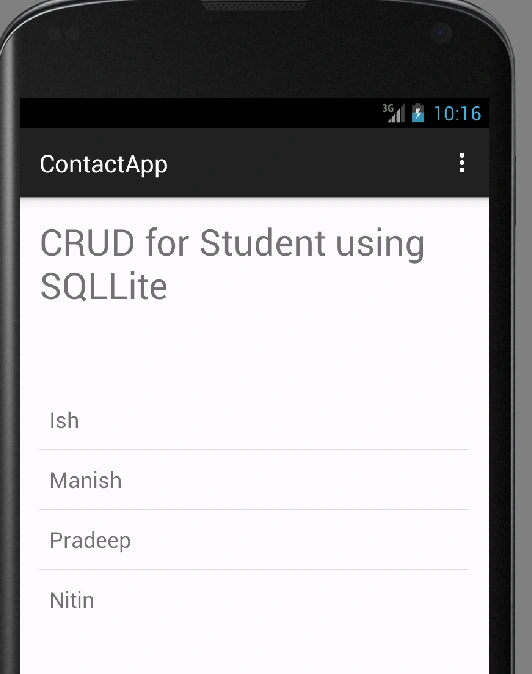
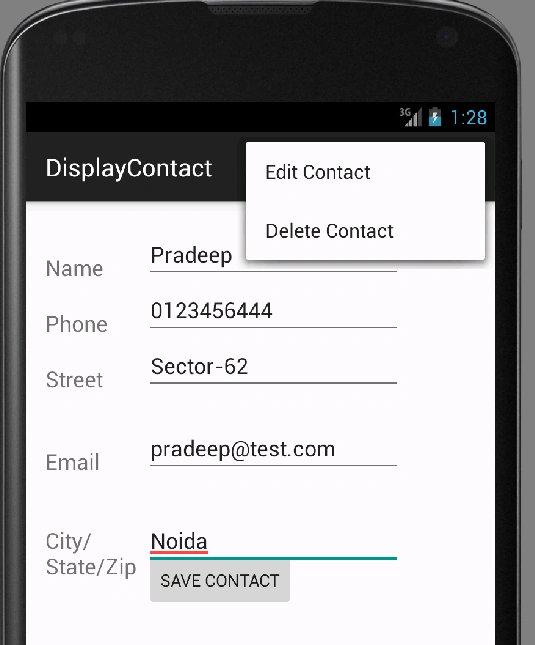
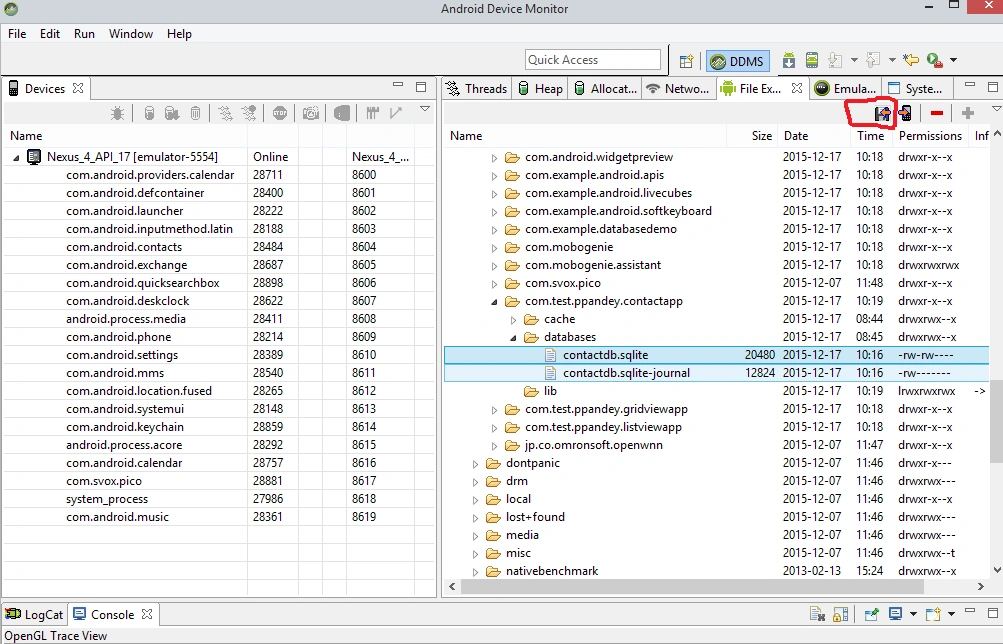
So, now we can see the database using Android Device Monitor.
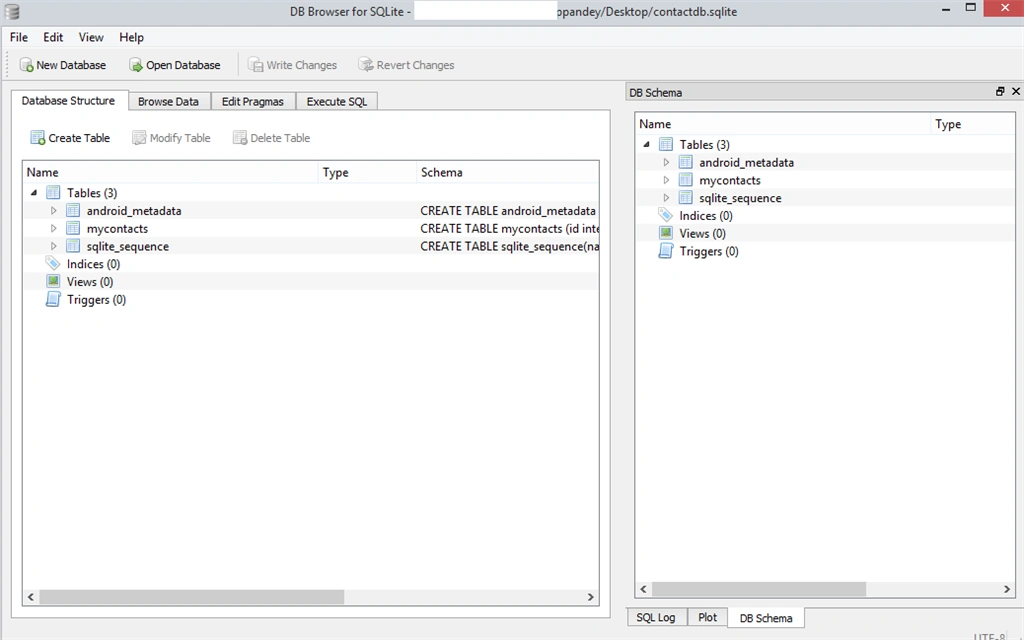
Open the SQLite browser to open the database.

Fernanda GutembergPosted Nov 16, 2021, 5:20 PM
Great job, could develop a CRUD using FLUTTER in Android Studio, thanks
AJAY donorPosted Dec 30, 2015, 6:53 AM
Please Lat,s me soon as possible
AJAY donorPosted Dec 30, 2015, 6:52 AM
Hi Pradip I am .net beground I want learn Android with mvc .net. so how to start learn.
Joe WilsonPosted Dec 26, 2015, 2:15 PM
Well, it was great.
Santhakumar MunuswamyPosted Dec 22, 2015, 10:50 AM
Good work. keep it up
Atul RawatPosted Dec 21, 2015, 8:29 AM
nice article sir
Ish BandhuPosted Dec 20, 2015, 11:27 PM
Excelent Work
Harshad PansuriyaPosted Dec 19, 2015, 7:30 AM
Nice one .can you post the CRUD App using Web Server not any DataBase I Really need that Concept...????
Humayun Kabir MamunPosted Dec 18, 2015, 4:48 AM
Nice...
Ankur MistryPosted Dec 18, 2015, 12:52 AM
excellent work
Blocked AccountPosted Dec 17, 2015, 11:36 PM
Nice Article