
While working on big Applications (like legacy applications – with more than 20-30 projects), most of us find it difficult to start a new instance of the specific project.
Most of us are habituated to do F5 (Start) button, by default, whereas the requirement is to start the new instance of the project.
The traditional way to do this is by using mouse right click on the project and going to Debug, followed by Start New Instance. According to the time taken, it becomes a tedious process, where you are debugging something over and over to find/solve the bug. Usually, there is no direct way where you can specify that this keyboard shortcut is for this purpose.
Here is how you can fix it by creating a shortcut for the same in Visual Studio 2015.
Navigate to Tools-Options.
Navigate further to Environment-Keyboard.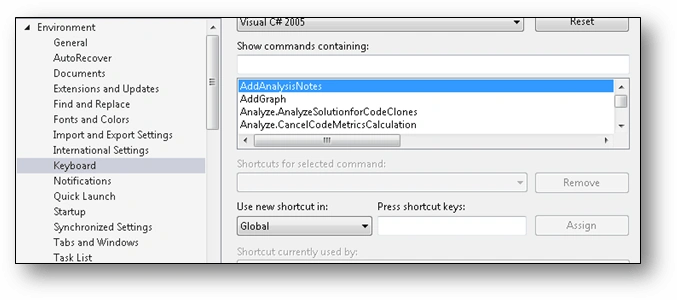
Look for the text containing.
‘ClassViewContextMenus.ClassViewProject.Debug.Startnewinstance’.
Once you find it, select it and navigate to click Shortcut Key command box.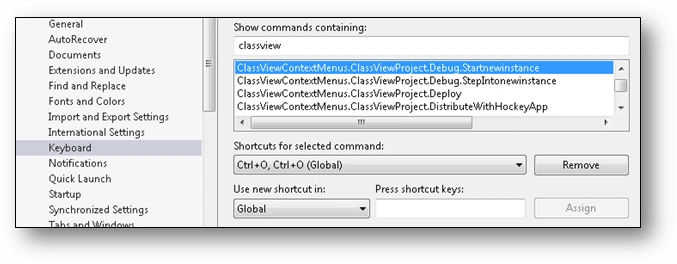
Apply the key strokes you are fine with and hit Assign.
That’s it, you are all set to save some seconds on each Debug session.

Creating Visual Studio Debug Shortcut
Join the conversation! Your thoughts help the community grow.
Sign in to leave a comment
It is the same account you read, post and publish with — and you will come straight back to this page.
Prasanna MuraliPosted Aug 4, 2016, 10:58 AM
Nice share..
Tapan PatelPosted Aug 4, 2016, 8:49 AM
Thank you Guys.
Vignesh ManiPosted Aug 4, 2016, 7:25 AM
Nice
Nigel FernandesPosted Aug 4, 2016, 7:17 AM
Nice
Joginder BangerPosted Aug 4, 2016, 1:13 AM
Is that possible old version of VS or any add on are required for older version.