

Introduction
Xamarin is a development platform, which allows us to code native, cross-platform iOS, Android and Windows phone apps in C#.
UI Designers
The tools which we use to create mobile user interfaces are called the designers. These generate Extensible Markup Language (XML) files in their respective proprietary file formats. Two designers are available from Xamarin: Xamarin Designer for Android, Xamarin Designer for iOS. With the availability of these designers, the need for the original, native XML editors has diminished. Anything you might need to build Android or iOS UI's can be found in Xamarin’s tools. However, iOS developers still frequently use the Xcode Interface Builder and Android developers (less frequently) use XML editors such as the Android Development Tools (ADT) plug-in for Eclipse. An XML layout is an XML layout and the tool is largely a matter of taste and personal preference and even the decision to use a designer tool lies on him. Some Xamarin developers are opting to code UIs by hand in C# for all the platforms with no designer use whatsoever. I recommend the designers to help them to learn the file formats, UI elements and their properties. Some people use a designer tool like training wheels, until they’re ready to ride freestyle.
Requirements
- Visual Studio RC 2017
- Xamarin Studio Packages should be installed
- Self confidence with creativity
Steps should be followed
Please follow my steps to create sliding Tab layout interface to use this tutorial effectively.
Step 1
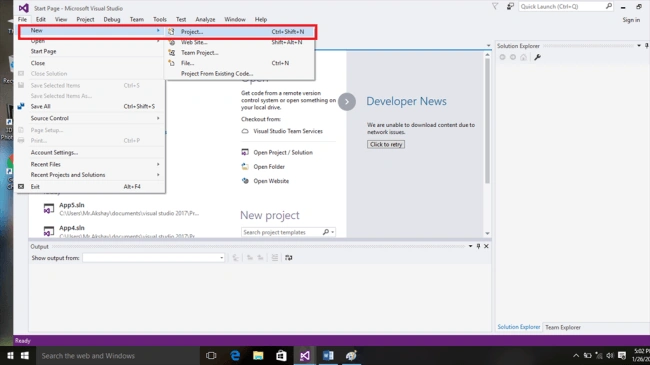
Launch Visual Studio RC 2017 and go to file new project.
Step 2
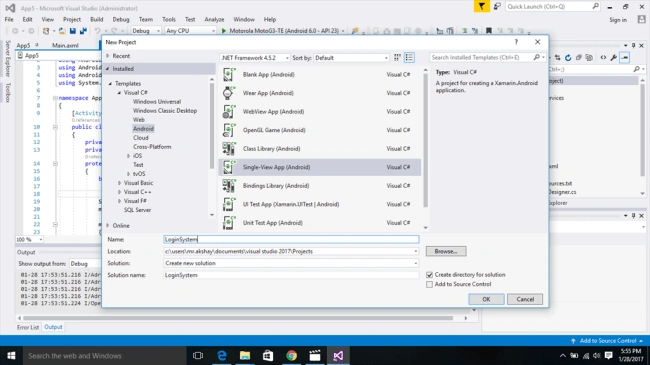
There is a need to select Android template from the list, name the Application, press to create the Project and select where to save the project.
Step 3
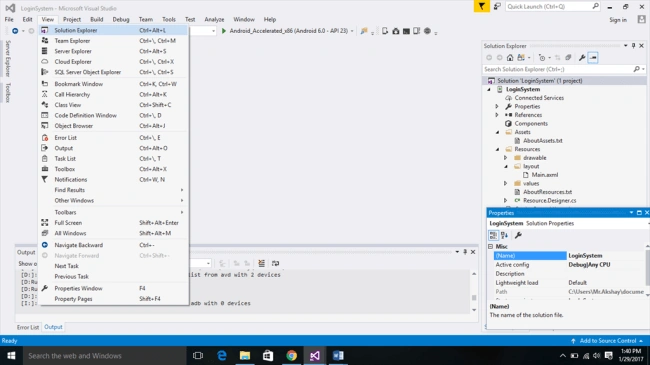
Here, we go to our new project has been created and then we need to navigate to Designer Page. To open the Designer page, you need to open Solution Explorer ViewàSolution Explorer.
Step 4
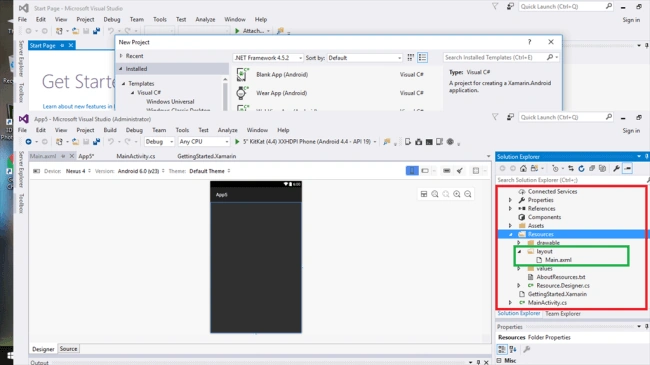
Now, open Designer page and in Solution ExploreràResourcesàLayoutàMain.Xaml, you need to select, as shown below.
Step 5
Main.axml
- <?xml version="1.0" encoding="utf-8"?>
- <LinearLayout xmlns:android="http://schemas.android.com/apk/res/android"
- android:orientation="vertical"
- android:layout_width="match_parent"
- android:layout_height="match_parent"
- android:background="#E2E2E2"
- android:id="@+id/sample_main_layout">
- <View
- android:layout_width="match_parent"
- android:layout_height="1dp"
- android:background="@android:color/darker_gray" />
- <FrameLayout
- android:id="@+id/sample_content_fragment"
- android:layout_weight="2"
- android:layout_width="match_parent"
- android:layout_height="0px" />
- </LinearLayout>
- <?xml version="1.0" encoding="utf-8"?>
- <LinearLayout xmlns:android="http://schemas.android.com/apk/res/android"
- android:layout_width="match_parent"
- android:layout_height="match_parent"
- android:orientation="vertical"
- android:gravity="center">
- <TextView
- android:id="@+id/item_subtitle"
- android:layout_width="wrap_content"
- android:layout_height="wrap_content"
- android:textAppearance="?android:attr/textAppearanceLarge"
- android:text="Page:" />
- <TextView
- android:id="@+id/item_title"
- android:layout_width="wrap_content"
- android:layout_height="wrap_content"
- android:textSize="80sp" />
- </LinearLayout>
- <?xml version="1.0" encoding="utf-8"?>
- <LinearLayout xmlns:android="http://schemas.android.com/apk/res/android"
- android:layout_width="match_parent"
- android:layout_height="match_parent"
- android:orientation="vertical">
- <SlidingTabLayoutTutorial.SlidingTabScrollView
- android:id="@+id/sliding_tabs"
- android:layout_width="match_parent"
- android:layout_height="wrap_content" />
- <android.support.v4.view.ViewPager
- android:id="@+id/viewpager"
- android:layout_width="match_parent"
- android:layout_height="0px"
- android:layout_weight="1"
- android:background="@android:color/white" />
- </LinearLayout>
Add C# code given below in your project under .SlidingTabLayoutTutorials.
MainActivity.cs
- using System;
- using Android.App;
- using Android.Content;
- using Android.Runtime;
- using Android.Views;
- using Android.Widget;
- using Android.OS;
- using App10;
- namespace SlidingTabLayoutTutorial
- {
- [Activity(Label = "Sliding Tab Layout", MainLauncher = true, Icon = "@drawable/xs")]
- public class MainActivity : Activity
- {
- protected override void OnCreate(Bundle bundle)
- {
- base.OnCreate(bundle);
- // Set our view from the "main" layout resource
- SetContentView(Resource.Layout.Main);
- FragmentTransaction transaction = FragmentManager.BeginTransaction();
- SlidingTabsFragment fragment = new SlidingTabsFragment();
- transaction.Replace(Resource.Id.sample_content_fragment, fragment);
- transaction.Commit();
- }
- public override bool OnCreateOptionsMenu(IMenu menu)
- {
- MenuInflater.Inflate(Resource.Menu.actionbar_main, menu);
- return base.OnCreateOptionsMenu(menu);
- }
- }
- }
- using System;
- using System.Linq;
- using Android.Content;
- using Android.OS;
- using Android.Views;
- using Android.Widget;
- using Android.Util;
- namespace SlidingTabLayoutTutorial
- {
- public class SlidingTabScrollView : HorizontalScrollView
- {
- private const int TITLE_OFFSET_DIPS = 24;
- private const int TAB_VIEW_PADDING_DIPS = 16;
- private const int TAB_VIEW_TEXT_SIZE_SP = 12;
- private int mTitleOffset;
- private int mTabViewLayoutID;
- private int mTabViewTextViewID;
- private ViewPager mViewPager;
- private ViewPager.IOnPageChangeListener mViewPagerPageChangeListener;
- private static SlidingTabStrip mTabStrip;
- private int mScrollState;
- public interface TabColorizer
- {
- int GetIndicatorColor(int position);
- int GetDividerColor(int position);
- }
- public SlidingTabScrollView(Context context) : this(context, null) { }
- public SlidingTabScrollView(Context context, IAttributeSet attrs) : this(context, attrs, 0) { }
- public SlidingTabScrollView (Context context, IAttributeSet attrs, int defaultStyle) : base(context, attrs, defaultStyle)
- {
- //Disable the scroll bar
- HorizontalScrollBarEnabled = false;
- //Make sure the tab strips fill the view
- FillViewport = true;
- this.SetBackgroundColor(Android.Graphics.Color.Rgb(0xE5, 0xE5, 0xE5)); //Gray color
- mTitleOffset = (int)(TITLE_OFFSET_DIPS * Resources.DisplayMetrics.Density);
- mTabStrip = new SlidingTabStrip(context);
- this.AddView(mTabStrip, LayoutParams.MatchParent, LayoutParams.MatchParent);
- }
- public TabColorizer CustomTabColorizer
- {
- set { mTabStrip.CustomTabColorizer = value; }
- }
- public int [] SelectedIndicatorColor
- {
- set { mTabStrip.SelectedIndicatorColors = value; }
- }
- public int [] DividerColors
- {
- set { mTabStrip.DividerColors = value; }
- }
- public ViewPager.IOnPageChangeListener OnPageListener
- {
- set { mViewPagerPageChangeListener = value; }
- }
- public ViewPager ViewPager
- {
- set
- {
- mTabStrip.RemoveAllViews();
- mViewPager = value;
- if (value != null)
- {
- value.PageSelected += value_PageSelected;
- value.PageScrollStateChanged += value_PageScrollStateChanged;
- value.PageScrolled += value_PageScrolled;
- PopulateTabStrip();
- }
- }
- }
- void value_PageScrolled(object sender, ViewPager.PageScrolledEventArgs e)
- {
- int tabCount = mTabStrip.ChildCount;
- if ((tabCount == 0) || (e.Position < 0) || (e.Position >= tabCount))
- {
- //if any of these conditions apply, return, no need to scroll
- return;
- }
- mTabStrip.OnViewPagerPageChanged(e.Position, e.PositionOffset);
- View selectedTitle = mTabStrip.GetChildAt(e.Position);
- int extraOffset = (selectedTitle != null ? (int)(e.Position * selectedTitle.Width) : 0);
- ScrollToTab(e.Position, extraOffset);
- if (mViewPagerPageChangeListener != null)
- {
- mViewPagerPageChangeListener.OnPageScrolled(e.Position, e.PositionOffset, e.PositionOffsetPixels);
- }
- }
- void value_PageScrollStateChanged(object sender, ViewPager.PageScrollStateChangedEventArgs e)
- {
- mScrollState = e.State;
- if (mViewPagerPageChangeListener != null)
- {
- mViewPagerPageChangeListener.OnPageScrollStateChanged(e.State);
- }
- }
- void value_PageSelected(object sender, ViewPager.PageSelectedEventArgs e)
- {
- if (mScrollState == ViewPager.ScrollStateIdle)
- {
- mTabStrip.OnViewPagerPageChanged(e.Position, 0f);
- ScrollToTab(e.Position, 0);
- }
- if (mViewPagerPageChangeListener != null)
- {
- mViewPagerPageChangeListener.OnPageSelected(e.Position);
- }
- }
- private void PopulateTabStrip()
- {
- PagerAdapter adapter = mViewPager.Adapter;
- for (int i = 0; i < adapter.Count; i++)
- {
- TextView tabView = CreateDefaultTabView(Context);
- tabView.Text = ((SlidingTabsFragment.SamplePagerAdapter)adapter).GetHeaderTitle(i);
- tabView.SetTextColor(Android.Graphics.Color.Black);
- tabView.Tag = i;
- tabView.Click += tabView_Click;
- mTabStrip.AddView(tabView);
- }
- }
- void tabView_Click(object sender, EventArgs e)
- {
- TextView clickTab = (TextView)sender;
- int pageToScrollTo = (int)clickTab.Tag;
- mViewPager.CurrentItem = pageToScrollTo;
- }
- private TextView CreateDefaultTabView(Android.Content.Context context)
- {
- TextView textView = new TextView(context);
- textView.Gravity = GravityFlags.Center;
- textView.SetTextSize(ComplexUnitType.Sp, TAB_VIEW_TEXT_SIZE_SP);
- textView.Typeface = Android.Graphics.Typeface.DefaultBold;
- if (Build.VERSION.SdkInt >= Android.OS.BuildVersionCodes.Honeycomb)
- {
- TypedValue outValue = new TypedValue();
- Context.Theme.ResolveAttribute(Android.Resource.Attribute.SelectableItemBackground, outValue, false);
- textView.SetBackgroundResource(outValue.ResourceId);
- }
- if (Build.VERSION.SdkInt >= Android.OS.BuildVersionCodes.IceCreamSandwich)
- {
- textView.SetAllCaps(true);
- }
- int padding = (int)(TAB_VIEW_PADDING_DIPS * Resources.DisplayMetrics.Density);
- textView.SetPadding(padding, padding, padding, padding);
- return textView;
- }
- protected override void OnAttachedToWindow()
- {
- base.OnAttachedToWindow();
- if (mViewPager != null)
- {
- ScrollToTab(mViewPager.CurrentItem, 0);
- }
- }
- private void ScrollToTab(int tabIndex, int extraOffset)
- {
- int tabCount = mTabStrip.ChildCount;
- if (tabCount == 0 || tabIndex < 0 || tabIndex >= tabCount)
- {
- //No need to go further, dont scroll
- return;
- }
- View selectedChild = mTabStrip.GetChildAt(tabIndex);
- if (selectedChild != null)
- {
- int scrollAmountX = selectedChild.Left + extraOffset;
- if (tabIndex >0 || extraOffset > 0)
- {
- scrollAmountX -= mTitleOffset;
- }
- this.ScrollTo(scrollAmountX, 0);
- }
- }
- }
- }
- using System;
- using System.Collections.Generic;
- using System.Linq;
- using System.Text;
- using Android.App;
- using Android.Content;
- using Android.OS;
- using Android.Runtime;
- using Android.Util;
- using Android.Views;
- using Android.Widget;
- using Android.Support.V4.View;
- namespace SlidingTabLayoutTutorial
- {
- public class SlidingTabsFragment : Fragment
- {
- private SlidingTabScrollView mSlidingTabScrollView;
- private ViewPager mViewPager;
- public override View OnCreateView(LayoutInflater inflater, ViewGroup container, Bundle savedInstanceState)
- {
- return inflater.Inflate(Resource.Layout.fragment_sample, container, false);
- }
- public override void OnViewCreated(View view, Bundle savedInstanceState)
- {
- mSlidingTabScrollView = view.FindViewById<SlidingTabScrollView>(Resource.Id.sliding_tabs);
- mViewPager = view.FindViewById<ViewPager>(Resource.Id.viewpager);
- mViewPager.Adapter = new SamplePagerAdapter();
- mSlidingTabScrollView.ViewPager = mViewPager;
- }
- public class SamplePagerAdapter : PagerAdapter
- {
- List<string> items = new List<string>();
- public SamplePagerAdapter() : base()
- {
- items.Add("Xamarin");
- items.Add("Android");
- items.Add("Tutorial");
- items.Add("Part");
- items.Add("12");
- items.Add("Hooray");
- }
- public override int Count
- {
- get { return items.Count; }
- }
- public override bool IsViewFromObject(View view, Java.Lang.Object obj)
- {
- return view == obj;
- }
- public override Java.Lang.Object InstantiateItem(ViewGroup container, int position)
- {
- View view = LayoutInflater.From(container.Context).Inflate(Resource.Layout.pager_item, container, false);
- container.AddView(view);
- TextView txtTitle = view.FindViewById<TextView>(Resource.Id.item_title);
- int pos = position + 1;
- txtTitle.Text = pos.ToString();
- return view;
- }
- public string GetHeaderTitle (int position)
- {
- return items[position];
- }
- public override void DestroyItem(ViewGroup container, int position, Java.Lang.Object obj)
- {
- container.RemoveView((View)obj);
- }
- }
- }
- }
- using System;
- using System.Collections.Generic;
- using System.Linq;
- using System.Text;
- using Android.App;
- using Android.Content;
- using Android.OS;
- using Android.Runtime;
- using Android.Views;
- using Android.Widget;
- using Android.Graphics;
- using Android.Util;
- namespace SlidingTabLayoutTutorial
- {
- public class SlidingTabStrip : LinearLayout
- {
- //Copy and paste from here................................................................
- private const int DEFAULT_BOTTOM_BORDER_THICKNESS_DIPS = 2;
- private const byte DEFAULT_BOTTOM_BORDER_COLOR_ALPHA = 0X26;
- private const int SELECTED_INDICATOR_THICKNESS_DIPS = 8;
- private int[] INDICATOR_COLORS = { 0x19A319, 0x0000FC };
- private int[] DIVIDER_COLORS = { 0xC5C5C5 };
- private const int DEFAULT_DIVIDER_THICKNESS_DIPS = 1;
- private const float DEFAULT_DIVIDER_HEIGHT = 0.5f;
- //Bottom border
- private int mBottomBorderThickness;
- private Paint mBottomBorderPaint;
- private int mDefaultBottomBorderColor;
- //Indicator
- private int mSelectedIndicatorThickness;
- private Paint mSelectedIndicatorPaint;
- //Divider
- private Paint mDividerPaint;
- private float mDividerHeight;
- //Selected position and offset
- private int mSelectedPosition;
- private float mSelectionOffset;
- //Tab colorizer
- private SlidingTabScrollView.TabColorizer mCustomTabColorizer;
- private SimpleTabColorizer mDefaultTabColorizer;
- //Stop copy and paste here........................................................................
- //Constructors
- public SlidingTabStrip (Context context) : this(context, null)
- { }
- public SlidingTabStrip (Context context, IAttributeSet attrs) : base(context, attrs)
- {
- SetWillNotDraw(false);
- float density = Resources.DisplayMetrics.Density;
- TypedValue outValue = new TypedValue();
- context.Theme.ResolveAttribute(Android.Resource.Attribute.ColorForeground, outValue, true);
- int themeForeGround = outValue.Data;
- mDefaultBottomBorderColor = SetColorAlpha(themeForeGround, DEFAULT_BOTTOM_BORDER_COLOR_ALPHA);
- mDefaultTabColorizer = new SimpleTabColorizer();
- mDefaultTabColorizer.IndicatorColors = INDICATOR_COLORS;
- mDefaultTabColorizer.DividerColors = DIVIDER_COLORS;
- mBottomBorderThickness = (int)(DEFAULT_BOTTOM_BORDER_THICKNESS_DIPS * density);
- mBottomBorderPaint = new Paint();
- mBottomBorderPaint.Color = GetColorFromInteger(0xC5C5C5); //Gray
- mSelectedIndicatorThickness = (int)(SELECTED_INDICATOR_THICKNESS_DIPS * density);
- mSelectedIndicatorPaint = new Paint();
- mDividerHeight = DEFAULT_DIVIDER_HEIGHT;
- mDividerPaint = new Paint();
- mDividerPaint.StrokeWidth = (int)(DEFAULT_DIVIDER_THICKNESS_DIPS * density);
- }
- public SlidingTabScrollView.TabColorizer CustomTabColorizer
- {
- set
- {
- mCustomTabColorizer = value;
- this.Invalidate();
- }
- }
- public int [] SelectedIndicatorColors
- {
- set
- {
- mCustomTabColorizer = null;
- mDefaultTabColorizer.IndicatorColors = value;
- this.Invalidate();
- }
- }
- public int [] DividerColors
- {
- set
- {
- mDefaultTabColorizer = null;
- mDefaultTabColorizer.DividerColors = value;
- this.Invalidate();
- }
- }
- private Color GetColorFromInteger(int color)
- {
- return Color.Rgb(Color.GetRedComponent(color), Color.GetGreenComponent(color), Color.GetBlueComponent(color));
- }
- private int SetColorAlpha(int color, byte alpha)
- {
- return Color.Argb(alpha, Color.GetRedComponent(color), Color.GetGreenComponent(color), Color.GetBlueComponent(color));
- }
- public void OnViewPagerPageChanged(int position, float positionOffset)
- {
- mSelectedPosition = position;
- mSelectionOffset = positionOffset;
- this.Invalidate();
- }
- protected override void OnDraw(Canvas canvas)
- {
- int height = Height;
- int tabCount = ChildCount;
- int dividerHeightPx = (int)(Math.Min(Math.Max(0f, mDividerHeight), 1f) * height);
- SlidingTabScrollView.TabColorizer tabColorizer = mCustomTabColorizer != null ? mCustomTabColorizer : mDefaultTabColorizer;
- //Thick colored underline below the current selection
- if (tabCount > 0)
- {
- View selectedTitle = GetChildAt(mSelectedPosition);
- int left = selectedTitle.Left;
- int right = selectedTitle.Right;
- int color = tabColorizer.GetIndicatorColor(mSelectedPosition);
- if (mSelectionOffset > 0f && mSelectedPosition < (tabCount - 1))
- {
- int nextColor = tabColorizer.GetIndicatorColor(mSelectedPosition + 1);
- if (color != nextColor)
- {
- color = blendColor(nextColor, color, mSelectionOffset);
- }
- View nextTitle = GetChildAt(mSelectedPosition + 1);
- left = (int)(mSelectionOffset * nextTitle.Left + (1.0f - mSelectionOffset) * left);
- right = (int)(mSelectionOffset * nextTitle.Right + (1.0f - mSelectionOffset) * right);
- }
- mSelectedIndicatorPaint.Color = GetColorFromInteger(color);
- canvas.DrawRect(left, height - mSelectedIndicatorThickness, right, height, mSelectedIndicatorPaint);
- //Creat vertical dividers between tabs
- int separatorTop = (height - dividerHeightPx) / 2;
- for (int i = 0; i < ChildCount; i++)
- {
- View child = GetChildAt(i);
- mDividerPaint.Color = GetColorFromInteger(tabColorizer.GetDividerColor(i));
- canvas.DrawLine(child.Right, separatorTop, child.Right, separatorTop + dividerHeightPx, mDividerPaint);
- }
- canvas.DrawRect(0, height - mBottomBorderThickness, Width, height, mBottomBorderPaint);
- }
- }
- private int blendColor(int color1, int color2, float ratio)
- {
- float inverseRatio = 1f - ratio;
- float r = (Color.GetRedComponent(color1) * ratio) + (Color.GetRedComponent(color2) * inverseRatio);
- float g = (Color.GetGreenComponent(color1) * ratio) + (Color.GetGreenComponent(color2) * inverseRatio);
- float b = (Color.GetBlueComponent(color1) * ratio) + (Color.GetBlueComponent(color2) * inverseRatio);
- return Color.Rgb((int)r, (int)g, (int)b);
- }
- private class SimpleTabColorizer : SlidingTabScrollView.TabColorizer
- {
- private int[] mIndicatorColors;
- private int[] mDividerColors;
- public int GetIndicatorColor(int position)
- {
- return mIndicatorColors[position % mIndicatorColors.Length];
- }
- public int GetDividerColor (int position)
- {
- return mDividerColors[position % mDividerColors.Length];
- }
- public int[] IndicatorColors
- {
- set { mIndicatorColors = value; }
- }
- public int[] DividerColors
- {
- set { mDividerColors = value; }
- }
- }
- }
- }
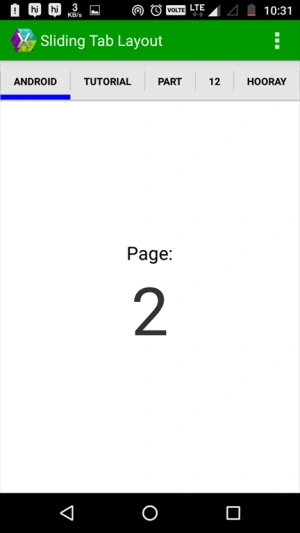
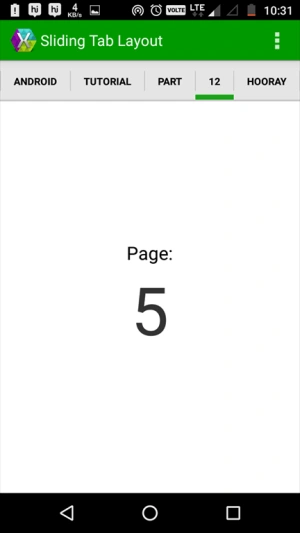
This project shows you how to create SlidingTabLayout.
Output
Thank you for reading.
Nam CastrolPosted Oct 21, 2019, 6:20 AM
How do I change the different layouts generated to reference to different layouts rather than all showing the same xml(Pager_item.xml)
Priya NousPosted Jun 19, 2019, 7:38 AM
How to change the selected tab text color?
Svetlin GrancharovPosted Mar 29, 2019, 9:45 AM
It was published 3 years before from other person. See here: https://www.youtube.com/watch?v=0Rr0ZCvX_Zs&list=PLCuRg51-gw5VqYchUekCqxUS9hEZkDf6l&index=10
Manoj SethiPosted Apr 16, 2018, 2:39 AM
MenuInflater.Inflate(Resource.Menu.actionbar_main, menu); where is this code..?
Manoj SethiPosted Apr 16, 2018, 12:13 AM
I didn't find using app10 here in main activity