

Here, I am going to explain cascading drop down list in MVC, using two approaches.
- Using ADO.NET
- Using Entity framework.
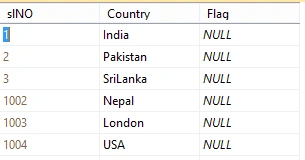
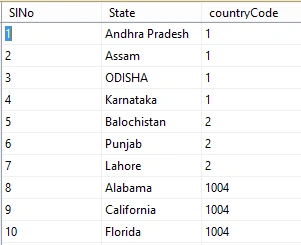
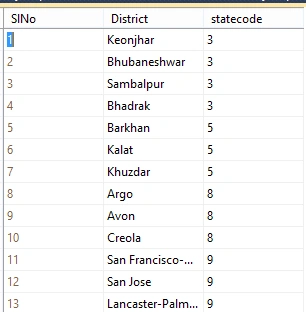
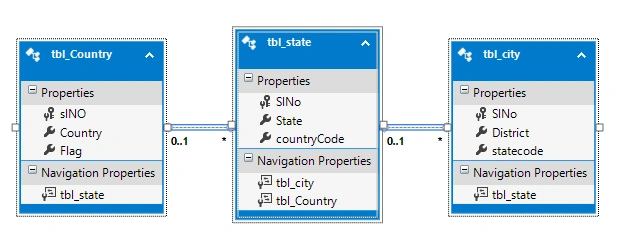
As shown, I have three tables in my database.
- First table is tbl_Country(slNo is Primary Key).
- Second table is tbl_state(slNo is Primary Key, country code is the secondary key with slNo from tbl_country).
- Third table is tbl_city(slNo is the primary key, statecode is the secondary key with slno from tbl_state).
- <connectionStrings>
- <add name="Connect" connectionString="Data Source=DEBENDRA;Initial Catalog=CodeX;User ID=sa;Password=123"/>
- </connectionStrings>
- using System;
- using System.Collections.Generic;
- using System.Linq;
- using System.Web;
- using System.Data.SqlClient;
- using System.Data;
- using System.Configuration;
- using System.Collections;
- using System.Web.Mvc;
- namespace MVC2
- {
- public class DAL
- {
- DataSet ds;
- SqlDataAdapter da;
- public static SqlConnection connect()
- {
- //Reading the connection string from web.config
- string Name = ConfigurationManager.ConnectionStrings["connect"].ConnectionString;
- //Passing the string in sqlconnection.
- SqlConnection con = new SqlConnection(Name);
- //Check wheather the connection is close or not if open close it else open it
- if(con.State==ConnectionState.Open)
- {
- con.Close();
- }
- else
- {
- con.Open();
- }
- return con;
- }
- //Creating a method which accept any type of query from controller to execute and give result.
- //result kept in datatable and send back to the controller.
- public DataTable MyMethod( string Query)
- {
- ds= new DataSet();
- DataTable dt = new DataTable();
- da = new SqlDataAdapter(Query, DAL.connect());
- da.Fill(dt);
- List<SelectListItem> list = new List<SelectListItem>();
- return dt;
- }
- }
- }
- public class HomeController : Controller
- {
- DAL objdal = new DAL();
- public ActionResult Index()
- {
- string countrystring = "select * from tbl_Country";
- DataSet ds = new DataSet();
- List<string> li = new List<string>();
- DataTable dt=new DataTable();
- dt= objdal.MyMethod(countrystring);
- List<SelectListItem> list = new List<SelectListItem>();
- foreach (DataRow row in dt.Rows)
- {
- list.Add(new SelectListItem { Text =Convert.ToString(row.ItemArray[1]),Value=Convert.ToString(row.ItemArray[0])});
- }
- ViewBag.country = list;
- return View();
- }
Add a drop down list in it.
- <div style=" background-color:blanchedalmond; border-color:black; border:solid">
- <br />
- <div>
- <b>Select your Country:</b>
- </div>
- <div>
- @Html.DropDownList("country", ViewBag.country as List<SelectListItem>, new { style = "width: 200px;" })
- </div>
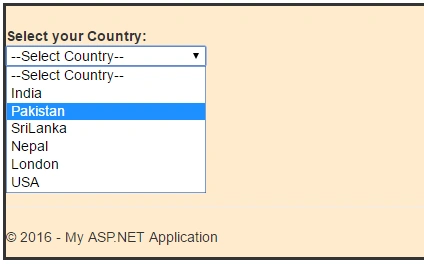
Save the project and run it. It will bind the data and will be shown as follows:
Similarly, add one more action method, which will take one parameter as a countrycode to retrieve the state of the respective country and adding jQuery method will send the selected country Id to the controller.
Here is jQuery code, which will send the Id and selected country id to the Action method and bind the data to the state drop down list.
Similarly, add one more action method, which will take one parameter as a countrycode to retrieve the state of the respective country and adding jQuery method will send the selected country Id to the controller.
Here is jQuery code, which will send the Id and selected country id to the Action method and bind the data to the state drop down list.
- <script src="~/Scripts/jquery-1.10.2.min.js"></script>
- <script type="text/javascript">
- $(document).ready(function () {
- $("#country").change(function () {
- $("#State").empty();
- $.ajax({
- type: 'POST',
- url: '@Url.Action("getstate")',
- dataType: 'json',
- data: { id: $("#country").val() },
- success: function (states) {
- $.each(states, function (i, state) {
- $("#State").append('<option value="' + state.Value + '">' +
- state.Text + '</option>');
- });
- },
- error: function (ex) {
- alert('Failed to retrieve country states.' + ex);
- }
- });
- return false;
- })
- });
- </script>
Now, it is the getstate controller.
Here, is the view:
- public JsonResult getstate(int id)
- {
- string countrystring = "select * from tbl_state where countrycode='"+id+"'";
- DataTable dt = new DataTable();
- dt = objdal.MyMethod(countrystring);
- List<SelectListItem> list = new List<SelectListItem>();
- list.Add(new SelectListItem { Text = "--Select Country--", Value = "0" });
- foreach (DataRow row in dt.Rows)
- {
- list.Add(new SelectListItem { Text = Convert.ToString(row.ItemArray[1]), Value = Convert.ToString(row.ItemArray[0]) });
- }
- return Json(new SelectList(list, "Value", "Text", JsonRequestBehavior.AllowGet));
- }
- <div style=" background-color:blanchedalmond; border-color:black; border:solid">
- <div>
- <b>Select Country</b>
- </div>
- <div>
- @Html.DropDownList("country", ViewBag.country as List<SelectListItem>, new { style = "width: 200px;" })
- </div>
- <br />
- <div>
- <b>Select State</b>
- </div>
- <div>
- @Html.DropDownList("State", new SelectList(string.Empty, "Value", "Text"), "--Select State--", new { style = "width:200px" })
- </div>
- </div>
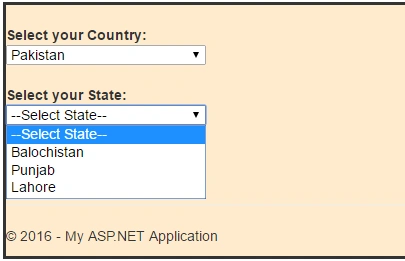
Similarly, pass the state Id to the controller, using jQuery, and get all the cities from the controller and bind, using the drop down list.
- <script type="text/javascript">
- $(document).ready(function () {
- $("#State").change(function () {
- $("#city").empty();
- $.ajax({
- type: 'POST',
- url: '@Url.Action("getCity")',
- dataType: 'json',
- data: { id: $("#State").val() },
- success: function (city) {
- $.each(city, function (i, city) {
- $("#city").append('<option value="'
- + city.Value + '">'
- + city.Text + '</option>');
- });
- },
- error: function (ex) {
- alert('Failed.' + ex);
- }
- });
- return false;
- })
- });
- </script>
- public JsonResult getCity(int id)
- {
- string countrystring = "select * from tbl_city where statecode='" + id + "'";
- DataSet ds = new DataSet();
- List<string> li = new List<string>();
- DataTable dt = new DataTable();
- dt = objdal.MyMethod(countrystring);
- List<SelectListItem> list = new List<SelectListItem>();
- foreach (DataRow row in dt.Rows)
- {
- list.Add(new SelectListItem { Text = Convert.ToString(row.ItemArray[1]), Value = Convert.ToString(row.ItemArray[0]) });
- }
- return Json(new SelectList(list, "Value", "Text", JsonRequestBehavior.AllowGet));
- }
- @{
- ViewBag.Title = "Region Details";
- }
- <h2>Details</h2>
- <script src="~/Scripts/jquery-1.10.2.min.js"></script>
- <script type="text/javascript">
- $(document).ready(function () {
- $("#country").change(function () {
- $("#State").empty();
- $.ajax({
- type: 'POST',
- url: '@Url.Action("getstate")',
- dataType: 'json',
- data: { id: $("#country").val() },
- success: function (states) {
- $.each(states, function (i, state) {
- $("#State").append('<option value="' + state.Value + '">' +
- state.Text + '</option>');
- });
- },
- error: function (ex) {
- alert('Failed to retrieve states.' + ex);
- }
- });
- return false;
- })
- });
- </script>
- <script type="text/javascript">
- $(document).ready(function () {
- $("#State").change(function () {
- $("#city").empty();
- $.ajax({
- type: 'POST',
- url: '@Url.Action("getCity")',
- dataType: 'json',
- data: { id: $("#State").val() },
- success: function (city) {
- $.each(city, function (i, city) {
- $("#city").append('<option value="'
- + city.Value + '">'
- + city.Text + '</option>');
- });
- },
- error: function (ex) {
- alert('Failed.' + ex);
- }
- });
- return false;
- })
- });
- </script>
- <div style=" background-color:blanchedalmond; border-color:black; border:solid">
- <br />
- <div>
- <b>Select your Country:</b>
- </div>
- <div>
- @Html.DropDownList("country", ViewBag.country as List<SelectListItem>, new { style = "width: 200px;" })
- </div>
- <br />
- <div>
- <b>Select your State:</b>
- </div>
- <div>
- </div>
- <div>
- @Html.DropDownList("State", new SelectList(string.Empty, "Value", "Text"), "--Select State--", new { style = "width:200px" })
- </div>
- <br />
- <div>
- <b>Select your Region:</b>
- </div>
- <div>
- @Html.DropDownList("city", new SelectList(string.Empty, "Value", "Text"), "--Select City--", new { style = "width:200px" })
- </div>

Using Entity frame work: Here, I will show how to achieve cascading drop down list, using Entity frame work in MVC:
The complete controller code is given:
- using System;
- using System.Collections.Generic;
- using System.Linq;
- using System.Web;
- using System.Web.Mvc;
- namespace MVC_Project.Controllers
- {
- public class HomeController : Controller
- {
- CodeXEntities obj = new CodeXEntities();
- public ActionResult Index()
- {
- return View();
- }
- public ActionResult About()
- {
- ViewBag.Message = "Your application description page.";
- return View();
- }
- public ActionResult Contact()
- {
- ViewBag.Message = "Your contact page.";
- return View();
- }
- public ActionResult Details()
- {
- var country = obj.tbl_Country.ToList();
- List<SelectListItem> li = new List<SelectListItem>();
- li.Add(new SelectListItem { Text = "--Select Country--", Value = "0" });
- foreach(var m in country)
- {
- li.Add(new SelectListItem { Text = m.Country, Value = m.slNO.ToString() });
- ViewBag.country = li;
- }
- return View();
- }
- public JsonResult getstate(int id)
- {
- var states = obj.tbl_state.Where(x => x.countryCode == id).ToList();
- List<SelectListItem> listates = new List<SelectListItem>();
- listates.Add(new SelectListItem { Text = "--Select State--", Value = "0" });
- if (states != null)
- {
- foreach(var x in states)
- {
- listates.Add(new SelectListItem { Text =x.State, Value =x.SlNo.ToString() });
- }
- }
- return Json(new SelectList(listates, "Value", "Text", JsonRequestBehavior.AllowGet));
- }
- public JsonResult getCity(int id)
- {
- var city = obj.tbl_city.Where(x => x.statecode == id).ToList();
- List<SelectListItem> licity = new List<SelectListItem>();
- licity.Add(new SelectListItem { Text = "--Select City--", Value = "0" });
- if (city != null)
- {
- foreach (var l in city)
- {
- licity.Add(new SelectListItem { Text = l.District, Value = l.SlNo.ToString() });
- }
- }
- return Json(new SelectList(licity, "Value", "Text", JsonRequestBehavior.AllowGet));
- }
- }
- }
- @{
- ViewBag.Title = "Index";
- }
- <h2>Index</h2>
- <script src="~/Scripts/jquery-1.10.2.min.js"></script>
- <script type="text/javascript">
- $(document).ready(function () {
- $("#country").change(function () {
- $("#State").empty();
- $.ajax({
- type: 'POST',
- url: '@Url.Action("getstate")',
- dataType: 'json',
- data: { id: $("#country").val() },
- success: function (states) {
- $.each(states, function (i, state) {
- $("#State").append('<option value="' + state.Value + '">' +
- state.Text + '</option>');
- });
- },
- error: function (ex) {
- alert('Failed to retrieve states.' + ex);
- }
- });
- return false;
- })
- });
- </script>
- <script type="text/javascript">
- $(document).ready(function () {
- $("#State").change(function () {
- $("#city").empty();
- $.ajax({
- type: 'POST',
- url: '@Url.Action("getcity")',
- dataType: 'json',
- data: { id: $("#State").val() },
- success: function (city) {
- $.each(city, function (i, city) {
- $("#city").append('<option value="'
- + city.Value + '">'
- + city.Text + '</option>');
- });
- },
- error: function (ex) {
- alert('Failed.' + ex);
- }
- });
- return false;
- })
- });
- </script>
- <div style=" background-color:aqua; border-color:black; border:solid">
- <div>
- <b>Select Country</b>
- </div>
- <div>
- @Html.DropDownList("country", ViewBag.country as List<SelectListItem>, new { style = "width: 200px;" })
- </div>
- <br />
- <div>
- <b>Select State</b>
- </div>
- <div>
- @Html.DropDownList("State", new SelectList(string.Empty, "Value", "Text"), "--Select State--", new { style = "width:200px" })
- </div>
- <br />
- <div>
- <b>Select Region</b>
- </div>
- <div>
- @Html.DropDownList("city", new SelectList(string.Empty, "Value", "Text"), "--Select City--", new { style = "width:200px" })
- </div>
- </div>
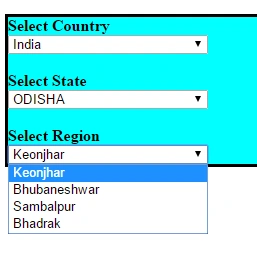
Thus, in this way, we can achieve cascading drop down list in our project.
Sarmad YousifPosted Aug 15, 2019, 9:33 AM
A lot of details needed, Mainly, how to link the database to the project and what are the models we need so on. not for beginners.
Tabarak HussainPosted Apr 30, 2017, 8:28 AM
Easy to understand, good job.
Dave ErnestoPosted Oct 8, 2016, 9:20 AM
Could you please explain a bit more it is not clear and unfortunately ive been trying to make it work for 2 days now and I couldn't manage to secseed , please help
Vignesh ManiPosted Jul 18, 2016, 6:28 PM
Nice one
kalu singh raoPosted Jul 18, 2016, 1:56 AM
Nice...
Raja TPosted Jul 17, 2016, 7:54 AM
Good, thanks for sharing