
Tools Used: .NET Framework, EditPlus.
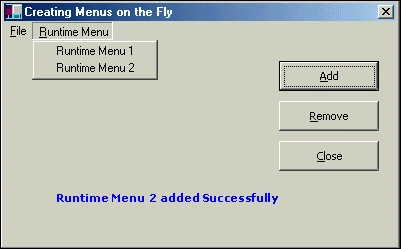
The following example demonstrates how to add menu item and remove menu items at runtime.
- /*
- Author - Mokhtar B
- Date - 13th June, 2001
- Company - Adsoft Solutions Pvt. Ltd
- Application Type - Windows Forms
- */
- using System;
- using System.WinForms;
- using System.Drawing;
- //<Summary>
- ///This application demonstrates how to create Menus at runtime.
- ///</Summary>
- class RuntimeMenus:Form
- {
- private MainMenu myMenu;
- private MenuItem mnuFile, mnuExit, mnuRtime;
- private Button btnAdd, btnRemove, btnClose;
- private Graphics g;
- private Font DispFont;
- private SolidBrush MyBrush;
- static int i;
- ///Constructor Calls InitializeComponents method, which is used
- ///for initializing components that are used in the application
- public RuntimeMenus()
- {
- InitializeComponents();
- }
- public void InitializeComponents()
- {
- DispFont = new Font("Verdana",8,FontStyle.Bold);
- MyBrush = new SolidBrush(Color.Blue);
- //Instantiating Main Menu
- myMenu = new MainMenu();
- //Instantiating Menus
- mnuFile = new MenuItem("&File");
- mnuRtime = new MenuItem("&Runtime Menu");
- //Adding menus to Main Menu
- myMenu.MenuItems.Add(mnuFile);
- myMenu.MenuItems.Add(mnuRtime);
- //Instantiating Exit menuitem along with a shortcut key.
- mnuExit = new MenuItem("&Exit", new EventHandlerbtnClose_Click),Shortcut.CtrlX);
- //Adding menuitem to File Menu
- mnuFile.MenuItems.Add(mnuExit);
- //Instantiating Add Button
- btnAdd = new Button();
- btnAdd.Location = new Point(275,20);
- btnAdd.Text = "&Add";
- btnAdd.Click += new EventHandler(btnAdd_Click);
- btnAdd.Size = new Size(100,30);
- //Instantiating Remove Button
- btnRemove = new Button();
- btnRemove.Location = new Point(275,60);
- btnRemove.Text = "&Remove";
- btnRemove.Click += new EventHandler(btnRemove_Click);
- btnRemove.Size = new Size(100,30);
- //Instantiating Close Button
- btnClose = new Button();
- btnClose.Location = new Point(275,100);
- btnClose.Text = "&Close";
- btnClose.Click += new EventHandler(btnClose_Click);
- btnClose.Size = new Size(100,30);
- //Adding Buttons to Form
- this.Controls.Add(btnAdd);
- this.Controls.Add(btnRemove);
- this.Controls.Add(btnClose);
- //Setting properties of the Form
- this.MaximizeBox = false;
- this.MinimizeBox = false;
- this.Text = "Creating Menus on the Fly";
- this.Menu = myMenu;
- this.Size = new Size(400,250);
- this.CancelButton = btnClose;
- this.StartPosition = FormStartPosition.CenterScreen;
- //Initializing Graphics from Windows Handle
- g = Graphics.FromHWND(this.Handle);
- }
- ///Adds Menuitems to RuntimeMenu
- protected void btnAdd_Click(object sender, EventArgs e)
- {
- mnuRtime.MenuItems.Add("Runtime Menu " + (i+1), new EventHandler mnuRtime_Click));
- g.Clear(Color.FromA#d8d0c8);
- g.DrawString("Runtime Menu " + (i + 1) + " added Successfully",DispFont,MyBrush,50,150);
- i++;
- }
- ///Removes Menuitems from RuntimeMenu
- protected void btnRemove_Click(object sender, EventArgs e)
- {
- if (i <= 0)
- {
- g.Clear(Color.FromA#d8d0c8);
- g.DrawString("Menu is Empty",DispFont, MyBrush,125,150);
- }
- else
- {
- mnuRtime.MenuItems.Remove(i-1);
- g.Clear(Color.FromA#d8d0c8);
- g.DrawString("Runtime Menu " + (i) + " Removed Successfully",DispFont,MyBrush,50,150);
- i=i-1;
- }
- }
- //Event for Displaying the MessageBox on Clicking
- protected void mnuRtime_Click(object sender, EventArgs e)
- {
- String s = sender.ToString();
- MessageBox.Show("You Clicked " + s.Substring(28), "RunTime Menu", MessageBox.IconInformation);
- }
- ///Event for Closing Window
- protected void btnClose_Click(object sender, EventArgs e)
- {
- Application.Exit();
- }
- ///Instantiating the Application
- public static void Main()
- {
- Application.Run(new RuntimeMenus());
- }
- }
Join the conversation! Your thoughts help the community grow.