

Introduction
Today I will share some of the information for creating many-to-many mappings using the Code First Approach. Using the Code First approach we follow mostly the case when our database is already created or with our DomainModel classes, we will create a database.
Creating Mapping
There is sometimes a situation where we need to create a many-to-many relationship. To do that we create a bridge table that holds the primary keys of both of the tables involved in the many-to-many relationship.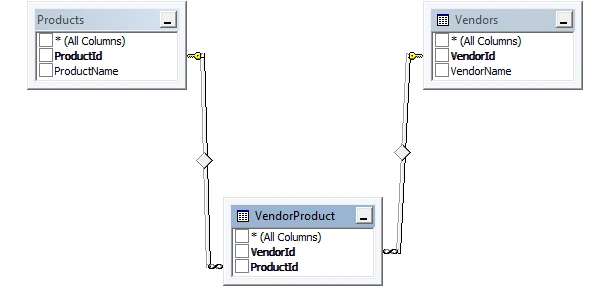
Figure 1: Creating Many-to-Many Mapping
In the Code First Approach, while we creating such a relationship, we create entries for both sides in an ICollection Objects here. First create a Console Application with a many-to-many relationship.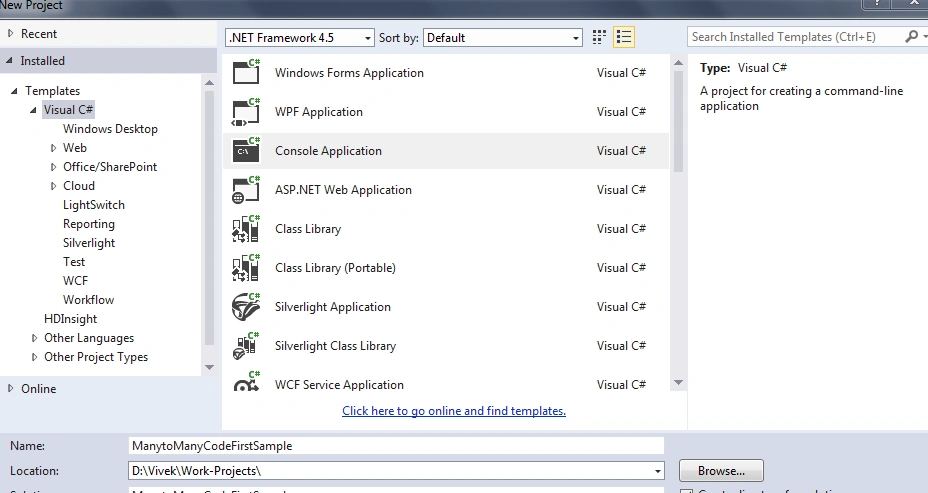
Figure 2: Create Application
Then install a Nuget package Entityframework as Figure 3.
Figure 3: Install Nuget Package
Now add a connection string in the App.config file as in the following:
- < connectionStrings >
- < add name = "ConnString" connectionString = "server=****;database=MVCSample;uid=**;password=***;Connection Timeout=3"
- providerName = "System.Data.SqlClient" / >
- < /connectionStrings>
- public class Vendor
- {
- public Vendor()
- {
- VendorProducts = new List < Product > ();
- }
- public virtual int VendorId
- {
- get;
- set;
- }
- public virtual string VendorName
- {
- get;
- set;
- }
- public virtual ICollection < Product > VendorProducts
- {
- get;
- set;
- }
- }
- public class Product
- {
- public Product()
- {
- ProductVendors = new List < Vendor > ();
- }
- public virtual int ProductId
- {
- get;
- set;
- }
- public virtual string ProductName
- {
- get;
- set;
- }
- public virtual ICollection < Vendor > ProductVendors
- {
- get;
- set;
- }
- }
- public class SuperMarketContext: DbContext
- {
- public DbSet < Product > Product
- {
- get;
- set;
- }
- public DbSet < Vendor > Vendor
- {
- get;
- set;
- }
- public SuperMarketContext(): base("ConnString") {}
- }
- public DbSet<Product> Product { get; set; }
- public DbSet<Vendor> Vendor { get; set; }
Now if we run the sample application it will create the MVCSample database (as specified in the config) and the table will be created but the column name is not as per our expectations. See the figure below.
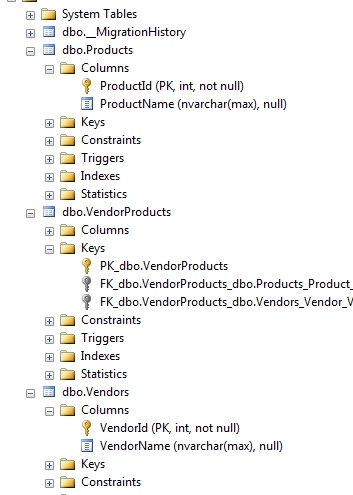
Figure 4: Solution Explorer
So we can solve this problem by overriding the OnModelCreating method and mapping using the Code First Fluent API as in the following:
- protected override void OnModelCreating(DbModelBuilder modelBuilder)
- {
- modelBuilder.Entity < Vendor > ()
- .HasMany(v = > v.VendorProducts)
- .WithMany(p = > p.ProductVendors)
- .Map(
- m = >
- {
- m.MapLeftKey("VendorId");
- m.MapRightKey("ProductId");
- m.ToTable("VendorProduct");
- });
- }
- HasMany: Vendors has many products
- WithMany: Products has many vendors
- Map: It specifies for Code First how to build the relation table (so the bridge table sud can be generated here with VendorProduct and with the ToTable method)
- m.MapLeft: since we start a Vendor so its vendorid sud can be the left key here (the primary key of the Vendor table)
- m.MaprRight: will be the productid and will be the right key (the primary key of the Product table)
- ToTable: will be the bridge table name
So if you run the code you will get the tables generated depending on your specified column name.
- static void Main(string[] args)
- {
- using(SuperMarketContext db = new SuperMarketContext())
- {
- Product P1 = new Product();
- P1.ProductName = "Dell products";
- Vendor V1 = new Vendor();
- V1.VendorName = "Vivek";
- V1.VendorProducts.Add(P1);
- db.Vendor.Add(V1);
- db.SaveChanges();
- Console.ReadKey();
- }
- }
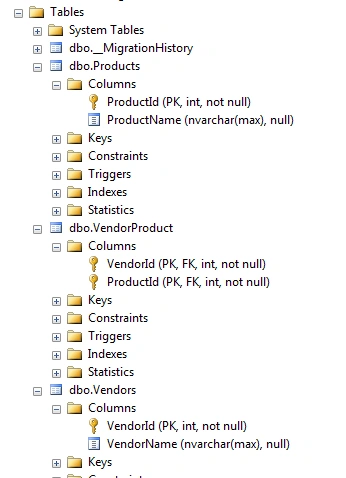
Figure 5: Output
So in this way you can create a many-to-many relationship with the Code First Approach very easily.
Thanks.
Sonu ChaudharyPosted May 26, 2016, 10:44 AM
Good one...
Bhuvanesh MohankumarPosted May 6, 2016, 3:58 PM
Good one...
Mohammad YousefiPosted Mar 26, 2016, 4:04 AM
Thanks Vivek for the article, but I got confused about the table that EF create automatically(vendorproduct). I think Primary Keys are unique if so how is it possible that those FK that are also PK create a many to many relationship ? Thanks
Rahul Kumar SaxenaPosted May 24, 2015, 11:23 PM
Good One..