

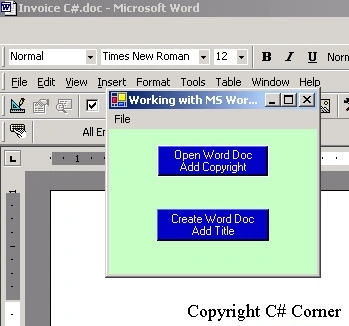
Figure 1. Word Launched from .NET Form
This article is being written in response to a couple of inquiries on the question, "How do I open a Word document from .NET?". I guess after people read my Excel article, they were under the impression that I knew how to do this in Word. Luckily, after some hunting around on the forums and getting feedback from other C# Corner members, I got the gist of it.
The First Step in manipulating Word in .NET is that you'll need to add a COM reference to your project by right-clicking in the solution explorer on References->Add Reference. Click on the COM tab and look for the Microsoft Word 9.0 Object Library. Click Select and OK.
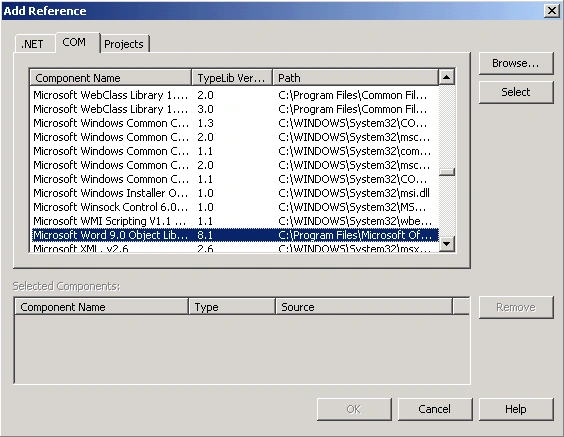
This will automatically place an assembly in your application directory that wraps COM access to Word. Now, we are ready to create a word object in our code. To instantiate an instance of a Word application, you just declare the line below in your class.
private Word.ApplicationClass WordApp = new Word.ApplicationClass();
Now, you can use the interesting methods and properties that Microsoft Word provides to manipulate documents in Word. Personally, I never want to figure out the Microsoft Word code myself because the Word hierarchy and properties, although rich in features, have a bit of a learning curve. So, in order to jump straight over the learning curve, I simply turn the Macro Recorder on in Word and let Word write the code for me. (Of course, this is VBA code, but it is close enough). To start the macro recorder in Word, go to Tools->Macro->Record New Macro inside Microsoft Word. Now, anything you type, open, delete, or format will get recorded in VBA, so you have a clue how to write your Word Interoperability code.
The application in this particular article is divided into two methods based on the button that is pressed in the form. The first button opens an existing Word Document and adds a copyright line to the document. The second button creates a new document and brings up a dialog to allow you to enter a title to the document.
Below is the code for the first button event handler.
private void button1_Click(object sender, System.EventArgs e)
{
    // Use the open file dialog to choose a word document
    if (this.openFileDialog1.ShowDialog() == DialogResult.OK)
    {
        // Set the file name from the open file dialog
        object fileName = openFileDialog1.FileName;
        object readOnly = false;
        object isVisible = true;
        // Here is the way to handle parameters you don't care about in .NET
        object missing = System.Reflection.Missing.Value;
        // Make word visible, so you can see what's happening
        WordApp.Visible = true;
        // Open the document that was chosen by the dialog
        Word.Document aDoc = WordApp.Documents.Open(
            ref fileName,
            ref missing,
            ref readOnly,
            ref missing,
            ref missing,
            ref missing,
            ref missing,
            ref missing,
            ref missing,
            ref missing,
            ref missing,
            ref isVisible
        );
        // Activate the document so it shows up in front
        aDoc.Activate();
        // Add the copyright text and a line break
        WordApp.Selection.TypeText("Copyright C# Corner");
        WordApp.Selection.TypeParagraph();
    }
}
The code above opens a document based on the file chosen in the OpenFileDialog. Notice the parameters passed to the Document. Open methods are all references. Don't ask me why it was done this way, but it seems like when Microsoft goes through a call with optional parameters, they had no choice but to make everything a variant, so on the C# side of the parameter list, it looks like a bunch of references to objects. If you want to skip over a parameter in the call to Open, use the System.Reflection.Missing.Value and assign it to an object. Once you know this trick, the rest of the interoperability used with Word is pretty straightforward.
Below is the code for creating a document from scratch.
private void button2_Click(object sender, System.EventArgs e)
{
    // Use the custom dialog to get the title of the document from the user
    TitleQuery theQueryDialog = new TitleQuery();

    if (theQueryDialog.ShowDialog() == DialogResult.OK)
    {
        // VBA code generated from recorded macro to "remind me" how to do it.
        //**********************************************************
        // Selection.ParagraphFormat.Alignment = wdAlignParagraphCenter
        // Selection.Font.Bold = wdToggle
        // Selection.TypeText Text:="Creating a Title"
        // Documents.Add Template:="C:\My Documents\CSharp Book Project\Normal.dot",
        // NewTemplate:=False, DocumentType:=0
        // **********************************************************

        // Set up all the parameters as generic objects so we can pass them in Documents.Add
        object missing = System.Reflection.Missing.Value;
        object fileName = "normal.dot"; // template file name
        object newTemplate = false;
        object docType = 0;
        object isVisible = true;

        // Create a new Document, by calling the Add function in the Documents collection
        Word.Document aDoc = WordApp.Documents.Add(ref fileName, ref newTemplate, ref docType, ref isVisible);

        // Need to see the created document, so make it visible
        WordApp.Visible = true;
        aDoc.Activate();

        // Global Constant enumerations are members of Word and can be assigned to Properties
        // Set alignment to the center of the document
        WordApp.Selection.ParagraphFormat.Alignment = Word.WdParagraphAlignment.wdAlignParagraphCenter;

        // Toggle the title to a Bold Font
        WordApp.Selection.Font.Bold = (int)Word.WdConstants.wdToggle;

        // Type the Text of the Title that was inputted by the user in the Custom Dialog
        WordApp.Selection.TypeText(theQueryDialog.Title);
    }
}
The code above is a little less intuitive, so I used the Macro Recorder in VBA to spit out the VBA code for creating a document. Creating a document is done through the Documents Collection. The Add method of the Documents Collection creates a new document and brings it up in Word. The Add method allows you to specify the template and document type. Note that the Add method also takes optional parameters, so as a result, you need to pass it a series of references to objects that box the types you would normally pass.
The title being placed in the document is formatted using some of the existing Word global enumeration constants. These constants tend to be constants nested in constants for organizational purposes. Although VBA gives you a clue to the relative name of the constants, you need to hunt for them a little bit using intellisense to find the parent enumeration. The code above uses the global enumerations to first center the title and then make it bold. The final line is similar to the previous listing in that it types the title into the Document.
Conclusion
I hope this article gives you a head start in controlling Word from .NET and C#. It's a little more cumbersome than VBA, but it's much less cumbersome than Visual C++ and MFC. Remember to take advantage of the Microsoft Word Macro Recorder to help you along (this helpful hint also applies to coding in Excel and other Microsoft products). Hopefully, with a little coding and the power of .NET Rapid Application Development, you can add some very powerful reporting features to your applications that incorporate Microsoft Word.
vipin rathorePosted Feb 24, 2017, 7:36 AM
I have to render .html content to word file. How I can do that?
Parvez AhadPosted Jul 14, 2016, 5:07 AM
Good one
Vipul MalhotraPosted Jul 8, 2015, 3:40 AM
Nice...Thanks
murugan ggrPosted Mar 5, 2012, 10:07 PM
hai it is very usefull to me thanks to you
Pratik BaserPosted Jan 29, 2011, 2:53 AM
Hi, I am trying to create a word document and read the same to modify the content using c#. When I host the same functionality as a windows service, it throws an error at the Activate() method call. Even I tried to schedule a windows task for the exe, it gives the same error. But if I run the same as an executable it works fine. What could be the problem ?
manish kaleeditedPosted Dec 23, 2009, 9:36 AMEdited Dec 23, 2009, 12:23 PM
Hi Mike,All, the above article is nice to refer to.. I am using VS 2005, .NET framework 2.0, MS Word 2007, C# ASP.NET and added reference using Microsoft Word 12.0 Object Library . Also i have the correct references/ namespaces used as below, using System; using System.Data; using System.Configuration; using System.Collections; using System.Web; using System.Web.Security; using System.Web.UI; using System.Web.UI.WebControls; using System.Web.UI.WebControls.WebParts; using System.Web.UI.HtmlControls; using System.Data.SqlClient; using System.Data.Sql; using System.Net.Mail; using System.Runtime.Remoting; using System.Reflection; using System.Reflection.Emit; using Microsoft.Office; using Microsoft.Office.Core; using System.Runtime.InteropServices; using Outlook = Microsoft.Office.Interop.Outlook; using Word = Microsoft.Office.Interop.Word; using System.IO; Note: ------- For testing purposes i put script in the cancel button i guess this should not matter.. Would you know why Word 2007 would not show up using below code? Actually i can see the winword.exe instance running in task manager, but what i could see during debug is that oWord.Visible = true changes/flips back to false, not sure if is this the reason word does not show up. Also the second concern is that the word instance does not get removed from task manager, how to handle this issue ? Word document does not open up at on click of button script even if i keep MSWord open. While running below script i do not have MS Word open.. Can you pls. suggest ? I am using the below code in an .aspx page. protected void btnCancel_Click(object sender, ImageClickEventArgs e) { Word._Application oWord = new Word.Application(); //Word.ApplicationClass oWord = new Word.ApplicationClass(); //Word.Document oWordDoc = new Word.Document(); object missing = System.Reflection.Missing.Value; object fileName = @"C:\Working\3rd partyReimbursement.dot"; object readOnly = false; object isVisible = true; oWord.Visible = true; Word.Document aDoc = oWord.Documents.Open( ref fileName, ref missing, ref readOnly, ref missing, ref missing, ref missing, ref missing, ref missing, ref missing, ref missing, ref missing, ref isVisible,ref missing,ref missing,ref missing,ref missing); aDoc.Activate(); oWord.Selection.TypeText("Copyright C# Corner"); oWord.Selection.TypeParagraph(); } oWord.Visible = true; adv. thanks Manish [email protected]
Chandra SrinivasanPosted Jun 25, 2009, 2:51 PM
I want to create a Windows form with similar feature. I would like to know how to create like this one. Appreciate if you could let me know. Thanks.
Marcel NolletPosted Mar 30, 2009, 2:39 PM
This is quite basic stuff, but I need to create a preview page for a report that will use only one object containing collections of objects underneath. I need to list 4 or 5 small collections in dynamic grids on the word Document. As an example : The main object has 20 accessible properties that I can access and it may have a small collection of cities which I need to list in a grid (the number of rows in each grid on the word document must be different every time depending on the quantity of cities). Is Word the best tool for this kind of dynamic report ? Thank you in advance. Marcel
Vitalii SymonPosted Dec 24, 2008, 1:38 PM
thanks to docx format you can create document easily from prepared template by managing xml or using specific libraries like invoke docx (free, http://invoke.co.nz) or aspose.words (not free, http://aspose.net)
abhishek singhPosted Oct 23, 2008, 7:49 AM
) how can i display pdf file in windows in ASP.Net using c# if any body can help just reply me in below mail id-- [email protected]
abhishek singhPosted Oct 23, 2008, 7:49 AM
) how can i display pdf file in windows in ASP.Net using c# if any body can help just reply me in below mail id [email protected]
abhishek singhPosted Oct 23, 2008, 7:46 AM
1).how can i read pdf file in ASP.Net using c# i know that how can read doc file and text file but i hv some doubt to read pdf file can u help me out from this problem. i m using below code but i got error using system; using org.pdfbox.pdmodel; using org.pdfbox.util; NameSpace PDFReader { class program { static void main(string[]args) { PDDocument doc=PDDocument.load("lopreacamasa.pdf"); PDFTextStripper pdfdtripper=new PDFTextstripper(); console.write(pdfstripper.gettext(doc)); } } } but i got error if any body can help just reply me in below mail id [email protected] 2)how can i display pdf file in windows in ASP.Net using c# if any body can help just reply me in below mail id [email protected]
abhishek singhPosted Oct 23, 2008, 7:32 AM
we can use streamreader also for this.means to read doc file. reply [email protected]
abhishek singhPosted Oct 23, 2008, 7:32 AM
we can use streamreader also for this.means to read doc file. reply [email protected]
SriramPosted Sep 29, 2008, 4:11 PM
Hi this article is really helpful, but is it possible to create a word doc with the user's input and in a particular format with tables,attcachments etc.. pls let me know your suggestion. Thanks Sriram
toddPosted Dec 17, 2007, 2:06 PM
I only want to close the instance of the WORD object that was created in my App and not one created by Word itself. The current problem is when the WinForms app is closed..so does the users Word that is open.
uma sudhakarPosted Nov 28, 2007, 12:52 AM
the Microsoft Object Library is not appearing in my project under References.and iam unable to add the word through add reference.pl suggest me what to do.it is quit urgent thanks
vcir vcirPosted Oct 25, 2007, 7:25 AM
hi mike, I can open a doc without problem. But when i close a word doc by cliking "X" and after that i want to open another word doc it doesnt word. Wron message: the rpc server is unavailable. How can i fix this, can you help me please? vcir
kjohn johnPosted Oct 16, 2007, 8:51 AM
Hi, I am trying to compare two pdf files using vb.net or vb6. Can anyone help me about this. Thanks Kalpana
Parthasarathy SPosted Oct 5, 2007, 3:20 AM
Hi Mike, You did an Master Piece code. It's working well for me, but i want to export my data with line break EG: Data 1 Data 2 Data 3 Data 4 ...... Now my code exports as : Data 1Data 2Data 3Data 4 ...... How to do this, plz suggest me Thanks in advance
pavan reddyPosted Sep 14, 2007, 3:38 AM
I want to build a component for word that why i want prepare the document for this . i mean i want to know what are the function, methodes and properties used to create word component
Jaya KrishnanPosted Sep 4, 2007, 12:29 AM
Hi, i want to create report using word in C#.NET. Pl, any one help me in this regard.
vin tonyPosted Aug 21, 2007, 2:09 AM
when i run this code of wod application i got an error saying Exception Details: System.UnauthorizedAccessException: Access is denied. why this way.. I want to open one word document in asp.net with vb can u help me
Trent WhiteleyPosted Aug 20, 2007, 10:12 AM
After referencing the Word 11 Object Library, I'm unable to create a Word.Application variable (ie. I don't see it on the completion list when typing it in). Any idea why or what I'm doing wrong?
Trent WhiteleyPosted Aug 20, 2007, 10:01 AM
After referencing the Word 11 Object Library, I'm unable to create a Word.Application variable (ie. I don't see it on the completion list when typing it in). Any idea why or what I'm doing wrong?
Hiren PatelPosted Aug 1, 2007, 8:12 AM
Hi Mike, This is very good article. I can able to open word document from c#.net. I have used Microsoft 10.0 object Library for my application. Now my problem is that when I was given this application to my client for test it will give error bcoz client has Microsoft 9.0 object library installed on his pc. can you tell me how can i make my application compatible with all versions of Microsoft Word like office 2000, office 2002 , office 2003 and 2007 Waiting for your possitive reply. Thanks Regards, Hiren Patel [email protected]
Hare krishnaPosted Jul 2, 2007, 5:42 AM
how to compare of two word file and result show in new word document in c# ode if it is possible then pls inform me on [email protected]
sandeep mishraPosted Jun 22, 2007, 7:35 AM
How would i know that a document is having a macro attached to it using c#.net
udyani etampawalaPosted May 23, 2007, 1:58 AM
i tried to open a word document in C# by using your code.but it gives a error saying"No overload for method 'Open' takes '12' arguments