
Introduction
The Interoperability services make it very easy to work with COM Capable Applications such as Word and Excel. This article reveals using Excel from a managed application. Excel is the spreadsheet component of Microsoft Office 2000. The majority of Excel programmatic functionality is exposed through Automation via the type library Excel9.olb. The intention of this article is to express that a managed application can interrelate with Excel as a COM server.
The first step is to create a reference in our project to Excel 9.0 Objects Library. By using Tlbimp tool we can generate Excel.dll.
TlbImp Excel9.olb Excel.dll
By adding Excel.dll to our program we can use the functionality of the Excel.
Now let us see in detail how to create an Excel Spreadsheet? & Set values to the cell using C#. The codes for Creating, make visible, add a new workbook and to set a value for cell in the Excel file is shown below.
- Creating new excel.application
- Application exc = new Application();
- if (exc == null)
- {
- Console.WriteLine("ERROR: EXCEL couldn't be started");
- return 0;
- }
- To make application visible
- exc.set_Visible(0, true);
- To get the workbooks collection
- Workbooks workbooks = exc.Workbooks;
- _Workbook workbook = workbooks.Add(XlWBATemplate.xlWBATWorksheet, 0);
- To get the worksheets collection
- _Worksheet worksheet = (_Worksheet) sheets.get_Item(1);
- if (worksheet == null)
- {
- Console.WriteLine ("ERROR in worksheet == null");
- }
- To set the value for cell
- Range range1 = worksheet.get_Range("C1", Missing.Value);
- if (range1 == null)
- {
- Console.WriteLine ("ERROR: range == null");
- }
- const int nCells = 1;
- Object[] args1 = new Object[1];
- args1[0] = nCells;
- range1.GetType().InvokeMember("Value", BindingFlags.SetProperty, null, range1, args1);
Example
- using System;
- using System.Reflection; // For Missing.Value and BindingFlags
- using System.Runtime.InteropServices; // For COMException
- using Excel;
- class AutoExcel
- {
- public static int Main()
- {
- Application exc = new Application();
- if (exc == null)
- {
- Console.WriteLine("ERROR: EXCEL couldn't be started!");
- return 0;
- }
- exc.set_Visible(0, true);
- Workbooks workbooks = exc.Workbooks;
- _Workbook workbook = workbooks.Add(XlWBATemplate.xlWBATWorksheet, 0);
- Sheets sheets = workbook.Worksheets;
- _Worksheet worksheet = (_Worksheet)sheets.get_Item(1);
- if (worksheet == null)
- {
- Console.WriteLine("ERROR: worksheet == null");
- }
- Range range1 = worksheet.get_Range("C1", Missing.Value);
- if (range1 == null)
- {
- Console.WriteLine("ERROR: range == null");
- }
- const int nCells = 1;
- Object[] args1 = new Object[1];
- args1[0] = nCells;
- range1.GetType().InvokeMember("Value", BindingFlags.SetProperty, null, range1, args1);
- return 100;
- }
- }
It is similar to set the value for the cell. Only change is we use array as args2[0] = array2.
- const int nCell = 5;
- Range range2 = worksheet.get_Range("A1", "E1");
- int[] array2 = new int [nCell];
- for (int i=0; i < array2.GetLength(0); i++)
- {
- array2[i] = i+1;
- }
- Object[] args2 = new Object[1];
- args2[0] = array2;
- range2.GetType().InvokeMember("Value", BindingFlags.SetProperty, null, range2, args2);
Output
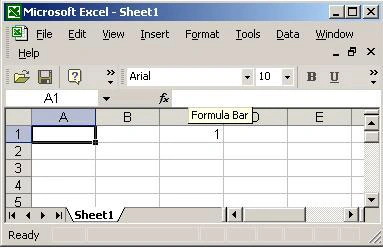
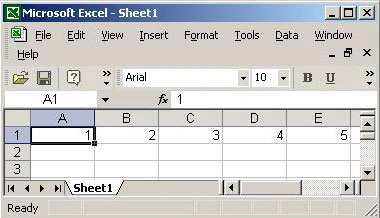
Conclusion
With the help of TlbImp.exe tool we can generate .NET assembly from Type library files and we can use that functionality of Type library file in C#.
Former memberPosted Nov 13, 2013, 2:03 AM
You can create excel spreadsheet with multiple worksheets by using Aspose.Cells for .NET : http://www.aspose.com/.net/excel-component.aspx
Prachyut ShresthaPosted Nov 5, 2012, 10:48 AM
Thank you, this is a big help. I was wondering if we could add multiple worksheets in a single workbook and add data to them? If you could help me with this regard or guide me to a helpful resource, i would highly appreciate it. Thank you
sinoai aronPosted Feb 20, 2012, 2:09 PM
Using the following library you can create new xlsx files based on a sample xlsx file, by reusing parts of the latter: http://officehelper.codeplex.com/
ali mPosted Feb 7, 2011, 1:40 AM
I need convert text to excel
MDeLeonPosted Dec 5, 2010, 2:15 PM
If you're trying to make Excel files on the server (without installing Office) then give my API a try: http://ClosedXML.CodePlex.com Right now it's fairly robust but I want to get more feedback to keep improving it.
Opeyemi OyefesoPosted Nov 26, 2009, 10:08 PM
Hello, I am doing a project that involves designing an application using c#(visual studio) where the user enters 9 values and when they click 'next', the 9 values get saved in an excel spreadsheet and go to the next row. I have the buttons and data entry spaces set but i need help with the codes that will write those values to excel and save them there. This is my first time using c# or really programming at all so i will appreciate help with this. Thank you much! Oppy
Kashif RazaPosted Sep 6, 2009, 5:10 AM
Not so much satisfied code projected on this site
Former memberPosted Jan 28, 2009, 11:32 AM
no wonder he's looking for work!
JyothiPosted Feb 1, 2007, 5:53 AM
Hi, Can u please help me to insert an image in Excel file. I am using COM components to get the data in to Excel file.