

Introduction
In this article, we are going to develop a file watcher application. This application will listen for file changes on a given directory.
We will add controls to check the activity done on .txt file types.
The same concept can be also employed on different file types.
We will be using C# and WPF technologies.
We will also use Visual Studio 2019 version but any version can work.
The application we are going to create will look like this
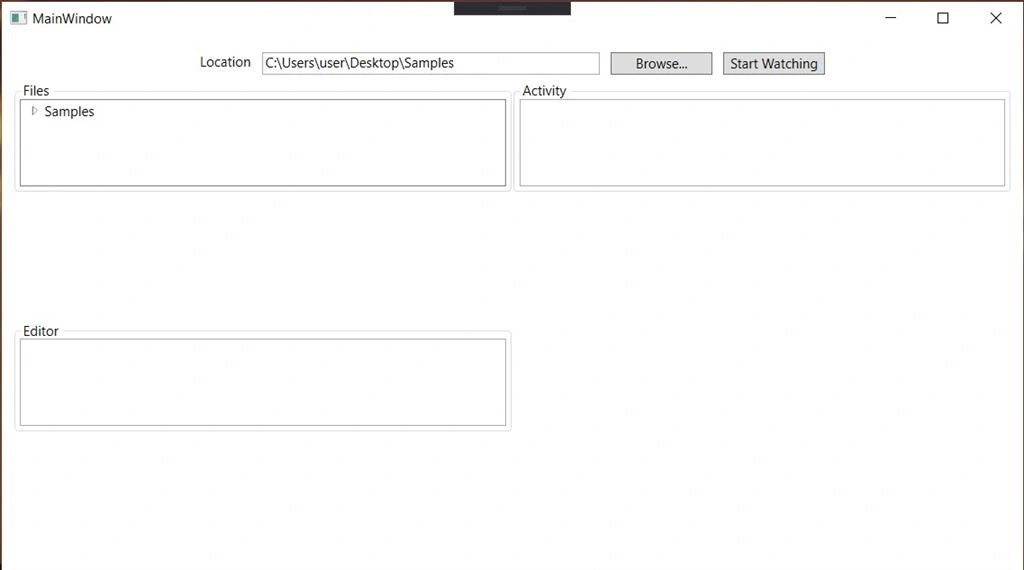
We have the following sections:
Files
The files section will be the root directory that we will be watching or listening for changes.
Activity
On the activity section, we will be logging changes to files
Editor
This is a simple text editor that we will be using to make our text file changes.
We will also save the location in the application settings for easy retrieval.
Here are the steps that we will follow
-
Create the C# WPF application project
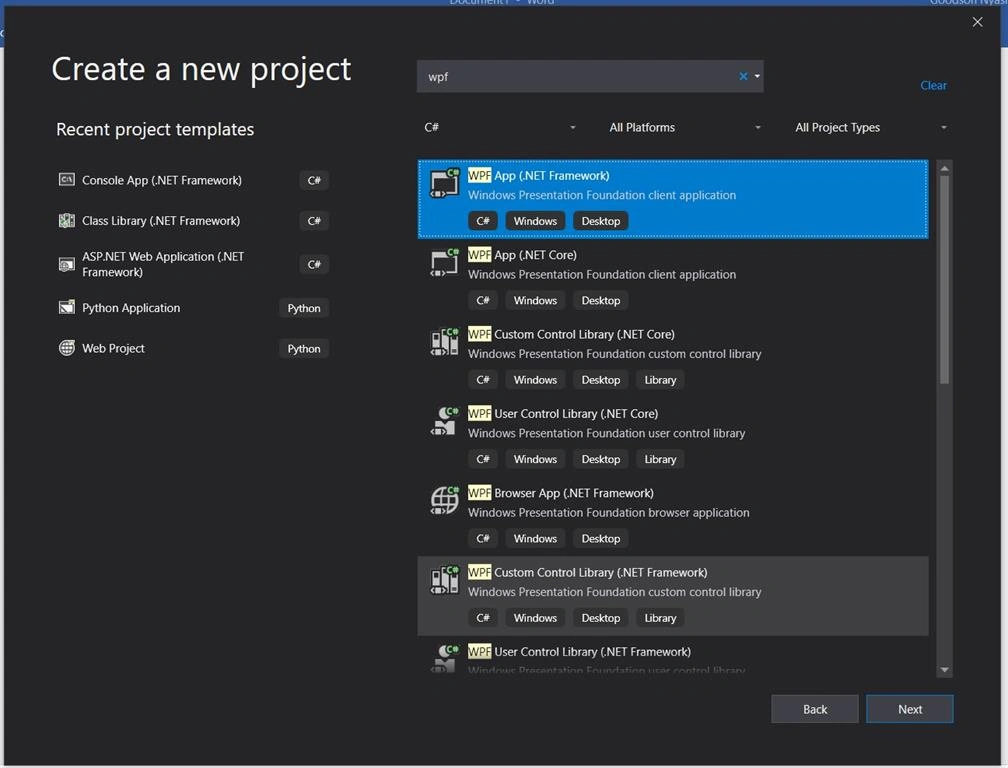
- Give the project a name of your choice
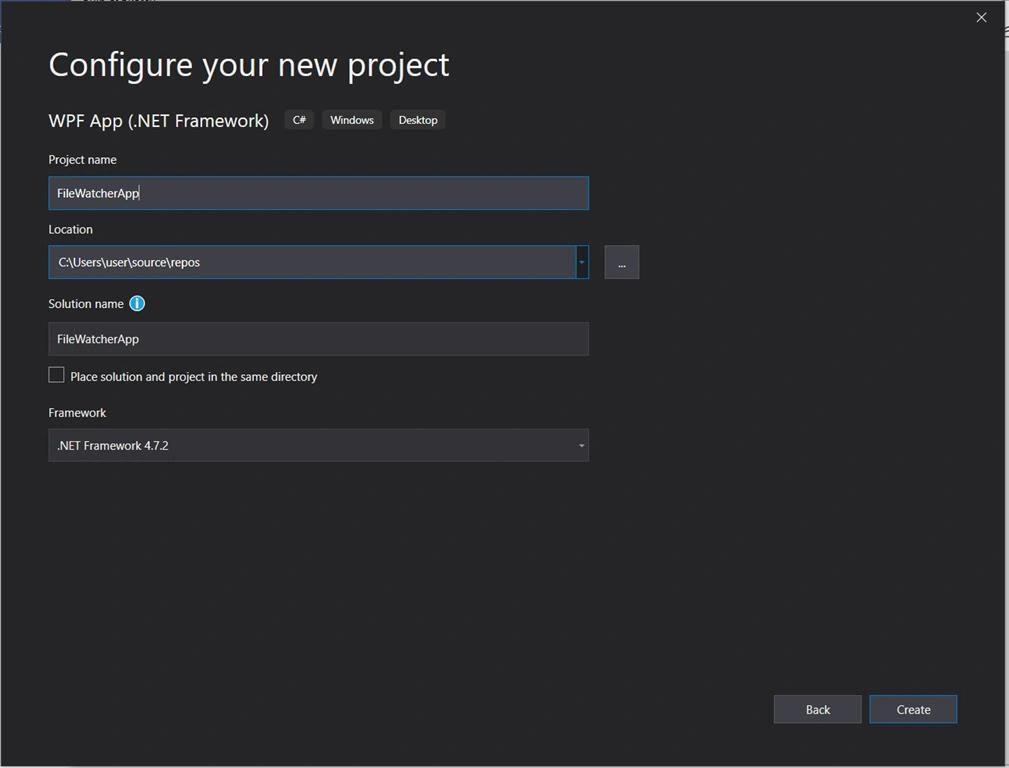
- Press create and once we are going to add the following code.
User Interface
Our user interface will consist of the following code snippnet
- <Window x:Class="FileWatcherApp.MainWindow"
- xmlns="http://schemas.microsoft.com/winfx/2006/xaml/presentation"
- xmlns:x="http://schemas.microsoft.com/winfx/2006/xaml"
- xmlns:d="http://schemas.microsoft.com/expression/blend/2008"
- xmlns:mc="http://schemas.openxmlformats.org/markup-compatibility/2006"
- xmlns:local="clr-namespace:FileWatcherApp"
- mc:Ignorable="d"
- Title="MainWindow" Height="450" Width="800" Closing="Window_Closing">
- <Grid>
- <Grid Margin="10">
- <Grid.RowDefinitions>
- <RowDefinition Height="30"/>
- <RowDefinition Height="*"/>
- </Grid.RowDefinitions>
- <StackPanel Orientation="Horizontal" HorizontalAlignment="Center" Grid.Row="0">
- <TextBlock Margin="5" Text="Location"></TextBlock>
- <TextBox Width="300" Margin="5" Name="txtDirectory"></TextBox>
- <Button Name="btnBrowse" Width="90" Content="Browse..." Margin="5" Click="btnBrowse_Click"></Button>
- <Button Name="btnListen" Width="90" Content="Start Watching" Margin="5" Click="btnListen_Click"></Button>
- </StackPanel>
- <Grid Grid.Row="1">
- <Grid.ColumnDefinitions>
- <ColumnDefinition Width="*"></ColumnDefinition>
- <ColumnDefinition Width="*"></ColumnDefinition>
- </Grid.ColumnDefinitions>
- <Grid Grid.Column="0" Name="FilesGrid">
- <Grid.RowDefinitions>
- <RowDefinition Height="*"></RowDefinition>
- <RowDefinition Height="*"></RowDefinition>
- </Grid.RowDefinitions>
- <GroupBox x:Name="groupBox" Grid.Row="0" Header="Files" MinHeight="100" HorizontalAlignment="Left" VerticalAlignment="Top" Width="{Binding ActualWidth, ElementName=FilesGrid, Mode=OneWay}">
- <TreeView Name="treeFiles" SelectedItemChanged="treeFiles_SelectedItemChanged"></TreeView>
- </GroupBox>
- <GroupBox x:Name="groupBoxEditor" Grid.Row="1" MinHeight="100" Header="Editor" HorizontalAlignment="Left" VerticalAlignment="Top" Width="{Binding ActualWidth, ElementName=FilesGrid, Mode=OneWay}">
- <TextBox x:Name="txtEditor" TextChanged="txtEditor_TextChanged"></TextBox>
- </GroupBox>
- </Grid>
- <Grid Grid.Column="1" Name="ActivityGrid">
- <GroupBox x:Name="groupBox1"Header="Activity" MinHeight="100"HorizontalAlignment="Left" VerticalAlignment="Top"Width="{Binding ActualWidth, ElementName=FilesGrid, Mode=OneWay}">
- <ListView x:Name="lstResults" ></ListView>
- </GroupBox>
- </Grid>
- </Grid>
- </Grid>
- </Grid>
- </Window>
Our backend code will look like this:
- using FileWatcherApp.Properties;
- using System;
- using System.IO;
- using System.Text.RegularExpressions;
- using System.Windows;
- using System.Windows.Controls;
- using System.Windows.Forms;
- using System.Windows.Threading;
- namespace FileWatcherApp
- {
- /// <summary>
- /// Interaction logic for MainWindow.xaml
- /// </summary>
- public partial class MainWindow : Window
- {
- FileSystemWatcher watcher;
- static readonly object locker = new object();
- private Timer timer = new Timer();
- private bool isWatching;
- private bool canChange;
- private string filePath = string.Empty;
- DateTime lastRead = DateTime.MinValue;
- public MainWindow()
- {
- InitializeComponent();
- if (!string.IsNullOrEmpty(Settings.Default.PathSetting))
- {
- txtDirectory.Text = Settings.Default.PathSetting;//Get Saved Path
- ListDirectory(treeFiles, txtDirectory.Text);
- }
- }
- private void btnBrowse_Click(object sender, RoutedEventArgs e)
- {
- var dialog = new FolderBrowserDialog();
- if (dialog.ShowDialog() == System.Windows.Forms.DialogResult.OK)
- {
- txtDirectory.Text = dialog.SelectedPath;
- }
- ListDirectory(treeFiles, txtDirectory.Text);
- }
- //This method will list files to our treeview
- private void ListDirectory(System.Windows.Controls.TreeView treeView, string path)
- {
- try
- {
- treeView.Items.Clear();
- var rootDirectoryInfo = new DirectoryInfo(path);
- treeView.Items.Add(CreateDirectoryItems(rootDirectoryInfo));
- }
- catch (Exception ex)
- {
- AppendListViewcalls(ex.Message);
- }
- }
- private static TreeViewItem CreateDirectoryItems(DirectoryInfo directoryInfo)
- {
- var directoryItem = new TreeViewItem { Header = directoryInfo.Name };
- foreach (var directory in directoryInfo.GetDirectories())
- directoryItem.Items.Add(CreateDirectoryItems(directory));
- foreach (var file in directoryInfo.GetFiles())
- directoryItem.Items.Add(new TreeViewItem { Header = file.Name, Tag = file.FullName });
- return directoryItem;
- }
- private void btnListen_Click(object sender, RoutedEventArgs e)
- {
- //We want to check whether the filewatche is on or not and display usefull signal to the user either to start or stop
- if (isWatching)
- {
- btnListen.Content = "Start Watching";
- stopWatching();
- }
- else
- {
- btnListen.Content = "Stop Watching";
- startWatching();
- }
- }
- private void startWatching()
- {
- if (!isDirectoryValid(txtDirectory.Text))
- {
- AppendListViewcalls(DateTime.Now + " - Watch Directory Invalid");
- return;
- }
- isWatching = true;
- timer.Enabled = true;
- timer.Start();
- timer.Interval = 500;
- AppendListViewcalls(DateTime.Now + " - Watcher Started");
- watcher = new FileSystemWatcher();
- watcher.Path = txtDirectory.Text;
- watcher.NotifyFilter = NotifyFilters.LastAccess | NotifyFilters.LastWrite
- | NotifyFilters.FileName | NotifyFilters.DirectoryName;
- watcher.Filter = "*.*";
- watcher.Created += new FileSystemEventHandler(OnChanged);
- watcher.Renamed += new RenamedEventHandler(OnChanged);
- watcher.Changed += new FileSystemEventHandler(OnChanged);
- watcher.EnableRaisingEvents = true;
- }
- private void stopWatching()
- {
- isWatching = false;
- timer.Enabled = false;
- timer.Stop();
- AppendListViewcalls(DateTime.Now + " - Watcher Stopped");
- }
- private bool isDirectoryValid(string path)
- {
- if (Directory.Exists(path))
- {
- return true;
- }
- else
- {
- return false;
- }
- }
- protected void OnChanged(object source, FileSystemEventArgs e)
- {
- //Specify what to do when a file is changed, created, or deleted
- //filter file types
- if (Regex.IsMatch(System.IO.Path.GetExtension(e.FullPath), @"\.txt", RegexOptions.IgnoreCase))
- {
- try
- {
- while (IsFileLocked(e.FullPath))
- {
- System.Threading.Thread.Sleep(100);
- }
- lock (locker)
- {
- //Process file
- //Do further activities
- DateTime lastWriteTime = File.GetLastWriteTime(e.FullPath);
- if (lastWriteTime != lastRead)
- {
- AppendListViewcalls("File: \"" + e.FullPath + "\"- " + DateTime.Now + " - Processed the changes successfully");
- lastRead = lastWriteTime;
- }
- }
- }
- catch (FileNotFoundException)
- {
- //Stop processing
- }
- catch (Exception ex)
- {
- AppendListViewcalls("File: \"" + e.FullPath + "\" ERROR processing file (" + ex.Message + ")");
- }
- }
- else
- AppendListViewcalls("File: \"" + e.FullPath + "\" has been ignored");
- }
- private static bool IsFileLocked(string file)
- {
- FileStream stream = null;
- try
- {
- stream = new FileInfo(file).Open(FileMode.Open, FileAccess.ReadWrite, FileShare.None);
- }
- catch (FileNotFoundException err)
- {
- throw err;
- }
- catch (IOException)
- {
- //the file is unavailable because it is:
- //still being written to
- //or being processed by another thread
- //or does not exist (has already been processed)
- return true;
- }
- finally
- {
- if (stream != null)
- stream.Close();
- }
- //file is not locked
- return false;
- }
- public void AppendListViewcalls(string input)
- {
- this.Dispatcher.Invoke(DispatcherPriority.Normal, new Action(delegate ()
- {
- this.lstResults.Items.Add(input);
- }));
- }
- private void treeFiles_SelectedItemChanged(object sender, RoutedPropertyChangedEventArgs<object> e)
- {
- try
- {
- var item = (TreeViewItem)e.NewValue;
- filePath = item.Tag.ToString();
- //Check changes for .txt files only
- if (Regex.IsMatch(System.IO.Path.GetExtension(filePath), @"\.txt", RegexOptions.IgnoreCase))
- {
- canChange = false;
- txtEditor.Clear();
- string contents = File.ReadAllText(filePath);
- txtEditor.Text = contents;
- canChange = true;
- }
- }
- catch (Exception ex)
- {
- AppendListViewcalls(ex.Message);
- }
- }
- private void txtEditor_TextChanged(object sender, TextChangedEventArgs e)
- {
- try
- {
- if (canChange)
- {
- System.IO.File.WriteAllText(filePath, txtEditor.Text);
- }
- }
- catch (Exception ex)
- {
- AppendListViewcalls(ex.Message);
- }
- }
- private void Window_Closing(object sender, System.ComponentModel.CancelEventArgs e)
- {
- //Save Path on closure
- Settings.Default.PathSetting = txtDirectory.Text;
- Settings.Default.Save();
- }
- }
- }
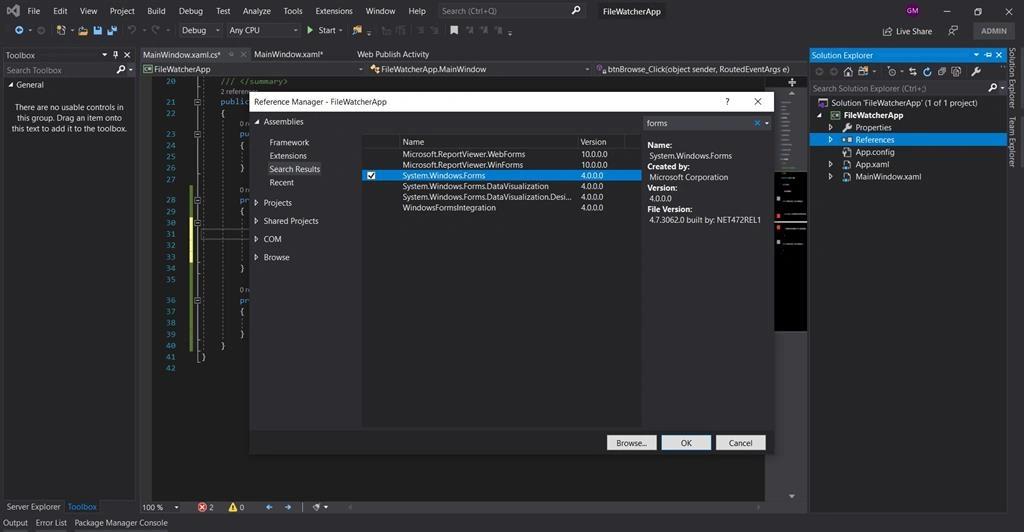
If you encounter a namespace reference error on the System.Windows.Forms namespace kindly add the reference as depicted in the picture below.
Our project is complete and when run it should display a user interface like this and we are free to test our implementation.
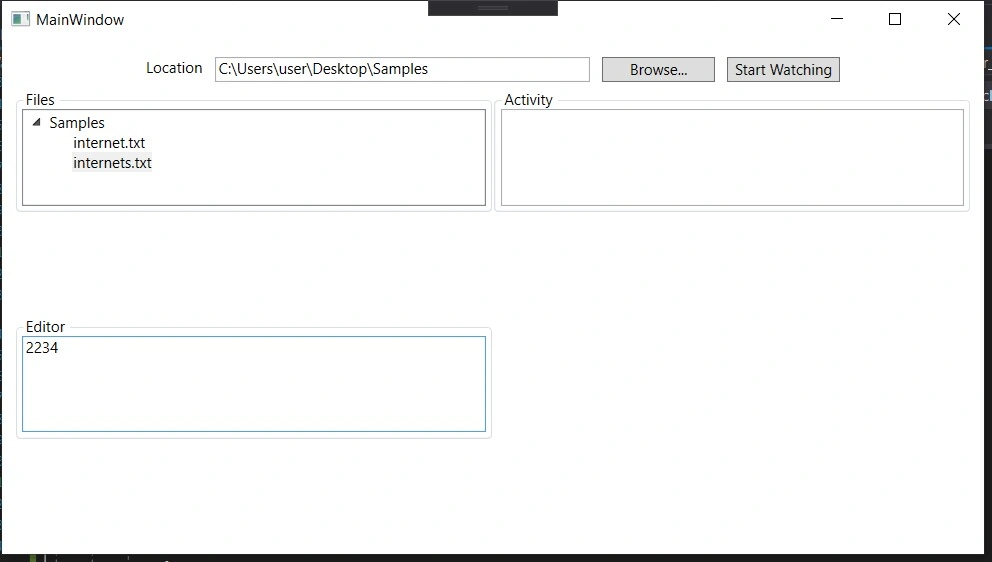
While our start listening button is displaying we can try to change the text in the editor as much as we want and we can see no activity is logged.
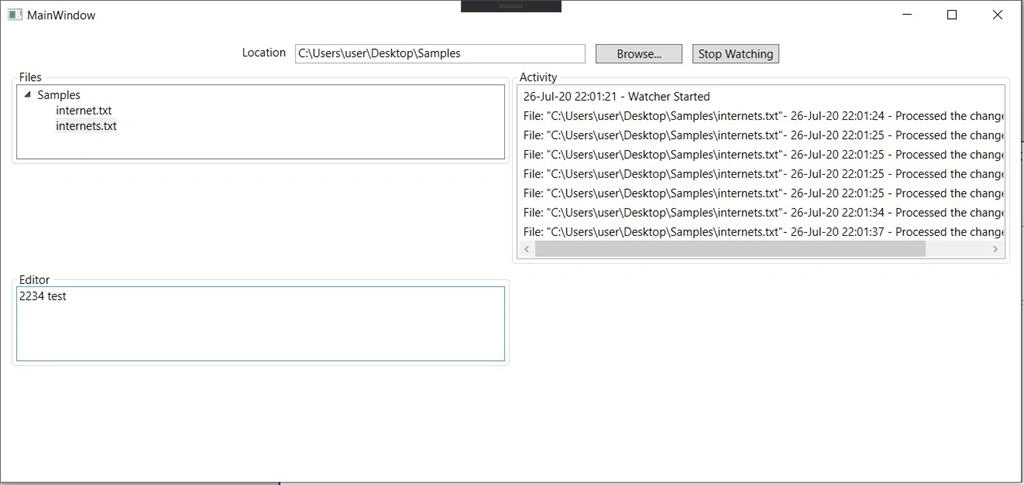
However, when we start listening and make changes to any selected file we can see that the activities are being logged on the activity section.
This concludes our file watcher application.
Join the conversation! Your thoughts help the community grow.