

This blog is a continuation of “Create Your Customized Copilot Using Microsoft Copilot Part 1 and 2” in which we explained the left side navigation menu Overview, Topics, Actions (preview), Entities, Analytics, Publish, and Settings. In this blog, we will discuss Copilot's available channels.
Overview of channels
These are the available "Channels," which are various platforms where the copilot can interact with users.
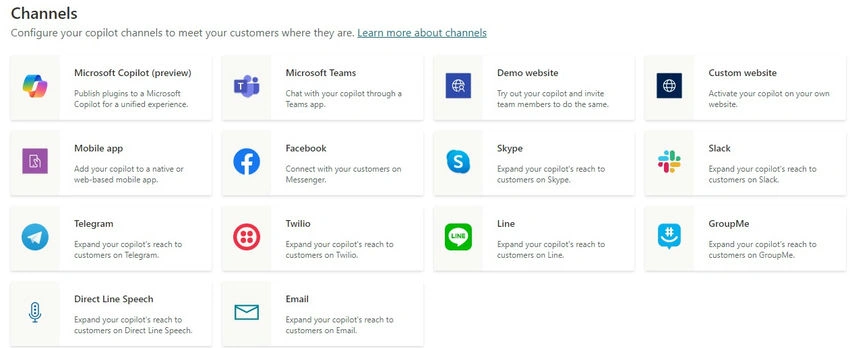
Here are the channels shown
- Microsoft Copilot (preview): This suggests you can publish plugins to a unified Microsoft Copilot experience, possibly meaning that you can integrate custom functionalities or workflows into the copilot's operation.
- Microsoft Teams: Enables the copilot to chat through a Teams app, allowing for integration within a corporate or collaborative environment where Teams is used for communication.
- Businesses can utilize Microsoft Teams integration with Copilot to automate internal support, streamline onboarding, enhance customer service, manage projects efficiently, and trigger workflows within the familiar Teams environment. This integration ensures seamless access to AI-powered assistance, improving productivity and response times for both employees and customers.
- For integration, you can refer to this link https://learn.microsoft.com/en-us/microsoft-copilot-studio/publication-add-bot-to-microsoft-teams
- Mobile app: Suggests that you can add the copilot to either a native or web-based mobile application, thus reaching users on their mobile devices.
- For integration copilot in mobile, you can either share the Token Endpoint or iframe code.
- Facebook: This would allow a business to connect with customers via Facebook Messenger, leveraging the vast user base of the social media platform.
- Facebook integration can be done after creating an app on Facebook and providing details like Facebook app ID, Page ID, and Page Token.
- Telegram: Indicates the ability to extend the copilot's capabilities to interact with users on the Telegram messaging service.
- Twilio: By integrating with Twilio, the copilot can reach customers through Twilio's communication APIs, which support messaging, voice calls, and more.
- Direct Line Speech: This may refer to a specific channel or API service that allows for voice interaction with the copilot.
- Direct Line Speech is likely a service that facilitates voice-enabled communication with Copilot. Businesses can use this to add voice command capabilities to their apps, allowing users to interact with the copilot through spoken language, making services more accessible, and enhancing the user experience.
- Email: Allows the copilot to interact with users via email, which could be used for customer support, marketing, or other email-based communications.
- By integrating Copilot with email, businesses can automate responses to customer inquiries, manage email marketing campaigns, and handle routine communications. This allows for timely and consistent interactions, improving customer engagement and operational efficiency.
- Demo website: A feature to test the copilot and invite team members to interact with it, likely to ensure that the bot is functioning as intended before wider deployment.
- Custom website: Businesses can activate their copilot on their websites, which is crucial for providing automated customer service or support directly on the business's digital property.
- Skype: Extends the reach of the copilot to users on Skype, another popular communication platform.
- Slack: Integration here would allow businesses to employ the copilot within the Slack environment, suitable for both internal team interactions and customer engagement.
- Integrating Copilot with Slack enables businesses to provide real-time AI assistance within a widely-used communication tool, facilitating quicker resolution of internal queries and proactive customer support directly where conversations happen
- Line: This integration suggests that businesses can utilize the copilot to engage with customers online, a messaging app popular in certain regions like East Asia.
- GroupMe: Lastly, this allows the copilot to communicate with users on GroupMe, a group messaging service.
- For businesses, these channel options are critical because they allow the copilot to be where their customers are, providing support and engagement across a broad spectrum of platforms. This can lead to improved customer satisfaction, streamlined support processes, and an overall increase in accessibility to the services that the copilot provides. It ensures that businesses can interact with their customers through the most convenient channel for each individual, thereby enhancing the customer experience.
Conclusion
The versatility of channels available for Microsoft Copilot is a game-changer for businesses looking to enhance their communication strategies both internally and with customers. By integrating Copilot with popular platforms such as Microsoft Teams, Email, and Slack, companies can automate and personalize their interactions, improving efficiency and satisfaction. These integrations mean that Copilot can be employed exactly where the conversations are already happening, from team chats to customer support emails, ensuring that every message can be handled with the same intelligence and care, regardless of the medium. The result is a unified communication experience that is not only more efficient but also more intelligent, driving better business outcomes in a digital-first world.
Join the conversation! Your thoughts help the community grow.