

Overview
Below are some useful links to start programming in Android Applications.
- Android Programming - Day One
- Android Programming - Day Two
- How To Display A Dialog Windows In Android
- How To Display A Progress Dialog Window In Android
- Intent In Android
- Return Data Using Intent Object In Android Applications
- Passing Data Using An Intent Object In Android Applications
- Fragments In Android Applications
- Adding Fragments Dynamically In Android Application
- Fragment Life Cycle In Android Application
- Interaction Between Two Fragments
- Calling In Built Functions in Android Application
- Intent Object and Intent Filters in Android Application
- Displaying Notifications in Android Applications
- User Interface in Android Applications
- Orientation, Anchoring, Resizing And Repositioning Of Views In Android Application
- Activity Behavior When Screen Orientation Changes in Android Application
- Persevere with State Information during Changes in Configuration
- Detect Orientation Changes and Controlling the Orientation of the Activity
- Utilizing the Action Bar in Android Application
Introduction
In this article, we will learn to create user interface, using code. So far, we have seen all the UIs, which you have created, using XML file but we can create the user interface programmatically. This is useful, when UI needs to be dynamically generated during runtime if you are creating an app for the air ticket reservation system and your app is supposed to display the seats for each way's travel, using the buttons. In this case, you will have to dynamically generate the UI code, which is based on the air travel selected by the user.
Implementation
Create a new project by selecting File->New->New Project.
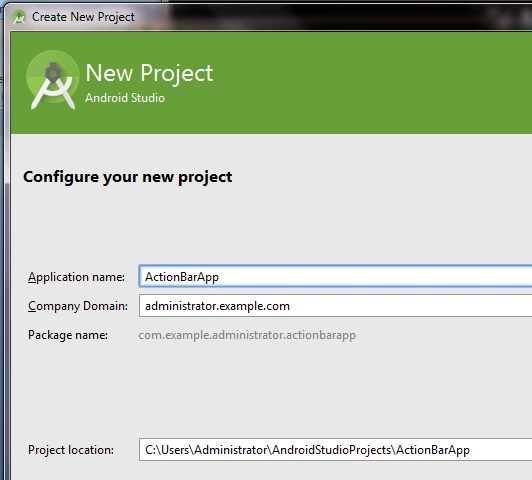
Now, add some elements which are used to create UI in Android, as shown below.
- package com.example.administrator.actionbarapp;
- import android.app.ActionBar;
- import android.app.Activity;
- import android.support.v7.app.ActionBarActivity;
- import android.os.Bundle;
- import android.view.Menu;
- import android.view.MenuItem;
- import android.view.ViewGroup;
- import android.widget.Button;
- import android.widget.CheckBox;
- import android.widget.EditText;
- import android.widget.LinearLayout;
- import android.widget.RadioButton;
- import android.widget.RadioGroup;
- import android.widget.TextView;
- import android.widget.Toast;
- public class MainActivity extends Activity {
- @Override
- protected void onCreate(Bundle savedInstanceState) {
- //getSupportActionBar().setDisplayHomeAsUpEnabled(false);
- super.onCreate(savedInstanceState);
- //setContentView(R.layout.activity_main);
- //Create params for views---------------
- LinearLayout.LayoutParams params = new LinearLayout.LayoutParams(LinearLayout.LayoutParams.FILL_PARENT, LinearLayout.LayoutParams.WRAP_CONTENT);
- //Create a layout---------------
- LinearLayout linearLayout = new LinearLayout(this);
- linearLayout.setOrientation(LinearLayout.VERTICAL);
- //----Create a TextView------
- TextView textView = new TextView(this);
- textView.setText("This TextView is dynamically created");
- textView.setLayoutParams(params);
- //--Create A EditText------------------
- EditText editText = new EditText(this);
- editText.setLayoutParams(params);
- //----Create a CheckBox-------------
- CheckBox checkBox = new CheckBox(this);
- checkBox.setLayoutParams(params);
- //--- Create a RadioGroup---------------
- RadioGroup radioGroup = new RadioGroup(this);
- radioGroup.setLayoutParams(params);
- //--------Create a RadioButton----------
- RadioButton radioButton = new RadioButton(this);
- radioButton.setLayoutParams(params);
- //-----Create a Button--------
- Button button = new Button(this);
- button.setText("This Button is dynamically created");
- button.setLayoutParams(params);
- //---Add all elements to the layout
- linearLayout.addView(textView);
- linearLayout.addView(checkBox);
- linearLayout.addView(editText);
- linearLayout.addView(radioGroup);
- linearLayout.addView(radioButton);
- linearLayout.addView(button);
- //---Create a layout param for the layout-----------------
- LinearLayout.LayoutParams layoutParams = new LinearLayout.LayoutParams(ActionBar.LayoutParams.FILL_PARENT, ActionBar.LayoutParams.WRAP_CONTENT);
- this.addContentView(linearLayout, layoutParams);
- }
- }
Explanation
Press F11 to debug the Application on the mobile device or Android emulator. The activity created looks as shown below.
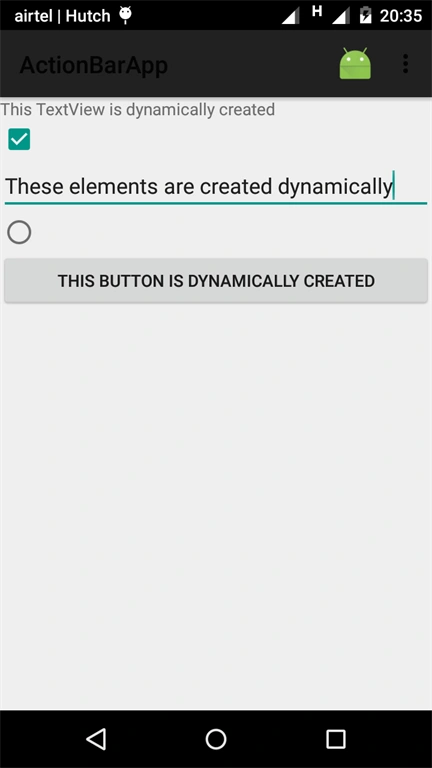
If you see the code carefully, we have commented on the code
- //setContentView(R.layout.activity_main);
- //Create params for views---------------
- LinearLayout.LayoutParams params=new LinearLayout.LayoutParams(LinearLayout.LayoutParams.FILL_PARENT,LinearLayout.LayoutParams.WRAP_CONTENT);
- //Create a layout---------------
- LinearLayout linearLayout=new LinearLayout(this);
- linearLayout.setOrientation(LinearLayout.VERTICAL);
- //----Create a TextView------
- TextView textView=new TextView(this);
- textView.setText("This TextView is dynamically created");
- textView.setLayoutParams(params);
- //--Create A EditText------------------
- EditText editText=new EditText(this);
- editText.setLayoutParams(params);
- //----Create a CheckBox-------------
- CheckBox checkBox=new CheckBox(this);
- checkBox.setLayoutParams(params);
- //--- Create a RadioGroup---------------
- RadioGroup radioGroup=new RadioGroup(this);
- radioGroup.setLayoutParams(params);
- //--------Create a RadioButton----------
- RadioButton radioButton=new RadioButton(this);
- radioButton.setLayoutParams(params);
- //-----Create a Button--------
- Button button=new Button(this);
- button.setText("This Button is dynamically created");
- button.setLayoutParams(params);
- //---Add all elements to the layout
- linearLayout.addView(textView);
- linearLayout.addView(checkBox);
- linearLayout.addView(editText);
- linearLayout.addView(radioGroup);
- linearLayout.addView(radioButton);
- linearLayout.addView(button);
- //---Create a layout param for the layout-----------------
- LinearLayout.LayoutParams layoutParams=new LinearLayout.LayoutParams(ActionBar.LayoutParams.FILL_PARENT, ActionBar.LayoutParams.WRAP_CONTENT);
- this.addContentView(linearLayout,layoutParams);
Conclusion
In this article, you learned how to create UI dynamically. In the next article, I will explain about how the activities interact with the user.
葉文彬 葉文彬Posted Sep 8, 2021, 3:20 AM
I certainly benefit a lot from your sharing and appreciate it!
Manav PandyaPosted Jan 22, 2017, 1:40 PM
Thanks for sharing this .........