

Introduction
We can use the SharePoint 2013 Representational State Transfer (REST) service to do the same tasks you can do when you use the .Net CSOM and JSOM.
Here I will explain CreateList in SharePoint 2013 using the REST API.
Procedure
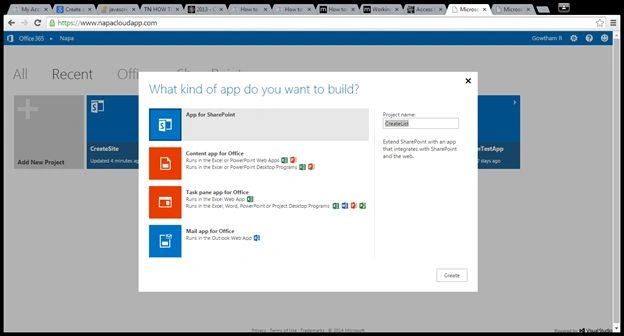
- On your Developer Site, open the "Napa" Office 365 Development Tools and then choose Add New Project.
- Choose the App for SharePoint template, name the project Create Site, and then choose the Create button.
Prerequisites
These are important steps to be taken before creating the app.
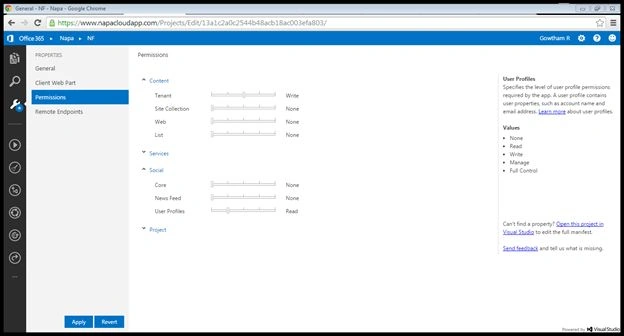
Specify the permissions that your app needs as follows:
- Choose the Properties button at the bottom of the page.
- In the Properties window, choose Permissions.
- In the Content category, set Write permissions for the Tenant scope.
- In the Social category, set Read permissions for the User Profiles scope.
- Close the Properties window.
Expand the Scripts node, choose the App.js file, delete the contents of the file, and replace it with the following code.
'use strict';

var hostweburl;
var appweburl;

// This code runs when the DOM is ready and creates a context object
// which is needed to use the SharePoint object model
$(document).ready(function () {
    hostweburl = decodeURIComponent(getQueryStringParameter("SPHostUrl"));
    appweburl = decodeURIComponent(getQueryStringParameter("SPAppWebUrl"));
});

function createSPList() {
    $.ajax({
        url: appweburl + "/_api/SP.AppContextSite(@target)/web/lists?@target='" + hostweburl + "/sites/apps'",
        type: "POST",
        data: JSON.stringify({
            '__metadata': { 'type': 'SP.List' },
            'AllowContentTypes': true,
            'BaseTemplate': 100,
            'ContentTypesEnabled': true,
            'Description': 'My TestCustomList description',
            'Title': 'TestCustomList'
        }),
        headers: {
            "accept": "application/json;odata=verbose",
            "content-type": "application/json;odata=verbose",
            "X-RequestDigest": $("#__REQUESTDIGEST").val()
        },
        success: successHandler,
        error: errorHandler
    });
}

function successHandler() {
    $('#message').text('Success');
}

function errorHandler(data, errorCode, errorMessage) {
    $('#message').text('Error ' + errorMessage);
}

function getQueryStringParameter(paramToRetrieve) {
    var params = document.URL.split("?")[1].split("&");
    for (var i = 0; i < params.length; i++) {
        var singleParam = params[i].split("=");
        if (singleParam[0] == paramToRetrieve) {
            return singleParam[1];
        }
    }
}
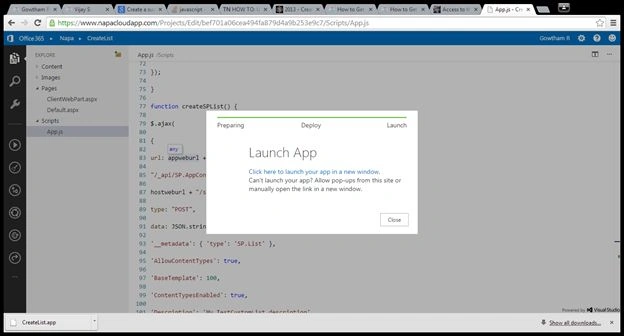
Once you completed the code part, then run the project.
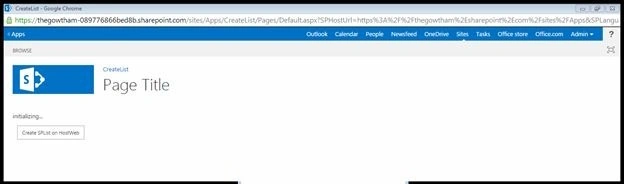
Once you deploy the app, select Click here to launch your app using the new window link. It will redirect to another page.
I hope you have enjoyed this.
Gowtham RajamanickamPosted Apr 10, 2016, 1:48 AM
Hope you all enjoyed this blog
Gowtham RajamanickamPosted Apr 10, 2016, 1:48 AM
Thanks all
Gowtham RajamanickamPosted Apr 10, 2016, 1:48 AM
Thanks Vijay
Gowtham RajamanickamPosted Apr 10, 2016, 1:48 AM
thanks vithal
Gowtham RajamanickamPosted Apr 10, 2016, 1:48 AM
thanks rahul
Vijay SPosted Apr 8, 2015, 9:18 AM
Good work
Vithal WadjePosted Mar 13, 2015, 3:03 PM
nice explanation
Rahul Kumar SaxenaPosted Mar 13, 2015, 1:25 PM
Gud show