

Introduction
This article explains the Representational State Transfer (REST) services with the attribute routing. REST is based on the client/server architecture in which both communicate with each other.
We know that the attribute routing is the new feature of the Web API2 that uses attributes for defining the routes.
Let's see an example.
Step 1
First we create an application:
- Start Visual Studio 2013.
- From the Start Window select "New Project".
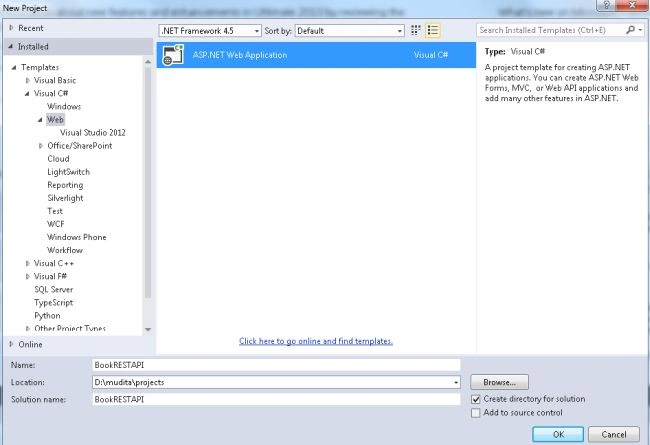
- Select "Installed" -> "Templates" -> "Visual C#" -> "Web" and select ASP.NET Web Application.
- From the ASP.NET project window select "Empty" and select the "Web API" check box.
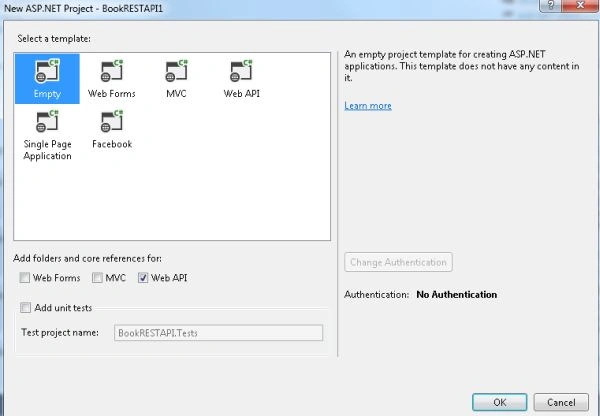
- Click on the "OK" button.
Step 2
Create Two Model Classes. The first is "novel.cs" and the second is "Writer.cs" as in the following:
- In the "Solution Explorer".
- Right-click on the Model Folder.
- Select "Add" -> "Class".
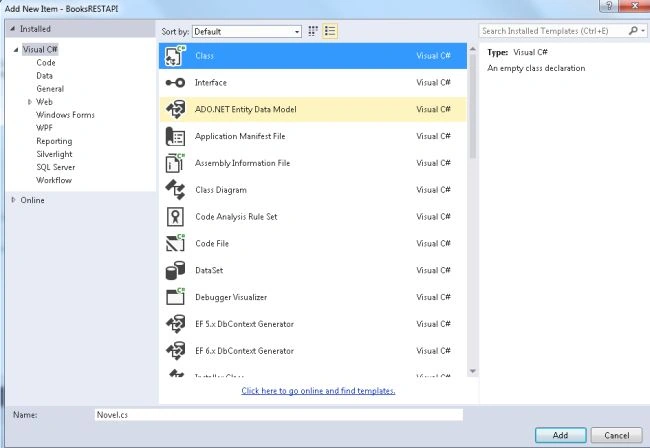
- Select "Installed" -> "Visual C#" and select "Class".
Add the following code in the Novel.cs class:
- using System;
- using System.Collections.Generic;
- using System.ComponentModel.DataAnnotations;
- using System.ComponentModel.DataAnnotations.Schema;
- using System.Linq;
- using System.Web;
- namespace BooksRESTAPI.Models
- {
- public class Novel
- {
- public int NovelId { get; set; }
- [Required]
- public string N_Title { get; set; }
- public decimal Cost { get; set; }
- public string N_Genre { get; set; }
- public DateTime N_PublishDate { get; set; }
- public string N_Desc { get; set; }
- public int WriterId { get; set; }
- [ForeignKey("WriterId")]
- public Writer Writer { get; set; }
- }
- }
Add the following code in the Writer.cs class:
- using System;
- using System.Collections.Generic;
- using System.ComponentModel.DataAnnotations;
- using System.Linq;
- using System.Web;
- namespace BooksRESTAPI.Models
- {
- public class Writer
- {
- public int WriterId { get; set; }
- [Required]
- public string WriterName { get; set; }
- }
- }
Step 3
Now add a OData Controller as in the following:
- In the "Solution Explorer".
- Right-click on the Controller folder.
- Select "Controller" -> "Web API2 Controller with actions using Entity Framework".
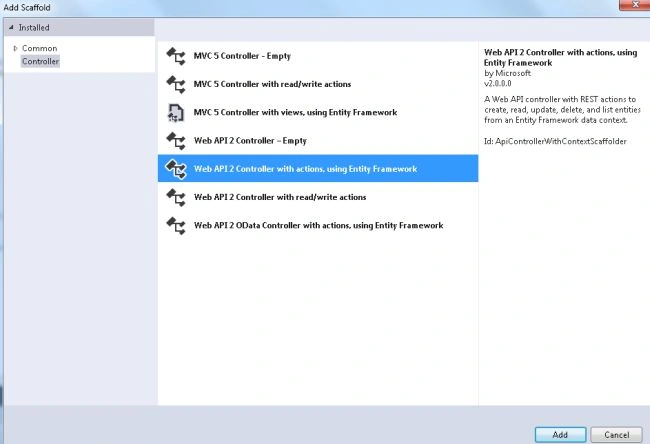
- In the Add Controller Dialog box, name the Controller "NovelsController" and select the "Use async controller actions" , now from the model dropdown list select "Model class".
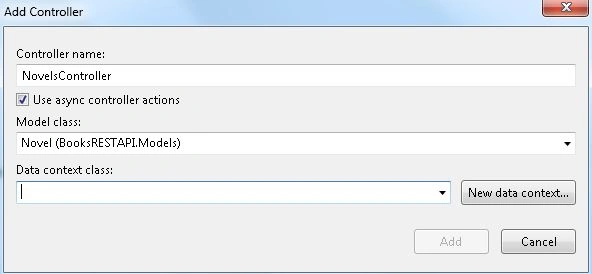
- Click on the "New Data Context".
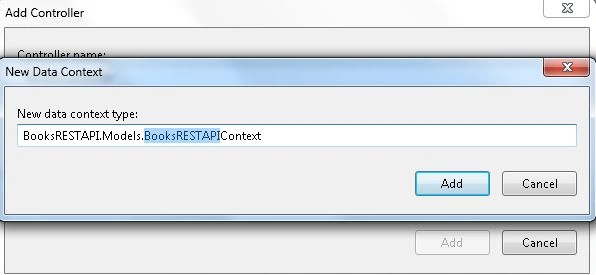
- Click on the "Add" button.
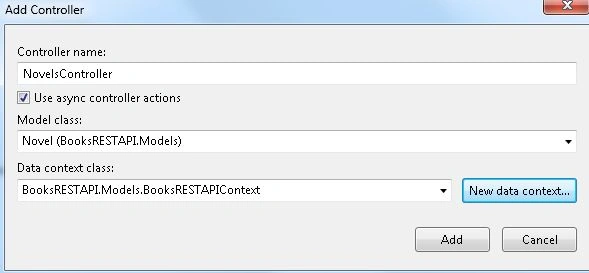
- Now again click on the "Add" button.
If there is an error message generated then before creating the OData controller build the project and then create the controller.
Here create two code files as in the following:
- The first is "NovelsController" that defines the Web API Controller.
- The second is "BookRESTAPIContext.cs" that defines the methods of querying data with the Entity Framework.
Step 4
Now we seed the database as in the following:
- From the tools menu select "Library package manager" -> "Package Manager Console".
- And enter the "Enable migrations" command.
It adds a Migration folder in the application with the configuration file.
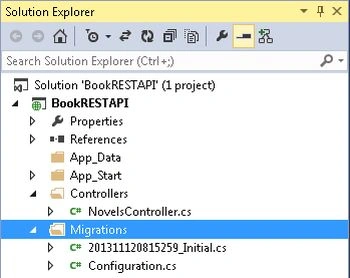
Now we add some code in this file as in the following:
- namespace BooksRESTAPI.Migrations
- {
- using BooksRESTAPI.Models;
- using System;
- using System.Data.Entity;
- using System.Data.Entity.Migrations;
- using System.Linq;
- internal sealed class Configuration : DbMigrationsConfiguration<BooksRESTAPI.Models.BooksRESTAPIContext>
- {
- public Configuration()
- {
- AutomaticMigrationsEnabled = false;
- }
- protected override void Seed(BooksRESTAPI.Models.BooksRESTAPIContext context)
- {
- context.Writers.AddOrUpdate(new Writer[] {
- new Writer() { WriterId = 1, WriterName = "A.M. Homes" },
- new Writer() { WriterId = 2, WriterName = "Mark Danielewski" },
- new Writer() { WriterId = 3, WriterName = "Cormac McCatrhy" },
- new Writer() { WriterId = 4, WriterName = "Brett Easton Ellis" }
- });
- context.Novels.AddOrUpdate(new Novel[] {
- new Novel() { NovelId = 1, N_Title= "Music For Torching", N_Genre = "Fantasy",
- N_PublishDate = new DateTime(2000, 12, 16), WriterId = 1, N_Desc ="It is after midnight on one of those Friday nights when the guests have all gone home and the host and hostess are left in their drunkenness to try and put things right again.", Cost = 14.95M },
- new Novel() { NovelId = 2, N_Title = "House or Leaves", N_Genre = "Horrorable",
- N_PublishDate = new DateTime(2000, 11, 17), WriterId = 2, N_Desc = "While enthusiasts and detractors will continue to empty entire dictionaries attempting to describe or deride it, "authenticity" still remains the word most likely to stir a debate.", Cost= 12.95M },
- new Novel() { NovelId = 3, N_Title = "The Road", N_Genre = "Fantasy", N_PublishDate = new DateTime(2001, 09, 10), WriterId = 2, N_Desc ="When he woke in the woods in the dark and cold of the night he'd reach out to touch the child sleeping beside him.", Cost = 12.95M },
- new Novel() { NovelId = 4, N_Title = "Rules of Attraction", N_Genre = "Romance",
- N_PublishDate = new DateTime(2000, 09, 02), WriterId = 3, N_Desc =
- "And it's a story that might bore you, but you don't have to listen, she told me, because she always knew it was going to be like that", Cost = 7.99M },
- new Novel() { NovelId = 5, N_Title = "Splish Splash", N_Genre = "Romance",
- N_PublishDate = new DateTime(2000, 11, 02), WriterId = 4, N_Desc = "A deep sea diver finds true love 20,000 leagues beneath the sea.", Cost = 6.99M},
- });
- }
- }
- }
Now for creating the local database we need to use this command that we enter into the console window. The commands are "Add-migration Initial" and then "Update-database".
Step 5
Execute the application:
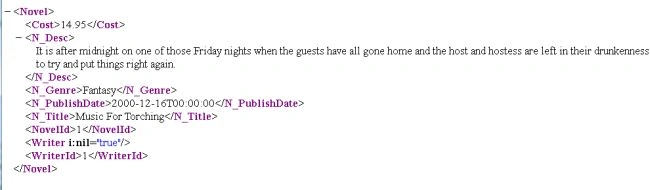
Here we see that it does not return the Write name. If we want it to return the Writer Name instead of the Writer ID, we use the DTO (Data Transfer Object).
Step 6
In the Solution Explorer add the DTOs folder:
-
Right-click on the project and select "Add" -> "New Folder".
-
Then in this folder add two classes.
-
First id is "NovelDetailDto" and the second is "NovelDto".
Add the following code to the "NovelDetailDto.cs" file:
- using System;
- using System.Collections.Generic;
- using System.Data.Entity;
- using System.Linq;
- using System.Web;
- namespace BooksRESTAPI.Models
- {
- public class BooksRESTAPIContext : DbContext
- {
- public BooksRESTAPIContext() : base("name=BooksRESTAPIContext")
- {
- }
- public System.Data.Entity.DbSet<BooksRESTAPI.Models.Novel> Novels { get; set; }
- public System.Data.Entity.DbSet<BooksRESTAPI.Models.Writer> Writers { get; set; }
- }
- }
Add the following code code to the "NovelDto.cs" file:
- using System;
- using System.Collections.Generic;
- using System.ComponentModel.DataAnnotations;
- using System.ComponentModel.DataAnnotations.Schema;
- using System.Linq;
- using System.Web;
- namespace BooksRESTAPI.Models
- {
- public class Novel
- {
- public int NovelId { get; set; }
- [Required]
- public string N_Title { get; set; }
- public decimal Cost { get; set; }
- public string N_Genre { get; set; }
- public DateTime N_PublishDate { get; set; }
- public string N_Desc { get; set; }
- public int WriterId { get; set; }
- [ForeignKey("WriterId")]
- public Writer Writer { get; set; }
- }
- }
Step 7
Update the code of the "NovelsControler" class for returning the NovelDto instances as in the following:
- using System;
- using System.Collections.Generic;
- using System.Data;
- using System.Data.Entity;
- using System.Data.Entity.Infrastructure;
- using System.Linq;
- using System.Net;
- using System.Net.Http;
- using System.Threading.Tasks;
- using System.Web.Http;
- using System.Web.Http.Description;
- using BooksRESTAPI.Models;
- using BooksRESTAPI.DTOs;
- using System.Linq.Expressions;
- namespace BooksRESTAPI.Controllers
- {
- [RoutePrefix("api/novels")]
- public class NovelsController : ApiController
- {
- private BooksRESTAPIContext db = new BooksRESTAPIContext();
- private static readonly Expression<Func<Novel, NovelDto>> AsBookDto =
- x => new NovelDto
- {
- N_Title = x.N_Title,
- Writer = x.Writer.WriterName,
- N_Genre = x.N_Genre,
- };
- // GET api/Novels
- [Route("")]
- public IQueryable<NovelDto> GetNovels()
- {
- return db.Novels.Include(b=>b.Writer).Select(AsBookDto);
- }
- // GET api/Novels/5
- [Route("{id:int}")]
- [ResponseType(typeof(NovelDto))]
- public async Task<IHttpActionResult> GetNovel(int id)
- {
- NovelDto novel = await db.Novels.Include(p => p.Writer)
- .Where(p => p.NovelId == id)
- .Select(AsBookDto)
- .FirstOrDefaultAsync();
- if (novel == null)
- {
- return NotFound();
- }
- return Ok(novel);
- }
- protected override void Dispose(bool disposing)
- {
- db.Dispose();
- base.Dispose(disposing);
- }
- }
- }
In the code above we can see that we used the following routes:
[RoutePrefix("api/novels")]
[Route("")]
[Route("{id:int}")]
Execute the application:

Step 8
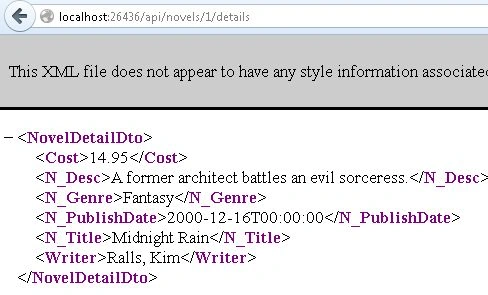
If you want to get the details then add this code in the "NovelsController". With the URL "http://localhost:26436/api/novels/1/details".
- [Route("{id:int}/details")]
- [ResponseType(typeof(NovelDetailDto))]
- public async Task<IHttpActionResult> GetNovelDetail(int id)
- {
- var novel = await (from p in db.Novels.Include(p => p.Writer)
- where p.WriterId == id
- select new NovelDetailDto
- {
- N_Title = p.N_Title,
- N_Genre = p.N_Genre,
- N_PublishDate = p.N_PublishDate,
- Writer = p.Writer.WriterName,
- N_Desc = p.N_Desc,
- Cost = p.Cost
- }).FirstOrDefaultAsync();
- if (novel == null)
- {
- return NotFound();
- }
- return Ok(novel);
- }
Now execute the application; the output will be:
Step 9
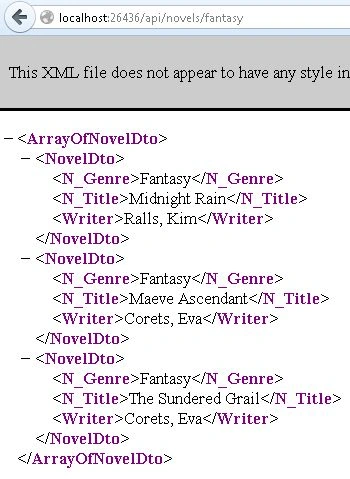
If you want to see the details of novels by the "N_Genre" then add the following code in the "NovelsController".
- [Route("{genre}")]
- public IQueryable<NovelDto> GetNovelsByGenre(string genre)
- {
- return db.Novels.Include(p=> p.Writer)
- .Where(p => p.N_Genre.Equals(genre, StringComparison.OrdinalIgnoreCase))
- .Select(AsBookDto);
- }
Again execute the application: with URL "http://localhost:26436/api/novels/fantasy".
Join the conversation! Your thoughts help the community grow.