

Introduction
Application Programming Interface (API)
An API is good for communication between an app and a server. When we send a user request to the server using an Android server the response from your request is fast in JSON or XML format. REST is very simple compared to other methods like SOAP, CORBA and WSDL. The RESTful API supports the most commonly used HTTP methods (GET, POST, PUT and DELETE).
- GET to retrieve and search data
- POST to add data
- PUT to update data
- DELETE to delete data
How to Communicate Between a Device and MySQL Server using API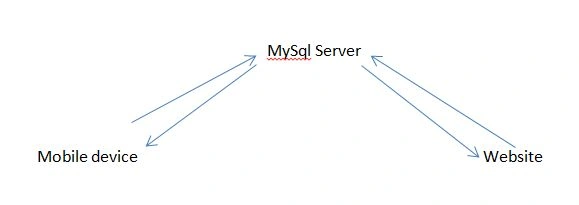
Start the Application
Step 1: Create a table in a MySQL database.
- CREATE TABLE products_api(
- pid int(11) primary key auto_increment,
- name varchar(100) not null,
- price decimal(10,2) not null,
- description text,
- created_at timestamp default now(),
- updated_at timestamp
- );
Step 2: Create two files called database_connect.php.
- define('DB_USER', "root"); // db user
- define('DB_PASSWORD', ""); // db password
- define('DB_DATABASE', "myconnectapi"); // database name
- define('DB_SERVER', "localhost"); // db server/ host name
- <?php
- /**
- * A class file to connect to database
- */
- class DATABASE_CONNECT {
- // constructor
- function __construct() {
- // connecting to database
- $this->connect();
- }
- // destructor
- function __destruct() {
- // closing db connection
- $this->close();
- }
- function connect() {
- $con = mysql_connect(DB_SERVER, DB_USER, DB_PASSWORD) or die(mysql_error());
- $db = mysql_select_db(DB_DATABASE) or die(mysql_error()) or die(mysql_error());
- return $con;
- }
- /**
- * Function to close db connection
- */
- function close() {
- // closing db connection
- mysql_close();
- }
- }
- ?>
- $MY_DB = new DB_CONNECT();
Insert product list API
Create an insert_product.php file. When the insert_proudct.php file is called and inserts a product the response is in JSON format.
insert_product.php
- <?php
- $response = array();
- if (isset($_POST['name']) && isset($_POST['price']) && isset($_POST['description'])) {
- $name = $_POST['name'];
- $price = $_POST['price'];
- $description = $_POST['description'];
- // include db connect class
- require_once __DIR__ . '/ database_connect.php';
- // connecting to db
- $db = new DB_CONNECT();
- $result = mysql_query("INSERT INTO products_api(name, price, description) VALUES('$name', '$price', '$description')");
- // check if row inserted or not
- if ($result) {
- $response["success_msg"] = 1;
- $response["message"] = "Product successfully Insert.";
- echo json_encode($response);
- } else {
- // failed to insert row
- $response["success_msg "] = 0;
- $response["message"] = "Product not insert because Oops! An error occurred.";
- // echoing JSON response
- echo json_encode($response);
- }
- }
- ?>
The following output will be displayed in your browser.
- {
- " success_msg ": 1,
- "message": "Product successfully insert."
- }
- {
- " success_msg ": 0,
- "message": " Product not insert because Oops! An error occurred."
- }
Reading product details
product_details.php
- <?php
- /*
- * Following code will get single product details
- * A product is identified by product id (pid)
- */
- // array for JSON response
- $response = array();
- // include db connect class
- require_once __DIR__ . '/database_connect.php';
- // connecting to db
- $db = new DB_CONNECT();
- // check for post data
- if (isset($_GET["pid"])) {
- $pid = $_GET['pid'];
- // get a product from products table
- $result = mysql_query("SELECT *FROM products_api WHERE pid = $pid");
- if (!emptyempty($result)) {
- // check for empty result
- if (mysql_num_rows($result) > 0) {
- $result = mysql_fetch_array($result);
- $product = array();
- $product["pid"] = $result["pid"];
- $product["name"] = $result["name"];
- $product["price"] = $result["price"];
- $product["description"] = $result["description"];
- $product["created_at"] = $result["created_at"];
- $product["updated_at"] = $result["updated_at"];
- // success
- $response["success"] = 1;
- // user node
- $response["product"] = array();
- array_push($response["product"], $product);
- // echoing JSON response
- echo json_encode($response);
- } else {
- // no product found
- $response["success"] = 0;
- $response["message"] = "No product found";
- // echo no users JSON
- echo json_encode($response);
- }
- } else {
- // no product found
- $response["success"] = 0;
- $response["message"] = "No product found";
- // echo no users JSON
- echo json_encode($response);
- }
- }
- ?>
- {
- "success": 1,
- "product": [
- {
- "pid": "1",
- "name": "demo product",
- "price": "300.00",
- "description": "demo description",
- "created_at": "2012-05-29 01:41:42",
-
- "updated_at": "0000-03-00 06:02:00"
- }
- ]
- }
Deleting a Row in MySQL (Deleting a product)
delete_product.php
- <?php
- /*
- * Following code will delete a product from table
- * A product is identified by product id (pid)
- */
- // array for JSON response
- $response = array();
- // check for required fields
- if (isset($_POST['pid'])) {
- $pid = $_POST['pid'];
- // include db connect class
- require_once __DIR__ . '/db_connect.php';
- // connecting to db
- $db = new DB_CONNECT();
- // mysql update row with matched pid
- $result = mysql_query("DELETE FROM products WHERE pid = $pid");
- // check if row deleted or not
- if (mysql_affected_rows() > 0) {
- // successfully updated
- $response["success"] = 1;
- $response["message"] = "Product successfully deleted";
- // echoing JSON response
- echo json_encode($response);
- } else {
- // no product found
- $response["success"] = 0;
- $response["message"] = "No product found";
- // echo no users JSON
- echo json_encode($response);
- }
- }
- ?>
The output will be:
- {
- "success": 1,
- "message": "Product successfully deleted"
- }
johnPosted May 5, 2020, 2:46 PM
Where is the mobile code, we all know how to do this in PHP. Show how to use these in Xamarin, otherwise this article is mislabled
Nilmar CastroPosted May 1, 2019, 9:47 AM
My question/problem is, how to connect my app with that api?s using Xamarin Forms ? Can You send one example please?
Ipung PurwonoPosted Aug 15, 2017, 6:42 AM
Look Great (y) this tutorial very helping me to create simple API