

The code for Browse Multiple Files button click event handler looks like following that let users select multiple images and show their thumbnails. Download the attached project for more details. The application looks like this:
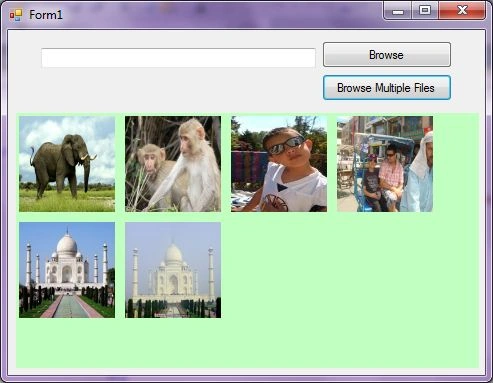
It is is a Windows Forms application developed using Visual Studio 2010.
private void
BrowseMultipleButton_Click(object sender, EventArgs e)
{
this.openFileDialog1.Filter =
"Images
(*.BMP;*.JPG;*.GIF,*.PNG,*.TIFF)|*.BMP;*.JPG;*.GIF;*.PNG;*.TIFF|" +
"All files (*.*)|*.*";
this.openFileDialog1.Multiselect = true;
this.openFileDialog1.Title = "Select
Photos";
DialogResult dr = this.openFileDialog1.ShowDialog();
if (dr == System.Windows.Forms.DialogResult.OK)
{
foreach (String
file in openFileDialog1.FileNames)
{
try
{
PictureBox imageControl = new PictureBox();
imageControl.Height = 100;
imageControl.Width = 100;
Image.GetThumbnailImageAbort
myCallback =
new Image.GetThumbnailImageAbort(ThumbnailCallback);
Bitmap myBitmap = new Bitmap(file);
Image myThumbnail =
myBitmap.GetThumbnailImage(96, 96,
myCallback, IntPtr.Zero);
imageControl.Image = myThumbnail;
PhotoGallary.Controls.Add(imageControl);
}
catch (Exception
ex)
{
MessageBox.Show("Error: " + ex.Message);
}
}
}
}
public bool
ThumbnailCallback()
{
return false;
}
DANNY ROUGHPosted Apr 18, 2013, 10:32 PM
hi, duddy! i think it is an ubiquitous question among developers, i believe i can give you a favor. use http://www.rasteredge.com/how-to/csharp-imaging/thumbnail-creating/, and you will solve it , good luck!
Safeer KarippathodikaPosted Nov 1, 2010, 6:31 PM
Dear Sir, Kindly give example for MS Access 2007 attachment data type in C# 2005. Safeer ([email protected])
Veera pandiyanPosted Sep 22, 2010, 4:59 AM
Hi, i want click event on the images. please let me know Thanks, Farhan.
Veera pandiyanPosted Sep 22, 2010, 4:40 AM
if i click a image, how to display full view. Regards, Veerapandiayn.K