

Introduction
This article explains how to create a hyperlink in a Web Grid. Here we create a hyperlink for the Employee Name.
Use the following procedure to create a sample application.
Step 1
Create a Web Application as in the following:
- Start Visual Studio 2012.
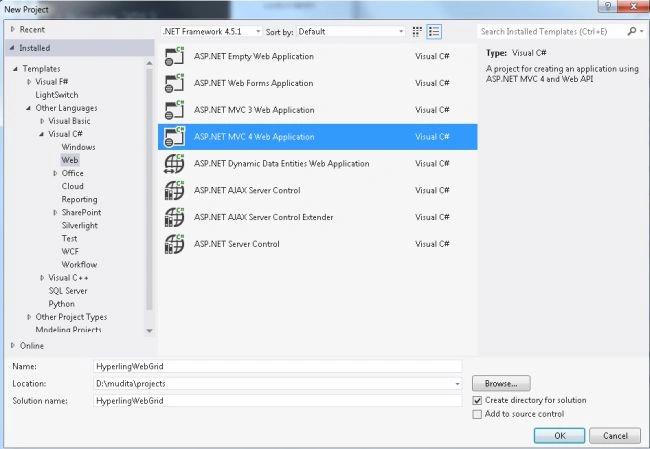
- From the Start window select "Installed" -> "Visual C#" -> "Web".
- Select "ASP.NET MVC4 Web Application" and click on the "Ok" button.
- From the "MVC4 Project" window select "Web API".
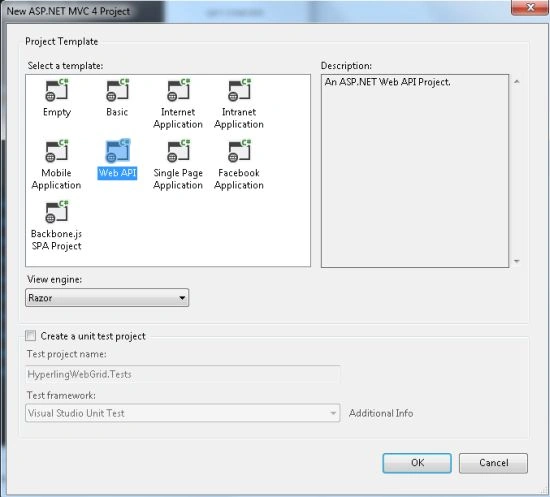
- Click on the "OK" button.
Step 2
Create a Model Class.
- In the "Solution Explorer".
- Right-click on the Model Folder.
- Select "Add" -> "Class".
- Select "Installed" -> "Visual C#" and select class.
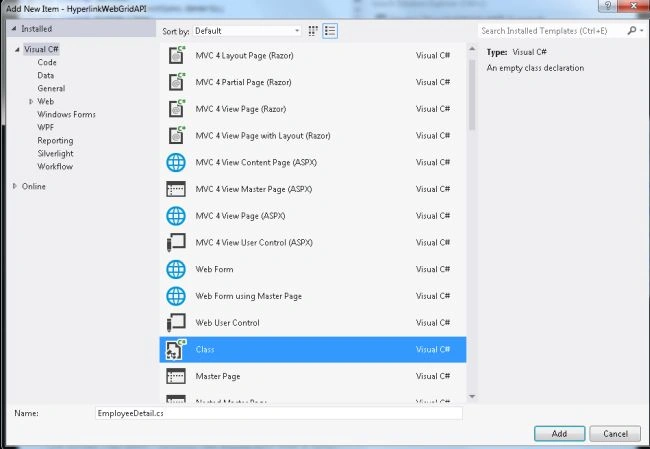
- Click on the "Add" button.
Add the following code:
- using System;
- using System.Collections.Generic;
- using System.Linq;
- using System.Web;
- namespace HyperlinkWebGridAPI.Models
- {
- public class EmployeeDetail
- {
- public List<Employee> UserCollection { get; set; }
- }
- public class Employee
- {
- public int Id { get; set; }
- public string Emp_Name { get; set; }
- public int Contact_No { get; set; }
- public string Emp_Address { get; set; }
- }
- }
Step 3
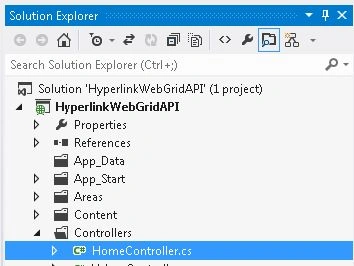
Now select the "HomeController".
- In the "Solution Explorer".
- Expand the Controller folder.
- Select the "HomeController".
Add the following code:
- using System;
- using System.Collections.Generic;
- using System.Linq;
- using System.Web;
- using System.Web.Mvc;
- using HyperlinkWebGridAPI.Models;
- namespace HyperlinkWebGridAPI.Controllers
- {
- public class HomeController : Controller
- {
- public ActionResult Index()
- {
- EmployeeDetail obj = new EmployeeDetail();
- List<Employee> empdtl = new List<Employee>();
- empdtl.Add(new Employee { Id = 1, Emp_Name = "Name 1", Contact_No = 2345, Emp_Address = "Address 1" });
- empdtl.Add(new Employee { Id = 2, Emp_Name = "Name 1", Contact_No = 567, Emp_Address = "Address 1" });
- empdtl.Add(new Employee {Id = 3, Emp_Name = "Name 1", Contact_No = 4567, Emp_Address = "Address 1" });
- empdtl.Add(new Employee { Id = 4, Emp_Name = "Name 1", Contact_No = 345, Emp_Address = "Address 1" });
- empdtl.Add(new Employee { Id = 5, Emp_Name = "Name 1", Contact_No = 890, Emp_Address = "Address 1" });
- obj.UserCollection = empdtl;
- return View(obj);
- }
- }
- }
Step 4
Now write some HTML code in the "index.cshtml" file. This file exists:
-
In the "Solution Explorer".
-
Expand "Views" folder.
-
Select "Home" -> "index.cshtml".
Add the following code:
- @model HyperlinkWebGridAPI.Models.EmployeeDetail
- @{
- ViewBag.Title = "create hyper ling in webgrid";
- }
- <style type="text/css">
- table {
- font-family: verdana,arial,sans-serif;
- font-size:11px;
- color:#b6ff00;
- border-width: 1px;
- border-color: #666666;
- border-collapse: collapse;
- }
- table th {
- border-width: 1px;
- padding: 8px;
- border-style: solid;
- border-color: #666666;
- background-color: #dedede;
- }
- table td {
- border-width: 1px;
- padding: 8px;
- border-style: solid;
- border-color: #0026ff;
- background-color: #ffffff;
- }
- </style>
- @using (Html.BeginForm("Index", "Home"))
- {
- var grid = new WebGrid(Model.UserCollection, columnNames: new[] { "Emp_Name", "Contact_No" });
- @grid.GetHtml(columns: grid.Columns(
- grid.Column("Emp_Name", format: @<text>@Html.ActionLink((string)item.Emp_Name,"ActionName", "Controllername", new { id = item.id }, null)</text>),
- grid.Column("Contact_No"),
- grid.Column("Emp_Address")
- ))
- }
Step 5
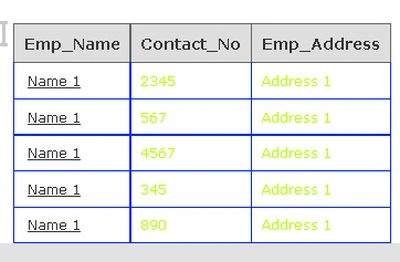
Execute the application, the output will display like this:
Tim GapinskiPosted Oct 6, 2016, 11:59 AM
I was trying this... format: (item) => Html.Raw("<a href='/mycontroller/ActionName/" + (item).GUID + both2 + Html.Raw("'>Edit" + "</a>"))),
Tim GapinskiPosted Oct 6, 2016, 11:58 AM
Thank you so much. I was really struggling with my own hack, that was not quite pulling it off.
kalu singh raoPosted Jul 1, 2016, 9:31 AM
Nice...