In this example we will create a Windows Form Project that will create new FTP and Web IIS Virtual Directories from code based on the name and path specified by the user. You can create virtual directories on the local computer by specifying the server name as "localhost" or you can create the virtual directory on a remote computer by specifying the machine name.
We make use of the DirectoryServices namespace for creating the Virtual directory.
Step 1: Create the Project and the basic User Interface.
Create a new Visual C# Windows Forms Project and add controls on the default form as shown below. 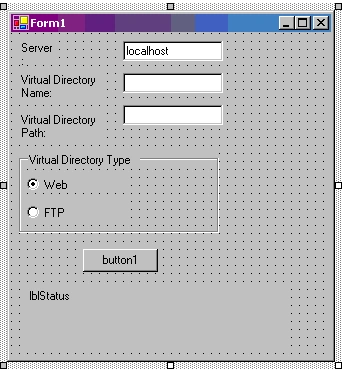
Figure 1: User interface
Control
Property Name
Property Value
Label
Text
Server
TextBox
Name
txtServer
Text
localhost
Label
Text
Virtual Directory Name
TextBox
Name
txtVDirName
Label
Text
Virtual Directory Path
TextBox
Name
txtVDir
GroupBox
Text
Virtual Directory Type
RadioButton
Label
Web
RadioButton
Label
FTP
Button
Label
Name
lblStatus
The windows form allows the user to specify the server name on which to create the virtual directory, the virtual directory name, the virtual directory path, the type of virtual directory (FTP or Web). We will now add the code to create the virtual directory when the button is clicked. The code is specified in the code listing below.
We first determine if the user has selected to create an FTP virtual directory or a Web Virtual Directory. Based on this selection, we set the values for the schema name and a part of the path for the IIS root to create the node in. We now create a DirectoryEntry object for the root of the IIS directory on the server specified by the user which points to the web or ftp root. We then add a node to the children collection of the root node and set the value for the Path property of the newly created node. If the user selected to create a web virtual directory, we set the new node as an application. We then commit the changes and close the directory entry nodes. Finally we display the status - whether successful or error, to the user. You need to make sure that the user has the privileges to create the new virtual directories before running the sample.
private void button1_Click(object sender, System.EventArgs e)
{
string strSchema= "";
string strRootSubPath = "";
if (radioButton1.Checked)
{
strSchema = "IIsWebVirtualDir";
strRootSubPath = "/W3SVC/1/Root";
}
if (radioButton2.Checked)
{
strSchema = "IIsFtpVirtualDir";
strRootSubPath = "/MSFTPSVC/1/Root";
}
if (strSchema == "")
{
strSchema = "IIsWebVirtualDir";
strRootSubPath = "/W3SVC/1/Root";
}
DirectoryEntry deRoot= new DirectoryEntry("IIS://" + txtServer.Text + strRootSubPath);
try
{
deRoot.RefreshCache();
DirectoryEntry deNewVDir = deRoot.Children.Add(txtVDirName.Text,strSchema);
deNewVDir.Properties["Path"].Insert(0,txtVDir.Text);
deNewVDir.CommitChanges();
deRoot.CommitChanges();
// Create a Application
if (strSchema == "IIsWebVirtualDir")
deNewVDir.Invoke("AppCreate",true);
// Save Changes
deNewVDir.CommitChanges();
deRoot.CommitChanges();
deNewVDir.Close();
deRoot.Close();
lblStatus.Text = "Virtual Directory " + txtVDirName.Text + "(" + txtVDir.Text + ") has been created";
}
catch (Exception ex)
{
lblStatus.Text = "Error: " + ex.Message;
}
}
Code Listing : Button Click event handler code - create a new virtual directory.
Please refer to the complete code listing available for download at the top of the article. 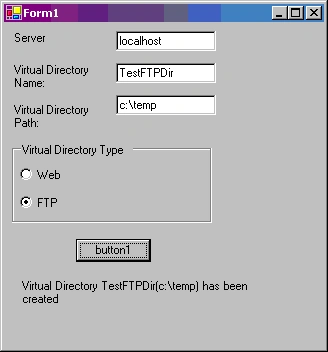
Figure : Creating a virtual directory from our program. This creates a FTP Virtual directory named "TestFTPDir" pointing to path "C:\Temp"
Conclusion:
In this article, we saw how to create FTP and Web virtual directories programmatically. This can be very useful in deployment scenarios.

Create FTP and Web IIS Virtual Directory using C#
Join the conversation! Your thoughts help the community grow.
Sign in to leave a comment
It is the same account you read, post and publish with — and you will come straight back to this page.
MOHAMED JACKARIAHPosted Apr 1, 2015, 11:41 AM
How do I update the virtual directory files after successfully creating the website from C# code.
jhon mejiasPosted Dec 18, 2012, 10:21 AM
How do I copy the project folder in the directory created?, and how do I assign user data with permission? helpppp me
Kumar VeerabadraneditedPosted Nov 11, 2011, 6:57 AMEdited Nov 11, 2011, 7:56 AM
Yeah...its helpful for me.. thanks a lot.
Kardes ASLANPosted Aug 24, 2009, 8:31 AM
Hi everbody I want to ask a question. I want to write a interface. its mission is to send video files to some different ip adresses over internet. Can you advice me? in which language can I write it.
rob 0Posted Dec 12, 2008, 1:35 AM
Here's how to do it deNewVDir.Properties["AccessWrite"][0] = true Can't explain all of it yet, but I'll learn.
rob 0Posted Dec 12, 2008, 1:26 AM
FTP is set up properly, but defaults to only read access... How to make it writable. User account has permission to write, but ftp account does not.
gaurav singhPosted Oct 15, 2008, 2:04 AM
Comment:
mahadev bobhatePosted Oct 1, 2008, 5:56 AM
can u tell me how to set default document and to check 'enable default document' checkbox
baliPosted Mar 14, 2008, 3:09 PM
Never created IIS Virtual Directory programmaticaly before. This article helped a lot.. Was able to programmaticaly create my first Virtual Directory!!!!!!!!!!