

Introduction
HTML5 has been with us for a while now, roughly ten years. And, it hasn't really seen a major update. Sure there's XHTML, but that did little more than make things slightly stricter - making you write better quality code if you were at all concerned with compliance. HTML 5 does more than that. For one thing, it adds a few new features. Not a huge amount, but the ones that it does add are very useful.
Work on HTML 5 started way back in 2004, and now it's starting to get interesting. Browser support is increasing, and the element I'm most interested in - CANVAS - is supported by four out of the major five browsers. It is, however, not really feasible to use it since MSIE doesn't have any support for it.
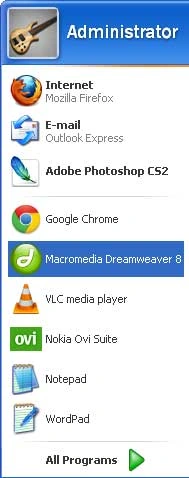
Step 1: Open Macromedia Dreamweaver
Click Start button -> Macromedia Dreamweaver
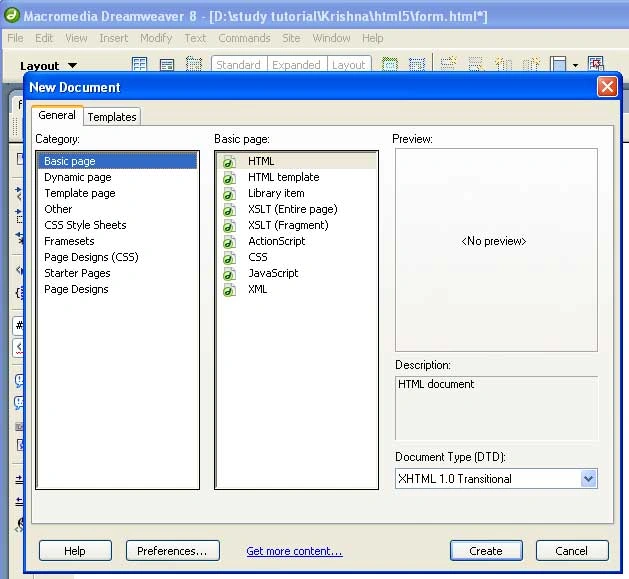
Step 2: Create a new document
Click File Menu -> New Document
Click the Create button.
- <!DOCTYPE html>
- <html dir="ltr" lang="en" xmlns="http://www.w3.org/1999/xhtml">
- <head>
- <meta charset=utf-8 />
- <title>Title </title>
- </head>
- <body>
- Create Text here
- </body>
- </html>
Step 4: Define the body part and set the content of the Payment form.
Code
- <h1>Payment form</h1>
- <form id=payment>
- <fieldset>
- <legend>Your details</legend>
- <ol>
- <li>
- <label for=name>Name</label>
- <input id=name namename=name type=text placeholder="First and last name" required autofocus>
- </li>
- <li>
- <label for=email>Email</label>
- <input id=email name=email type=email placeholder="[email protected]" required>
- </li>
- <li>
- <label for=phone>Phone</label>
- <input id=phone name=phone type=tel placeholder="Eg. +447500000000" required>
- </li>
- </ol>
- </fieldset>
- <fieldset>
- <legend>Delivery address</legend>
- <ol>
- <li>
- <label for=address>Address</label>
- <textarea id=address name=address rows=5 required>
- <li>
- <label for="postcode">Post code</label>
- <input id="postcode" name="postcode" type="text" required="">
- </li>
- <li>
- <label for="country">Country</label>
- <input id="country" name="country" type="text" required="">
- </li>
- <fieldset>
- <legend>Card details</legend>
- <ol>
- <li>
- <fieldset>
- <legend>Card type</legend>
- <ol>
- <li>
- <input id="visa" name="cardtype" type="radio">
- <label for="visa">VISA</label>
- </li>
- <li>
- <input id="amex" name="cardtype" type="radio">
- <label for="amex">AmEx</label>
- </li>
- <li>
- <input id="mastercard" name="cardtype" type="radio">
- <label for="mastercard">Mastercard</label>
- </li>
- </ol>
- </fieldset>
- </li>
- <li>
- <label for="cardnumber">Card number</label>
- <input id="cardnumber" name="cardnumber" type="number" required="">
- </li>
- <li>
- <label for="secure">Security code</label>
- <input id="secure" name="secure" type="number" required="">
- </li>
- <li>
- <label for="namecard">Name on card</label>
- <input id="namecard" name="namecard" type="text" placeholder="Exact name as on the card" required="">
- </li>
- </ol>
- </fieldset>
- <fieldset>
- <button type="submit">Submit</button>
- </fieldset>
- <style>
- html, body, h1, form, fieldset, legend, ol, li {
- margin: 0;
- padding: 0;
- }
- body {
- background: #ffffff;
- color: #111111;
- font-family: Georgia, "Times New Roman", Times, serif;
- padding: 20px;
- }
- h1 {
- font-size: 28px;
- margin-bottom: 20px;
- }
- form#payment {
- background: #9cbc2c;
- -moz-border-radius: 5px;
- -webkit-border-radius: 5px;
- -khtml-border-radius: 5px;
- border-radius: 5px;
- counter-reset: fieldsets;
- padding: 20px;
- width: 400px;
- }
- form#payment fieldset {
- border: none;
- margin-bottom: 10px;
- }
- form#payment fieldset:last-of-type {
- margin-bottom: 0;
- }
- form#payment legend {
- color: #384313;
- font-size: 16px;
- font-weight: bold;
- padding-bottom: 10px;
- text-shadow: 0 1px 1px #c0d576;
- }
- form#payment > fieldset > legend:before {
- content: "Step " counter(fieldsets) ": ";
- counter-increment: fieldsets;
- }
- form#payment fieldset fieldset legend {
- color: #111111;
- font-size: 13px;
- font-weight: normal;
- padding-bottom: 0;
- }
- form#payment ol li {
- background: #b9cf6a;
- background: rgba(255,255,255,.3);
- border-color: #e3ebc3;
- border-color: rgba(255,255,255,.6);
- border-style: solid;
- border-width: 2px;
- -moz-border-radius: 5px;
- -webkit-border-radius: 5px;
- -khtml-border-radius: 5px;
- border-radius: 5px;
- line-height: 30px;
- list-style: none;
- padding: 5px 10px;
- margin-bottom: 2px;
- }
- form#payment ol ol li {
- background: none;
- border: none;
- float: left;
- }
- form#payment label {
- float: left;
- font-size: 13px;
- width: 110px;
- }
- form#payment fieldset fieldset label {
- background: none no-repeat left 50%;
- line-height: 20px;
- padding: 0 0 0 30px;
- width: auto;
- }
- form#payment label[for=visa] {
- background-image: url(visa.gif);
- }
- form#payment label[for=amex] {
- background-image: url(amex.gif);
- }
- form#payment label[for=mastercard] {
- background-image: url(mastercard.gif);
- }
- form#payment fieldset fieldset label:hover {
- cursor: pointer;
- }
- form#payment input:not([type=radio]),form#payment textarea {
- background: #ffffff;
- border: none;
- -moz-border-radius: 3px;
- -webkit-border-radius: 3px;
- -khtml-border-radius: 3px;
- border-radius: 3px;
- font: italic 13px Georgia, "Times New Roman", Times, serif;
- outline: none;
- padding: 5px;
- width: 200px;
- }
- form#payment input:not([type=submit]):focus,form#payment textarea:focus {
- background: #eaeaea;
- }
- form#payment input[type=radio] {
- float: left;
- margin-right: 5px;
- }
- form#payment button {
- background: #384313;
- border: none;
- -moz-border-radius: 20px;
- -webkit-border-radius: 20px;
- -khtml-border-radius: 20px;
- border-radius: 20px;
- color: #ffffff;
- display: block;
- font: 18px Georgia, "Times New Roman", Times, serif;
- letter-spacing: 1px;
- margin: auto;
- padding: 7px 25px;
- text-shadow: 0 1px 1px #000000;
- text-transform: uppercase;
- }
- form#payment button:hover {
- background: #1e2506;
- cursor: pointer;
- }
- </style>
Step 6: Write the complete code for the developed simple Payment form that uses the HTML 5 tools. The complete application is given below.
Code:
- <!DOCTYPE html>
- <html dir="ltr" lang="en" xmlns="http://www.w3.org/1999/xhtml">
- <head>
- <meta charset=utf-8 />
- <title>Form HTML 5 </title>
- <style>
- html, body, h1, form, fieldset, legend, ol, li {
- margin: 0;
- padding: 0;
- }
- body {
- background: #ffffff;
- color: #111111;
- font-family: Georgia, "Times New Roman", Times, serif;
- padding: 20px;
- }
- h1 {
- font-size: 28px;
- margin-bottom: 20px;
- }
- form#payment {
- background: #9cbc2c;
- -moz-border-radius: 5px;
- -webkit-border-radius: 5px;
- -khtml-border-radius: 5px;
- border-radius: 5px;
- counter-reset: fieldsets;
- padding: 20px;
- width: 400px;
- }
- form#payment fieldset {
- border: none;
- margin-bottom: 10px;
- }
- form#payment fieldset:last-of-type {
- margin-bottom: 0;
- }
- form#payment legend {
- color: #384313;
- font-size: 16px;
- font-weight: bold;
- padding-bottom: 10px;
- text-shadow: 0 1px 1px #c0d576;
- }
- form#payment > fieldset > legend:before {
- content: "Step " counter(fieldsets) ": ";
- counter-increment: fieldsets;
- }
- form#payment fieldset fieldset legend {
- color: #111111;
- font-size: 13px;
- font-weight: normal;
- padding-bottom: 0;
- }
- form#payment ol li {
- background: #b9cf6a;
- background: rgba(255,255,255,.3);
- border-color: #e3ebc3;
- border-color: rgba(255,255,255,.6);
- border-style: solid;
- border-width: 2px;
- -moz-border-radius: 5px;
- -webkit-border-radius: 5px;
- -khtml-border-radius: 5px;
- border-radius: 5px;
- line-height: 30px;
- list-style: none;
- padding: 5px 10px;
- margin-bottom: 2px;
- }
- form#payment ol ol li {
- background: none;
- border: none;
- float: left;
- }
- form#payment label {
- float: left;
- font-size: 13px;
- width: 110px;
- }
- form#payment fieldset fieldset label {
- background: none no-repeat left 50%;
- line-height: 20px;
- padding: 0 0 0 30px;
- width: auto;
- }
- form#payment label[for=visa] {
- background-image: url(visa.gif);
- }
- form#payment label[for=amex] {
- background-image: url(amex.gif);
- }
- form#payment label[for=mastercard] {
- background-image: url(mastercard.gif);
- }
- form#payment fieldset fieldset label:hover {
- cursor: pointer;
- }
- form#payment input:not([type=radio]),
- form#payment textarea {
- background: #ffffff;
- border: none;
- -moz-border-radius: 3px;
- -webkit-border-radius: 3px;
- -khtml-border-radius: 3px;
- border-radius: 3px;
- font: italic 13px Georgia, "Times New Roman", Times, serif;
- outline: none;
- padding: 5px;
- width: 200px;
- }
- form#payment input:not([type=submit]):focus,
- form#payment textarea:focus {
- background: #eaeaea;
- }
- form#payment input[type=radio] {
- float: left;
- margin-right: 5px;
- }
- form#payment button {
- background: #384313;
- border: none;
- -moz-border-radius: 20px;
- -webkit-border-radius: 20px;
- -khtml-border-radius: 20px;
- border-radius: 20px;
- color: #ffffff;
- display: block;
- font: 18px Georgia, "Times New Roman", Times, serif;
- letter-spacing: 1px;
- margin: auto;
- padding: 7px 25px;
- text-shadow: 0 1px 1px #000000;
- text-transform: uppercase;
- }
- form#payment button:hover {
- background: #1e2506;
- cursor: pointer;
- }
- </style>
- </head>
- <body>
- <h1>Payment form</h1>
- <form id=payment>
- <fieldset>
- <legend>Your details</legend>
- <ol>
- <li>
- <label for=name>Name</label>
- <input id=name namename=name type=text placeholder="First and last name" required autofocus>
- </li>
- <li>
- <label for=email>Email</label>
- <input id=email name=email type=email placeholder="[email protected]" required>
- </li>
- <li>
- <label for=phone>Phone</label>
- <input id=phone name=phone type=tel placeholder="Eg. +447500000000" required>
- </li>
- </ol>
- </fieldset>
- <fieldset>
- <legend>Delivery address</legend>
- <ol>
- <li>
- <label for=address>Address</label>
- <textarea id=address name=address rows=5 required>
- <li>
- <label for="postcode">Post code</label>
- <input id="postcode" name="postcode" type="text" required="">
- </li>
- <li>
- <label for="country">Country</label>
- <input id="country" name="country" type="text" required="">
- </li>
- <fieldset>
- <legend>Card details</legend>
- <ol>
- <li>
- <fieldset>
- <legend>Card type</legend>
- <ol>
- <li>
- <input id="visa" name="cardtype" type="radio">
- <label for="visa">VISA</label>
- </li>
- <li>
- <input id="amex" name="cardtype" type="radio">
- <label for="amex">AmEx</label>
- </li>
- <li>
- <input id="mastercard" name="cardtype" type="radio">
- <label for="mastercard">Mastercard</label>
- </li>
- </ol>
- </fieldset>
- </li>
- <li>
- <label for="cardnumber">Card number</label>
- <input id="cardnumber" name="cardnumber" type="number" required="">
- </li>
- <li>
- <label for="secure">Security code</label>
- <input id="secure" name="secure" type="number" required="">
- </li>
- <li>
- <label for="namecard">Name on card</label>
- <input id="namecard" name="namecard" type="text" placeholder="Exact name as on the card" required="">
- </li>
- </ol>
- </fieldset>
- <fieldset>
- <button type="submit">Submit</button>
- </fieldset>
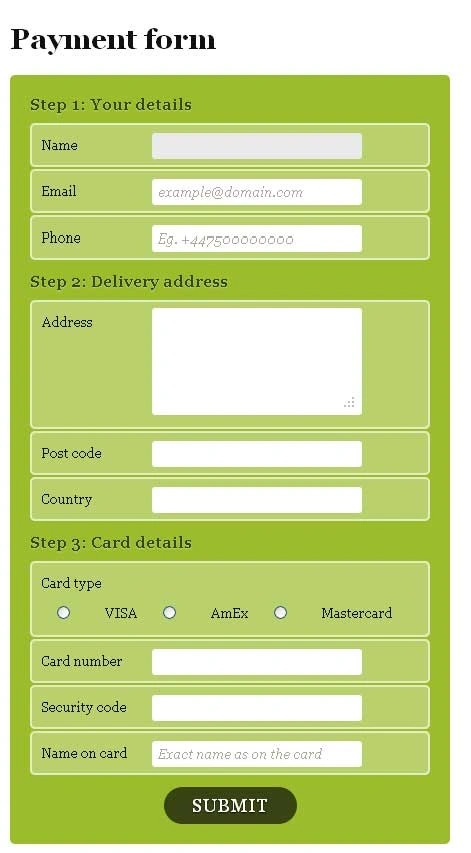
Output:
Gowtham RajamanickamPosted Apr 12, 2016, 2:14 AM
Good One, Thanks for sharing