

Introduction
This article explains how to create a Fixed Size Cropper using ASP.NET and jQuery.
On many websites, we can crop our image and then can paste it on a timeline. They often provide a fixed-sized cropper to crop our image. This article will help you to create the same type of cropper that can be used on your website.
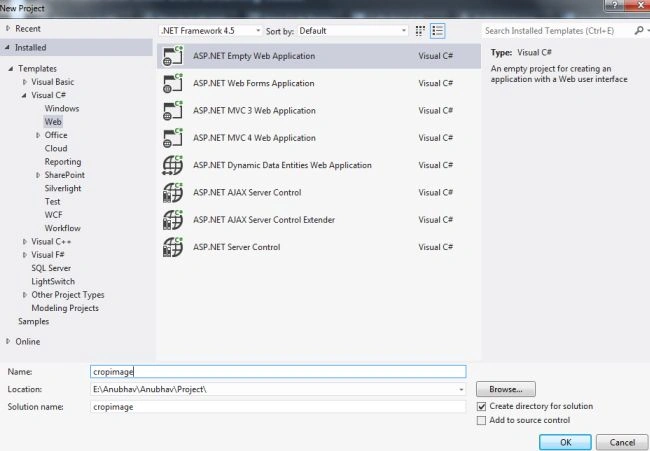
Step 1. First of all, add a new Web Application to your Visual Studio and name it "Crop Image".
Now you need to add three jQuery files to the application; they are.
- jquey.min.js
- jquery.jcrop.min.js
- jquery.jcrop.js
You can download these files from the Zip File provided above.
Step 2. Now we need to add a few Panels, Hidden Fields, a Button, a Label, and so on to our application as in the following.
<p>
    <asp:Panel ID="pnlUpload" runat="server">
        <asp:FileUpload ID="Upload" runat="server" />
        <asp:Button ID="btnUpload" runat="server" OnClick="btnUpload_Click" Text="Upload" />
        <asp:Label ID="lblError" runat="server" Visible="false" />
    </asp:Panel>
    <asp:Panel ID="pnlCrop" runat="server" Visible="false">
        <asp:Image ID="imgCrop" runat="server" />
        <asp:HiddenField ID="X" runat="server" />
        <asp:HiddenField ID="Y" runat="server" />
        <asp:HiddenField ID="W" runat="server" />
        <asp:HiddenField ID="H" runat="server" />
    </asp:Panel>
    <asp:Panel ID="pnlCropped" runat="server" Visible="false">
        <asp:Image ID="imgCropped" runat="server" />
    </asp:Panel>
    <asp:Button ID="btnCrop" runat="server" Text="Crop" OnClick="btnCrop_Click" />
</p>
Now go to the head section of the application and add the following code there.
<script>
    $(window).load(function() {
        var jcrop_api;
        var i, ac;

        initJcrop();

        function initJcrop() {
            jcrop_api = $.Jcrop('#imgCrop', {
                onSelect: storeCoords,
                onChange: storeCoords
            });
            jcrop_api.setOptions({ aspectRatio: 1 / 1 });
            jcrop_api.setOptions({
                minSize: [250, 250],
                maxSize: [250, 350]
            });
            jcrop_api.setSelect([140, 180, 160, 180]);
        };

        function storeCoords(c) {
            jQuery('#X').val(c.x);
            jQuery('#Y').val(c.y);
            jQuery('#W').val(c.w);
            jQuery('#H').val(c.h);
        };
    });
</script>
This code will help to make the cropper a fixed size whose start and end coordinates can also be set from here.
Step 3. Now we will move to the aspx.cs file and will do the coding there.
First, we will add code to the Upload Button that will upload the image from our computer.
bool FileOK = false;
bool FileSaved = false;

if (Upload.HasFile) {
    Session["UploadImage"] = Upload.FileName;
    string ExtensionofImage = Path.GetExtension(Session["UploadImage"].ToString()).ToLower();
    string[] allowed = { ".png", ".jpeg", ".jpg", ".gif" };
    for (int i = 0; i < allowed.Length; i++) {
        if (ExtensionofImage == allowed[i]) {
            FileOK = true;
        }
    }
}
if (FileOK) {
    try {
        Upload.PostedFile.SaveAs(path + Session["UploadImage"]);
        FileSaved = true;
    } catch (Exception ex) {
        lblError.Text = "Sorry Can't Upload" + ex.Message.ToString();
        lblError.Visible = true;
        FileSaved = false;
    }
} else {
    lblError.Text = "Select some Other Image";
    lblError.Visible = true;
}

if (FileSaved) {
    pnlUpload.Visible = false;
    pnlCrop.Visible = true;
    imgCrop.ImageUrl = "images/" + Session["UploadImage"].ToString();
}
This code will check the extension of the file if the extension is .png .jpeg, .jpg, or .gif if any file has an extension other than these extensions then the file will not be uploaded and it will throw an exception.
Step 4. Now we will do the code for the Crop Button.
string Img = Session["UploadImage"].ToString();
int w = Convert.ToInt32(W.Value);
int h = Convert.ToInt32(H.Value);
int x = Convert.ToInt32(X.Value);
int y = Convert.ToInt32(Y.Value);
byte[] CropImage = Cut(path + Img, w, h, x, y);
using (MemoryStream mem = new MemoryStream(CropImage, 0, CropImage.Length))
{
    mem.Write(CropImage, 0, CropImage.Length);
    using (SD.Image CroppedImage = SD.Image.FromStream(mem, true))
    {
        string SaveTo = path + "crop" + Img;
        CroppedImage.Save(SaveTo, CroppedImage.RawFormat);
        pnlCrop.Visible = false;
        pnlCropped.Visible = true;
        imgCropped.ImageUrl = "images/crop" + Img;
    }
}
This code will convert the coordinates into integers and then crop the image depending on these values.
static byte[] Cut(string Img, int Breadth, int Length, int X, int Y)
{
    try
    {
        using (SD.Image OriginalImage = SD.Image.FromFile(Img))
        {
            using (SD.Bitmap bmp = new SD.Bitmap(Breadth, Length))
            {
                bmp.SetResolution(OriginalImage.HorizontalResolution, OriginalImage.VerticalResolution);
                using (SD.Graphics Graphic = SD.Graphics.FromImage(bmp))
                {
                    Graphic.SmoothingMode = SmoothingMode.AntiAlias;
                    Graphic.InterpolationMode = InterpolationMode.HighQualityBicubic;
                    Graphic.PixelOffsetMode = PixelOffsetMode.HighQuality;
                    Graphic.DrawImage(OriginalImage, new SD.Rectangle(0, 0, Breadth, Length), X, Y, Breadth, Length, SD.GraphicsUnit.Pixel);
                    MemoryStream ms = new MemoryStream();
                    bmp.Save(ms, OriginalImage.RawFormat);
                    return ms.GetBuffer();
                }
            }
        }
    }
    catch (Exception Ex)
    {
        throw (Ex);
    }
}
This code will be added just after the Crop Button's code.
Output
First, this page will appear.
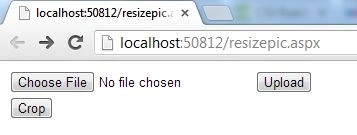
Now you need to choose a file and then click on the "Upload" button.
This will get the image to be cropped.
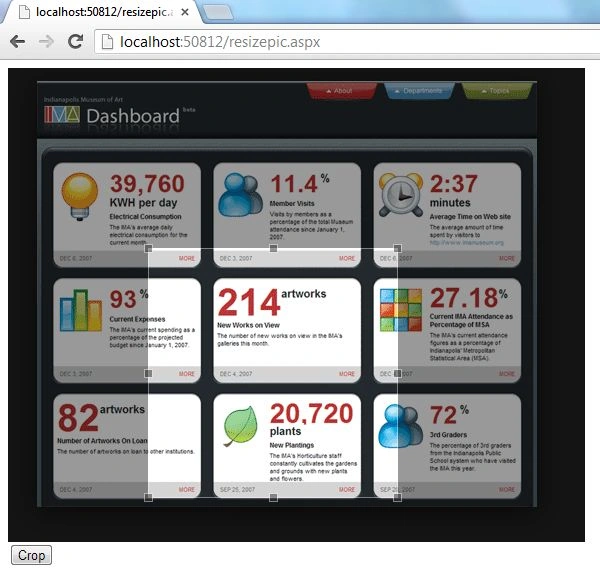
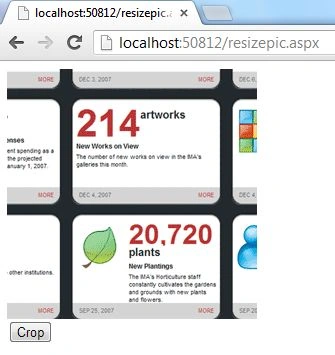
Now adjust the cropper and click on the Crop Button to crop it.
swapnali salgarePosted Mar 27, 2024, 5:54 AM
What is SD here
Manic ManicPosted Jul 8, 2017, 3:14 AM
I got a error message "Input string was not in a correct format." How to solve this error?
rakesh mhatrePosted Jan 1, 2015, 1:47 AM
hey bro I want fix size of image after cropping that is (74px X 84px) between 5kb-10kb size. please help me... thank you
Manish Kumar ChoudharyPosted Nov 26, 2014, 11:43 PM
Nice one Anubhav Chaudhary sir..
Meghna BhatiaPosted Nov 26, 2014, 8:55 AM
I tried running this code in VS2010 and gives me errors related to jquery and namespaces. Is there any way out?
Anubhav ChaudharyPosted Oct 21, 2013, 2:12 PM
Hey Hafeez, great to know that you downloaded my code and try to work on it but my code is downloaded 49 times and no one has complained about it's functionality. It's working absolutely fine everywhere even if it's showing any type of error then change the aspect ration from 16/9 to 1/1 as in downloaded code it's 16/9 instead of 1/1.
hafeez ansariPosted Oct 21, 2013, 6:36 AM
Your code is not working shows lot of errors even ur attached source code is also not working. Kindly fix it.