

Please go through the following article to understand about Azure Functions.
What is an Azure Function app?
Azure Function app provides all the infrastructure and management capabilities for hosting the Function apps. In this article, we will learn how to create our first Azure Function app.
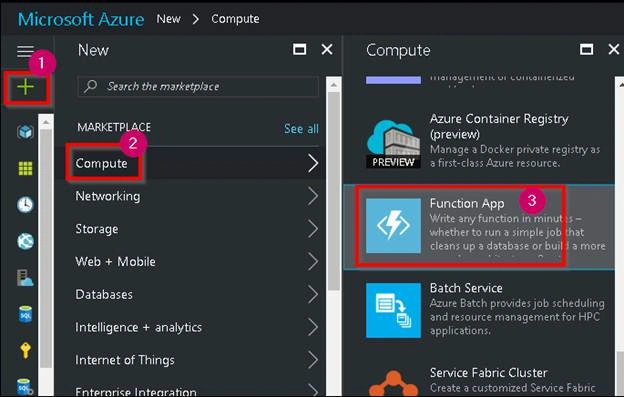
Clicking on the Function App in the above step will take you to the following Function App blade where you can provide all the required details for creating the Function App.
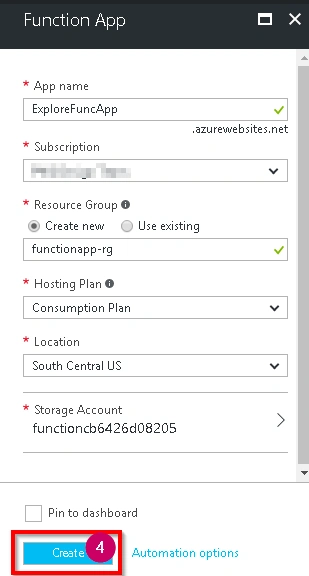
Please provide all the details in the above step. Below are a few of the new items that you might have to be aware of.
- Hosting Plan
Currently, you can host the Function App in the following two plans.- Consumption plan
This plan is based on the Executions and resource consumption. It also has a free monthly limit of 1 million requests and 4,00,000 GB-s (Gigabyte seconds) of resource consumption per month. For more information about the calculations, please refer to Functions Pricing. In most of the cases, you would choose this plan to make sure that your bill is low. - App Service Plan
This is a regular plan which would be billed based on the pricing tier that you have chosen for your applications. Please refer to the features of the Azure App Service Plan for more details about the features. You would choose this only in the case where you already have a few applications such that you might think that the same App Service plan is sufficient even for hosting the Azure Functions.
- Consumption plan
- Storage Account
- A Storage Account is created automatically. Azure Function App will use this storage account for storing all the required Logs, Codebases, and to store some runtime data. We will learn more about this in our upcoming articles.
Once you provide all the required details, please click on "Create" button to create the Azure Function app.
After a minute or two, the Function app gets created successfully, as shown below.
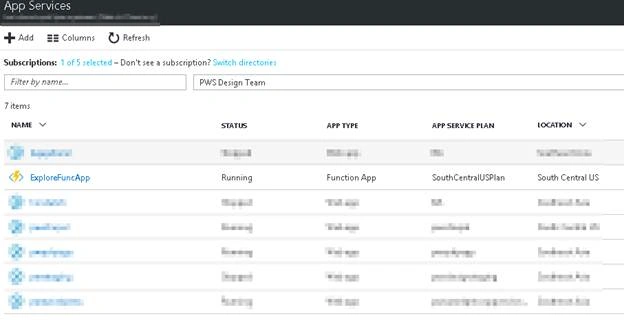
Clicking on the Function app (Explore FuncApp in this case) will take you to the following Function app homescreen where you can create Azure Functions.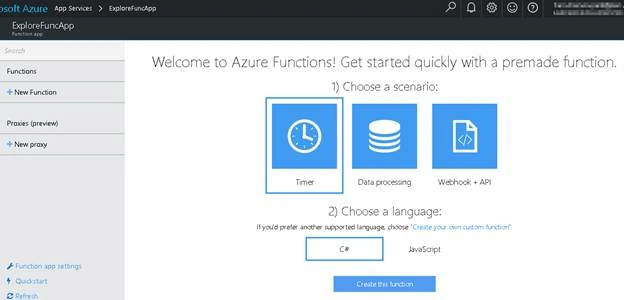
Summary
- We have learned how to create an Azure Function app
- We discussed the two hosting plans that are available for creating the Function apps
- We created our first Function app.
Prakash TripathiPosted Mar 29, 2017, 7:45 AM
Thanks for sharing the info about how to create Azure Function. It would be great if you could also share how to use or consume them.
Ravi KandelPosted Mar 8, 2017, 8:33 AM
Awesome Thanks for sharing