

Introduction
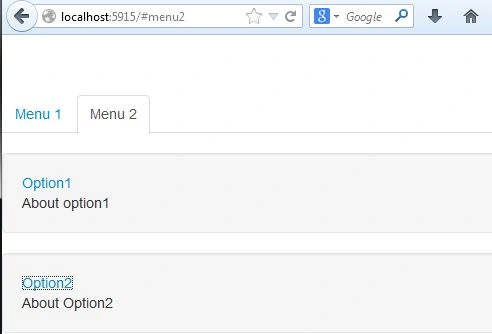
This article explains the strategy for efficiently maintained stateful backbone.js views. Here we will have two tabs, one is "Menu1" and other is "Menu2" . Both tabs are clickable, when you click on this tab then it will be expanded and will display some text. And the displaying text is also clickable when we click on this text then it again expands with some text.
Use the following procedure to the application.
- First create a web application as in the following:
- Start Visual Studio 2013.
- From the Start window select "New Project".
- Select "Installed" -> "Template" -> "Visual C#" -> "Web" -> "Visual Studio 2012" and select "Empty web application".

- Click on the "OK" button.
- Now add the HTML Page to the project as in the following:
- In the Solution Explorer.
- Right-click on the project and select "Add" -> "HTML Page".
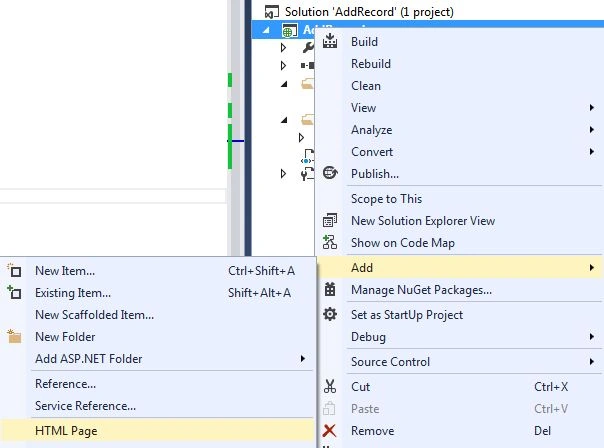
- Change the name.
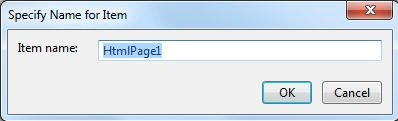
- Then click on the "OK" button.
Add the following code:
<!DOCTYPE html>
<html lang="en">
<head>
<meta charset="utf-8">
<title>Stateful Backbone Views</title>
<meta name="viewport" content="width=device-width, initial-scale=1.0">
<meta name="description" content="">
<meta name="author" content="">
<!-- Le styles -->
<link href="style/bootstrap.css" rel="stylesheet">
<style>
body {
padding-top: 60px; /* 60px to make the container go all the way to the bottom of the topbar */
}
</style>
<script id="template" type="text/x-javascript-template">
<div class="well">
<a href="" class="name"><%= get('name') %></a>
<div class="detail" style="display:none;"></div>
</div>
</script>
</head>
<body>
<div class="container">
<ul class="nav nav-tabs">
<li class="menu1"><a href="#menu1">Menu 1</a></li>
<li class="menu2"><a href="#menu2">Menu 2</a></li>
</ul>
<div class="content">
</div>
</div>
<!-- Le javascript
================================================== -->
<!-- Placed at the end of the document so the pages load faster -->
<script src="js/jquery.js"></script>
<script src="js/underscore.js"></script>
<script src="js/backbone.js"></script>
<script src="js/app.js"></script>
</body>
</html>
- Now we add a JavaScript file:
- In the Solution Explorer.
- Right-click on the project then select "Add" -> "New Item" -> "JavaScript".
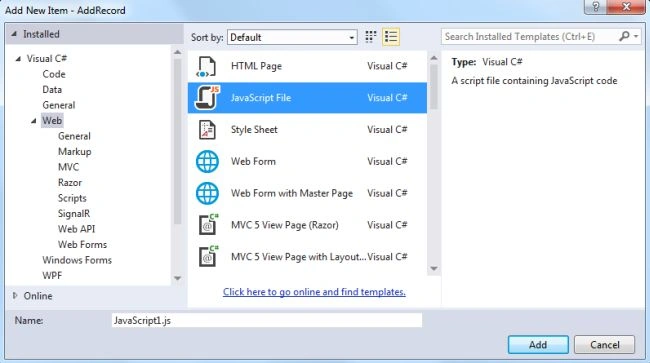
- Click on the "Add" button.
Add the following code:
$(function($) {
var CloseableView = Backbone.View.extend({
rendered: function(subView) {
if (!this._renderedSubViews) {
this._renderedSubViews = [];
}
if (_(this._renderedSubViews).indexOf(subView) === -1) {
this._renderedSubViews.push(subView);
}
return subView;
},
closed: function(subView) {
this._renderedSubViews = _(this._renderedSubViews).without(subView);
},
close: function() {
this.$el.empty();
this.undelegateEvents();
if (this._renderedSubViews) {
for (var i = 0; i < this._renderedSubViews.length; i++) this._renderedSubViews[i].close();
}
if (this.onClose) this.onClose();
}
});
var model = new Backbone.Model({name: 'Option1', detail: 'About option1'});
collection = new Backbone.Collection([
model,
new Backbone.Model({name: 'Option2', detail: 'About Option2'})
]);
var Router = Backbone.Router.extend({
routes: {
"menu1": "showMenu1",
"menu2": "showMenu2"
},
showMenu1: function() {
$('.menu2').removeClass('active');
$('.menu1').addClass('active');
if (!this._expandableView) this._expandableView = new ExpandableView({model: model});
if (this._listView) this._listView.close();
this._expandableView.setElement($('.content'));
this._expandableView.render();
},
showMenu2: function() {
$('.menu1').removeClass('active');
$('.menu2').addClass('active');
if (!this._listView) this._listView = new ListView({collection: collection});
if (this._expandableView) this._expandableView.close();
this._listView.setElement($('.content'));
this._listView.render();
}
});
var ExpandableView = CloseableView.extend({
events: {
'click .name': '_clickName'
},
render: function() {
this.$el.html(_.template($('#template').text())(this.model));
if (this._isExpanded) {
this._renderDetailView();
this._detailView.$el.show();
}
return this;
},
_clickName: function(evt) {
this._isExpanded = !this._isExpanded;
if (this._isExpanded) {
if (!this._detailView) {
this._detailView = new DetailView({model: this.model});
}
this._renderDetailView();
this._detailView.$el.slideDown();
} else {
this._detailView.$el.slideUp(_.bind(function() {
this._detailView.close();
this.closed(this._detailView);
}, this));
}
evt.preventDefault();
},
_renderDetailView: function() {
this._detailView.setElement(this.$('.detail'));
this._detailView.render();
this.rendered(this._detailView);
}
});
var ListView = CloseableView.extend({
render: function() {
this._renderList();
this.collection.on('reset', this._reset, this);
},
onClose: function() {
this.collection.off('reset', this._reset, this);
},
_reset: function() {
_(this._expandableViews).each(function(expandableView) {
expandableView.close();
this.closed(expandableView);
}, this);
this._renderList();
},
_renderList: function() {
if (!this._expandableViews) {
this._expandableViews = [];
}
var modelsWithViews = _(this._expandableViews).pluck('model');
var modelsThatNeedViews = _.difference(this.collection.models, modelsWithViews);
_(modelsThatNeedViews).each(function(model) {
this._expandableViews.push(new ExpandableView({model: model}));
}, this);
var modelsWhoseViewsShouldBeRemoved = _.difference(modelsWithViews, this.collection.models);
_(modelsWhoseViewsShouldBeRemoved).each(function(model) {
// Find the view to be removed
var expandableView = _(this._expandableViews).find(function(expandableView) {
return expandableView.model === model;
});
this._expandableViews = _(this._expandableViews).without(expandableView);
}, this);
this.$el.empty();
_(this._expandableViews).each(function(expandableView) {
this.$el.append(expandableView.render().$el);
this.rendered(expandableView);
expandableView.delegateEvents();
}, this);
}
});
var DetailView = CloseableView.extend({
render: function() {
this.$el.text(this.model.get('detail'));
return this;
}
});
var router = new Router();
Backbone.history.start({ pushState: false });
});
- Execute the application:
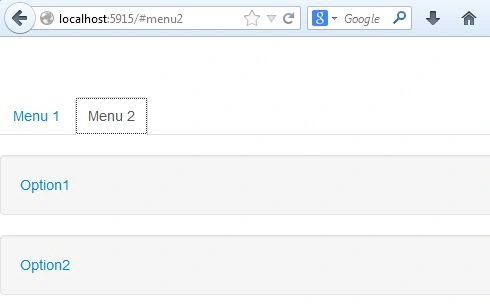
Expand all tabs.
Join the conversation! Your thoughts help the community grow.