

Before reading this article, please go through the following articles:
- Create a Custom Code Snippet In Visual Studio 2015 - Part One
- Create Custom Code Snippet In Visual Studio 2015 - Part Two
In previous articles, we looked into custom C# code snippet and built-in functions available for it in Visual Studio 2015. Here, we will go further and look into elements and attributes available for extending a code snippet.
We can use Header section for specifying general information about the code snippet as shown below: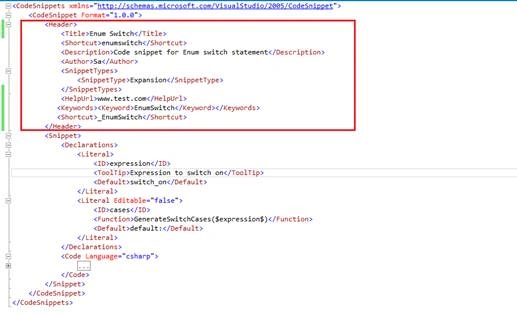
HelpUrl contains a URL that contains more information about the code snippet.
Keyword contains custom keyword for the snippet and is used by Visual Studio to represent a standard way for online content providers to add custom keywords for searching or categorization.
Shortcut contains shortcut text used to insert the snippet and can have alphanumeric characters, hyphens ( - ), and underscores ( _ ).
SnippetType specifies how Visual Studio inserts the code snippet, it can have one of the following values:
- SurroundsWith: allows the code snippet to be placed around a selected piece of code.
- Expansion: allows the code snippet to be inserted at the cursor.
- Refactoring: specifies that the code snippet is used during Visual C# refactoring.
We can use code elements for defining short code blocks, which can contain two reserved keywords within it and can be used only once.
$selected$: It represents text selected in the document that is to be inserted into the snippet when it is invoked.
$end$: It marks the location to place the cursor after the code snippet is inserted.
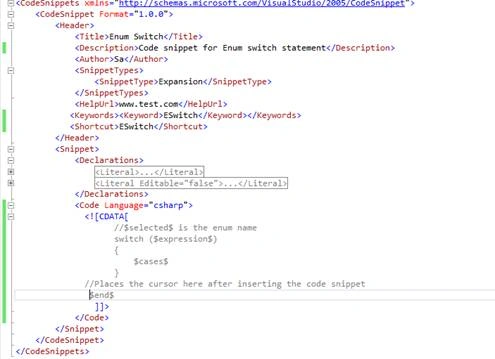
In above snippet, $selected$ will be replaced by text selected, while code snippet is invoked and cursor will be placed at$end$ after inserting it.
Let’s create an enum than select text Days and invoke snippet ESwitch by using shortcut Ctrl+K, Ctrl+X: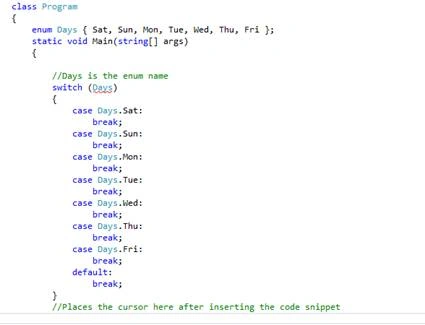
$selected$ is replaced with Days and cursor is placed at $end$ marker.
Similarly, we can use other elements like function element for defining a function to be executed when the literal or object receives focus in Visual Studio.
For a complete list of available code snippet elements, please refer here.
Code snippets increase productivity by reducing the amount of time spent in typing repetitive code. I am ending the article on code snippets, I hope this article will be helpful for all.
David BarrettPosted Apr 16, 2019, 2:53 PM
In your example of the use of $selected$, you write, "In above snippet, $selected$ will be replaced by text selected." But the variable $selected$ is nowhere to be seen in any of your examples. It is only referenced in a C# comment just above the switch statement. Therefore, I still don't know how to use $selected$.
Bhuvanesh MohankumarPosted May 3, 2016, 12:55 PM
Good one..
Sibeesh VenuPosted Mar 11, 2016, 4:49 AM
Nice Share
Mohammed IbrahimPosted Mar 10, 2016, 10:20 AM
nice
Kumaresh RajalingamPosted Mar 9, 2016, 8:37 PM
Nice