

In this article, we will look into steps to be followed for creating and registering a custom code snippet for C# in Visual Studio 2015. Code snippets are helpful for distributing and re-using code. It saves time in writing repetitive code. All we need is to create an XML file with all details for creating a custom code snippet.
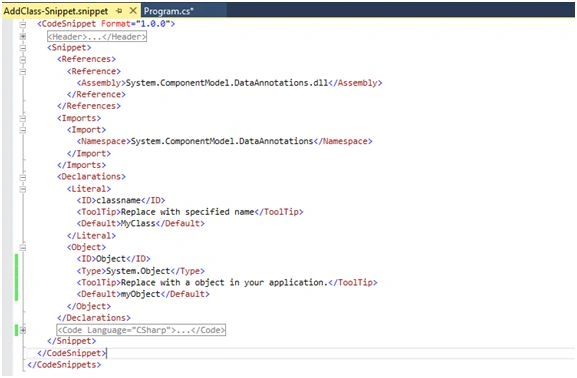
Let's create the following XML code and name it AddClass-Snippet.snippet:
In the header section, we will set attributes like Title, Author etc.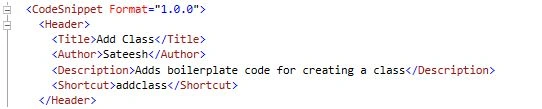
In Reference section, we can add reference to assemblies and namespaces to be included. Here, I added a reference to System.ComponentModel.DataAnnotations.dll and imported same. So, when I use this snippet, it will include that assembly in my project and add using statement as well.
In Declarations section, we can declare literals or objects that need to be replaced within snippet and the same can be referred in the snippet using $name$. Here, I declared class name literal and object literal.
Under Code section, we can mention Language and add code within CData as shown below:
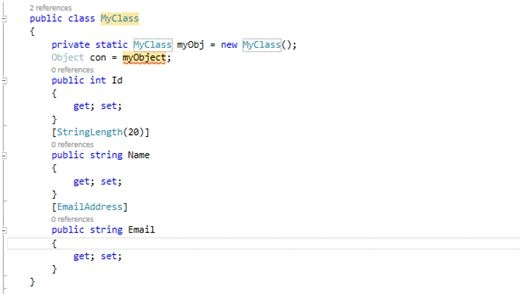
Basically, this snippet will insert a class and allows us to give a name for it and the same will be applied to the static variable as well.
Here's the complete code:
- <?xml version="1.0" encoding="utf-8"?>
- <CodeSnippets xmlns="http://schemas.microsoft.com/VisualStudio/2005/CodeSnippet">
- <CodeSnippet Format="1.0.0">
- <Header>
- <Title>Add Class</Title>
- <Author>Sateesh</Author>
- <Description>Adds boilerplate code for creating a class</Description>
- <Shortcut>addclass</Shortcut>
- </Header>
- <Snippet>
- <References>
- <Reference>
- <Assembly>System.ComponentModel.DataAnnotations.dll</Assembly>
- </Reference>
- </References>
- <Imports>
- <Import>
- <Namespace>System.ComponentModel.DataAnnotations</Namespace>
- </Import>
- </Imports>
- <Declarations>
- <Literal>
- <ID>classname</ID>
- <ToolTip>Replace with specified name</ToolTip>
- <Default>MyClass</Default>
- </Literal>
- <Object>
- <ID>Object</ID>
- <Type>System.Object</Type>
- <ToolTip>Replace with a object in your application.</ToolTip>
- <Default>myObject</Default>
- </Object>
- </Declarations>
- <Code Language="CSharp">
- <![CDATA[
- public class $classname${
- private static $classname$ myObj= new $classname$();
- Object con = $Object$;
- public int Id
- {
- get; set;
- }
- [StringLength(20)]
- public string Name
- {
- get; set;
- }
- [EmailAddress]
- public string Email
- {
- get; set;
- }
- }
- ]]>
- </Code>
- </Snippet>
- </CodeSnippet>
- </CodeSnippets>
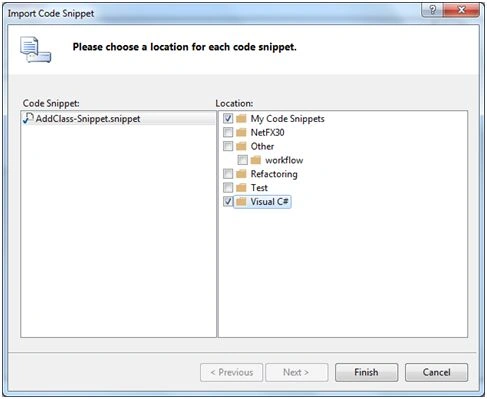
Select locations, under which snippet is to be saved. Click Finish and create a new console application and use our new code snippet by typing add class and pressing TAB:
This will add reference and import System.ComponentModel.DataAnnotations.dll into the project.
I am ending things here, I hope this article will be helpful for all.
Read more articles on Visual Studio:
Bhuvanesh MohankumarPosted May 3, 2016, 12:56 PM
Good one..
Vipin TyagiPosted Mar 10, 2016, 1:20 AM
thanks This help us.
Saillesh PawarPosted Mar 9, 2016, 11:29 PM
Nice will try and get back to you
Pramod ThakurPosted Feb 25, 2016, 2:55 AM
good..
Gowtham KPosted Feb 24, 2016, 2:43 AM
Good One, Thanks for sharing
Santhakumar MunuswamyPosted Feb 23, 2016, 2:17 PM
Thanks for nice share
Sibeesh VenuPosted Feb 23, 2016, 9:13 AM
Nice Share
Omid NasriPosted Feb 23, 2016, 8:30 AM
Thx.
Guest UserPosted Feb 23, 2016, 7:18 AM
Nice Explanation
Shubham KumarPosted Feb 23, 2016, 5:28 AM
nice share
Shriram PophaliPosted Feb 23, 2016, 5:23 AM
Nice article
Raja TPosted Feb 23, 2016, 2:34 AM
Thanks for sharing!!
Pankaj Kumar ChoudharyPosted Feb 22, 2016, 10:57 PM
Nice Explanation Sir......
Humayun Kabir MamunPosted Feb 22, 2016, 10:38 PM
Nice...
Vignesh ManiPosted Feb 22, 2016, 5:47 PM
Nice one