

Introduction
In this article I will create an application in which we can add an article type of description. We can also delete and edit this article. In this article we use the helper.js script.
We know that backbone is a JavaScript library for client-side applications. It helps for managing the code for the developers that use this code to create a single page application. Backbone.js has four classes that are Models, Views, Controllers and Collections. The Models and Collections work together when combined , those two classes make up the Model of MVC.
Now we can see how to create an application:
- First create a web application:
- Start Visual Studio 2013.
- From the Start window select "New Project".
- Select "Installed" -> "Template" -> "Visual C#" -> "Web" -> "Visual Studio 2012" and select "ASP.NET Empty Web Application".
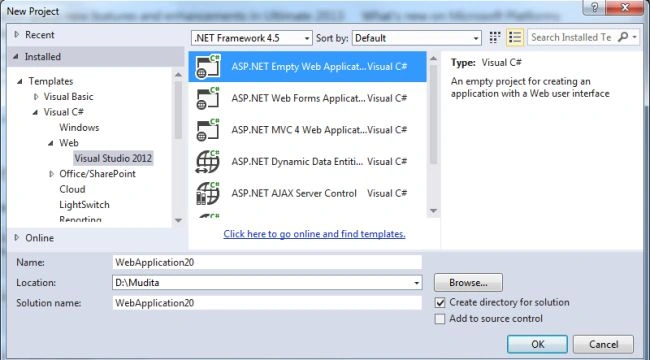
- Click on the "OK" button.
- Now add the HTML Page to the project:
- In the Solution Explorer.
- Right-click on the project and select "Add" -> "HTML Page".
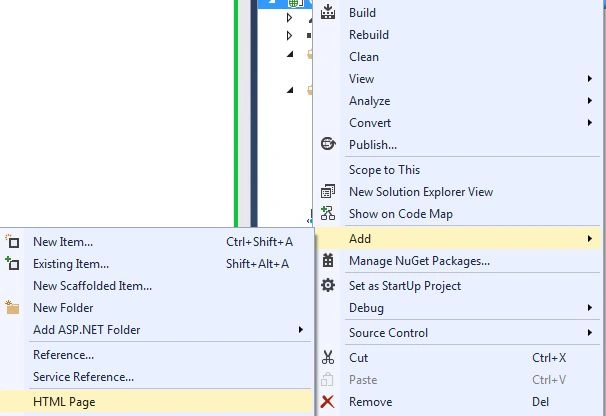
- Change the name.
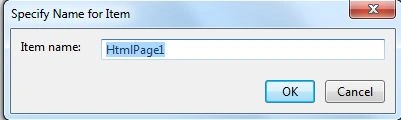
- Then click on the "OK" button.
Add the following code:
<!doctype html>
<html lang="en">
<head>
<meta charset="utf-8">
<meta http-equiv="X-UA-Comptatible" content="IE=edge,chrome=1">
<title>Backbone.js application</title>
<link rel="stylesheet" href="css/bootstrap.min.css">
<link rel="stylesheet" href="css/gh-buttons.css">
<link rel="stylesheet" href="css/main.css">
</head>
<body>
<div id="body" class="container">
<div id="content"><div style="text-align:center;"></div></div>
</div>
<script type="text/template" id="viewArticles">
<a href="#new" class="button primary icon add" style="float:right;margin-top:5px;">Add</a>
<h2>Lists of articles</h2>
<div id="articles" style="margin-top:10px;border-top:1px #CCC solid;padding-top:5px;">
<% if (articles && articles.length === 0) {
%><div style="margin-top:10px;">There is no article</div><%
} %>
</div>
</script>
<script type="text/template" id="viewArticleEntry">
<div class="article" id="article<%= article.cid %>">
<div class="affSupp">
<div class="button-group" style="float:right;padding-top:4px;padding-right:5px;">
<button class="button closeAffSupp icon arrowup">NO</button><button class="button primary danger icon trash deleteEntry">Yes</button>
</div>
<h5 style="color:white;padding-left:10px;">You want to delete it <%= article.title %> ?</h5>
</div>
<div style="padding:5px;padding-left:10px;">
<div class="button-group" style="float:right;">
<a href="#edit/<%= article.cid %>" class="button icon edit just-icon"></a>
<a class="button icon danger remove just-icon btnSupp"></a>
</div>
<a href="#<%= article.cid %>" title="Voir l'article">
<h3><%= article.title %></h3>
<p style="color:grey;"><%= article.contenu %></p>
</a>
</div>
</div>
</script>
<script type="text/template" id="viewArticle">
<% var article = model.toJSON(); %>
<h2><%= article.title %></h2>
<p style="margin-top:5px;border-top:1px #CCC solid;padding:10px 0;color:grey;border-bottom:1px #CCC solid;">
<%= article.contenu %>
</p>
<a href="#edit/<%= model.cid %>" class="button primary icon edit" style="float:right;">
Edit Article</a></button>
<a href="#" class="button" style="margin:0;">Return</a>
</script>
<script type="text/template" id="addOrEditArticle">
<h2><%= (article ? 'Éditer' : 'Add') %> an Article</h2>
<div style="margin-top:10px;border-top:1px #CCC solid;padding-top:15px;">
<form class="form">
<b style="font-size:1.1em;">Title : </b><br /><input type="text" name="title" value="<%= (article ? article.title : '') %>" class="field" style="width:100%;margin-top:5px;margin-bottom:8px;" /><br />
<b style="font-size:1.1em;">About It : </b><br />
<textarea name="contenu" class="field" style="width:100%;margin-top:5px;margin-bottom:10px;" rows="5"><%= (article ? article.contenu : '') %></textarea>
<button type="submit" class="button primary disabled icon <%= (article ? 'edit' : 'add') %>" style="float:right;"><%= (article ? 'Edit' : 'Add') %> article</button>
<a href="#" class="button" style="margin:0;">Return</a>
</form>
</div>
</script>
<!-- Thirt-Party Libraries (Order matters) -->
<script type="text/javascript" src="js/jquery.js"></script>
<script type="text/javascript" src="js/underscore.js"></script>
<script type="text/javascript" src="js/backbone.js"></script>
<script type="text/javascript" src="js/backbone-localstorage.js"></script>
<script type="text/javascript" src="js/helpers.js"></script>
<script type="text/javascript" src="js/jquery-effects.js"></script>
<script type="text/javascript" src="app.js"></script>
<!-- Modules (Order doesn't matter) -->
<script type="text/javascript" src="js/lib/views.js"></script>
<script type="text/javascript" src="js/lib/models.js"></script>
<script type="text/javascript" src="js/lib/routers.js"></script>
<script type="text/javascript">
var _gaq = _gaq || [];
_gaq.push(['_setAccount', 'UA-27481530-1']);
_gaq.push(['_trackPageview']);
(function () {
var ga = document.createElement('script'); ga.type = 'text/javascript'; ga.async = true;
ga.src = ('https:' == document.location.protocol ? 'https://ssl' : 'http://www') + '.google-analytics.com/ga.js';
var s = document.getElementsByTagName('script')[0]; s.parentNode.insertBefore(ga, s);
})();
</script>
</body>
</html>
Now we add a JavaScript as in the following:
- In the Solution Explorer.
- Right-click on the project then select "Add" -> "New Item" -> "JavaScript".
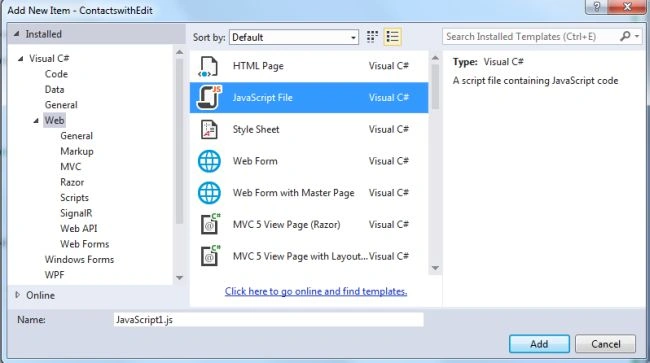
- Click on the "Add" button.
Add the following code:
var app = {
collections: {},
models: {},
views: {},
routers: {},
modals: {},
init: function () {
// Initiate modal
app.modals.supp = '#modal-supp';
$('#suppNo').click(function () {
$(app.modals.supp).modal('hide');
});
// Initialisation of route
this.articlesRouter = new this.routers.articles();
Backbone.history.start();
}
};
jQuery(function () {
// initiate app
app.init();
});
- Execute the application:
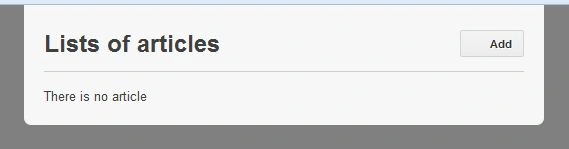
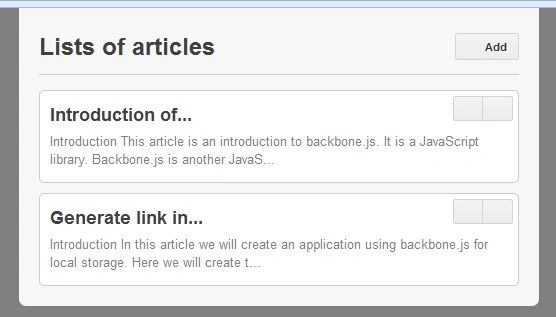
Add the title with description.
Join the conversation! Your thoughts help the community grow.