

Introduction
SQL Server Analysis Services (SSAS) provides a unified and integrated view of all your business data as the foundation for all of your traditional reporting, online analytical processing (OLAP) analysis, Key Performance Indicators (KPI) scorecards, and data mining.
To create a new Analysis Services project, follow these steps:
Step 1. Select Microsoft SQL Server 2008 => SQL Server Business Intelligence Development Studio from the Programs menu to launch Business Intelligence Development Studio.
Step 2. Select File => New => Project.
Step 3. In the New Project dialog box, select the Business Intelligence Projects project type.
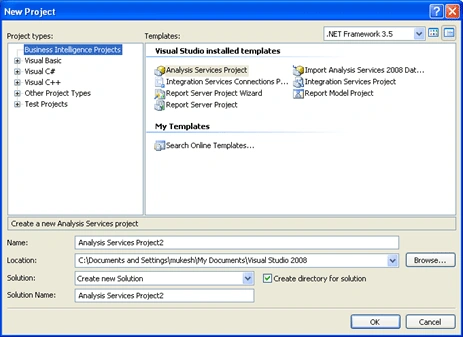
Step 4. Select the Analysis Services Project template.
Step 5. Name the new project, select a convenient location to save it, and click OK to create it.
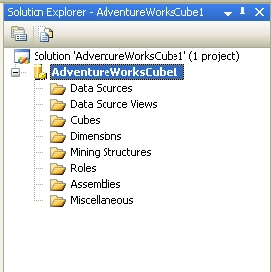
An Analysis Services project contains the following folders, which are used to organize items included in the project.
- Data Sources. Contains data sources for an Analysis Services project. You create and edit these objects with the Data Source Wizard in Data Source Designer.
- Data Source Views. Contains data source views for an Analysis Services project. You create these objects with the Data Source View Wizard and edit them in Data Source View Designer.
- Cubes. Contains cubes for an Analysis Services project. You create these objects with the Cube Wizard and edit them in Cube Designer.
- Dimensions. Contains dimensions for an Analysis Services project. You create these objects with the Dimension Wizard or the Cube Wizard and edit them in Dimension Designer.
- Mining. Contains mining structures for an Analysis Services project. You create these objects with the Mining Model Wizard and edit them in Mining Model Designer.
- Roles. Contains database roles for an Analysis Services project. You create and manage roles in Role Designer.
- Assemblies. Contains references to COM libraries and Microsoft .NET Framework assemblies for an Analysis Services project. You create references with the Add Reference dialog box.
- Miscellaneous. Contains any file except for Analysis Services file types.
Summary
This article taught us about Creating an Analysis Services Project in SQL Server.
Join the conversation! Your thoughts help the community grow.