

Overview
WCF
Windows Communication Foundation (WCF) is a distributed technology that provides a single, integrated platform or mode called the service mode to develop distributed applications for Windows. With WCF, powerful and interoperable service-oriented applications can be developed. It is a combined feature of Web Service, Remoting, MSMQ and COM+. WCF provides a common platform for all .NET communication and also uses Simple Object Access Protocol (SOAP) messages to exchange information between a service and client.
- Service Contract
Service contract is an attribute applied to an interface such as IService1. It describes which operations the client can perform on the services.
- Operation Contract
Operation Contract is an attribute applied to methods in interfaces such as IService1. It defines a method in an interface. It defines the input parameters and the return type of a specific Operation in the service.
- Data Contract
The DataContract defines which data types are passed to and from the service. It defines a class and the DataMember attribute defines the properties.
REST
Representational State Transfer (REST) is a protocol for exchanging data over a distributed environment. The main idea behind REST is that we should treat our distributed services as a resource and we should be able to use simple HTTP protocols to perform various operations on that resource.
JSON
The JavaScript Object Notation (JSON) data format, or JSON for short, is derived from the literals of the JavaScript programming language. JSON helps us to present and exchange data in a self-descriptive, independent and light way. This data can then be easily consumed and transformed into JavaScript objects.
In most browser-based applications, WCF can be consumed using JavaScript, jQuery, AngularJs and so on. When a client makes a call to WCF, JSON or XML is used as the format of the communication. WCF has the option to send the response in JSON object. This can be configured with the WebGet or WebInvoke attribute and the WebHttpBinding. This allows you to expose a ServiceContract as a REST service that can be invoked using either JSON or plain XML.
- GET: Retrieves the information.
- PUT: Replaces the entire collection with another collection.
- POST: Creates a new entry in the collection.
- DELETE: Deletes the entire collection.
First we need to create the WCF REST Service. So use the following procedure.
Open Visual Studio and select "File", then "New" and "Project...". Then select WCF in the left side, click WCF Service Application. Click OK.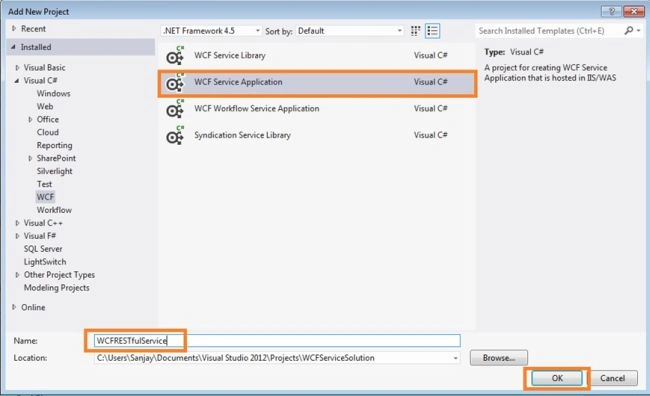
Now delete the IService.cs and Service.cs files.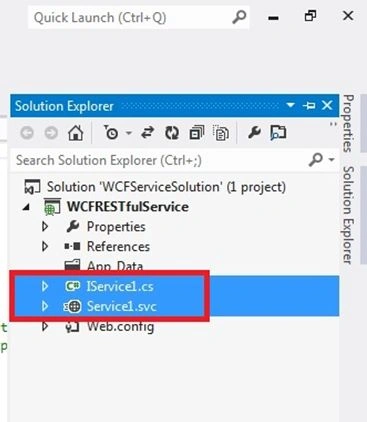
Now right-click on the project in the Solution Explorer and select Add New Item, then select WCF Service and name it Customer Service.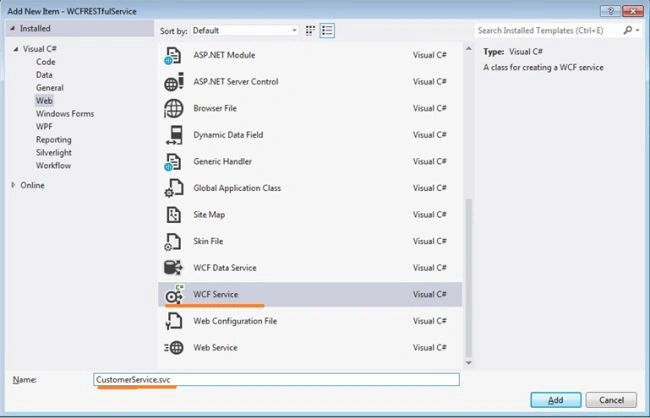
Now I will create a Data Contract CustomerDataContract.
Right-click on the project in the Solution Explorer and select Add New Item. Then add a .cs file and use the following code: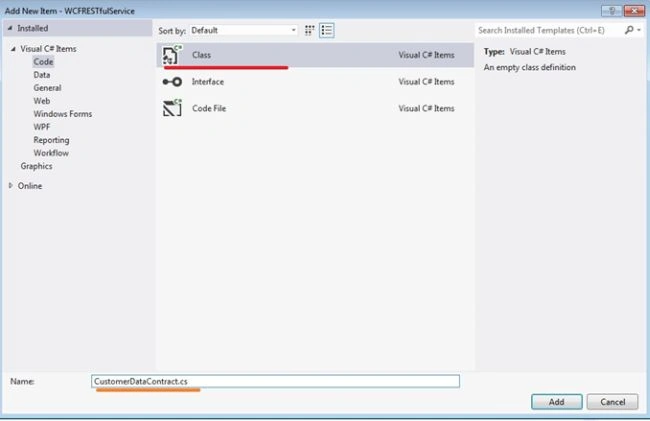
CustomerDataContract.cs
- using System;
- using System.Collections.Generic;
- using System.Linq;
- using System.Runtime.Serialization;
- using System.Web;
- namespace WCFRESTfulService
- {
- [DataContract]
- public class CustomerDataContract
- {
- [DataMember]
- public string CustomerID { get; set; }
- [DataMember]
- public string CompanyName { get; set; }
- [DataMember]
- public string ContactName { get; set; }
- [DataMember]
- public string ContactTitle { get; set; }
- [DataMember]
- public string Address { get; set; }
- [DataMember]
- public string City { get; set; }
- [DataMember]
- public string Region { get; set; }
- [DataMember]
- public string PostalCode { get; set; }
- [DataMember]
- public string Country { get; set; }
- [DataMember]
- public string Phone { get; set; }
- [DataMember]
- public string Fax { get; set; }
- }
- }
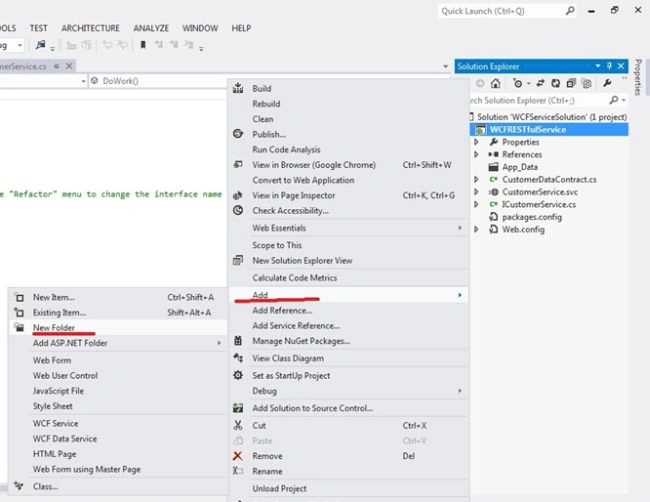
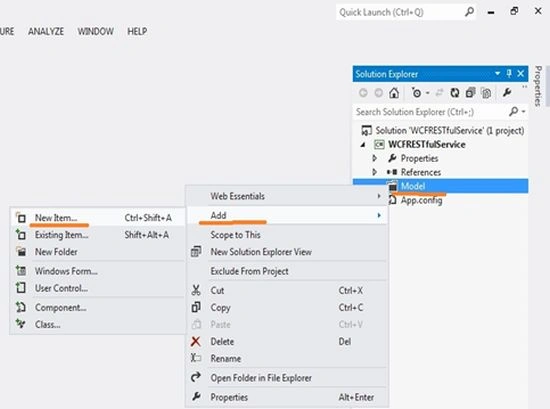
Now right-click on the Model folder and select Add, then click New Item.
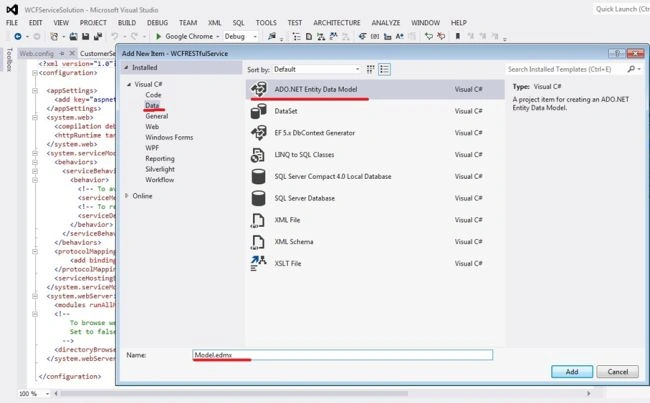
Select the ADO.NET Entity Data Model.
Right-click the Customer entity and choose Generate Database from Model on the context menu. You'll see the Generate Database Wizard dialog box, as shown here:
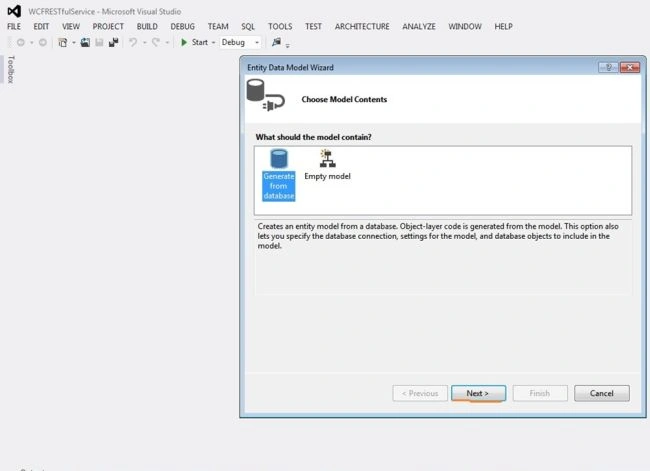
Here click on New Connection then enter your SQL Server Details and then select your database.
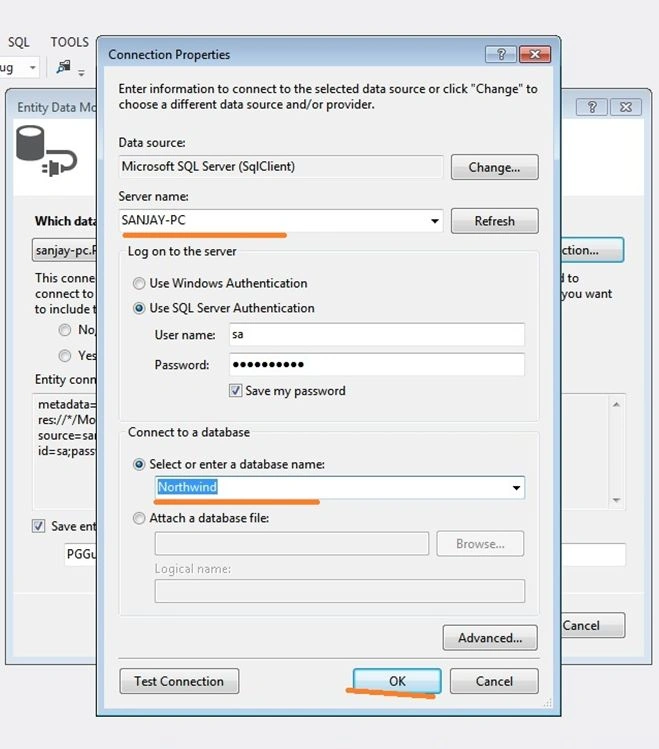
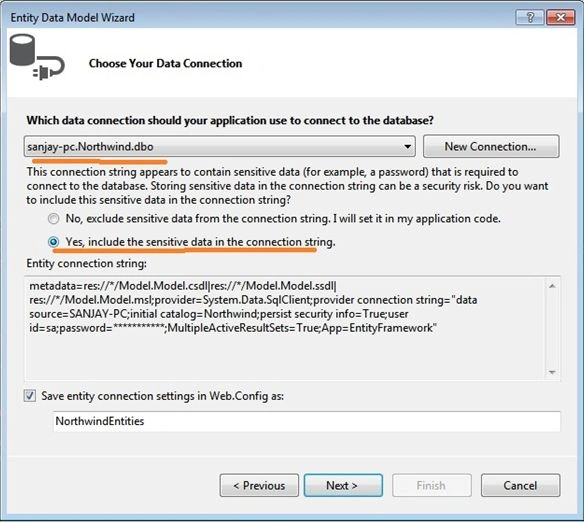
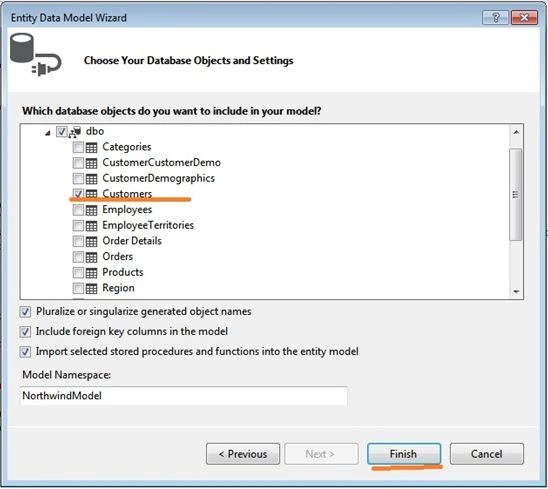
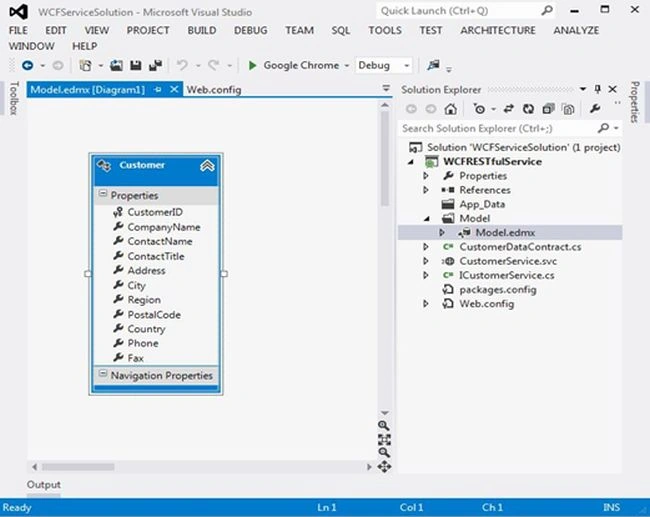
Now open the ICustomerService.cs file to define an interface as in the following:
- using System;
- using System.Collections.Generic;
- using System.Linq;
- using System.Runtime.Serialization;
- using System.ServiceModel;
- using System.ServiceModel.Web;
- using System.Text;
- namespace WCFRESTfulService
- {
- // NOTE: You can use the "Rename" command on the "Refactor" menu to change the interface name "ICustomerService" in both code and config file together.
- [ServiceContract]
- public interface ICustomerService
- {
- [OperationContract]
- [WebInvoke(Method = "GET", RequestFormat = WebMessageFormat.Json,
- ResponseFormat = WebMessageFormat.Json, UriTemplate = "/GetAllCustomer/")]
- List<CustomerDataContract> GetAllCustomer();
- [OperationContract]
- [WebGet( RequestFormat = WebMessageFormat.Json,
- ResponseFormat = WebMessageFormat.Json,
- UriTemplate = "/CustomerDetails/{CustomerID}")]
- CustomerDataContract CustomerDetails(string customerID);
- }
- }
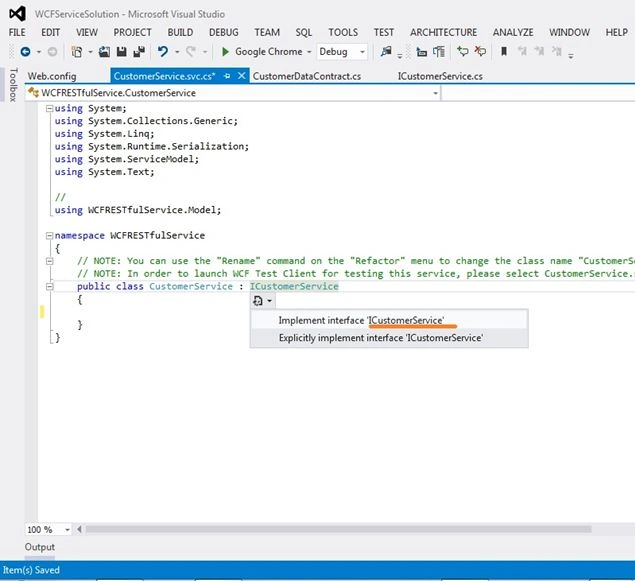
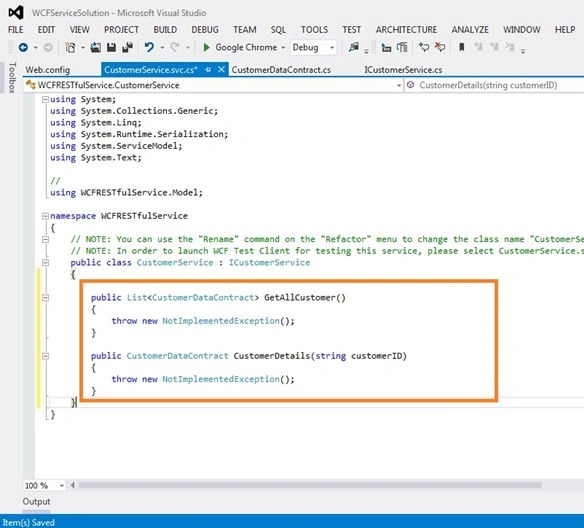
- using System;
- using System.Collections.Generic;
- using System.Linq;
- using System.Runtime.Serialization;
- using System.ServiceModel;
- using System.Text;
- //
- using WCFRESTfulService.Model;
- namespace WCFRESTfulService
- {
- // NOTE: You can use the "Rename" command on the "Refactor" menu to change the class name "CustomerService" in code, svc and config file together.
- // NOTE: In order to launch WCF Test Client for testing this service, please select CustomerService.svc or CustomerService.svc.cs at the Solution Explorer and start debugging.
- public class CustomerService : ICustomerService
- {
- NorthwindEntities dc;
- public CustomerService()
- {
- dc = new NorthwindEntities();
- }
- public List<CustomerDataContract> GetAllCustomer()
- {
- var query = (from a in dc.Customers
- select a).Distinct();
- List<CustomerDataContract> CustomersList = new List<CustomerDataContract>();
- query.ToList().ForEach(x =>
- {
- CustomersList.Add(new CustomerDataContract
- {
- CustomerID = Convert.ToString(x.CustomerID),
- CompanyName = x.CompanyName,
- ContactName = x.ContactName,
- ContactTitle = x.ContactTitle,
- Address = x.Address,
- City = x.City,
- Region = x.Region,
- PostalCode = x.PostalCode,
- Country = x.Country,
- Phone = x.Phone,
- Fax = x.Fax,
- });
- });
- return CustomersList;
- }
- public CustomerDataContract CustomerDetails(string customerID)
- {
- CustomerDataContract Cust = new CustomerDataContract();
- try
- {
- var query = (from a in dc.Customers
- where a.CustomerID.Equals(customerID)
- select a).Distinct().FirstOrDefault();
- Cust.CustomerID = query.CustomerID;
- Cust.CompanyName = query.CompanyName;
- Cust.ContactName = query.ContactName;
- Cust.ContactTitle = query.ContactTitle;
- Cust.Address = query.Address;
- Cust.City = query.City;
- Cust.Region = query.Region;
- Cust.PostalCode = query.PostalCode;
- Cust.Country = query.Country;
- Cust.Phone = query.Phone;
- Cust.Fax = query.Fax;
- }
- catch (Exception ex)
- {
- throw new FaultException<string> (ex.Message);
- }
- return Cust;
- }
- }
- }
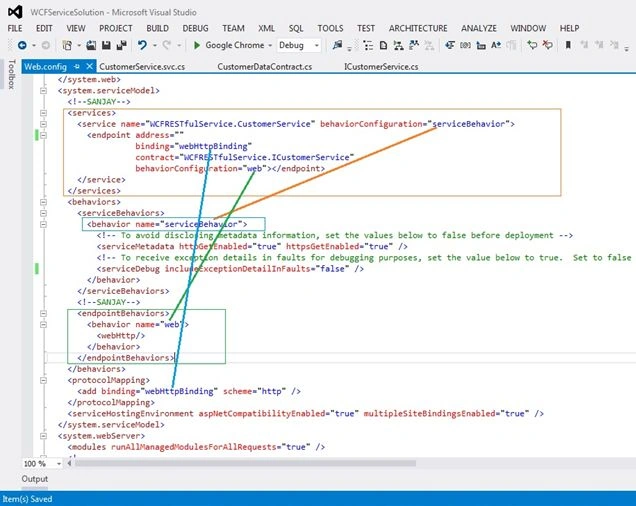
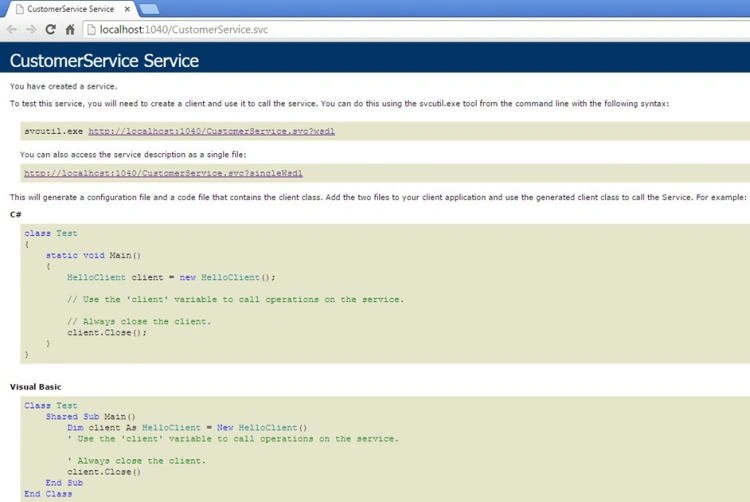
Now our WCF REST Service is ready. Run the WCF REST service.
http://localhost:1040/CustomerService.svc/GetAllCustomer/
You will see the following output http://localhost:1040/CustomerService.svc/GetAllCustomer/
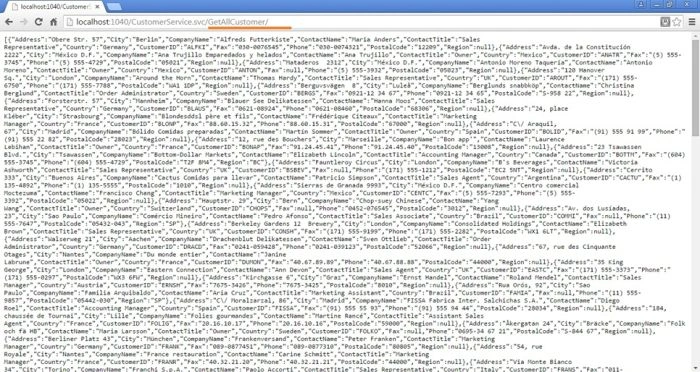
You will see the following output http://localhost:1040/CustomerService.svc/CustomerDetails/ALFKI

I hope this article is useful. If you have any other questions then please mention it in the comments section.
edwin canPosted May 3, 2020, 1:17 AM
Great, it help
Haris KhanPosted Feb 21, 2019, 3:45 AM
How to create login service in json format in mvc plzz ans!
Haris KhanPosted Feb 21, 2019, 3:44 AM
Can you please show to create a login service
Hamid KhanPosted Nov 20, 2018, 10:51 PM
Good explanation............
Sanjay KumarPosted Mar 21, 2016, 8:34 AM
https://github.com/webmasters964/WCFRESTfulService
Arul RPosted Nov 3, 2015, 9:11 AM
Nice share sir
Yogesh WaniPosted Sep 8, 2015, 4:25 AM
Thank you for nice post Please help me How to do POST ?
ted wolfPosted Sep 4, 2015, 4:37 PM
Could we get the source code please. I can't find where I messed it up.
Pawan ChandPosted Sep 2, 2015, 5:07 AM
Nice Explanation. I did the practical and its working fine. Thank YOu Sanjay!
Shridhar SharmaPosted Aug 6, 2015, 6:59 PM
Good one !
Santhakumar MunuswamyPosted Aug 6, 2015, 2:08 PM
Nice Article. Thanks for sharing
Gopi ChandPosted Aug 6, 2015, 12:34 PM
Nice work
RakeshPosted Aug 6, 2015, 10:32 AM
Good one
Gowtham RajamanickamPosted Aug 6, 2015, 9:43 AM
good one..
Sibeesh VenuPosted Aug 6, 2015, 8:33 AM
Nice Share
Nilesh JadavPosted Aug 6, 2015, 7:53 AM
Nice share sir :0
Ankit BansalPosted Aug 6, 2015, 6:23 AM
Very clear explanation...Can you also add source code zip file...??? It will be helpful..
Rajeesh MenothPosted Aug 6, 2015, 3:06 AM
Good One