

Steps to create new database by using code first in Entity framework
Note - I am using Visual Studio 2015 for creating this project.
Step 1 - Create Windows form project
Visual Studio, File menu, New, then click Project .
Select “Window” from templates and select “Window Form application”.
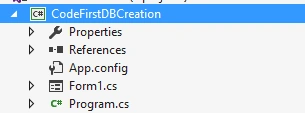
So it will create Window Form application and I have given its name “CodeFirstDBCreation” during creation.
Step 2 - Add entity frame work into newly created project using NuGet package.
Need entity frame work for using code first for creation of database.
Right Click over project -> Manage Nuget packages -> search EntityFramework
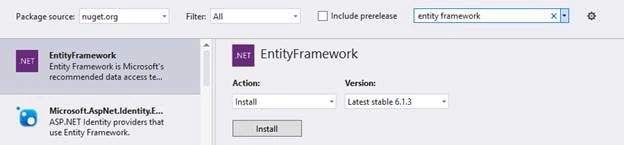
Now click over “Install” button to install entity frame into selected project.
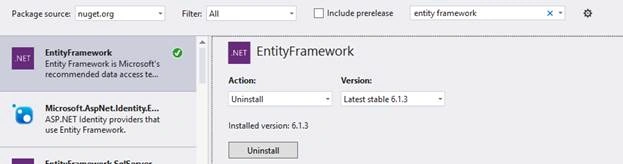
Now it is installed over project and some references over project.
Added reference 'EntityFramework' to project 'CodeFirstDBCreation'.
Added reference 'EntityFramework.SqlServer' to project 'CodeFirstDBCreation'.
Added reference 'System.ComponentModel.DataAnnotations'.
And add also add tags into app.config file <configSections> and <entityFramework>
Step 3 - Create Model into project
Add model class into project.
Example
- public class Company
- {
- public String CompanyId
- {
- get;
- set;
- }
- public String Name
- {
- get;
- set;
- }
- }
- public class CodeFirstContext: DbContext
- {
- public CodeFirst(): base()
- {
- Database.SetInitializer(new DropCreateDatabaseAlways < CodeFirstContext > ());
- }
- }
Step 5 - Exposed typed DbSet for each classes of model
Now expose each class of model into derived context (CodeFirstContext) by using DbSet<TEntity>. DbSet represents an entity set, which willbe used to perform operations like add, update, delete and read.
- class CodeFirstContext: DbContext
- {
- public CodeFirstContext(): base()
- {
- Database.SetInitializer(new DropCreateDatabaseAlways < CodeFirstContext > ());
- }
- public DbSet < Company > Companies
- {
- get;
- set;
- }
- }
Note - We will discuss about base class constructor of DbContext and its use in database creation at the end of these steps.
Step 6 - Create input section
Create input section, it can be anything for input, whether console or win form etc. We have created Win form application so we will create win form.
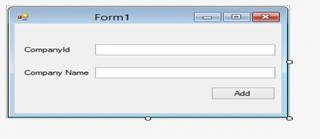
Step 7- Code to add entity into DB by DbSet of context
- private void btnAdd_Click(object sender, EventArgs e)
- {
- // Set values into company model.
- Company objCompany = new Company();
- objCompany.CompanyId = txtCompanyId.Text;
- objCompany.Name = txtCompanyName.Text;
- // Create context object and then save company data.
- CodeFirstContext objContext = new CodeFirstContext();
- objContext.Companies.Add(objCompany);
- objContext.SaveChanges();
- }
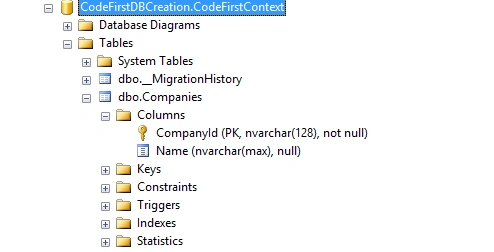
So now If at that moment, if we run the application and add company name and Id and save it, so it will create data base and create one table inside it by the name of “Companies” and add one record inside it, on the basis of input entry.
Now a question arises, we didn’t mention any connection string, so how and where will database be created?
- If a local SQL Express instance is available (installed by default with Visual Studio 2010) then Code First has created the database on that instance.
- If SQL Express isn’t available then Code First will try and use LocalDb (installed by default with Visual Studio 2012).
The database is named by the combination of ProjectName.ContextName , in our case that is CodeFirstDBCreation.CodeFirstContext , here CodeFirstDBCreation is our project name and CodeFirstContext is our derived context name.

Tables
Role of Base class constructor of context over Database creation:
Base class constructor has following parameters
- No Parameter:
- Database name as parameter:
- Connection string name as parameter:
No Parameter
- class CodeFirstContext: DbContext
- {
- public CodeFirstContext(): base()
- {
- Database.SetInitializer(new DropCreateDatabaseAlways < CodeFirstContext > ());
- }
- public DbSet < Company > Companies
- {
- get;
- set;
- }
- }
Database name as parameter
- class CodeFirstContext: DbContext
- {
- public CodeFirstContext(): base("CompanyDB")
- {
- Database.SetInitializer(new DropCreateDatabaseAlways < CodeFirstContext > ());
- }
- public DbSet < Company > Companies
- {
- get;
- set;
- }
- }

Connection string name as parameter
- class CodeFirstContext: DbContext
- {
- public CodeFirstContext(): base("name=CompanyConnectionString")
- {
- Database.SetInitializer(new DropCreateDatabaseAlways < CodeFirstContext > ());
- }
- public DbSet < Company > Companies
- {
- get;
- set;
- }
- }
- <connectionStrings>
- <add name="CompanyConnectionString" connectionString="Server=TESTServer\SQLEXPRESS; Database=Company; uid=sa;password=1234;" providerName="System.Data.SqlClient" />
- </connectionStrings>

DIPTI SHARMAPosted Sep 4, 2018, 9:30 AM
Please provide input if anyone have solution for the same
DIPTI SHARMAPosted Sep 4, 2018, 9:29 AM
Please help me.... Exception is The type initializer for 'System.Data.Entity.Internal.AppConfig' threw an exception. >> Configuration system failed to initialize
DIPTI SHARMAPosted Sep 4, 2018, 9:28 AM
I have created a separate dll for DataObjects and want to access connectionstring from App.config of Windows service . Windows service and DataObjects project are in same solution. code snippet for "Connection string name as parameter" is not functioning and throwing error
Santhakumar MunuswamyPosted Jun 9, 2016, 12:47 AM
Thank you for nice share
Vignesh ManiPosted Jun 6, 2016, 5:33 AM
Nice
Praveen SreeramPosted Jun 4, 2016, 1:04 PM
Nice.. Especially the three different types of constructors