

Install the extension
The extension can be installed in two ways,
- Through the Visual Studio market here
- Downloaded from Visual Studio itself (Tools > Extensions and Updates)
Create a new project
After you have successfully installed the extension, you can create a new DotVVM project using a Visual Studio project template.
There are two templates for DotVVM,
- .NET Core template
- Owin template
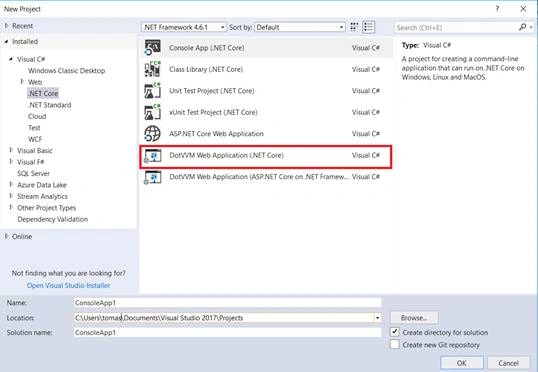
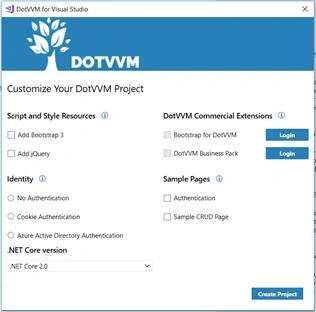
And after you have selected a project template, DotVVM will open a modal window for setting up the application in which you can:
- Add Bootstrap/jQuery
- Add Identity
- Add Sample pages
- Select .NET version
- Add commercial DotVVM controls
Basic project structure
The application’s basic configuration is in the Startup class, where services and middlewares are registered.
Usual project structure
- ViewModels
- Contains your ViewModel classes
- Contains your ViewModel classes
- Views
- Contains your Views (.dothtml files)
- Contains your Views (.dothtml files)
- DotvvmStartup
- A C# class; contains your DotVVM - specific configuration
- Routes
- Resources
- Controls
- A C# class; contains your DotVVM - specific configuration
The structure is not a strict rule. You can move your Views/ViewModels around if you want to.
- They must be JSON serializable so that they can be sent to the client
- They preserve state for your Views and defines Commands, which are called from the Views
- It is recommended to inherit all ViewModels from DotvvmViewModelBase as it gives you several useful mechanisms,
- Context property
- Option to hook into the ViewModel‘s lifecycle (Init, Load, PreRender)
- public class DefaultViewModel: DotvvmViewModelBase {
- public int Count {
- get;
- set;
- }
- public void Counter() {
- Count += 1;
- }
- }
- They must contain the @viewModel directive which specifies what ViewModel type must accompany it
- They are made up of controls
- They can (and most likely will) contain bindings
- {value: Property} - binds to a public property of the ViewModel
- {command: Command()} –calls method in the ViewModel
- {staticCommand: Command()} – calls static methods in the ViewModel
- If you want to use bindings outside of control properties, you need to use double braces as an example,
- @viewModel DotvvmApplication1.ViewModels.DefaultViewModel, DotvvmApplication1
- <p>
- <span>{{value: Count}}</span>
- <dot:Button Text="Counter" Click="{command: Counter()}" />
- </p>
Configuration class - DotvvmStartup
Implements interface IDotvvmStartup, which contains a single method,
- void Configure(DotvvmConfiguration config, string applicationPath);
An instance of DotvvmConfiguration has several properties, which are used to setup routing, resources, custom controls, etc.
RoutingIs set up using the DotvvmConfiguration.RouteTable property.
Your routes can be registered in two ways,
- Manually
Using the Add method with the following parameters, - Name of the route
- Url for the route
- The path to a View
- Default values for route parameters
- config.RouteTable.Add("Default", "", "Views/default.dothtml");
- Automatically
Using AutoDiscoveryStrategy. This way routes are derived from your folder structure in the Views directory.
Resources
- config.RouteTable.AutoDiscoverRoutes(new DefaultRouteStrategy(config));
The Resources API is used to register your javascript, CSS and other files. You can accomplish that using the DotvvmConfiguration.Resources property and its Register method.
Parameters for the Register method,
- The unique name of the resource
- An implementation of IResource
- StylesheetResource – CSS styles
- ScriptResource – javascript
If you have resources dependent on other resources, you should use the IResource.Dependencies property.
- config.Resources.Register("jquery", new StylesheetResource() {
- Location = new UrlResourceLocation("~/Content/jquery.min.css")
- });
- config.Resources.Register("bootstrap-css", new StylesheetResource() {
- Location = new UrlResourceLocation("~/Content/bootstrap.min.css")
- });
- config.Resources.Register("bootstrap", new ScriptResource() {
- Location = new UrlResourceLocation("~/Scripts/bootstrap.min.js"),
- Dependencies = new [] {
- "bootstrap-css",
- "jquery"
- }
- });
Registered resources can be used in your views,
- <dot:RequiredResource Name="bootstrap" />
If you have custom DotVVM controls, you must register them in the DotvvmConfiguration.Markup property.
- config.Markup.AddCodeControls("cc", typeof(MyCustomControl));
You can read more about configuration here.
Start application
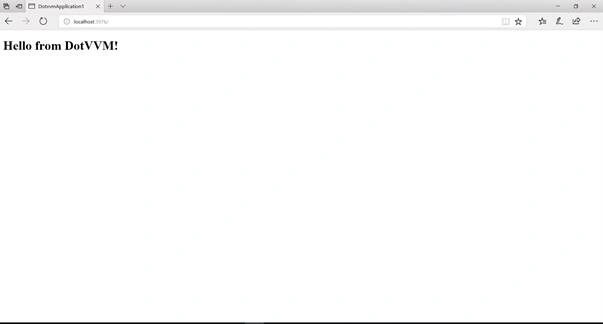
When you run the application, it will render the View that is registered in the routing table for the root URL.
Links
Join the conversation! Your thoughts help the community grow.