

Introduction
WAMP stands for Windows, Apache, MySQL, and anyone of PHP, Perl, or Python. WAMP server is a local webserver for running the scripting language (PHP, Perl) and this is open source. XAMPP stands for Cross-Platform (X), Apache (A), Maria DB (M), PHP (P), and Perl (P). It is developed by Apache Friends. It includes Apache and MySQL, FileZilla, Mercury, Tomcat, and Maria DB.
Here, I am going to show how to create a login form validation, using PHP and XAMPP.
Requirements
- XAMPP/WAMP Server.
- Brackets (IDE).
- Little HTML, CSS, and PHP knowledge.
Steps given below are required to be followed
Follow the steps to create a login form validation, using PHP and XAMPP. I have included the source code, which is given below.
Step 1
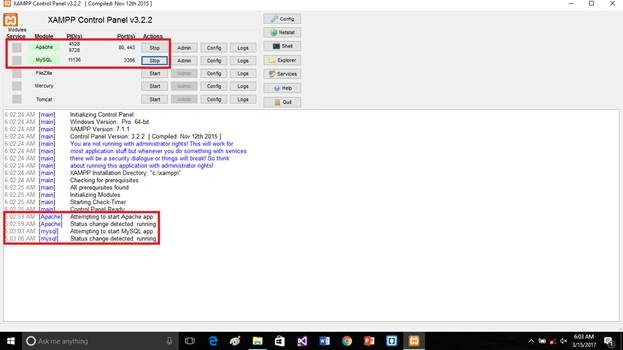
Open the XAMPP Control Panel. Start Apache and MySQL Server.
Step 2
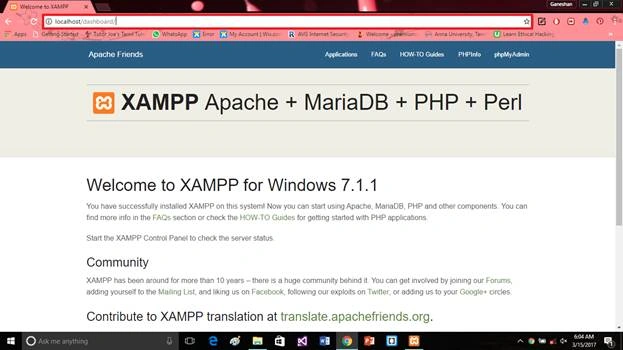
Open your browser and then type http:// localhost or http://127.0.0.1. After you see the XAMPP community page, make sure, if your Server is running or not.
Step 3
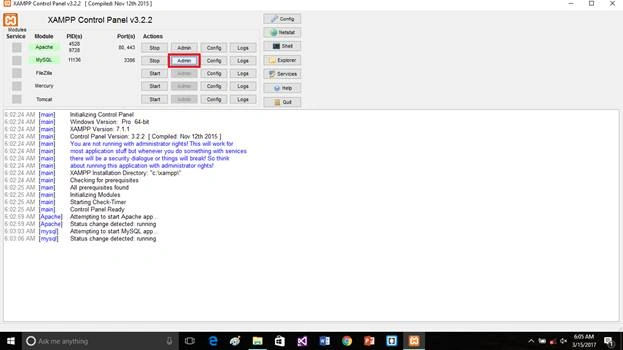
Open XAMPP Control Panel, followed by clicking MySQL admin. Now, create the database for the login validation form.
Step 4
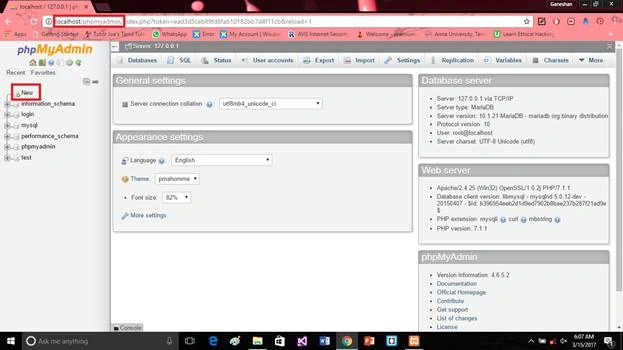
To create the new database, click New.
Step 5
Put the database name, which you want. Here, the database name is user-registration, followed by clicking create.
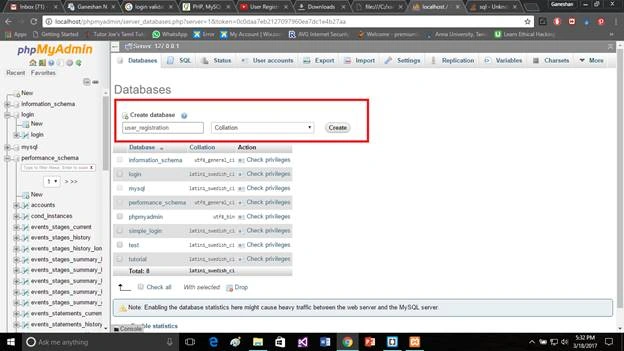
Step 6
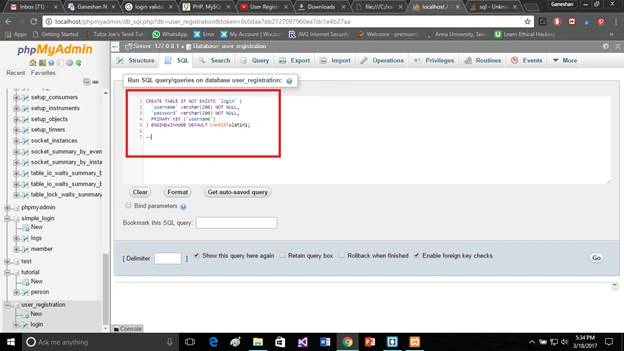
Go to the SQL query tab, copy and paste the query given below. Click go. Afterward, your table (my table name: person) is created successfully.
SQL query
- CREATE TABLE IF NOT EXISTS `login` (
- `username` varchar(200) NOT NULL,
- `password` varchar(200) NOT NULL,
- PRIMARY KEY (`username`)
- ) ENGINE=InnoDB DEFAULT CHARSET=latin1;
Put your Webpage files into the destination folder. Default folder is c:/xampp/htdocs.
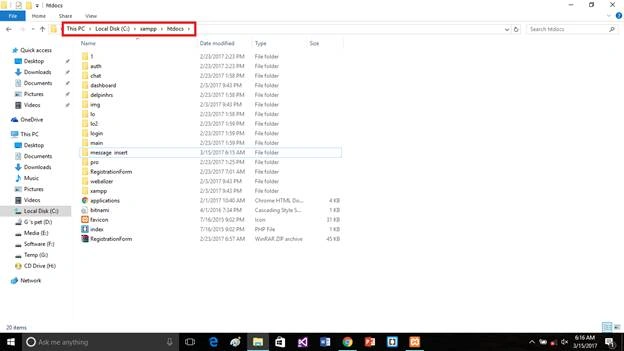
Step 8
Open the bracket(IDE) and create the login.php file. Copy the code given below and paste into login.php
- <!doctype html>
- <html>
- <head>
- <title>Login</title>
- <style>
- body{
- margin-top: 100px;
- margin-bottom: 100px;
- margin-right: 150px;
- margin-left: 80px;
- background-color: azure ;
- color: palevioletred;
- font-family: verdana;
- font-size: 100%
- }
- h1 {
- color: indigo;
- font-family: verdana;
- font-size: 100%;
- }
- h3 {
- color: indigo;
- font-family: verdana;
- font-size: 100%;
- } </style>
- </head>
- <body>
- <center><h1>CREATE REGISTRATION AND LOGIN FORM USING PHP AND MYSQL</h1></center>
- <p><a href="register.php">Register</a> | <a href="login.php">Login</a></p>
- <h3>Login Form</h3>
- <form action="" method="POST">
- Username: <input type="text" name="user"><br />
- Password: <input type="password" name="pass"><br />
- <input type="submit" value="Login" name="submit" />
- </form>
- <?php
- if(isset($_POST["submit"])){
- if(!empty($_POST['user']) && !empty($_POST['pass'])) {
- $user=$_POST['user'];
- $pass=$_POST['pass'];
- $con=mysql_connect('localhost','root','') or die(mysql_error());
- mysql_select_db('user_registration') or die("cannot select DB");
- $query=mysql_query("SELECT * FROM login WHERE username='".$user."' AND password='".$pass."'");
- $numrows=mysql_num_rows($query);
- if($numrows!=0)
- {
- while($row=mysql_fetch_assoc($query))
- {
- $dbusername=$row['username'];
- $dbpassword=$row['password'];
- }
- if($user == $dbusername && $pass == $dbpassword)
- {
- session_start();
- $_SESSION['sess_user']=$user;
- /* Redirect browser */
- header("Location: member.php");
- }
- } else {
- echo "Invalid username or password!";
- }
- } else {
- echo "All fields are required!";
- }
- }
- ?>
- </body>
- </html>
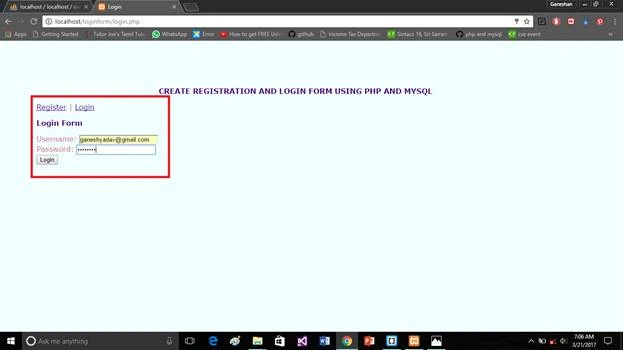
Create the register.php file. Copy the code given below and paste it into register.php.
register.php
- <!doctype html>
- <html>
- <head>
- <title>Register</title>
- <style>
- body{
- margin-top: 100px;
- margin-bottom: 100px;
- margin-right: 150px;
- margin-left: 80px;
- background-color: azure ;
- color: palevioletred;
- font-family: verdana;
- font-size: 100%
- }
- h1 {
- color: indigo;
- font-family: verdana;
- font-size: 100%;
- }
- h2 {
- color: indigo;
- font-family: verdana;
- font-size: 100%;
- }</style>
- </head>
- <body>
- <center><h1>CREATE REGISTRATION AND LOGIN FORM USING PHP AND MYSQL</h1></center>
- <p><a href="register.php">Register</a> | <a href="login.php">Login</a></p>
- <center><h2>Registration Form</h2></center>
- <form action="" method="POST">
- <legend>
- <fieldset>
- Username: <input type="text" name="user"><br />
- Password: <input type="password" name="pass"><br />
- <input type="submit" value="Register" name="submit" />
- </fieldset>
- </legend>
- </form>
- <?php
- if(isset($_POST["submit"])){
- if(!empty($_POST['user']) && !empty($_POST['pass'])) {
- $user=$_POST['user'];
- $pass=$_POST['pass'];
- $con=mysql_connect('localhost','root','') or die(mysql_error());
- mysql_select_db('user_registration') or die("cannot select DB");
- $query=mysql_query("SELECT * FROM login WHERE username='".$user."'");
- $numrows=mysql_num_rows($query);
- if($numrows==0)
- {
- $sql="INSERT INTO login(username,password) VALUES('$user','$pass')";
- $result=mysql_query($sql);
- if($result){
- echo "Account Successfully Created";
- } else {
- echo "Failure!";
- }
- } else {
- echo "That username already exists! Please try again with another.";
- }
- } else {
- echo "All fields are required!";
- }
- }
- ?>
- </body>
- </html>
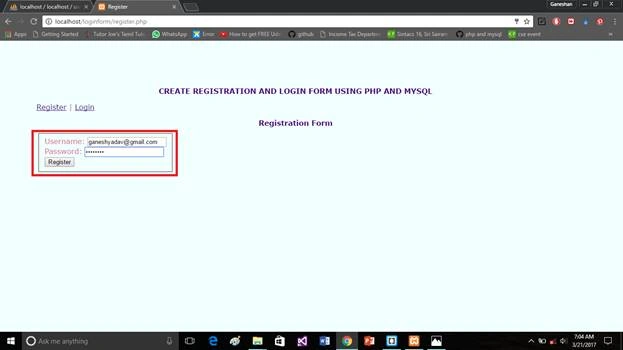
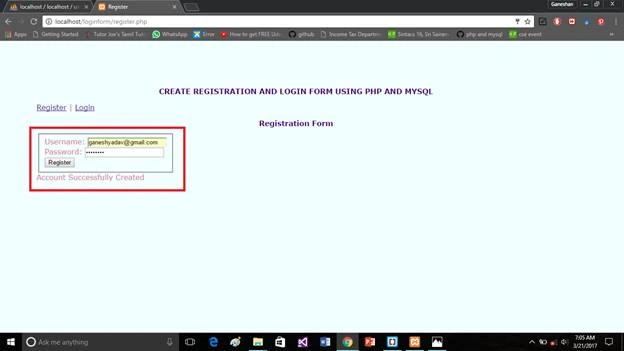
Step 10
Create the logout.php file. Copy the code given below and paste it into logout.php.
logout.php
- <?php
- session_start();
- unset($_SESSION['sess_user']);
- session_destroy();
- header("location:login.php");
- ?>
Step 13
Create the member.php file. Copy the code given below and paste it into member.php.
member.php
- <?php
- session_start();
- if(!isset($_SESSION["sess_user"])){
- header("location:login.php");
- } else {
- ?>
- <!doctype html>
- <html>
- <head>
- <title>Welcome</title>
- <style>
- body{
- margin-top: 100px;
- margin-bottom: 100px;
- margin-right: 150px;
- margin-left: 80px;
- background-color: azure ;
- color: palevioletred;
- font-family: verdana;
- font-size: 100%
- }
- h2 {
- color: indigo;
- font-family: verdana;
- font-size: 100%;
- }
- h1 {
- color: indigo;
- font-family: verdana;
- font-size: 100%;
- }
- </style>
- </head>
- <body>
- <center><h1>CREATE REGISTRATION AND LOGIN FORM USING PHP AND MYSQL</h1></center>
- <h2>Welcome, <?=$_SESSION['sess_user'];?>! <a href="logout.php">Logout</a></h2>
- <p>
- WE DO IT. SUCCESSFULLY CREATED REGISTRATION AND LOGIN FORM USING PHP AND MYSQL
- </p>
- </body>
- </html>
- <?php
- }
- ?>
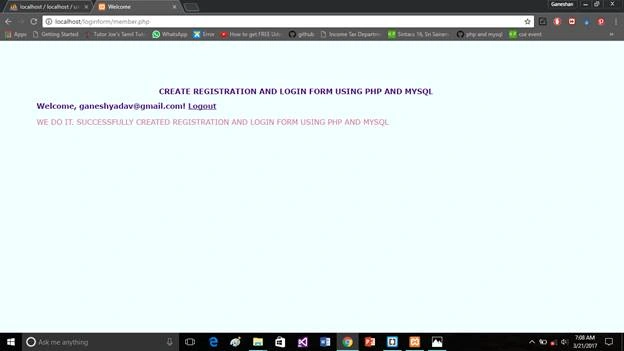
Now, you need to click the logout.
Output
Now, check the database to check, whether our data was stored or not.
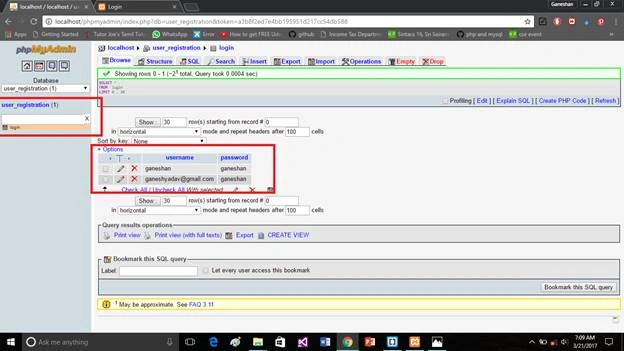
Here, we have successfully created a login form validation. Using PHP and WAMP/XAMPP, and we created and executed it. I will continue my next article to give you in-depth knowledge about XAMPP, FileZilla, and GitHub lessons.
Reference article
https://www.c-sharpcorner.com/article/install-and-configure-xampp-server-with-data-insert-into-database2/
vikas kumarPosted Jan 23, 2021, 1:29 PM
This code has many problems and it's not work properly like no work of validation....so please check and update according to new version of php...
Praveen VilliersPosted Nov 2, 2019, 3:13 PM
Warning: session_start() [function.session-start]: Cannot send session cookie - headers already sent by (output started at C:\wamp\www\pro\login.php:5) in C:\wamp\www\pro\login.php on line 60
Muhd FaizPosted May 6, 2018, 11:59 AM
The numrows thing got some problem it says
Happy IndiaPosted Dec 30, 2017, 4:34 AM
Cannot select db coming whene i click register
mahaveer chvanPosted Dec 12, 2017, 4:14 AM
Please help me Fatal error: Uncaught Error: Call to undefined function mysql_connect() in C:\xampp\htdocs\register.php:49 Stack trace: #0 {main} thrown in C:\xampp\htdocs\register.php on line 49
mohit tyagiPosted Jun 7, 2017, 7:53 AM
How to restrict multiple login using a single account in PHP
Ivan BarayevPosted May 28, 2017, 9:31 AM
Are u kidding the people ? u wrote your bio "Engineer". u wrote this article in Mar 22 2017 but u r using depreched php codes! this codes is dangerous because easily can get SQL Inject. and you install wamp server with PHP 7.1 ver. but still using depreched mysql* functions. hey new coders ! don't take referance this article.
Waruna ManjulaPosted May 2, 2017, 5:08 AM
Good article.......
Ajit SPosted Apr 8, 2017, 12:46 AM
trouble to start mysql server...... any solutions for that
Ajit SPosted Apr 8, 2017, 12:45 AM
good article....... the