

As you all know AngularJS is a JavaScript framework for developing applications. So basically AngularJS expects the response in the form of JSON. Hence it is recommended to return the data in JSON format before you start to work on the data. Here in this post we will load a local XML file using AngularJS $http service, and we will convert the same XML file to JSON. If you are new to AngularJS, please read here: Angular JS. I hope you will like this article.
Background
I have already posted an article related to $http service in Angular JS, you can see here.
Source Code
Please download the source code here: XML to JSON Source Code
Using the code
Create an html page first,
Using the code
Create an html page first,
- <!DOCTYPE html>
- <html>
- <head>
- <title>Convert XML to JSON In Angular JS - SibeeshPassion </title>
- </head>
- <body>
- </body>
- </html>
- <script src="jquery-2.1.3.min.js"></script>
- <script src="angular.min.js"></script>
- <script src="xml2json.js"></script>
Now create a controller and app directive as follows::
- <div ng-app="httpApp" ng-controller="httpController">
- </div>
- <script>
- var app = angular.module('httpApp', []);
- app.controller('httpController', function($scope, $http)
- {
- $http.get("Sitemap.xml",
- {
- transformResponse: function(cnv)
- {
- var x2js = new X2JS();
- var aftCnv = x2js.xml_str2json(cnv);
- return aftCnv;
- }
- }).success(function(response)
- {
- console.log(response);
- });
- });
- </script>
Transforming Request and Response
In AngularJS, requests can be transformed using a function called transformRequest and if it is a response we can transform by function transformResponse. These functions returns the transformed values.
Here in our example we are using the transformResponse function as follows:
- transformResponse: function(cnv)
- {
- var x2js = new X2JS();
- var aftCnv = x2js.xml_str2json(cnv);
- return aftCnv;
- }
Output
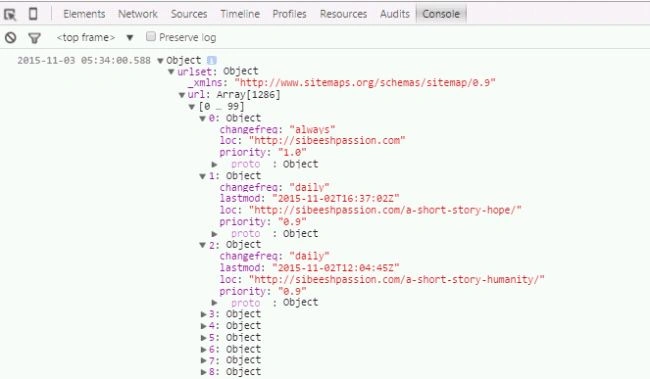
That’s all we have done everything.
Conclusion
Did I miss anything that you may think which is needed? Could you find this post as useful? I hope you liked this article. Please share me your valuable suggestions and feedback.
Your turn. What do you think?
If you have any questions, then please mention in the comments section.
Naveen BishtPosted Jul 7, 2016, 3:39 AM
If i am using some complex JSON, in that case is it useful, i think it would impact the performance....kindly suggest.
Sibeesh VenuPosted Jul 6, 2016, 7:42 AM
Debasis Saha Thanks
Debasis SahaPosted Jul 6, 2016, 7:15 AM
Good One..
Sibeesh VenuPosted Jul 6, 2016, 6:29 AM
kalu singh rao Thanks
Sibeesh VenuPosted Jul 6, 2016, 6:29 AM
Sr Karthiga Thanks
Sibeesh VenuPosted Jul 6, 2016, 6:29 AM
Mohamed Gani Mn Thanks
kalu singh raoPosted Jul 6, 2016, 6:21 AM
Nice...
Sr KarthigaPosted Feb 23, 2016, 7:52 PM
Nice explanation
Sr KarthigaPosted Feb 11, 2016, 9:51 AM
Good one
Mohamed Gani MnPosted Nov 14, 2015, 5:50 AM
good formation
Sibeesh VenuPosted Nov 7, 2015, 11:15 PM
Srinivasan K K Thanks a lot
Srinivasan K KPosted Nov 7, 2015, 9:25 AM
Sibeesh Venu Great and very useful article you presented:)
Sibeesh VenuPosted Nov 7, 2015, 9:09 AM
Manoj Kulkarni Thank you so much
Manoj KulkarniPosted Nov 7, 2015, 7:40 AM
Nice article. Thank you for sharing Sibeesh.
Sibeesh VenuPosted Nov 6, 2015, 12:05 AM
Rajeesh Menoth Thanks buddy
Rajeesh MenothPosted Nov 5, 2015, 11:57 PM
Good One
Sibeesh VenuPosted Nov 5, 2015, 11:56 PM
Rupali Shinde Thank you
Sibeesh VenuPosted Nov 5, 2015, 11:56 PM
Harshad Pansuriya Thank you
Rupali ShindePosted Nov 5, 2015, 11:38 PM
good article
Harshad PansuriyaPosted Nov 5, 2015, 11:33 PM
Nice one Sibeesh
Sibeesh VenuPosted Nov 5, 2015, 6:57 AM
Humayun Kabir Mamun Thank you
Humayun Kabir MamunPosted Nov 5, 2015, 6:54 AM
Nice...