

Introduction
In some situations, we will get a requirement like converting a number into words.
Example
568 = Five Hundred Sixty Eight only.
Here, I will explain how to convert this numeric value to words (In Indian Currency format), using C#, not only whole numbers but also with decimal and negative values.
Example
568.25 = Five Hundred Sixty Eight and two five paisa only.
-25 = Minus twenty five only.
Explanation
- Let’s begin converting numeric value into words. Before writing code, let's analyze how can we convert numeric values to words. For this, let’s take a 4 digit number (4568).

Now, we can start with ones. First, I am going to write a function for ones. This function should accept the numeric string and should return a converted word function, as shown below.- private static String ones(String Number)
- {
- int _Number = Convert.ToInt32(Number);
- String name = "";
- switch (_Number)
- {
- case 1:
- name = "One";
- break;
- case 2:
- name = "Two";
- break;
- case 3:
- name = "Three";
- break;
- case 4:
- name = "Four";
- break;
- case 5:
- name = "Five";
- break;
- case 6:
- name = "Six";
- break;
- case 7:
- name = "Seven";
- break;
- case 8:
- name = "Eight";
- break;
- case 9:
- name = "Nine";
- break;
- }
- return name;
- }
As you can see, the function given above accepts one string, that is our numeric one’s position value and here, I declared it as a string name for saving word, which is based on number you passed. I used a switch case to check all one's position value and save word, based on the number. This function will work only on single digit (1 to 9).
- Next step is to write a function, which is also same and it accepts one numeric string and returns converted word string. Here we can pass two digit value, the function as shown below.
- private static String tens(String Number)
- {
- int _Number = Convert.ToInt32(Number);
- String name = null;
- switch (_Number)
- {
- case 10:
- name = "Ten";
- break;
- case 11:
- name = "Eleven";
- break;
- case 12:
- name = "Twelve";
- break;
- case 13:
- name = "Thirteen";
- break;
- case 14:
- name = "Fourteen";
- break;
- case 15:
- name = "Fifteen";
- break;
- case 16:
- name = "Sixteen";
- break;
- case 17:
- name = "Seventeen";
- break;
- case 18:
- name = "Eighteen";
- break;
- case 19:
- name = "Nineteen";
- break;
- case 20:
- name = "Twenty";
- break;
- case 30:
- name = "Thirty";
- break;
- case 40:
- name = "Fourty";
- break;
- case 50:
- name = "Fifty";
- break;
- case 60:
- name = "Sixty";
- break;
- case 70:
- name = "Seventy";
- break;
- case 80:
- name = "Eighty";
- break;
- case 90:
- name = "Ninety";
- break;
- default:
- if (_Number > 0)
- {
- name = tens(Number.Substring(0, 1) + "0") + " " + ones(Number.Substring(1));
- }
- break;
- }
- return name;
- }
This function is also the same as previous functions but here, you can pass a two-digit number. First the number will pass to this function for example, 25.
Now, this 25 will be checked in switch case, if it's matching, then it returns based on that number name string, else it goes to default. Here, it goes to default.
In this default, I am checking the number is greater than zero, if zero, then I am recursively calling this function again but before that I am removing the last number (here 5) and concatenating zero to it i.e. you will get as 20. I am passing this 20 to this function again, so that I will get the result. Here, I will get “Twenty” as a word then again I am concatenating space and I am calling one's function, which I have created in the step 1.in this function. I am passing last digit, which is 5, then we will get word as “Five” i.e. we will get the result as “Twenty Five”
- So far, we have seen how to convert the two-digit number into words. If the number contains more than two digits, how will we convert it? For this, I am going to write a function, which accepts a number up to 12 digits as a string and returns as a converted word string. The function is shown below.
- private static String ConvertWholeNumber(String Number)
- {
- string word = "";
- try
- {
- bool beginsZero = false;//tests for 0XX
- bool isDone = false;//test if already translated
- double dblAmt = (Convert.ToDouble(Number));
- //if ((dblAmt > 0) && number.StartsWith("0"))
- if (dblAmt > 0)
- {//test for zero or digit zero in a nuemric
- beginsZero = Number.StartsWith("0");
- int numDigits = Number.Length;
- int pos = 0;//store digit grouping
- String place = "";//digit grouping name:hundres,thousand,etc...
- switch (numDigits)
- {
- case 1://ones' range
- word = ones(Number);
- isDone = true;
- break;
- case 2://tens' range
- word = tens(Number);
- isDone = true;
- break;
- case 3://hundreds' range
- pos = (numDigits % 3) + 1;
- place = " Hundred ";
- break;
- case 4://thousands' range
- case 5:
- case 6:
- pos = (numDigits % 4) + 1;
- place = " Thousand ";
- break;
- case 7://millions' range
- case 8:
- case 9:
- pos = (numDigits % 7) + 1;
- place = " Million ";
- break;
- case 10://Billions's range
- case 11:
- case 12:
- pos = (numDigits % 10) + 1;
- place = " Billion ";
- break;
- //add extra case options for anything above Billion...
- default:
- isDone = true;
- break;
- }
- if (!isDone)
- {//if transalation is not done, continue...(Recursion comes in now!!)
- if (Number.Substring(0, pos) != "0" && Number.Substring(pos) != "0")
- {
- try
- {
- word = ConvertWholeNumber(Number.Substring(0, pos)) + place + ConvertWholeNumber(Number.Substring(pos));
- }
- catch { }
- }
- else
- {
- word = ConvertWholeNumber(Number.Substring(0, pos)) + ConvertWholeNumber(Number.Substring(pos));
- }
- //check for trailing zeros
- //if (beginsZero) word = " and " + word.Trim();
- }
- //ignore digit grouping names
- if (word.Trim().Equals(place.Trim())) word = "";
- }
- }
- catch { }
- return word.Trim();
- }
Here, as you can see this function is also same as the previous one buta little bit changes here. In this, we switch case. I am checking up to 12 digits due to which there are 12 cases, if you know more than that case, then you can have 12 cases. Here, if you pass more than 12 digits, it will return empty as a word because by default, I am updating isDone Boolean to true, then it will return nothing. Here, if you pass a single digit, then it will go to case one and calls step1 function ones and it returns and I am updating isDone Boolean to true, so it can return from this function as well and for two-digit numbers, it is also the same but for cases, where there are more than two digits, I didn’t update isDone Boolean. Thus, after executing that case, it comes to if condition. Here, I am recursively calling this function again which is based on the position, until isDone Boolean updates to true.
For example I am passing the number 4568, then in this function, case 4 will execute first because it has 4 digits and in case 4, you will get pos as (4568%4) +1 =0+1=1, place =” Thousand”
It comes to if condition and recursively calls it, which is based on this position.
Thus, it calls for substring from 0 to pos i.e. 1 character -- that is, you will get 4.
Thus, it returns “Four” + “Thousand”+ again.
At last, we will get an output as “Four Thousand Five Hundred Sixty Eight”.
This is how we can convert the whole number with 12 digit convert to words.
- The next step is to check if any decimal values are there, convert this decimal value separately and attach to this word. The functions are shown below.
- private static String ConvertToWords(String numb)
- {
- String val = "", wholeNo = numb, points = "", andStr = "", pointStr = "";
- String endStr = "Only";
- try
- {
- int decimalPlace = numb.IndexOf(".");
- if (decimalPlace > 0)
- {
- wholeNo = numb.Substring(0, decimalPlace);
- points = numb.Substring(decimalPlace + 1);
- if (Convert.ToInt32(points) > 0)
- {
- andStr = "and";// just to separate whole numbers from points/cents
- endStr = "Paisa " + endStr;//Cents
- pointStr = ConvertDecimals(points);
- }
- }
- val = String.Format("{0} {1}{2} {3}", ConvertWholeNumber(wholeNo).Trim(), andStr, pointStr, endStr);
- }
- catch { }
- return val;
- }
To convert decimal numbers to words, the function is shown below.
- private static String ConvertDecimals(String number)
- {
- String cd = "", digit = "", engOne = "";
- for (int i = 0; i < number.Length; i++)
- {
- digit = number[i].ToString();
- if (digit.Equals("0"))
- {
- engOne = "Zero";
- }
- else
- {
- engOne = ones(digit);
- }
- cd += " " + engOne;
- }
- return cd;
- }
- The main function is shown below
- static void Main(string[] args)
- {
- string isNegative = "";
- try
- {
- Console.WriteLine("Enter a Number to convert to currency");
- string number = Console.ReadLine();
- number = Convert.ToDouble(number).ToString();
- if (number.Contains("-"))
- {
- isNegative = "Minus ";
- number = number.Substring(1, number.Length - 1);
- }
- if (number == "0")
- {
- Console.WriteLine("The number in currency fomat is \nZero Only");
- }
- else
- {
- Console.WriteLine("The number in currency fomat is \n{0}", isNegative + ConvertToWords(number));
- }
- Console.ReadKey();
- }
- catch (Exception ex)
- {
- Console.WriteLine(ex.Message);
- }
- }
In this function, I am checking a negative symbol and if the number contains a negative symbol, I am removing that from the number and updating isNegative string to Minus, then I am attaching this to the converted word string.
Note
Here, I am giving Indian currency format like if the number contains a decimal, then I am attaching “Paisa” to word string, which can be changed based on your country.
Examples
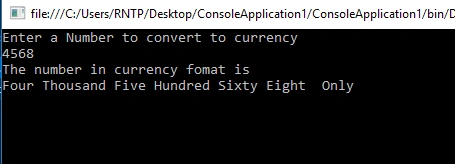
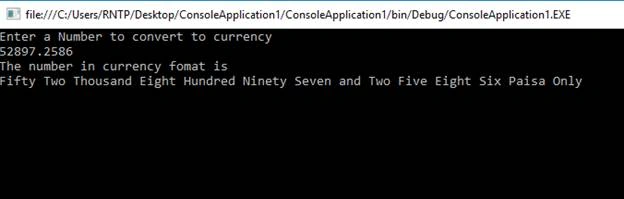
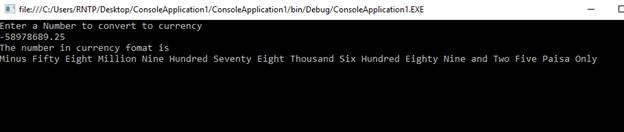

sangam kumarPosted Apr 17, 2019, 6:31 AM
Sixty Million Five Hundred Eighty Four should come
sangam kumarPosted Apr 17, 2019, 6:31 AM
60,000,584 (Sixty Million Thousand Five Hundred Eighty Four) its wrong
mashhod ulhaqPosted Jan 13, 2019, 11:28 AM
After remove comma seperator its working fine.
mashhod ulhaqPosted Jan 13, 2019, 11:26 AM
2,480 convert into Thousand Four Hundred Eighty Only...
Mamoon RasheedPosted Jan 11, 2019, 12:07 PM
Thank you for this post helped me lot
Vinit ThakrePosted Aug 10, 2018, 8:01 AM
Its working fine. But in case of consecutive zero, it fails. e.g. for 100740, it gives 1 Lakh and Thousand Seven Hundred forty.
Anuj KumarPosted May 17, 2018, 4:13 AM
Working wrong 302328.98
Anuj KumarPosted May 17, 2018, 4:13 AM
302328.98 convert it
曦 吴Posted Feb 28, 2018, 12:42 AM
It is more perfect to provide one other language ...
Vishwadeep SukhdevePosted Jul 20, 2017, 9:31 AM
Thanks , It's working fine :-)
Rafnas T PPosted Mar 15, 2017, 2:17 AM
Ok. but it works only for whole number not for decimals and for this I have to use select query.
Subhashkumar YadavPosted Mar 15, 2017, 2:05 AM
You can Use Function : - Create FUNCTION [dbo].[fnNumberToWords] ( @Number AS BIGINT ) RETURNS VARCHAR(MAX) AS BEGIN DECLARE @Below20 TABLE (ID INT IDENTITY(0,1), Word VARCHAR(32)) DECLARE @Below100 TABLE (ID INT IDENTITY(2,1), Word VARCHAR(32)) DECLARE @BelowHundred AS VARCHAR(126) INSERT @Below20 (Word) VALUES ('ZERO') INSERT @Below20 (Word) VALUES ('ONE') INSERT @Below20 (Word) VALUES ( 'TWO' ) INSERT @Below20 (Word) VALUES ( 'THREE') INSERT @Below20 (Word) VALUES ( 'FOUR' ) INSERT @Below20 (Word) VALUES ( 'FIVE' ) INSERT @Below20 (Word) VALUES ( 'SIX' ) INSERT @Below20 (Word) VALUES ( 'SEVEN' ) INSERT @Below20 (Word) VALUES ( 'EIGHT') INSERT @Below20 (Word) VALUES ( 'NINE') INSERT @Below20 (Word) VALUES ( 'TEN') INSERT @Below20 (Word) VALUES ( 'ELEVEN' ) INSERT @Below20 (Word) VALUES ( 'TWELVE' ) INSERT @Below20 (Word) VALUES ( 'THIRTEEN' ) INSERT @Below20 (Word) VALUES ( 'FOURTEEN') INSERT @Below20 (Word) VALUES ( 'FIFTEEN' ) INSERT @Below20 (Word) VALUES ( 'SIXTEEN' ) INSERT @Below20 (Word) VALUES ( 'SEVENTEEN') INSERT @Below20 (Word) VALUES ( 'EIGHTEEN' ) INSERT @Below20 (Word) VALUES ( 'NINETEEN' ) INSERT @Below100 VALUES ('TWENTY') INSERT @Below100 VALUES ('THIRTY') INSERT @Below100 VALUES ('FORTY') INSERT @Below100 VALUES ('FIFTY') INSERT @Below100 VALUES ('SIXTY') INSERT @Below100 VALUES ('SEVENTY') INSERT @Below100 VALUES ('EIGHTY') INSERT @Below100 VALUES ('NINETY') IF @Number > 99 BEGIN SELECT @belowHundred = dbo.fnNumberToWords( @Number % 100) END DECLARE @NumberInWords VARCHAR(MAX) SET @NumberInWords = ( SELECT CASE WHEN @Number = 0 THEN '' WHEN @Number BETWEEN 1 AND 19 THEN (SELECT Word FROM @Below20 WHERE ID=@Number) WHEN @Number BETWEEN 20 AND 99 THEN (SELECT Word FROM @Below100 WHERE ID=@Number/10)+ '-' + dbo.fnNumberToWords( @Number % 10) WHEN @Number BETWEEN 100 AND 999 THEN (dbo.fnNumberToWords( @Number / 100)) + ' HUNDRED '+ CASE WHEN @belowHundred <> '' THEN 'AND ' + @belowHundred else @belowHundred END WHEN @Number BETWEEN 1000 AND 999999 THEN (dbo.fnNumberToWords( @Number / 1000))+ ' THOUSAND '+ dbo.fnNumberToWords( @Number % 1000) WHEN @Number BETWEEN 1000000 AND 999999999 THEN (dbo.fnNumberToWords( @Number / 1000000)) + ' MILLION '+ dbo.fnNumberToWords( @Number % 1000000) WHEN @Number BETWEEN 1000000000 AND 999999999999 THEN (dbo.fnNumberToWords( @Number / 1000000000))+' BILLION '+ dbo.fnNumberToWords( @Number % 1000000000) ELSE ' INVALID INPUT' END ) SELECT @NumberInWords = RTRIM(@NumberInWords) SELECT @NumberInWords = RTRIM(LEFT(@NumberInWords,LEN(@NumberInWords)-1)) WHERE RIGHT(@NumberInWords,1)='-' RETURN (@NumberInWords) END
Subhashkumar YadavPosted Mar 14, 2017, 2:03 AM
When i am entering 6009 then it is give output like Six thousand Zero hundred and Nine Only. Please check the Zero Hundred.