

Introduction
Let’s discuss how to get the MVC view and layout HTML content through Razor View String. For instance, if you want to generate PDF through HTML content you need to get the MVC View and Layout DOM content.
Here you go with the step by step process to get the DOM content.
_Layout.cshtml file
This is the _Layout.cshtml file, which is available in Shared directory. Find the below screenshot for reference.
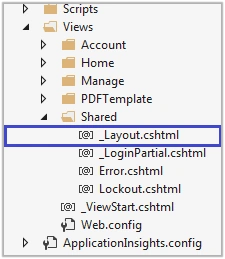
This is like the master page. Once you call this Layout in View, you can access header part in the web page. We can update the header information on this file.
- <!DOCTYPE html>
- <html>
- <head>
- <meta charset="utf-8" />
- <meta name="viewport" content="width=device-width, initial-scale=1.0">
- <title>@ViewBag.Title - My ASP.NET Application</title>
- @Styles.Render("~/Content/css")
- @Scripts.Render("~/bundles/modernizr")
- </head>
- <body>
- <div class="navbar navbar-inverse navbar-fixed-top" style="background-color:lightgray; color:black !important;">
- <div class="container">
- <div class="navbar-header">
- <button type="button" class="navbar-toggle" data-toggle="collapse" data-target=".navbar-collapse">
- <span class="icon-bar"></span>
- <span class="icon-bar"></span>
- <span class="icon-bar"></span>
- </button>
- <a href="https://storefront.crowehorwath.com/Citrix/CroweWeb/"> Logo</a>
- </div>
- <div class="navbar-collapse collapse">
- @Html.Partial("_LoginPartial")
- </div>
- </div>
- </div>
- <div class="container body-content">
- @RenderBody()
- <hr />
- <footer>
- <p>© @DateTime.Now.Year - Local Development</p>
- </footer>
- </div>
- @Scripts.Render("~/bundles/jquery")
- @Scripts.Render("~/bundles/bootstrap")
- @RenderSection("scripts", required: false)
- </body>
- </html>
ProjectContent.cshtml
This is the page that contains webpage contents. You can design your requirement on the view. Find the below screenshot.
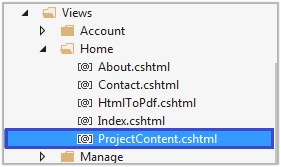
We have implemented the sample webpage that displays on web page. Find the code.
- @model iTexhSharpHTMLtoPDF.Models.ProjectModel
- @{
- ViewBag.Title = "ProjectContent";
- Layout = "~/Views/Shared/_Layout.cshtml";
- var auditProgram = ViewData.Model;
- }
- <h2>Audit Program</h2>
- <table border="0" cellpadding="12" cellspacing="10">
- <tr>
- <td>
- Project Number:
- </td>
- <td>
- @auditProgram.ProjectNumber
- </td>
- </tr>
- <tr>
- <td>
- Project Name:
- </td>
- <td>
- @auditProgram.ProjectName
- </td>
- </tr>
- <tr>
- <td>
- Element Number:
- </td>
- <td>
- @auditProgram.ElementNumber
- </td>
- </tr>
- <tr>
- <td>
- Element Name:
- </td>
- <td>
- @auditProgram.ElementName
- </td>
- </tr>
- </table>
Class File
This is the Class file, which is used to generate the DOM content by the combination of Controller, View Name, and Model Data. Here, Model data is an optional one.
In the method, ViewContext method will give the result of the current request.
- public class RazorViewToStringFormat
- {
- /// <summary>
- /// Render razorview to string
- /// </summary>
- /// <param name="controller"></param>
- /// <param name="viewName"></param>
- /// <param name="model"></param>
- /// <returns></returns>
- public static string RenderRazorViewToString(Controller controller, string viewName, object model)
- {
- controller.ViewData.Model = model;
- var viewResult = ViewEngines.Engines.FindPartialView(controller.ControllerContext, viewName);
- // checking the view inside the controller
- if (viewResult.View != null)
- {
- using (var sw = new StringWriter())
- {
- var viewContext = new ViewContext(controller.ControllerContext, viewResult.View, controller.ViewData, controller.TempData, sw);
- viewResult.View.Render(viewContext, sw);
- viewResult.ViewEngine.ReleaseView(controller.ControllerContext, viewResult.View);
- return sw.GetStringBuilder().ToString();
- }
- }
- else
- return "View cannot be found.";
- }
- }
Method
This method generates combination of View and Layout content as HTML DOM.
Here, RazorViewToStringFormat is the Class name and the method “RenderRazorViewToString” is used to retrieve the DOM content.
- public void GenerateAspose()
- {
- try
- {
- string HtmlContent = RazorViewToStringFormat.RenderRazorViewToString(this, ViewName, projectModel.TempData());
- if (!HtmlContent.Equals("View cannot be found."))
- pdfAspose.GeneratePDF(HtmlContent);
- }
- catch (Exception ex)
- {
- }
- }
Generate PDF
Eventually, you can pass output string to the method. In this function, we have used the ASPOSE PDF DLL for HTML content conversion but you can use your preferred DLL.
- public void GeneratePDF(string HtmlContent)
- {
- Aspose.Pdf.License Objpdflicense = new Aspose.Pdf.License();
- //Objpdflicense.SetLicense(@"E:\Aspose\Aspose.Pdf.lic");
- Objpdflicense.Embedded = true;
- //Check if licensed applied
- //if (Document.IsLicensed)
- //{
- //Set the properties for PDF file page format
- HtmlLoadOptions objLoadOptions = new HtmlLoadOptions(HttpContext.Current.Server.MapPath("~/Content/"));
- objLoadOptions.PageInfo.Margin.Bottom = 10;
- objLoadOptions.PageInfo.Margin.Top = 10;
- objLoadOptions.PageInfo.Margin.Left = 20;
- objLoadOptions.PageInfo.Margin.Right = 20;
- //Load HTML string into MemoryStream using Aspose document class
- Document doc = new Document(new MemoryStream(Encoding.UTF8.GetBytes(HtmlContent)), objLoadOptions);
- string FileName = "ProjectAudit_" + DateTime.Now.ToString("dd-MM-yyyy") + ".pdf";
- //Save PDF file on local hard drive or database or as you wish
- doc.Save(HttpContext.Current.Server.MapPath("~/" + FileName));
- System.Diagnostics.Process.Start(HttpContext.Current.Server.MapPath("~/" + FileName));
- //}
- }
Runtime Example
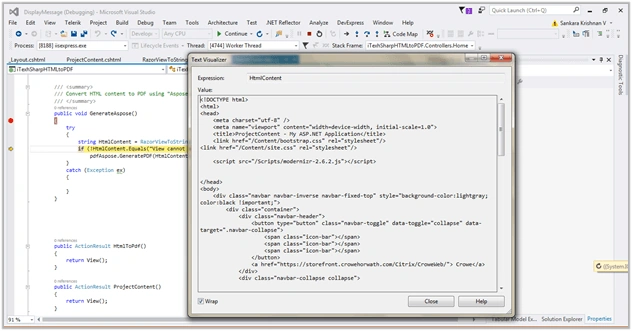
For instance, we have attached the run-time example screenshot for your reference to understand DOM conversion.
Here, you can see that the combination of Layout.cshtml and View.cshtml DOM content has been loaded into the string.
OUTPUT
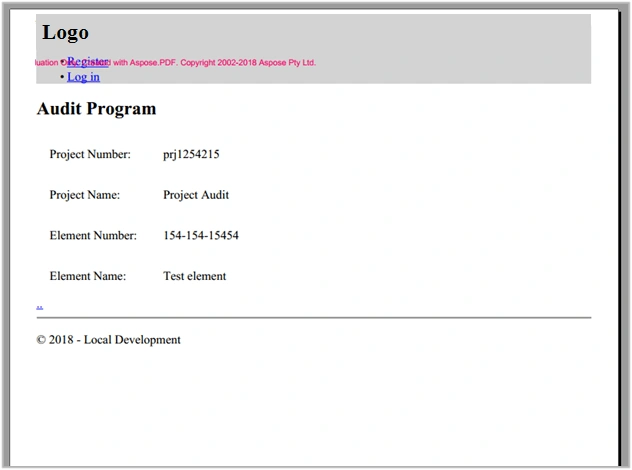
The Output will look like this,
Thank you.
Mohit KalaPosted May 29, 2018, 4:15 AM
Nice Article .....
Bhairab DuttPosted May 29, 2018, 3:32 AM
Nice Article .....