

If you ever ask yourself how to convert images to characters or to binary. This tutorial will show you how to make this on the easiest way posible by arrays.
Creating the Form
- Open the visual studio, create a new form, windows application.
- Drag the follow items to the form: Two Buttons, One pictureBox, One TextBox and one OpenDialog.
- Make the TextBox Multiline on the properties page.
- Be sure that the PictureBox is an square because we're going to work with square arrays.
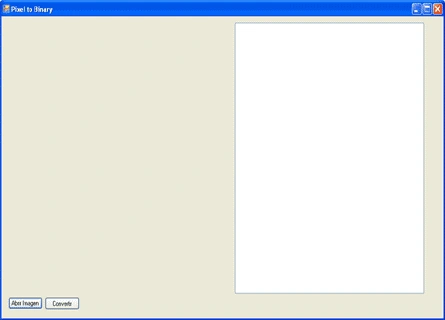
Your form should look like the one in the picture 1.
Inserting an Image to the Picture Box
To insert the image double click on one of the two buttons, this will lead you to the click event, and then try the next code:
- openFileDialog1.FileName = ""; // Setting the opefiledialog to default
- openFileDialog1.Title = "Images"; // Title of the dialog
- openFileDialog1.Filter = "All Images|*.jpg; *.bmp; *.png"; // In the filter you should write all the types of image
- // that you would like to open separete by |, example: "Png Images| *.png"
- openFileDialog1.ShowDialog(); // This show the dialog
- if (openFileDialog1.FileName.ToString() != "") // we check that theres a file selected.
- {
- Imagen.ImageLocation = openFileDialog1.FileName.ToString(); //Setting the pictureBox.Imagelocation to the
- direction.
- }
Voila the Picture Box will display the image you select.
Converting the image to binary
Ok this is how I normally works with arrays and images. First we should create a global variable:
- Bitmap img;
This one let us work with the image withou modify the original. Then you should add some code after the,
- "Imagen.ImageLocation = openFileDialog1.FileName.ToString();"
- img = new Bitmap(openFileDialog1.FileName.ToString()); // Make a copy of the image in the Bitmap variable
Then go back to the design form and double click on the second button, this will lead you to the event, and then place the next code:
- // First we declare the variable that will make the strig that will be printed in the textbox
- string texto = "";
- //The we make the cicles to read pixel by pixel and we make the comparation with the withe color.
- for (int i = 0; i < img.Height; i++) {
- for (int j = 0; j < img.Width; j++) {
- //When we add the value to the string we should invert the
- order because the images are reading from top to bottom
- //and the textBox is write from left to right.
- if (img.GetPixel(j, i).A.ToString() == "255" && img.GetPixel(j, i).B.ToString() == "255" && img.GetPixel(j, i).G.ToString() == "255" && img.GetPixel(j, i).R.ToString() == "255") {
- texto = texto + "0";
- } else {
- texto = texto + "1";
- }
- }
- texto = texto + "\r\n"; // this is to make the enter between lines
- }
- //And finally we put the string to the textbox
- txtArreglo.Text = texto;
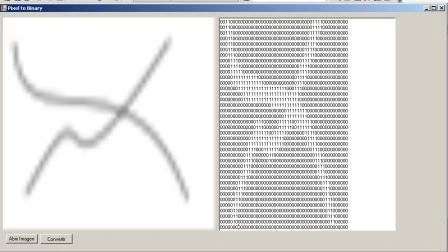
As you can see in picture 2 the image will display only zeros and ones, if the pixel color is diferent than white.
If your image is big the delay of execution will be long because this code search pixel by pixel.
Raja RajuPosted May 17, 2018, 12:59 PM
I tried but getting errors ..please share the video link here..plsssss
Raja RajuPosted May 17, 2018, 12:58 PM
Can you explain the same through video..
Hussain BadushaPosted Jan 15, 2017, 12:51 AM
Hi, thanks for the post. But i'm getting error array index out of bound.
mostafa fayadeditedPosted May 20, 2013, 11:01 PMEdited May 20, 2013, 11:02 PM
how can i convert it again into image? and thank you for your great work
FerdousPosted Feb 27, 2013, 8:59 PM
I got the Error: ArgumentOutOfRangeException was unhandled Parameter must be positive and < Height. Parameter name: y what does it mean? please help.
choey gamboaPosted Mar 24, 2012, 11:09 AM
sir, what about converting a template to binary?
chathuri buddhimaeditedPosted May 26, 2011, 5:14 AMEdited May 26, 2011, 5:41 AM
i got outofRangeException in code if (img.GetPixel(i, j).A.ToString() == "250" && img.GetPixel(i,j).B.ToString() == "250" && img.GetPixel(i, j).G.ToString() =="250" && img.GetPixel(i, j).R.ToString(); pl give me a solution i got the solution ....thanks u very much
jitendra madanPosted Apr 27, 2011, 3:44 AM
it's very good...
ayushi aggeditedPosted Apr 19, 2011, 6:34 AMEdited Apr 19, 2011, 6:36 AM
please tell me how to convert image to square binary matrix in c++ or any other at the earliest thanks [email protected]
venkatPosted Jan 29, 2011, 2:11 AM
Hi ... thanks for ur code.The problem here is its taking too much time.How to reduce the time delay. In my case need to send the scanned images to central server.Insted of sending images i am planning to send the binary data to central server through http post method. Is there any other way or sample code which will reduce the time delay at the time of convertion.
bikash karmokarPosted Jan 11, 2011, 4:50 AM
thanks for that
Jasmin GandhiPosted Dec 22, 2010, 5:29 AM
plz tell me how to get image from sql database in picturebox
hai nam ngoPosted Oct 12, 2010, 9:47 AM
this code is very slow :(
Abid AliPosted Aug 26, 2010, 1:18 AM
Hi Respected Sir! I am working on my FYP and searching for a C# code that can convert scanned image to the Binary digits Kindly help me if possilbe I will be thankful to you With Regards Abid Ali [email protected]
guru devPosted May 10, 2010, 12:16 PM
hi can u help me to convert image egb information into matrix format using c++
Rohit SharmaPosted Feb 10, 2010, 1:54 AM
Sir , could you please guide us how to read characters from a image taken by a camera.
rtrow dfkfkfPosted Aug 4, 2009, 12:21 AM
if (img.GetPixel(j, i).A.ToString() == "255" && img.GetPixel(j, i).B.ToString() == "255" && img.GetPixel(j, i).G.ToString() == "255" && img.GetPixel(j, i).R.ToString() == "255")
michael dwyerPosted May 2, 2009, 3:38 PM
this is my site
zeroPosted Apr 22, 2009, 1:15 AM
nice code...
koti kPosted Feb 20, 2009, 11:31 PM
sir i am doing stegnography implimentation (Audio) pls send me to mail id [email protected]
ryanPosted Mar 12, 2008, 9:54 AM
does anybody know of a website where this can be done easily online? Thanks Ryan
gava psPosted Feb 27, 2008, 7:06 AM
its really a dam good code... it taking just one day to convert a small image to binary.... well done my boy
danieleohPosted Dec 22, 2007, 12:37 AM
If this code run, it will give error Exception:"Parameter must be Positive and < Height change this section for (int i = 0; i < img.Width; i++) { for (int j = 0; j < img.Height; j++) to for (int i = 0; i < img.Height; i++) { for (int j = 0; j < img.Width; j++) GetPixel(j,i) will give exception otherwise.
shivnath GPosted Dec 11, 2007, 3:51 AM
I have a word file which contents a small images one on each line I neeed to read this images and convert them to binary format and have to save this binary data to Database on next page I need to display this images I am not getting how to do all this Please help me in this regard Its very Critical to me
parag wadkarPosted Nov 1, 2007, 6:14 AM
Hello Sir, Your R&D is excellent. It is very good. Just to avoid re-inventing the wheel, can u send me the code to read a char or word from a text image and store in the database? Thanks and Regards, Parag
wei minPosted Oct 30, 2007, 8:13 AM
Hi, This works great. I have a project that requires me to display an image onto a 16x16 resolution display panel. 1)Is there a way to resize the image to 16x16 resolution before converting it? 2)How can I save the result into a bin file? Thanks
sema phorePosted Oct 16, 2007, 2:00 PM
it's very good article thanks, But there is an Exception:"Parameter must be Positive and < Height" Parameter Name: Y So,Can You Solve this for me,plz Thanks Again
kien nguyenPosted Sep 14, 2007, 1:28 AM
Sir, I have an Image that has some charactors. I want to reade numer from that Image pls send me the source code in C#
mohammed essamPosted Jul 17, 2007, 11:07 AM
Realy It's very Nice
Vishwanath BPosted Jun 22, 2007, 12:31 AM
Its ok
subrat mahantyPosted May 15, 2007, 12:50 PM
hello sir can u send me the code for how to read a char or word from a text image
nethal azwaaPosted Mar 23, 2007, 2:46 PM
realy very very good thanks
binu M APosted Mar 10, 2007, 1:17 AM
Sir, I have an Image that has some charactors. I want to reade these charactors from that Image pls send me the source code in vb.net