

Overview
In this article, you’ll learn about container creation and application deployment with Google Kubernetes Engine.
Google Kubernetes Engine (GKE)
GKE provides a managed environment for deploying, managing, and scaling your containerized applications using the Google infrastructure.
Kubernetes on Google Cloud Platform
When you run a Kubernetes Engine cluster, you also gain the benefit of advanced cluster management features that Google Cloud Platform provides. The following includes
- Load Balancing
- Automatic scaling
- Automatic upgrades
- Logging and Monitoring
Prerequisites
Google Cloud Subscriptions.
Step 1
Login here.
Step 2
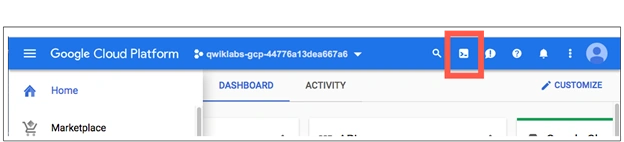
Activate cloud shell
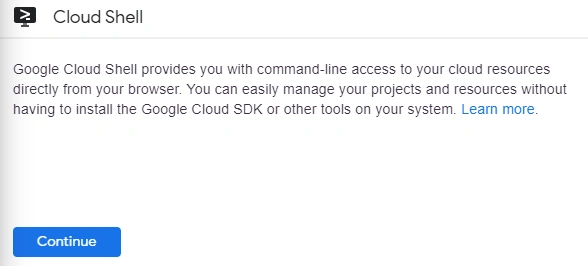
Click Continue.
Step 3
Set a default compute zone.
It is an approximate regional location in which your clusters and their resources live. For example, us-central1-a is a zone in the us-central1 region.
In Cloud Shell run the following command to set your default compute zone to us-central1-a,
gcloud config set compute/zone us-central1-a
You get the following output,
Updated property [compute/zone].
Step 4
Creating a Kubernetes Engine cluster.
A cluster consists of at least one cluster master machine and multiple worker machines called nodes.
To create a cluster, run the following command,
gcloud container clusters create [my-cluster]
You get the following output,

Step 4
Get authentication credentials for the cluster.
After creating your cluster, you need to get authentication credentials to interact with the cluster.
To authenticate the cluster run the following command,
gcloud container cluster s get-creditionals[my-cluster]
You get the following output,

Step 5 - Deploying an application to the cluster
Now that you have created a cluster, you can deploy a containerized_application to it. For this lab, you'll run hello-app in your cluster.
Run the following kubectl run command in Cloud Shell to create a new Deployment hello-serverfrom the hello-app container image.
kubectl run hello-server --image=gcr.io/google-samples/hello-app:1.0 --port 8080
You get the following output,

Step 6
Now create a Kubernetes Service, which is a Kubernetes resource that lets you expose your application to external traffic, by running the following kubectl_expose command,
kubectl expose deployment hello-server --type="LoadBalancer"
You get the following output,

Passing in type="LoadBalancer" creates a Compute Engine load balancer for your container.
Inspect the hello-server Service by running kubectl_get
kubectl get service hello-server
You get the following output,

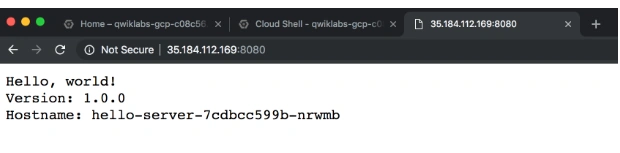
To insert the above EXTERNAL-IP address in the column, and open the browser, browse the following address http://[35.184.112.169]:8080
You get the final output,
Conclusion
That’s all. We have learned about the container creation and application deployment with Google Kubernetes Engine. I hope you understood how to do container creation and application deployment with Google Cloud Infrastructure.
Join the conversation! Your thoughts help the community grow.