

Introduction
Today we are going to learn how to create a Windows Store App tor pick a Contact using JavaScript. This app demonstrates how to use the Contact Picker to select one contact. It includes a basic implementation of the Contact Picker APIs to demonstrate how to display a list of contacts to the user.
I assume you can create a simple Windows Store App using JavaScript. For more help visit Simple Windows Store Apps using JavaScript.
To start the creation of the app, add two JavaScript pages by right-clicking on the js folder in the Solution Explorer and select Add > new item > JavaScript Page and then give an appropriate name. In the same way, add one HTML page to your project.
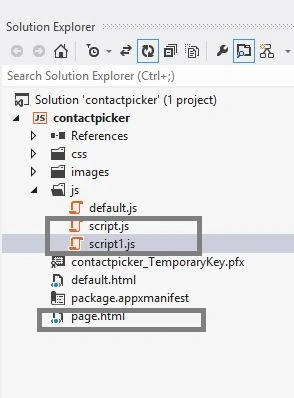
Write the following code in default.html:
<!DOCTYPE html>
<html>
<head>
<meta charset="utf-8" />
<title>App</title>
<link rel="stylesheet" href="//Microsoft.WinJS.1.0/css/ui-light.css" />
<script src="//Microsoft.WinJS.1.0/js/base.js"></script>
<script src="//Microsoft.WinJS.1.0/js/ui.js"></script>
<link rel="stylesheet" href="/css/default.css" />
<script src="/js/script.js"></script>
<script src="/js/default.js"></script>
</head>
<body role="application"style="background-color:gray">
<center><div id="rootGrid">
<div id="content">
<h1 id="featureLabel"></h1>
<div id="contentHost"></div>
</div>
</div></center>
</body>
</html>
Write the following code in default.js:
(function () {
"use strict";
var appTitle = "";
var pages = [
{ url: "page.html" }
];
function activated(eventObject) {
if (eventObject.detail.kind === Windows.ApplicationModel.Activation.ActivationKind.launch) {
eventObject.setPromise(WinJS.UI.processAll().then(function () {
var url = WinJS.Application.sessionState.lastUrl || pages[0].url;
return WinJS.Navigation.navigate(url);
}));
}
}
WinJS.Navigation.addEventListener("navigated", function (eventObject) {
var url = eventObject.detail.location;
var host = document.getElementById("contentHost");
host.winControl && host.winControl.unload && host.winControl.unload();
WinJS.Utilities.empty(host);
eventObject.detail.setPromise(WinJS.UI.Pages.render(url, host, eventObject.detail.state).then(function () {
WinJS.Application.sessionState.lastUrl = url;
}));
});
WinJS.Namespace.define("Apps", {
appTitle: appTitle,
pages: pages
});
WinJS.Application.addEventListener("activated", activated, false);
WinJS.Application.start();
})();
Write the following code in page.html:
<!DOCTYPE html>
<html xmlns="http://www.w3.org/1999/xhtml">
<head>
<title></title>
<script src="/js/script.js"></script>
<link rel="stylesheet" href="/css/pageSingle.css" />
</head>
<body>
<div data-win-control="Apps.pageInput">
<button id="open">Pick contact</button>
<br /><br />
</div>
<div data-win-control="Apps.pageOutput">
</div>
</body>
</html>
Write the following code in script.html:
(function () {
"use strict";
var page = WinJS.UI.Pages.define("page.html", {
ready: function (element, options) {
document.getElementById("open").addEventListener("click", pickContact, false);
}
});
function pickContact() {
WinJS.log && WinJS.log("", "app", "status");
var viewState = Windows.UI.ViewManagement.ApplicationView.value;
if (viewState === Windows.UI.ViewManagement.ApplicationViewState.snapped &&
!Windows.UI.ViewManagement.ApplicationView.tryUnsnap()) {
return;
};
var picker = new Windows.ApplicationModel.Contacts.ContactPicker();
picker.commitButtonText = "Select";
picker.pickSingleContactAsync().done(function (contact) {
if (contact !== null) {
var contactElement = document.createElement("div");
contactElement.className = "contact";
contactElement.appendChild(createTextElement("h3", contact.name));
appendFields("Emails:", contact.emails, contactElement);
appendFields("Phone Numbers:", contact.phoneNumbers, contactElement);
appendFields("Addresses:", contact.locations, contactElement);
document.getElementById("output").appendChild(contactElement);
} else {
WinJS.log && WinJS.log("No contact was selected", "app", "status");
}
});
}
function appendFields(title, fields, container) {
fields.forEach(function (field) {
if (field.value) {
if (title) {
container.appendChild(createTextElement("h4", title));
title = "";
}
switch (field.category) {
case Windows.ApplicationModel.Contacts.ContactFieldCategory.home:
container.appendChild(createTextElement("div", field.value + " (home)"));
break;
case Windows.ApplicationModel.Contacts.ContactFieldCategory.work:
container.appendChild(createTextElement("div", field.value + " (work)"));
break;
case Windows.ApplicationModel.Contacts.ContactFieldCategory.mobile:
container.appendChild(createTextElement("div", field.value + " (mobile)"));
break;
case Windows.ApplicationModel.Contacts.ContactFieldCategory.other:
container.appendChild(createTextElement("div", field.value + " (other)"));
break;
case Windows.ApplicationModel.Contacts.ContactFieldCategory.none:
default:
container.appendChild(createTextElement("div", field.value));
break;
}
}
});
}
function createTextElement(tag, text) {
var element = document.createElement(tag);
element.className = "singleLineText";
element.innerText = text;
return element;
}
})();
Write the following code in script1.html:
(function () {
var pageOutput = WinJS.Class.define(
function (element, options) {
element.winControl = this;
this.element = element;
new WinJS.Utilities.QueryCollection(element)
.setAttribute("role", "region")
.setAttribute("aria-labelledby", "outputLabel")
.setAttribute("aria-live", "assertive");
element.id = "output";
this._addOutputLabel(element);
this._addStatusOutput(element);
}, {
_addOutputLabel: function (element) {
var label = document.createElement("h2");
label.id = "outputLabel";
label.textContent = "Output";
element.parentNode.insertBefore(label, element);
},
_addStatusOutput: function (element) {
var statusDiv = document.createElement("div");
statusDiv.id = "statusMessage";
element.insertBefore(statusDiv, element.childNodes[0]);
}
}
);
var currentpageUrl = null;
WinJS.Navigation.addEventListener("navigating", function (evt) {
currentpageUrl = evt.detail.location;
});
WinJS.log = function (message, tag, type) {
var statusDiv = document.getElementById("statusMessage");
};
function activated(e) {
WinJS.Utilities.query("#featureLabel")[0].textContent = Apps.appTitle;
}
WinJS.Application.addEventListener("activated", activated, false);
WinJS.Namespace.define("Apps", {
pageOutput: pageOutput
});
})();
Output:

Summary
In this app I described how to pick a contact in a Windows Store App using JavaScript. I hope this article has helped you to understand this topic. Please share it if you know more about this. Your feedback and constructive contributions are welcome.
Join the conversation! Your thoughts help the community grow.